
EASYTONE 729920950270
EASYTONE 2.4G Wireless Voice Air Mouse Remote Control User Manual
モデル: 729920950270
導入
Thank you for choosing the EASYTONE 2.4G Wireless Voice Air Mouse Remote Control. This device combines a 2.4G wireless air mouse, voice control, and infrared learning functions into one compact unit. It is designed to enhance your experience with Smart TVs, Android TV Boxes, PCs, Laptops, and Projectors, offering intuitive control with its 6-axis gyroscope.
主な特徴
- 4-in-1 機能: Air Mouse, Voice Control, Infrared (IR) Learning Remote, and Somatosensory Game Support.
- 直感的なコントロール: Integrated 6-axis gyroscope for precise air mouse cursor movement and somatosensory gaming.
- 2.4Gワイヤレス接続: Stable and high-sensitivity wireless control up to 10 meters via a USB receiver.
- 音声検索: Built-in microphone for voice input, allowing easy search and navigation in compatible applications.
- IR学習: Ability to learn and store infrared codes from other remote controls, such as your TV's power button.
- 幅広い互換性: Supports Android TV, Projectors, Laptops, Android TV Boxes, PCs, Windows, Linux, and Mac OS.
- 人間工学に基づいたデザイン: 17 keys for essential functions, designed for comfortable use.

画像: 上view of the remote control's main features, including 2.4G wireless, voice search, and IR learning capabilities.
パッケージ内容
- 1 x 2.4G Voice Air Remote Control (batteries not included)
- 1 x USBレシーバー
- ユーザーマニュアル x 1
セットアップ手順
- バッテリーの挿入: Open the battery compartment on the back of the remote control. Insert 2 AAA batteries (not included), ensuring correct polarity.
- USBレシーバーを接続します: Plug the USB receiver into an available USB port on your device (Smart TV, Android TV Box, PC, etc.).
- 自動ドライバーインストール: Wait for 20 to 60 seconds for your device to automatically install the necessary driver for the USB receiver. No software installation is required.
- ペアリング確認: Once the driver is installed, move the remote control. A cursor should appear and move on your screen, indicating successful pairing and readiness for use.

Image: Illustration of inserting the USB receiver and the remote's dimensions.
操作手順
エアマウス機能
The remote control features a 6-axis gyroscope. Simply wave the remote in the air to control the cursor on your screen. This allows for intuitive navigation and interaction with your device.

Image: Demonstrating the 2.4G wireless air mouse functionality with a 10-meter range.
音声制御機能
The built-in microphone enables voice search. Press and hold the dedicated voice button (often marked with a microphone icon) on the remote to activate voice input. Speak your commands or search queries. This function works with integrated search fields or applications that support voice input.
赤外線(IR)学習機能
The remote can learn infrared codes from other remotes, allowing you to consolidate control. For example, you can program the power button to control your TV.
- IR学習モードに入る: を押し続けます 力 button on the EASYTONE Air Mouse. The LED indicator will begin to flash slowly, indicating it has entered IR learning mode.
- リモコンの位置合わせ: Point the infrared emitter of your original remote control directly at the infrared receiver of the EASYTONE Air Mouse (usually at the top).
- 送信コード: Press the button on your original remote (e.g., the Power button) that you wish to teach to the Air Mouse. The Air Mouse LED will light up steadily, then flash slowly, confirming successful code reception.
- 学習モードを終了: The learned data is automatically saved, and the product will exit learning mode.
- Clear Learned Code: To clear a learned IR code, press and hold the OK ボタンと 削除 ボタンを同時に押します。
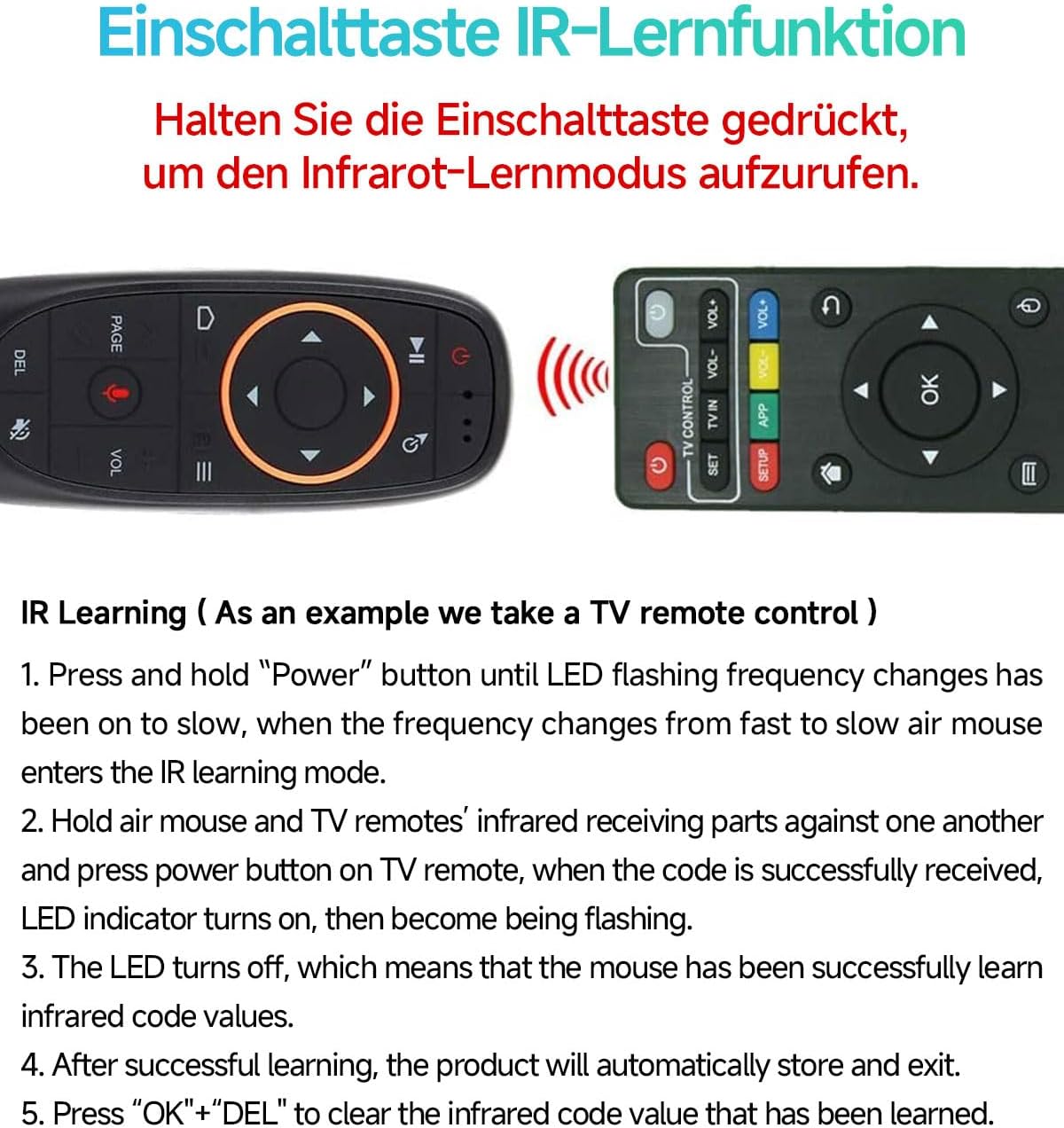
Image: Step-by-step guide for the IR learning function, using a TV remote as an exampル。
ボタンのレイアウト
The remote features 17 keys for various functions. Refer to the diagram below for a detailed overview of each button's purpose.

Image: Functional diagram of the remote control buttons, indicating their respective actions.
メンテナンス
- バッテリー交換: When the low battery indicator flashes slowly, replace the 2 AAA batteries. Ensure correct polarity.
- 節電: The remote automatically enters sleep mode when idle to conserve battery life. It boasts a working current under 15mA and microamp standby consumption.
- クリーニング: Use a soft, dry cloth to clean the remote control. Avoid using liquids or abrasive cleaners.
- ストレージ: リモコンは、直射日光や極端な温度を避け、涼しく乾燥した場所に保管してください。

Image: Information on intelligent power saving and low battery indication.
トラブルシューティング
- リモコンが応答しない:
- 電池が正しく挿入され、消耗していないことを確認してください。必要に応じて交換してください。
- Check if the USB receiver is securely plugged into your device.
- USB レシーバーを別の USB ポートに接続してみてください。
- Re-pair the remote by unplugging and re-plugging the USB receiver.
- カーソルの動きが不規則または不正確です:
- リモコンと USB レシーバーの間に障害物がないことを確認してください。
- リモコンを平らな面に数秒間置いて、ジャイロスコープを調整します。
- 音声制御が機能しない:
- Ensure you are pressing and holding the voice button while speaking.
- 使用しているアプリケーションまたはシステムが音声入力をサポートしていることを確認します。
- Check your device's settings for microphone permissions.
- IR学習に失敗しました:
- 元のリモコンの電池残量が少なくなっていないことを確認してください。
- Make sure the IR emitters of both remotes are closely aligned and pointing at each other.
- IR 学習手順を慎重に繰り返します。
仕様
| 送信方法 | 2.4G RFワイヤレス |
| センサー | 6-Axisジャイロスコープ |
| キーの数 | 17 |
| 動作範囲 | 最大10メートル |
| 電池のタイプ | 単2電池XNUMX本(別売) |
| 材料 | ABSプラスチックとシリコン |
| 寸法 | 143 x 45 x 29 ミリメートル |
| 重さ | 50グラム |
互換性
The EASYTONE 2.4G Wireless Voice Air Mouse Remote Control is compatible with a wide range of devices and operating systems:
- デバイス: Smart TV, Android TV Box, Mini PC, HTPC, Projector, Personal Computer (PC), Laptop.
- オペレーティング システム: Linux, Android, Windows, Mac OS.

Image: Visual representation of the remote's compatibility with multiple systems and devices.
保証とサポート
For any questions or issues regarding your EASYTONE 2.4G Wireless Voice Air Mouse Remote Control, please refer to the contact information provided with your purchase or visit the official EASYTONE support webサイトをご覧ください。具体的な保証内容は地域や販売店によって異なる場合がありますのでご注意ください。