
1.製品オーバーview
The NOYITO CH376 CH376S is a versatile USB bus interface chip designed for seamless communication with microcontrollers, DSPs, MCUs, and MPUs. It features an 8-bit data bus, read/write control lines, and an interrupt output, facilitating easy integration into various system buses. In USB host mode, the CH376 also supports serial communication via serial input, serial output, and interrupt output, enhancing its adaptability for diverse applications.

図1: トップダウン view of the NOYITO CH376 CH376S U-Disk Read Write Module, showing the USB port, CH376S chip, and pin headers.
2. 主な特徴
- ユニバーサルUSBインターフェース: Integrates an 8-bit data bus, read/write control lines, and interrupt output for easy connection to microcontrollers (MCUs), Digital Signal Processors (DSPs), and Microprocessors (MPUs).
- 柔軟な通信モード: Supports both parallel and serial communication modes, selectable via a jumper cap, offering adaptability for different system requirements.
- USBホスト機能: Operates in USB host mode, enabling direct communication with USB devices such as U-disks.
- 統合された File System (CH376): The CH376 model includes a built-in file system, simplifying U-disk operations by reducing the need for the microcontroller to load complex file システムライブラリ files. This allows for direct command-based file creation, reading, and writing.
- ステータスインジケーター: Equipped with a USB status indicator for visual feedback on operation.
- 電力調整: Features an onboard 3.3V LDO 1117 regulator, providing up to 800mA, ensuring stable power supply.
- Standard Pin Configuration: Includes 2x8 pins for straightforward connection to MCUs.
- 水晶発振器: Incorporates a 12MHz crystal for precise timing.
3. セットアップと接続
This section outlines the steps for connecting the NOYITO CH376 CH376S module to your microcontroller system.
3.1 電源
- The module requires a 5V power supply, typically provided from the target board.
- The onboard 3.3V LDO 1117 regulator converts the 5V input to 3.3V for the CH376S chip and associated components.
3.2 通信モードの選択
The CH376 CH376S module supports both parallel and serial communication modes. The mode is selected using a jumper cap on the module.
- パラレルモード: For high-speed data transfer, connect the jumper cap to enable parallel communication. This mode utilizes the 8-bit data bus (D0-D7).
- シリアルモード: For simpler wiring and reduced pin count, connect the jumper cap to enable serial communication (UART or SPI, depending on configuration).
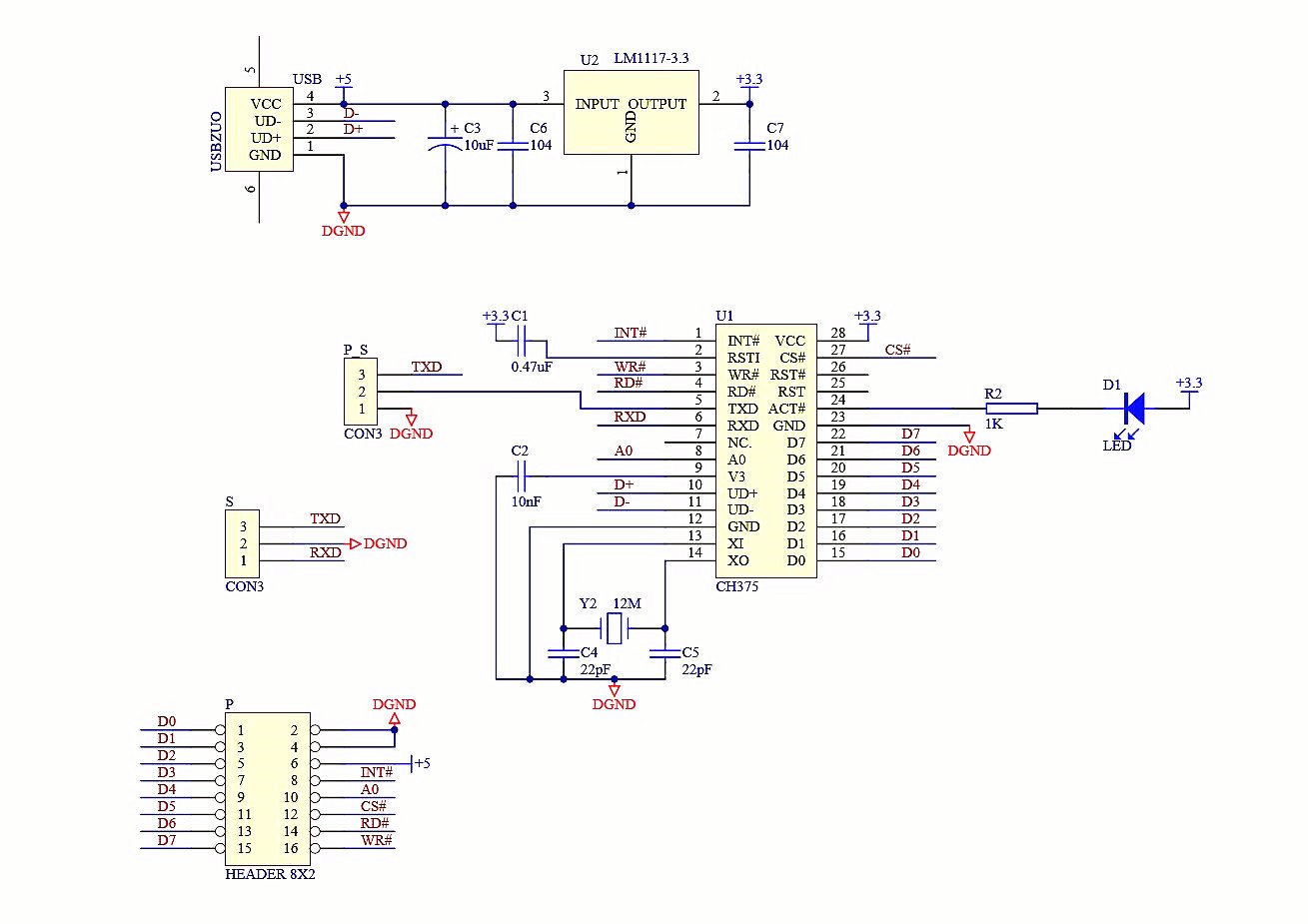
図2: Schematic diagram of the CH376 CH376S module, illustrating power regulation and chip connections.
3.3ピン接続
Connect the module to your microcontroller using the 2x8 pin headers. Refer to the following table for typical pin assignments when interfacing with 51 Microcontrollers and AVR Microcontrollers (64/128).

図3: Wiring Pins Description table for connecting the CH376S module to 51 and AVR microcontrollers.
| CH376 Pin | 51マイクロコントローラー | AVR Microcontroller (64/128) |
|---|---|---|
| D0〜D7 | P00〜P07 | PD0~PD7 |
| INIT | P32 | PG0 |
| AO | P21 | PG1 |
| CS | P20 | PG2 |
| RD | P37 | PG3 |
| WR | P36 | PG4 |
Note: Specific pin assignments may vary based on your microcontroller and chosen communication mode. Consult your microcontroller's datasheet for detailed information.
4. 操作手順
The CH376 CH376S module simplifies USB host operations, particularly for U-disk read/write functions. Understanding the differences between CH374, CH375, and CH376 is crucial for optimal use.
4.1 USB Host Mode
In USB host mode, the module allows your microcontroller to interact with USB devices. This is particularly useful for reading from and writing to U-disks (USB flash drives).
- Connect a U-disk to the USB-A port on the module.
- The CH376 chip handles the low-level USB protocol, presenting a simpler interface to the microcontroller.
- The USB status indicator LED will provide feedback on the connection status of the U-disk.
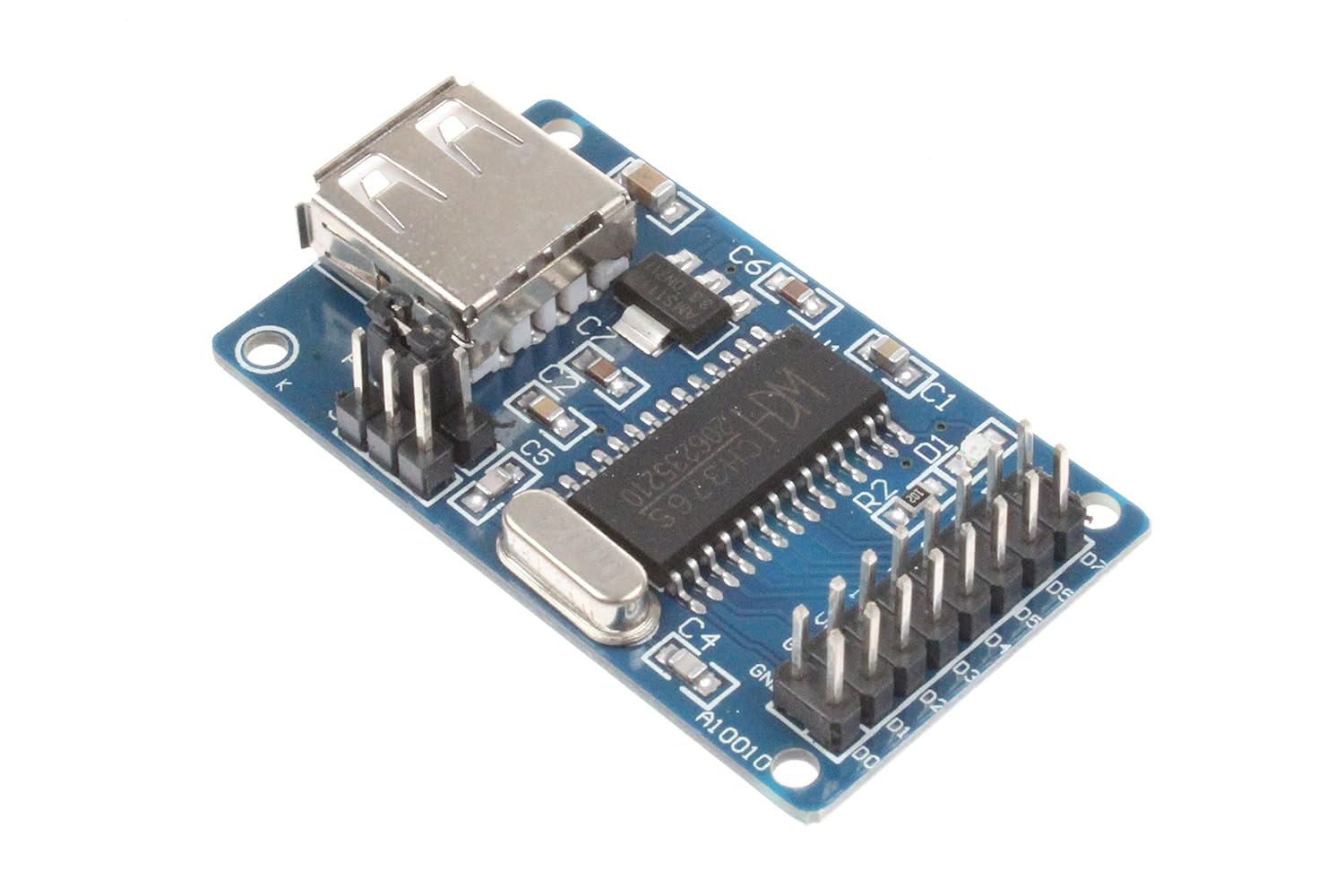
図4: 角度付き view of the CH376S module, highlighting the USB-A port for U-disk connection.
4.2 U-Disk Read/Write Operations (CH376 Specific)
The CH376 model significantly simplifies U-disk file operations due to its built-in file system. This means your microcontroller does not need to allocate significant resources (FLASH/RAM) for a file system library.
- Command-Based Control: The microcontroller sends simple commands and data to the CH376 to perform file operations (e.g., create file、 開ける file, write data, read data, close file).
- Reduced Microcontroller Overhead: This approach minimizes the code space and RAM requirements on the microcontroller, making it suitable for resource-constrained systems.
- サポートされているインターフェイス: The CH376 supports parallel, SPI, and UART interfaces for communication with the microcontroller.
4.3 Comparison with CH374 and CH375
Understanding the differences between the CH37x series chips can help in selecting the appropriate module for your application:
- CH374: Requires the microcontroller to load a file system library for U-disk file operations. This demands more FLASH (approx. 13KB) and RAM (at least 700 bytes) from the microcontroller. Supports parallel port and SPI interface. Offers fast operation with high-speed microcontrollers.
- CH375: Similar to CH374 in requiring a file system library on the microcontroller for file mode operations, with comparable FLASH and RAM requirements. Supports UART and parallel port interfaces.
- CH376: 特徴 内蔵 file システム, making microcontroller operation significantly more convenient. The microcontroller only needs to send commands and data, eliminating the need to load a file system library. This results in very low code space requirements for the microcontroller. Speed is similar to CH375. Supports parallel port, SPI, and UART interfaces.
5. 技術仕様
| パラメータ | 価値 |
|---|---|
| モデル | CH376S |
| Interface Chip | CH376S |
| データバス | 8ビット |
| 通信モード | Parallel, Serial (UART, SPI) |
| 電源 | 5V (from target board) |
| オンボードレギュレーター | 3.3V LDO 1117 (up to 800mA) |
| 水晶発振器 | 12MHz |
| 寸法(長さ×幅×高さ) | 1.97 x 1.34 x 0.59インチ(約50 x 34 x 15 mm) |
| アイテム重量 | 2.89オンス(約0.08kg) |
| 対応デバイス | Microcontrollers (MCU), DSPs, MPUs, Personal Computers, Laptops, Tablets, Smartphones, Printers, Routers, Monitors |

図5: トップ view of the CH376S module, showing component layout and pin labels.
6。 トラブルシューティング
If you encounter issues while using the NOYITO CH376 CH376S module, consider the following common troubleshooting steps:
- 電源なし/モジュールが応答しない:
- Verify that the 5V power supply from your target board is correctly connected and stable.
- Check all wiring connections for continuity and correct polarity.
- Ensure the onboard 3.3V LDO is functioning correctly (measure output voltage)。
- U-Disk Not Detected:
- Ensure the U-disk is properly inserted into the USB-A port.
- Check the USB status indicator LED for any activity or error codes.
- Try a different U-disk to rule out compatibility issues with the specific drive.
- Verify that the communication mode (parallel/serial) is correctly selected via the jumper cap and matches your microcontroller's configuration.
- 通信エラー:
- Double-check all data and control line connections between the module and the microcontroller.
- Ensure your microcontroller's code correctly implements the CH376 communication protocol (commands, data transfer).
- For serial communication, verify baud rates and other UART/SPI settings.
- Check for any interference or noise on the communication lines.
- File System Issues (CH376):
- Ensure the U-disk is formatted with a compatible file system (e.g., FAT16, FAT32).
- Verify that the commands sent to the CH376 for file operations are correct according to its datasheet.
7. お手入れとメンテナンス
To ensure the longevity and reliable operation of your NOYITO CH376 CH376S module, follow these maintenance guidelines:
- 取り扱いにはご注意ください: Avoid dropping or subjecting the module to physical shock, which can damage components or solder joints.
- 乾燥を保つ: Protect the module from moisture and liquids. Water damage can lead to short circuits and corrosion.
- 清潔さ: Keep the module free from dust and debris. Use a soft, dry brush or compressed air for cleaning if necessary. Avoid using harsh chemicals.
- 温度制御: モジュールは指定された温度範囲内で動作および保管してください。極端な温度は性能と寿命に影響を与える可能性があります。
- 静電気放電: Always handle the module with appropriate electrostatic discharge (ESD) precautions to prevent damage to sensitive electronic components.
- Power Off Before Connecting/Disconnecting: Always disconnect power before making or changing any wiring connections to prevent accidental short circuits or damage.
8. 保証とサポート
NOYITO provides quality electronic components. For specific warranty information and technical support, please refer to the documentation included with your purchase or contact NOYITO customer service directly through their official channels. Keep your proof of purchase for any warranty claims.