
Goshyda KX-T6001CID
Goshyda KX-T6001CID Big Button Corded Telephone User Manual
Model: KX-T6001CID | Brand: Goshyda
導入
Thank you for choosing the Goshyda KX-T6001CID Big Button Corded Telephone. This manual provides detailed instructions to help you set up, operate, and maintain your new telephone. Please read this manual thoroughly before use to ensure proper functionality and to take full advantagその機能のe。
安全情報
- 電話機を水や湿気にさらさないでください。
- Avoid placing the telephone in direct sunlight or near heat sources.
- Use only the provided telephone line cord.
- 電話機をご自身で開けたり修理したりしないでください。修理はすべて資格のある専門家にお任せください。
- お子様の手の届かない場所に保管してください。
パッケージ内容
パッケージにすべてのアイテムが揃っていることを確認します。
- 1 xハンドセット
- 1 x Telephone Base Unit
- 1 x Handset Cord
- 電話回線コード x 1
- ユーザーマニュアル x 1

Image: The Goshyda KX-T6001CID telephone, showing the base unit, handset, and coiled cord.
製品終了view
Familiarize yourself with the main components and controls of your telephone.

画像: 正面 view of the telephone, highlighting the LCD display, large numeric keypad, and function buttons.
Keypad and Display:
- 数字キーパッド (0~9、*、#): 電話番号をダイヤルします。
- LCDディスプレイ: Shows caller ID, time, date, and menu options.
- M1/M2ボタン: One-touch memory dialing keys.
- SET/STORE Button: Used for entering settings menu and saving entries.
- 上/下ボタン: Navigate through menu options or adjust volume.
- RING Button: Adjust ringer volume.
- VOLボタン: Adjust earpiece/speaker volume.
- FL/BRT (Flash/Brightness) Button: Flash function for call waiting, also adjusts LCD brightness.
- REDIAL Button: 最後にダイヤルした番号をリダイヤルします。
- H.F (Hands-Free) Button: スピーカーフォン モードを有効にします。

画像: クローズアップ view of the large, easy-to-read buttons on the telephone's keypad.
設定
1. Connecting the Telephone:
- コイル状の受話器コードの一方の端を受話器に接続し、もう一方の端を電話機本体の左側にある受話器ジャックに接続します。
- Connect one end of the telephone line cord to the LINE jack on the back of the telephone base unit.
- 電話回線コードのもう一方の端を壁の電話ジャックに接続します。
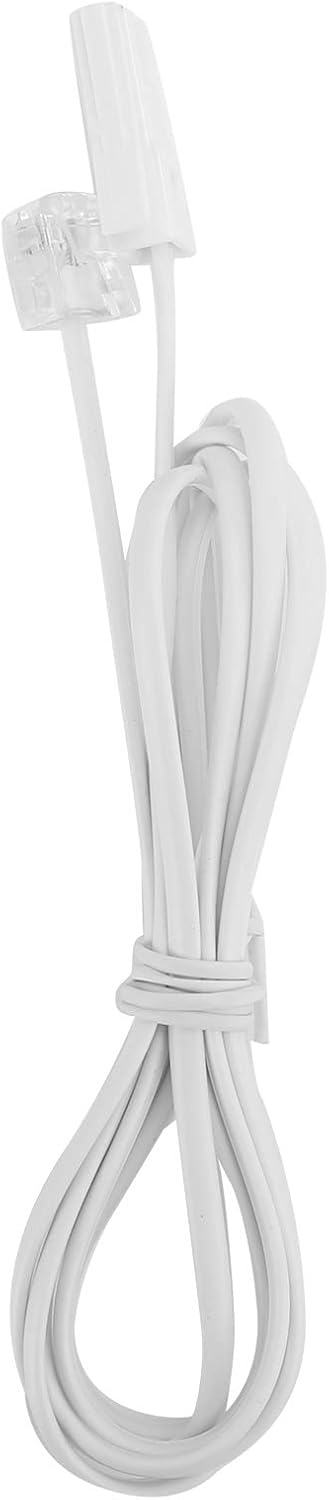
Image: The telephone line cord, used to connect the phone to the wall jack.
2. Initial Settings:
Upon initial connection, the LCD display may prompt you to set the date and time. Follow the on-screen instructions using the UP そして 下 値を調整するためのボタンと セット/ストア 確認するにはボタンを押してください。
操作手順
電話をかける:
- 受話器を持ち上げるか、 HF button for speakerphone.
- 数字キーパッドを使用して希望の電話番号をダイヤルします。
- 呼び出しが接続するのを待ちます。
- 通話を終了するには、受話器を置くか、 HF もう一度ボタンを押します。
電話に出る:
電話が鳴ったら、受話器を上げるか、 HF 答えるボタン。
リダイヤル:
受話器を持ち上げるか、を押します HFを押して、 リダイヤル 最後にダイヤルした番号に電話をかけるボタン。
Using Memory Keys (M1/M2):
数値の保存:
- 受話器を持ち上げるか、を押します HF.
- プレス セット/ストア.
- 保存したい電話番号をダイヤルします。
- プレス セット/ストア また。
- どちらかを押してください M1 or M2 to save the number to that memory key.
メモリからのダイヤル:
受話器を持ち上げるか、を押します HF, then press either M1 or M2 to dial the stored number.
特徴
- DTMF/FSK Dual System Caller ID: Supports both DTMF and FSK caller ID systems for displaying incoming call information.

Image: The telephone's display, showing its capability for DTMF/FSK dual system caller ID function.
- FLASH Time Adjustment: Adjustable FLASH time (90/95/100/120/180/300/600/1000ms) for compatibility with various PBX systems or call waiting services.
- 16 Ringtone Options: Choose from 16 different ringtones.

Image: The telephone with graphic elements suggesting a choice of 16 ringtones.
- Adjustable LCD Brightness: Five levels of LCD screen brightness adjustment for optimal viewing。
- 3 Alarm Clock Functions: Set up to 3 different alarm clocks, each with unique alarm sounds.
- 10 Groups of Dual Key Memory: Store up to 10 frequently called numbers using dual-key memory functions.
- 1-99 Hours Do Not Disturb Function: Set a "Do Not Disturb" period from 1 to 99 hours.
メンテナンス
- 電話機を柔らかくて清潔な布で拭いてくださいamp 布で拭いてください。研磨剤や溶剤は使用しないでください。
- Keep the telephone away from dust and extreme temperatures.
- 損傷を防ぐため、コードが絡まったり挟まれたりしないようにしてください。
トラブルシューティング
| 問題 | 考えられる原因 | 解決 |
|---|---|---|
| 発信音なし | 電話回線コードが外れているか故障しています。 | Check all cable connections. Try a different telephone line cord. Test the wall jack with another phone. |
| 電話をかけることも受けることもできない | Line issue, or phone is in "Do Not Disturb" mode. | Verify phone line service. Check if "Do Not Disturb" is active and disable it. |
| 発信者番号が表示されない | Caller ID service not subscribed or incompatible system. | 電話サービスプロバイダーに問い合わせて、発信者IDサービスがアクティブであることを確認してください。 |
| ディスプレイが暗い、または何も表示されない | LCD brightness setting is too low. | Adjust the LCD brightness using the FL/BRT button or menu settings. |
仕様
| 特徴 | 詳細 |
|---|---|
| モデル | KX-T6001CID |
| ブランド | ゴシダ |
| 材料 | アクリロニトリルブタジエンスチレン(ABS) |
| 色 | 白 |
| タイプ | コード付き電話 |
| ダイヤラの種類 | シングルキーパッド |
| 発信者ID | Yes (DTMF/FSK Dual System) |
| フラッシュタイム | 90/95/100/120/180/300/600/1000ms |
| 着信音 | 16つのオプション |
| LCDの明るさ | 5段階調節可能 |
| アラーム機能 | 3グループ |
| メモリ機能 | 10 groups of dual key memory |
| 邪魔しないでください | 1~99時間 |
| アイテム重量 | 481グラム |
| 寸法(長さ×幅×高さ) | 10 x 10 x 10 millimeters (approximate) |
| 電源 | Battery Powered (likely referring to LCD/memory backup, as corded phones are line-powered for basic functions) |
保証とサポート
This Goshyda product is covered by a standard manufacturer's warranty. For specific warranty details, please refer to the documentation included with your purchase or contact Goshyda customer support.
For technical assistance or further inquiries, please contact Goshyda customer service through their official webサイトまたは製品に付属の連絡先情報を参照してください。
Ask a question about this manual
Ask about setup, troubleshooting, compatibility, parts, safety, or missing instructions. Manuals+ will review the question and use this page’s manual context to help answer it.