
1. はじめに
ご購入ありがとうございますasing the RHM K666 Karaoke Machine. This portable system is designed to deliver powerful and clear sound with rich, deep bass, perfect for various occasions including home entertainment, parties, weddings, picnics, and outdoor activities. It features two wireless microphones, a long-lasting rechargeable battery, and multiple connectivity options. This manual will guide you through the setup, operation, maintenance, and troubleshooting of your new karaoke machine.
2. パッケージ内容
パッケージにすべてのアイテムが含まれていることを確認してください:
- 1 x RHM K666 Karaoke Machine
- ワイヤレスハンドヘルドマイク 2 本
- 電源アダプター x 1
- 充電ケーブル(USB)×1
- 1 x AUXケーブル
- ユーザーマニュアル x 1

Image: The RHM K666 Karaoke Machine along with its included accessories: two wireless microphones, power adapter, charging cable, AUX cable, and user manual.
3.製品オーバーview
3.1 本体機能
The RHM K666 is a compact yet powerful karaoke machine. Its dimensions are approximately 13.86 x 7.87 x 6.89 inches, making it highly portable with a sturdy built-in handle. It features 2x15W tweeters and a 30W subwoofer for clear, loud sound and deep bass. A DSP chip ensures full-range surround stereo sound.

画像: 正面 view of the RHM K666 Karaoke Machine with a smartphone placed in the integrated holder, showcasinコンパクトなデザイン。

Image: An exploded diagram illustrating the internal components of the RHM K666, highlighting the 15W tweeters and 30W subwoofer for high-quality stereo sound.
ビデオ: オーバーview of the RHM K666 Karaoke Machine, highlighting its clear sound quality and various features.
3.2つのワイヤレスマイク
The system includes two wireless microphones made of metal material. Each microphone features controls for speaker volume, microphone volume, echo effect, and voice enhancement, allowing for convenient adjustments without needing to access the main unit. They are equipped with a 400mAh rechargeable battery, providing up to 6 hours of use.

画像: クローズアップ view of the two wireless microphones, showing their control buttons for volume, echo, and voice enhancement, along with an LED display.
3.3 接続オプション
The RHM K666 supports multiple connection methods:
- ブルートゥース: スマートフォン、タブレット、その他の Bluetooth 対応デバイスへのワイヤレス接続用。
- 3.5mm AUX In: オーディオソースへの有線接続用。
- USBドライブ: For playing music directly from a USB storage device.
- パソコン: コンピューターへの接続用。
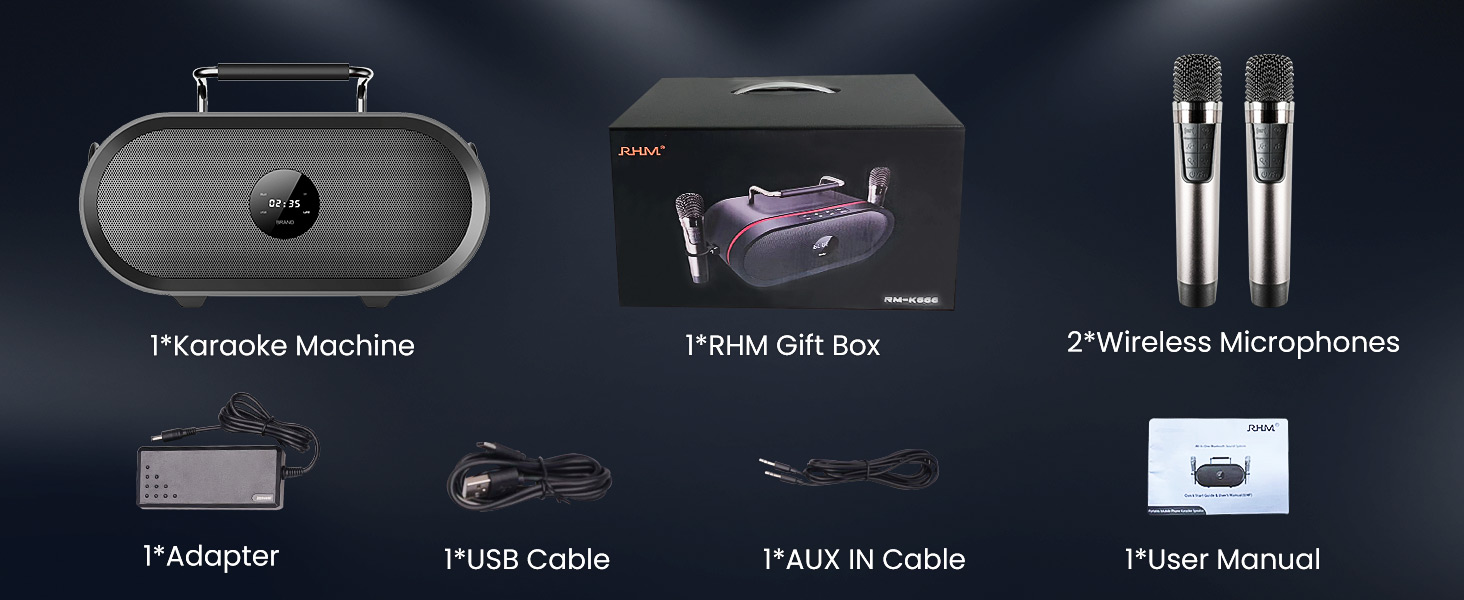
Image: A graphic illustrating the various connectivity options of the RHM K666 Karaoke Machine, including Bluetooth, AUX, USB, and PC.
4. セットアップ
4.1 初期充電
Before first use, fully charge the karaoke machine and both wireless microphones. The main unit's 4400mAh battery takes approximately 3 hours to fully charge and provides up to 8 hours of playtime. The microphones' 400mAh batteries last up to 6 hours.
4.2 電源のオン/オフ
- To power on the main unit, press and hold the power button on the top panel.
- To power on the microphones, press and hold the power button on each microphone.
- To power off, repeat the process for both the main unit and microphones.
4.3 マイクのペアリング
The microphones are typically pre-synced with the speaker. If re-pairing is needed:
- スピーカーの電源がオフになっていることを確認します。
- Turn off one of the microphones.
- Hold the music decrease button and the power button on the remaining microphone to switch it between Mic 1 and Mic 2. Confirm one is Mic 1 and the other is Mic 2.
- With both microphones on, hold the music decrease button and the power button on both microphones simultaneously. The icons on both mics will flash.
- While the mic icons are still blinking (for approximately 20 seconds), turn on the speaker.
- The icons on both microphones will stop blinking after successful pairing. If not, please try to re-sync again.
Video: This video demonstrates the process of re-syncing the RHM K666 wireless microphones with the main speaker unit, providing a solution if the microphones are not working correctly.
4.4 オーディオソースの接続
- ブルートゥース: Activate Bluetooth on your device and select "RM-K666" from the available devices list.
- AUX 入力: Connect one end of the 3.5mm AUX cable to your audio source and the other end to the "AUDIO IN" port on the back of the karaoke machine.
- USBドライブ: Insert a USB drive containing music files into the USB port on the back of the machine.
- パソコン: Connect the machine to your PC using a compatible cable.
5. 操作手順
5.1 Basic Controls (Main Unit)
The top panel of the RHM K666 features intuitive controls:
- ボリューム+/-: スピーカー全体の音量を調整します。
- 前/次のトラック: 前の曲または次の曲にスキップします。
- 再生/一時停止: 音楽の再生を制御します。
- モード (M): Switches between input modes (Bluetooth, AUX, USB, PC).
- Power/Bluetooth (BT): Powers the unit on/off and activates Bluetooth pairing mode.
5.2 マイクコントロール
Each wireless microphone offers the following controls:
- スピーカー音量 +/-: Adjusts the main speaker's volume directly from the microphone.
- Mic Volume +/-: マイクの出力音量を調整します。
- エコー効果: Cycles through different echo levels (up to 5 levels) or turns it off.
- 音声強化: Activates special voice effects.
- Power/Function (U/Fn): Powers the microphone on/off and may switch between functions.
Video: A demonstration of the echo effect feature on the RHM K666 Karaoke Machine's wireless microphones, showing how to adjust the echo levels.
5.3 Using the Phone/Tablet Holder
The integrated handle on the top of the unit doubles as a convenient stand for your smartphone or tablet, allowing you to easily view lyrics or control music while performing.
Image: The RHM K666 Karaoke Machine with a smartphone securely placed in the built-in holder on top of the unit, ready for use.
6. メンテナンス
- Keep the unit and microphones clean by wiping with a soft, dry cloth.
- デバイスを極端な温度、直射日光、湿気にさらさないでください。
- 使用しないときは涼しく乾燥した場所に保管してください。
- ご自身でユニットを分解したり修理したりしないでください。サポートが必要な場合は、カスタマーサポートにお問い合わせください。
7。 トラブルシューティング
| 問題 | 解決 |
|---|---|
| スピーカーから音が出ない |
|
| マイクが機能しない |
|
| Bluetooth接続の問題 |
|
Video: A detailed guide on troubleshooting microphone issues, specifically addressing scenarios where the RHM K666 wireless microphones may not be functioning as expected.
8. 仕様
| 特徴 | 詳細 |
|---|---|
| モデル | K666 |
| 出力電力 | 55W (2x15W tweeters + 30W subwoofer) |
| 周波数応答 | 35Hz - 20KHz |
| 電気インピーダンス | 4Ω |
| 電力仕様 | 15V 4ADC adaptor (110-240V, 50/60Hz) |
| Battery (Main Unit) | 4400mAh充電式リチウム電池 |
| Playtime (Main Unit) | 最大8時間 |
| Battery (Microphones) | 400mAh充電式バッテリー |
| Playtime (Microphones) | 最大6時間 |
| 寸法 | 13.86 x 7.87 x 6.89インチ |
| 重さ | 11.13ポンド |
| 接続性 | Bluetooth, 3.5mm AUX In, USB, PC |
9. 保証とサポート
For warranty information and customer support, please refer to the contact details provided in your product packaging or visit the official RHM webサイト。 保証請求に備えて購入時のレシートを保管しておいてください。