
導入
This manual provides essential information for the safe and effective use of your Bytech Office Tray. Please read it thoroughly before use and retain it for future reference.
安全情報
- Ensure the tray is placed on a stable, flat surface before use.
- Do not overload the tray beyond its intended capacity.
- 裸火や極度の熱源から遠ざけてください。
- Avoid placing sharp objects directly on the tray surface to prevent damage.
- Supervise children when they are near or using the product.
製品終了view
The Bytech Office Tray is a versatile and portable solution designed to enhance your workspace comfort and organization.
主な特徴:
- Foldable design for use in various settings (home, office, bed, outdoor).
- Adjustable 360° rotating knobs for stable positioning.
- Sturdy, ergonomic design for comfort and easy portability.
- Compact folding for convenient storage in a laptop bag.
- No assembly required and easy-to-clean surface.
コンポーネント:
- Main Tray Surface
- Adjustable Legs with 360° Rotating Knobs
- Anti-slip stoppers (for laptop stability)
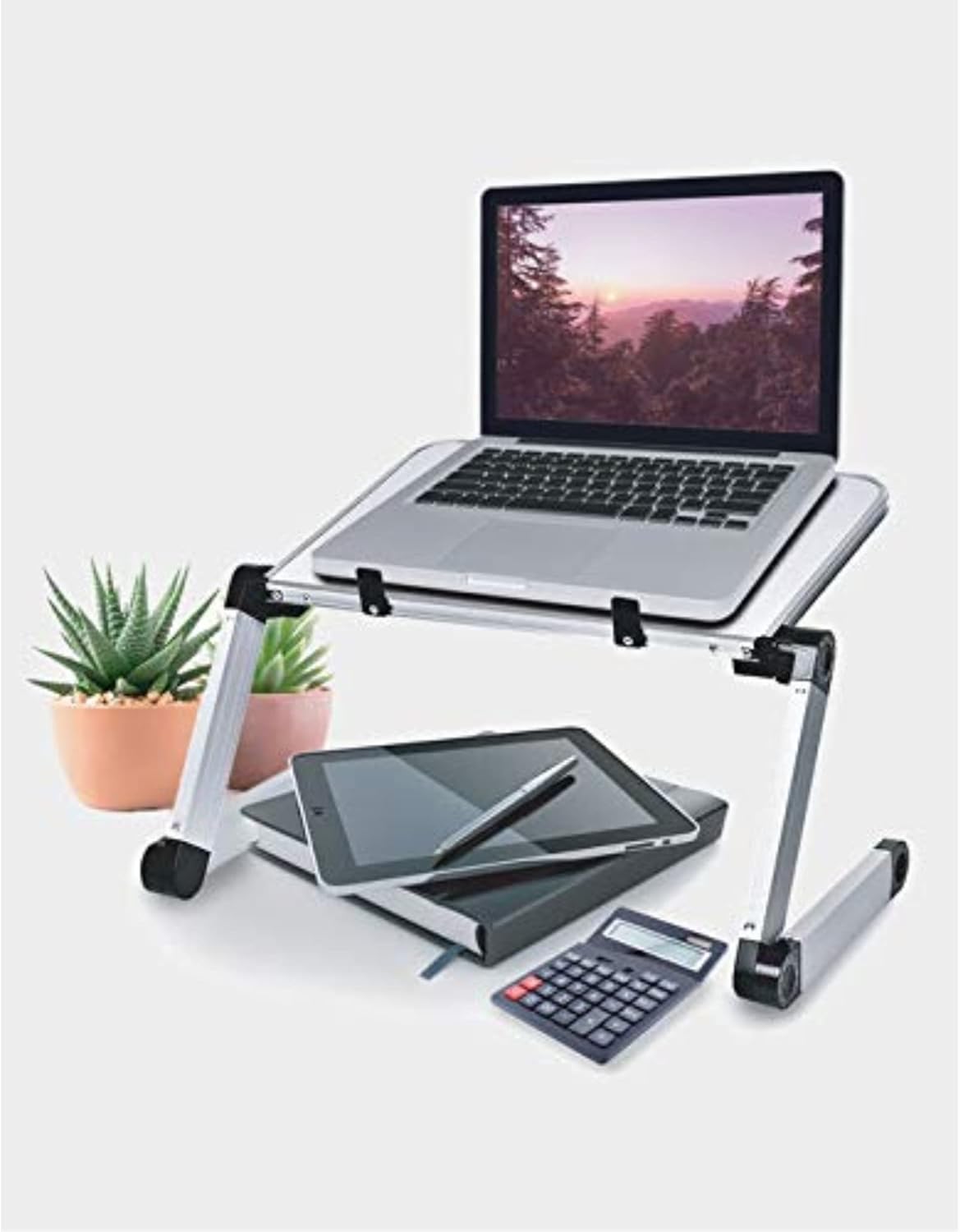
Image: The Bytech Office Tray in use, supporting a laptop. Below the tray, a tablet, notebook, and calculator are visible, demonstrating its utility as a portable workstation. The tray features adjustable legs and a white surface.
設定
The Bytech Office Tray requires no assembly.
- Unfold the legs of the tray from their collapsed position.
- Adjust the angle and height of the tray by loosening the 360° rotating knobs on each leg.
- Position the tray to your desired height and angle, then tighten the knobs firmly to secure the position.
- Ensure all legs are stable and the tray is balanced before placing items on it.
操作手順
The Bytech Office Tray is designed for versatile use as a portable desk or stand.
Using as a Laptop Stand:
- Place your laptop securely on the main tray surface. The integrated stoppers will help prevent the laptop from sliding.
- Adjust the tray to an ergonomic height and angle for comfortable typing and viewing。
Using as a Reading or Writing Desk:
- Place books, notebooks, or documents on the tray.
- Adjust the angle for optimal reading or writing posture.
折りたたんで保管:
- Loosen the rotating knobs on the legs.
- Fold the legs inward until they are flat against the main tray surface.
- Tighten the knobs to secure the folded position for compact storage or transport.
メンテナンス
To ensure the longevity and cleanliness of your Bytech Office Tray:
- クリーニング: d 柔らかい布で表面を拭きますamp cloth. For stubborn marks, a mild soap solution can be used. Avoid abrasive cleaners or harsh chemicals.
- ストレージ: Store the tray in a dry place away from direct sunlight and extreme temperatures when not in use.
- 検査: Periodically check the rotating knobs and leg joints to ensure they are secure and functioning correctly.
トラブルシューティング
If you encounter issues with your Bytech Office Tray, refer to the following common solutions:
| 問題 | 解決 |
|---|---|
| トレイが不安定またはぐらつきます。 | Ensure all 360° rotating knobs are tightened firmly after adjusting the legs. Verify the tray is on a flat, even surface. |
| Legs are difficult to adjust. | Loosen the rotating knobs sufficiently before attempting to adjust the leg angles. Do not force the joints. |
| Surface appears dirty or stained. | 柔らかくて乾いた布で拭き取ってください。amp cloth and mild soap solution. Avoid abrasive materials. |
仕様
- ブランド: バイテック
- モデル番号: BYLTTY10002
- 材料: プラスチック
- 色: 白
- 特別な機能: Adjustable, Foldable
- 製品寸法: 4.5 x 4.5 x 4.5インチ
- 商品の重量: 5.59ポンド
- 国際コード: 805112066728
- 組み立てが必要: いいえ
保証とサポート
For warranty information or technical support, please contact Bytech customer service. Refer to the product packaging or Bytech's official web連絡先の詳細についてはサイト。