
1.製品オーバーview
The KUIDAMOS DSO FNIRSI PRO is a portable digital oscilloscope designed for various measurement tasks. It features a 2.4-inch LCD display, a real-time sampling rate of up to 20MS/s, and an analog bandwidth of 5MHz. This device is equipped with a built-in 1200mAh rechargeable lithium battery, offering approximately 3 hours of continuous operation. It supports waveform storage and management, making it suitable for both maintenance and research and development applications.
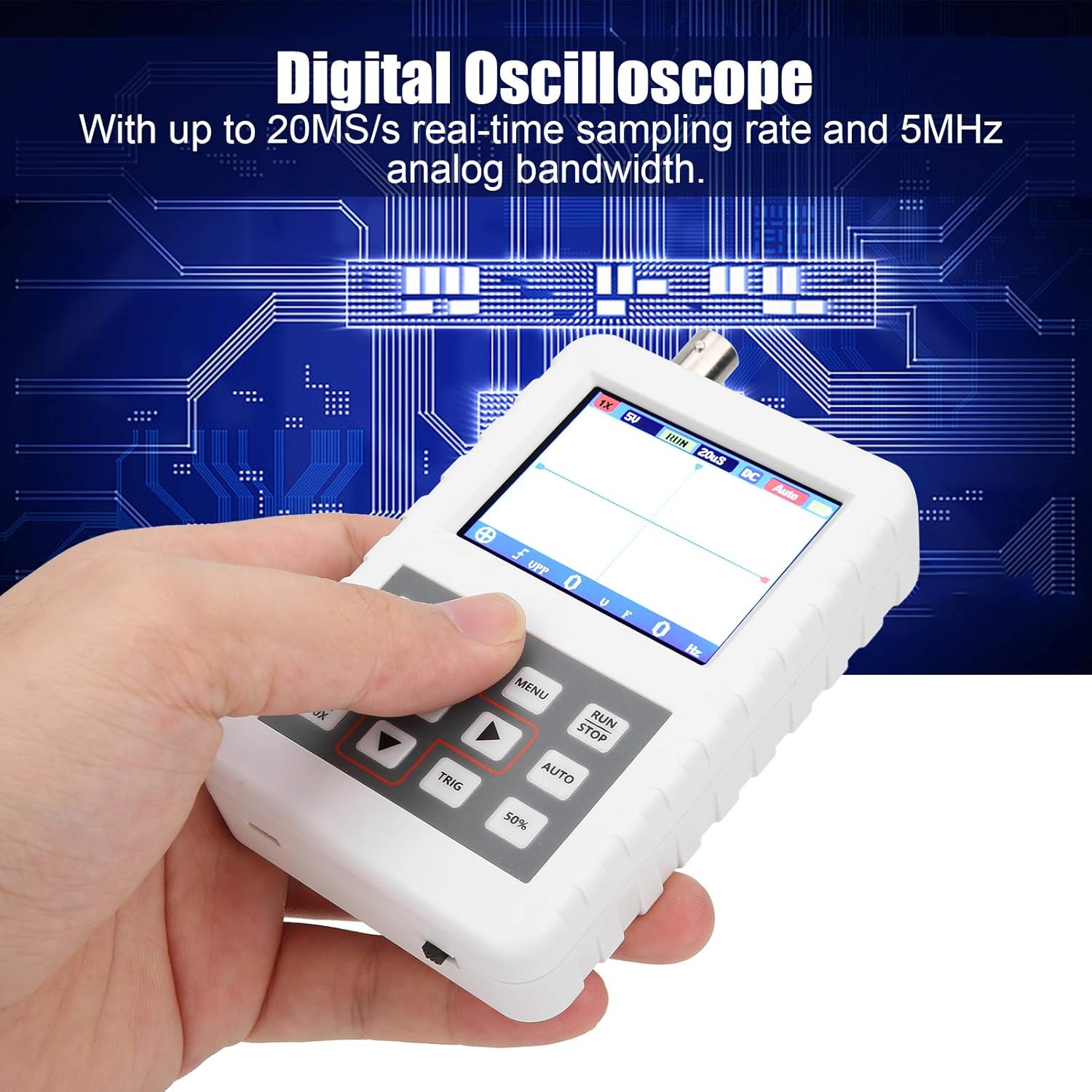
Image 1.1: The DSO FNIRSI PRO Digital Oscilloscope, highlighting its 20MS/s sampling rate and 5MHz analog bandwidth.

Image 1.2: The oscilloscope's 2.4-inch HD LCD screen with 320 x 240 resolution for clear waveform display.

画像1.3: 前面と背面 views of the DSO FNIRSI PRO, illustrating its physical layout.
2. パッケージ内容
以下にリストされているすべてのアイテムがパッケージに含まれていることを確認してください。
- 1 x DSO FNIRSI PRO Digital Oscilloscope
- 1 x Matching Probe
- 1 x USBデータライン
- ユーザーマニュアル (本書) x 1
3. 初期設定
3.1デバイスの充電
Before first use, fully charge the oscilloscope. Connect the provided USB data line to the device's charging port and to a 5V/1A, 2A, 3A, or 4A USB power adapter. The built-in 1200mAh lithium battery can be charged continuously for approximately 3 hours.
3.2 プローブの接続
Connect the matching probe to the BNC connector on the top of the oscilloscope. Ensure a secure connection by twisting the probe connector clockwise until it locks into place.
3.3 電源のオン/オフ
To power on the device, press and hold the power button (usually located on the side or bottom) for a few seconds until the screen illuminates. To power off, press and hold the power button again until the device shuts down.
4. 操作手順
4.1 コントロールとインターフェース
The oscilloscope features a user-friendly interface with several buttons for navigation and function control.

Image 4.1: Operating the DSO FNIRSI PRO, showing the placement of control buttons.
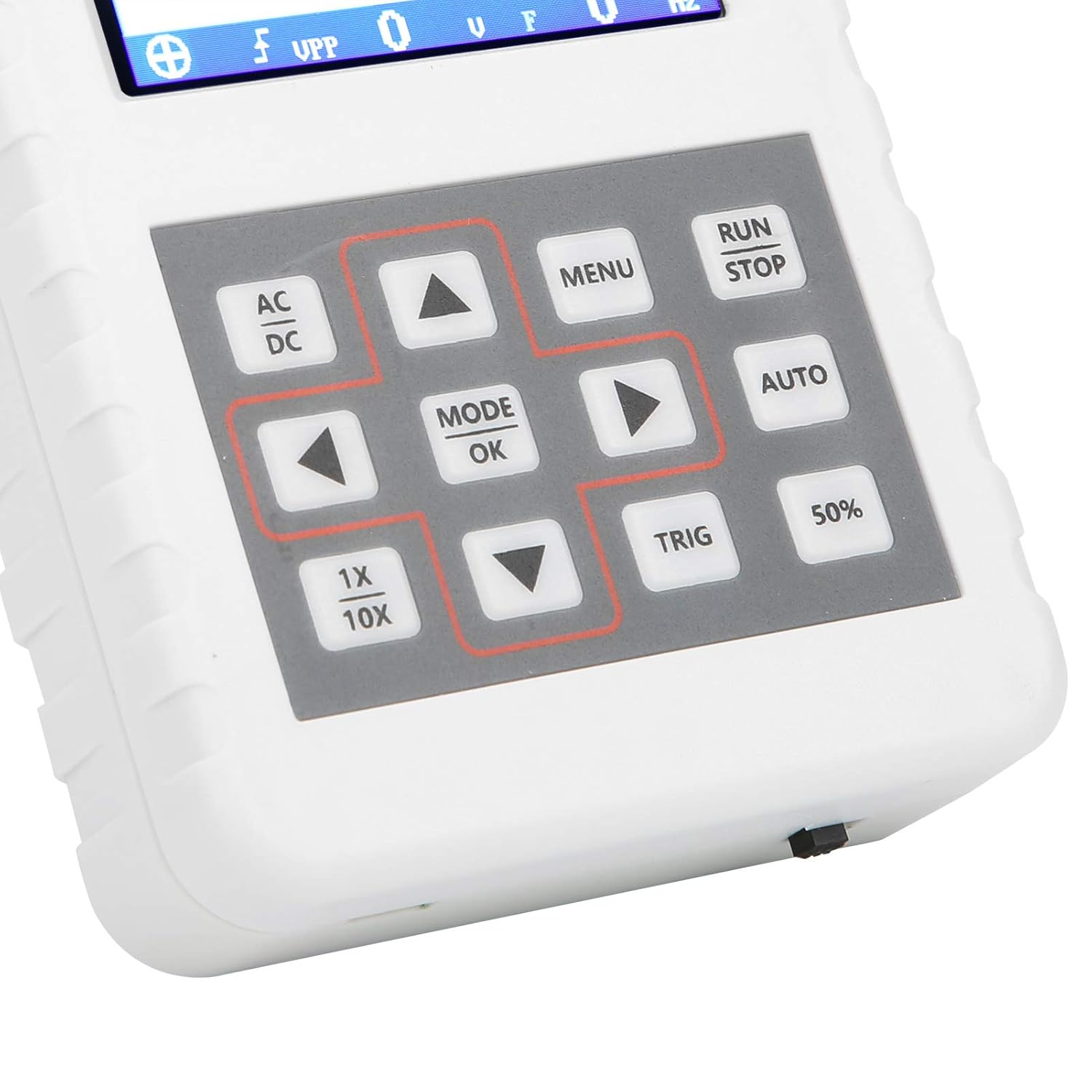
画像4.2: 詳細 view of the oscilloscope's control panel.
- メニュー: Accesses the main menu for settings and functions.
- 実行/停止: Starts or pauses waveform acquisition.
- 自動: 最適な波形表示のために設定を自動的に調整します。
- トリガー: トリガー レベルを調整します。
- 50%: Sets the trigger level to 50% of the waveform ampリチュード。
- AC / DC: Toggles between AC and DC coupling modes.
- 1X/10X: Sets the oscilloscope's input attenuation to match the probe's setting.
- MODE/OK: 選択を確定するか、モードを変更します。
- 矢印ボタン(上、下、左、右): メニューを移動し、パラメータを調整します。
4.2 Probe Attenuation Settings
It is critical to match the probe's attenuation setting with the oscilloscope's input setting to ensure accurate measurements.
- のために 1X measurement (0-40V): Set both the physical switch on the probe and the 1倍/10倍 button on the oscilloscope to the 1X 位置。
- のために 10X measurement (40-800V): Set both the physical switch on the probe and the 1倍/10倍 button on the oscilloscope to the 10X 位置。
4.3 Measurement Modes and Triggering
The oscilloscope supports various trigger modes to stabilize waveform display:
- シングル: Captures a single waveform event and then stops.
- 普通: Captures a waveform only when a trigger condition is met.
- 自動: Continuously acquires waveforms, even without a trigger, but will trigger if a signal is present.
使用 TRIG button and arrow keys to adjust the trigger level, which determines the voltage point at which the oscilloscope begins to acquire data.
4.4 Waveform Storage and Management
The device includes 16MB of built-in storage, capable of storing up to 500 waveform images. Use the file manager function to browse, view, and manage saved waveforms. This includes viewing detailed information, flipping through images, and deleting unwanted files.

図4.3: 例amples of sine wave measurements at various frequencies.

図4.4: 例amples of square, triangular, and sawtooth wave measurements.
5. お手入れとメンテナンス
5.1 クリーニング
柔らかく乾いた布で拭いてください。研磨剤入りの洗剤や溶剤は、機器を傷める恐れがあるため使用しないでください。asingまたは画面。清掃する前に、デバイスの電源がオフになっており、すべての電源から切断されていることを確認してください。
5.2バッテリーケア
To prolong battery life, avoid fully discharging the battery frequently. If storing the device for an extended period, charge it to approximately 50% and recharge every few months.
5.3 ストレージ
Store the oscilloscope in a cool, dry place, away from direct sunlight, extreme temperatures, and high humidity. Keep it protected from dust and physical impact.
6。 トラブルシューティング
- Issue: Abnormal measured data.
解決: Check the probe's attenuation switch (1X or 10X) and ensure it matches the setting on the oscilloscope (using the 1倍/10倍 button). If the probe is set to 10X and the oscilloscope is set to 1X, the device will not be damaged, but the data displayed will be incorrect. - Issue: Device does not power on.
解決: Ensure the battery is sufficiently charged. Connect the device to a power source using the USB data line and allow it to charge for at least 30 minutes before attempting to power it on again. - Issue: Screen is blank or frozen.
解決: Try performing a soft reset by pressing and holding the power button for an extended period (e.g., 10-15 seconds) until the device powers off, then power it back on. If the issue persists, ensure the battery is charged.
7. 技術仕様
| 特徴 | 仕様 |
|---|---|
| 製品モデル | DSO FNIRSI PRO |
| 製品素材 | アブソリュート |
| チャンネル数 | 1 |
| 画面サイズ | 約6.1cm / 2.4インチ |
| 画面解像度 | 320×240 |
| 表示タイプ | 液晶画面 |
| アナログ帯域幅 | 5MHz |
| 最大Sampリンレート | 20MSPS |
| トリガーモード | シングル/ノーマル/オート |
| 波形保存 | 16MB (up to 500 waveform pictures) |
| 内蔵バッテリー | リチウム電池 1200mAh |
| 待機時間 | 3時間 |
| 充電入力 | 5V/1A/2A/3A/4A |
| メーカー | KUIDAMOS |
| 原産国 | アメリカ合衆国 |
| 品番 | KUIDAMOStgaix9hwck |
8. 保証と顧客サポート
保証情報、テクニカルサポート、またはサービスに関するお問い合わせは、ご購入時に付属の説明書をご参照いただくか、販売元に直接お問い合わせください。保証請求の際は、購入証明としてレシートを保管してください。