
1. はじめに
Thank you for choosing the Depusheng DT8 Professional 8-Channel Mixer. This manual provides essential information for the safe and efficient operation of your new audio mixer. Please read this manual thoroughly before use and retain it for future reference.

Figure 1: Depusheng DT8 Professional 8-Channel Mixer overview.
2. 安全に関する注意事項
- 電源: 指定された電源アダプタのみを使用してください。tage はお住まいの地域の電源に適合します。
- 水と湿気: Do not expose the mixer to water, rain, or excessive moisture. Avoid placing liquid-filled objects on the unit.
- 換気: 十分な換気を確保してください。通気口を塞がないでください。
- 熱源: ミキサーは、ラジエーター、暖房送風口、ストーブ、その他の熱を発生する器具などの熱源から遠ざけてください。
- クリーニング: 清掃する前に電源を切ってください。乾いた柔らかい布を使用してください。液体クリーナーやエアゾールクリーナーは使用しないでください。
- サービス: この製品を自分で修理しようとしないでください。 すべてのサービスを資格のあるサービス担当者に依頼してください。
- ファントムパワー: When using +48V phantom power, ensure microphones are connected before activating to prevent damage.
3.製品オーバーview
The Depusheng DT8 is a professional 8-channel audio mixer designed for various applications, including live performances, studio recording, and home use. It features built-in DSP digital effects, USB playback, Bluetooth connectivity, and +48V phantom power.
主な特徴:
- Built-in DSP digital effects for enhanced audio.
- Eight audio input interfaces for versatile connectivity.
- USB playback function for direct media access.
- +48V phantom power supply for condenser microphones.
- XNUMX秒tage equilibrium adjustment (3-band EQ) on all channels.
- Wireless Bluetooth audio streaming.
- Ultra-thin and robust casing with dust-resistant rotary knobs.
4. セットアップ
4.1電源接続
Connect the provided power adapter to the AC IN socket on the rear panel of the mixer. Plug the adapter into a suitable power outlet. Use the Power Switch to turn the unit on or off.

Figure 2: Rear panel showing Power Switch and external power input socket. The USB interface is also visible on the top panel.
4.2 オーディオ入力接続
The DT8 mixer offers various input options:
- XLR入力: For microphones. Channels 1-8 feature XLR inputs.
- 6.35mmジャック入力: For line-level instruments or other audio sources. Channels 1-8 also feature 6.35mm unbalanced jack inputs.
- ステレオライン入力: Dedicated stereo line inputs for devices like keyboards or media players.
- USBインターフェース: Connect a USB flash drive for MP3 playback or connect to a computer for digital audio interface functionality.
4.3 オーディオ出力接続
Connect your monitoring and recording equipment to the appropriate output interfaces:
- Main Output (MIX L/R): XLR and 6.35mm jack outputs for connecting to main speakers or power amplifiers。
- Control Room Output (CTRL ROOM): 6.35mm jack outputs for connecting to studio monitors.
- Monitor Headphones (PHONES): ヘッドフォンモニタリング用の 6.35mm ステレオ ジャック。
- Auxiliary Send (AUX SEND): 6.35mm jack for sending audio to external effects processors or monitor mixes.
- Effect Send (EFFECT): 6.35mm jack for sending audio to the internal effects processor.
- REC Output (RCA): RCA outputs for connecting to recording devices.
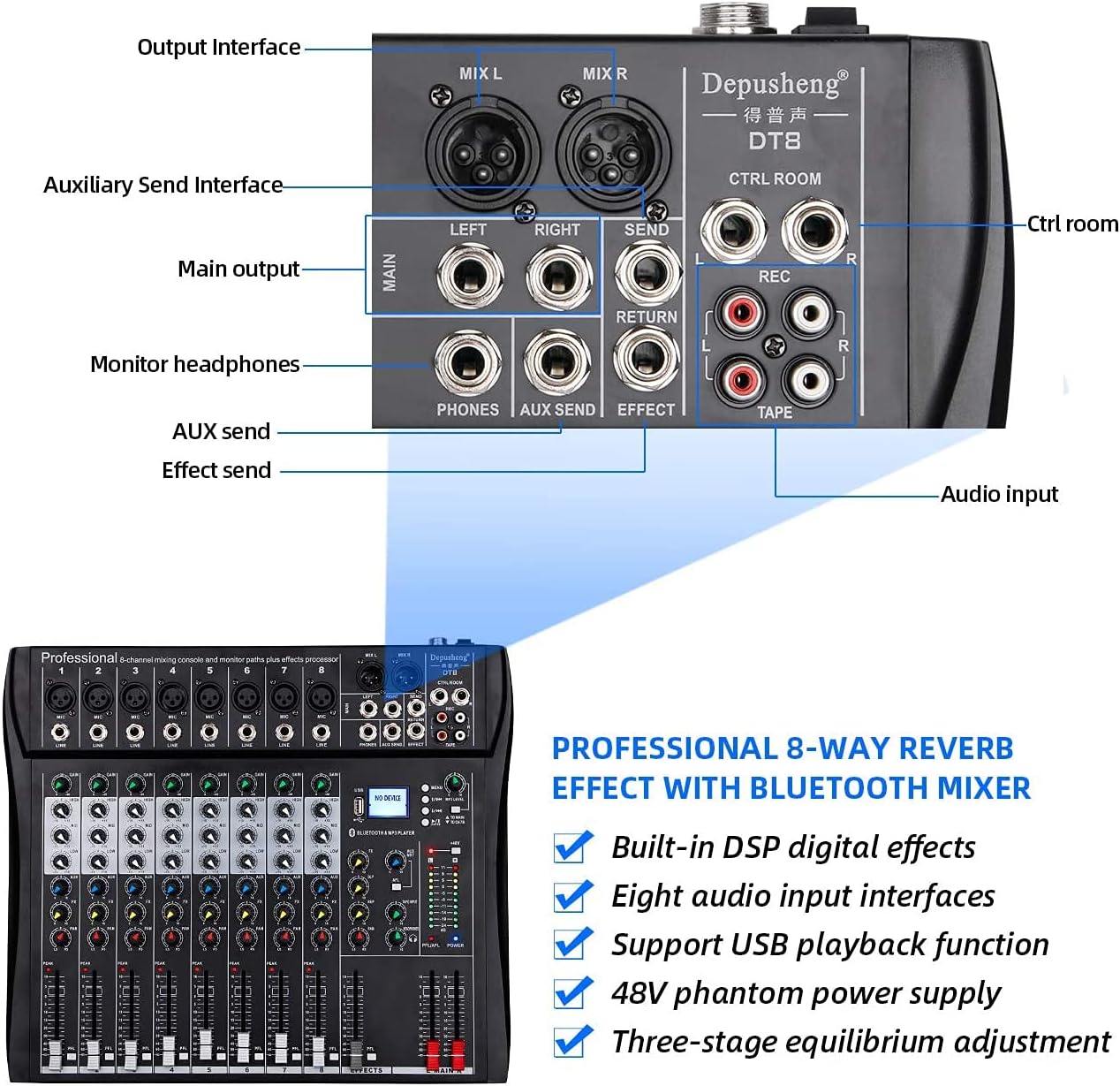
Figure 3: Rear panel showing various output and auxiliary interfaces.
5. 操作手順
5.1 チャンネルコントロール
各入力チャンネルには次のコントロールがあります。
- 利得: Adjusts the input sensitivity for the microphone or line input.
- HIGH, MID, BASS (EQ): Three-band equalizer for adjusting the treble, midrange, and bass frequencies of the input signal.
- FX: 内部エフェクト プロセッサに送信される信号の量を制御します。
- PAN: チャンネル信号のステレオ位置(左から右)を調整します。
- PFL(プリフェーダーリッスン): ヘッドフォンを通してチャンネルのプリフェーダーモニタリングを有効にします。
- ボリュームフェーダー: メイン ミックスへのチャンネルの出力レベルを制御します。

図4:詳細 view of a single channel strip with Gain, EQ, Effect, Balance, and Volume Fader controls.
5.2 USB/MP3 Player Operation
The integrated USB/MP3 player allows for direct playback of audio files from a USB flash drive or connection to a computer.
- USBインターフェース: Insert a USB flash drive into the USB port. The display will show "NO DEVICE" until a compatible device is detected.
- コントロール: Use the dedicated buttons for Previous Song, Next Song, Play/Pause, and Enter to navigate and control playback.
- MP3 レベル: Adjust the volume of the MP3 player using the corresponding level control.

Figure 5: MP3 player controls, FX section, and +48V phantom power button.
5.3 Bluetooth接続
Bluetooth経由でワイヤレスでオーディオをストリーミングするには:
- ミキサーの電源がオンになっていることを確認します。
- ミキサーの Bluetooth モードを有効にします (モードの選択についてはディスプレイを参照してください)。
- On your smartphone or tablet, search for available Bluetooth devices and select "Depusheng DT8" (or similar name).
- ペアリングすると、デバイスからミキサーにオーディオをストリーミングできます。

Figure 6: Illustrates Bluetooth wireless streaming from a smart device to the mixer.
5.4 ファンタム電源(+48V)
The mixer provides +48V phantom power for condenser microphones. Locate the +48V button on the mixer's control panel. Press this button to activate phantom power. Ensure all condenser microphones are connected before activating phantom power to prevent damage.
6. メンテナンス
- クリーニング: ミキサーの表面は、柔らかく乾いた布で定期的に拭いてください。研磨剤入りの洗剤や溶剤は使用しないでください。
- 防塵: ミキサーを使用していないときは、特にフェーダーやノブにほこりがたまらないようにカバーをしておいてください。
- ストレージ: 直射日光や極端な温度を避け、涼しく乾燥した場所に保管してください。
- ケーブル管理 コネクタやポートの損傷を防ぐために、ケーブルがきちんと整理され、張力がかかっていないことを確認してください。
7。 トラブルシューティング
| 問題 | 考えられる原因 | 解決 |
|---|---|---|
| 電源なし | Power cable disconnected; Power switch off; Faulty power adapter | Check power cable connection; Turn on power switch; Test with another power adapter if available |
| 音声出力なし | Volume faders down; Output cables disconnected; Speakers off/faulty | Increase master and channel faders; Check all output cable connections; Verify speakers are powered on and working |
| 入力信号なし | Input cable disconnected; Gain knob too low; Microphone/instrument off/faulty; Phantom power off for condenser mics | Check input cable connections; Increase GAIN knob; Verify microphone/instrument functionality; Activate +48V phantom power for condenser mics |
| Bluetooth接続の問題 | Mixer not in Bluetooth mode; Device too far; Interference | Ensure mixer is in Bluetooth mode; Move device closer to mixer; Reduce other wireless interference |
| USB再生が機能しない | USBドライブが正しく挿入されていません。互換性がありません。 file フォーマット; USBドライブに障害があります | Reinsert USB drive; Ensure audio files are in a compatible format (e.g., MP3); Try a different USB drive |
8. 仕様
| 特徴 | 詳細 |
|---|---|
| モデル番号 | DT8 |
| チャンネル数 | 8 |
| 製品寸法(長さ x 幅 x 高さ) | 33.6 x 39 x 3.5 cm |
| アイテム重量 | 4.67キログラム |
| 接続技術 | ブルートゥース、USB |
| 電源 | 電源コード |
| 周波数応答 | 20 Hz(最小指定値) |
| 出力コネクタタイプ | 6.35 mm, RCA, XLR |
| オーディオ入力 | Microphone, Music |
| Sound Level / Noise Level | 90デシベル |
| 巻tage | 220ボルト(AC) |
| メーカー | デプシェン |
9. 保証とサポート
For warranty information and technical support, please refer to the documentation included with your purchase or contact Depusheng customer service through their official webご購入いただいたサイトまたは販売店にお問い合わせください。保証請求のために購入証明書を保管してください。