
1. はじめに
The NEJE Master 2 Mini is a compact, high-speed laser engraver designed for precision engraving and light cutting tasks. It features wireless control via a dedicated application, a 110 x 120 mm engraving area, and a 2.5W laser output. This manual provides essential information for safe operation, setup, maintenance, and troubleshooting to ensure optimal performance and longevity of your device.

Image: The NEJE Master 2 Mini laser engraver held in hand, illustrating its compact size and key features such as automatic reset, smart & power module, built-in MEMS protection, APP wireless control, and high-strength material construction.
主な特徴:
- Compact design for space efficiency.
- Wireless offline control and application support for ease of use.
- 360-degree engraving capability.
- High-speed operation for efficient project completion.
- Cloud gallery and online G-code support for creative flexibility.
- 110 x 120 mm engraving area for precise work on small objects.
- User-friendly interface, ideal for beginners.
- Built-in MEMS protection for enhanced safety.
2. 安全情報
警告: This device uses a high-power laser. Improper use can cause serious injury, including eye damage and burns. Always follow these safety guidelines:
- Always wear appropriate laser safety goggles when operating the engraver.
- レーザー光線やその反射を決して直接見ないでください。
- Ensure the work area is well-ventilated to dissipate fumes from engraved materials.
- Keep children and pets away from the operating engraver.
- 操作中は彫刻機から目を離さないでください。
- Operate the device on a stable, non-flammable surface.
- Be aware of the materials that can be safely engraved. Avoid highly reflective, transparent, or unknown materials that may cause unexpected laser behavior or hazardous fumes.
- In case of emergency, immediately disconnect power to the device.
3. パッケージ内容
下記のすべての品目がパッケージに含まれていることをご確認ください。不足または破損している品目がある場合は、カスタマーサポートまでご連絡ください。

Image: The NEJE Master 2 Mini laser engraver shown with its included accessories, such as power adapter, USB cable, safety goggles, and sampル資料。
- NEJE Master 2 Mini Laser Engraver Unit
- レーザー安全ゴーグル
- 電源アダプター
- USBケーブル
- 六角レンチ
- Sample Engraving Materials (e.g., wood blocks, paper)
- ユーザーマニュアル(このドキュメント)
4. セットアップ
4.1 初期組み立てと接続
The NEJE Master 2 Mini comes largely pre-assembled. No complex installation is required.
- 彫刻機を安定した、水平な、不燃性の面に置いてください。
- Connect the power adapter to the engraver's power input port and then plug it into a suitable power outlet.
- (Optional) Connect the engraver to your computer using the provided USB cable for wired control.
4.2 ソフトウェアとアプリのインストール
The NEJE Master 2 Mini can be controlled via NEJE Windows software, NEJE Android APP, or the "NEJE Wireless" APP for iOS and macOS.
- PC(Windows/macOS)の場合: Download the latest software from the official NEJE webサイトにアクセスしてください。画面の指示に従ってインストールしてください。
- For Mobile (Android/iOS): 検索する "NEJE" or "NEJE Wireless" in your device's app store and install the application.
Once installed, open the NEJE application and connect to your device via Bluetooth (for mobile) or USB (for PC) to begin.
4.3 レーザーの焦点合わせ
Proper laser focus is crucial for achieving optimal engraving and cutting results. The NEJE Master 2 Mini features an easy focus mechanism.


Images: A sequence demonstrating how to adjust the laser module for optimal focus. This typically involves rotating the lens or moving the module up/down until the laser spot is at its smallest and most intense point on the material surface.
- 彫刻プラットフォームに材料を置きます。
- Adjust the laser module's height or lens rotation until the laser dot projected onto the material surface is as small and sharp as possible. This indicates the focal point.
- Ensure the focus is set correctly for each new material thickness to achieve the best results.
5. 操作手順
5.1 設計の準備
- Create or import your design using the NEJE software or app. Supported graphic formats include G-CODE, BMP, JPG, PNG, NC, DXF.
- Adjust the size, position, and engraving parameters (power, speed, passes) according to your material and desired effect.
- The NEJE cloud service provides high-quality pictures, and you can share phone pictures directly to your computer for engraving.
5.2 材料の適合性
The NEJE Master 2 Mini is suitable for engraving a wide range of materials. Cutting functionality is supported only in G-code mode and is limited to certain materials.
| カテゴリ | サポートされている素材 | サポートされていない材料 |
|---|---|---|
| Wood & Paper | MDF, Balsa, Paper, Wood, Plywood, Foam paper, Bamboo | |
| Fabrics & Leather | Fabric, Leather, Non-woven, Cotton, Linen, Velvet, Canvas | |
| プラスチック | Plastic, Acrylic, PPR, ABS board, PVC board | Transparent material |
| Metals & Others | Anodized aluminum, Paint metal, Dark alumina, Light alumina, EPE, KT board | Metal (pure), Glass, Stone, Ceramic, PCB, Stainless steel, Reflective metal, Gold |
注記: The Mini series modules are not compatible with modules of other specifications.
5.3 Starting an Engraving Job
- Place the material securely on the engraving platform.
- レーザーが材料の表面に適切に焦点を合わせていることを確認します。
- Wear your laser safety goggles.
- In the NEJE software/app, send your prepared design to the engraver.
- Monitor the engraving process. The device supports 360-degree engraving for cylindrical objects or specific orientations.

Image: The NEJE Master 2 Mini laser engraver shown in operation, demonstrating its ability to perform 360-degree engraving on a vertical surface like a door, controlled wirelessly via a smartphone app.
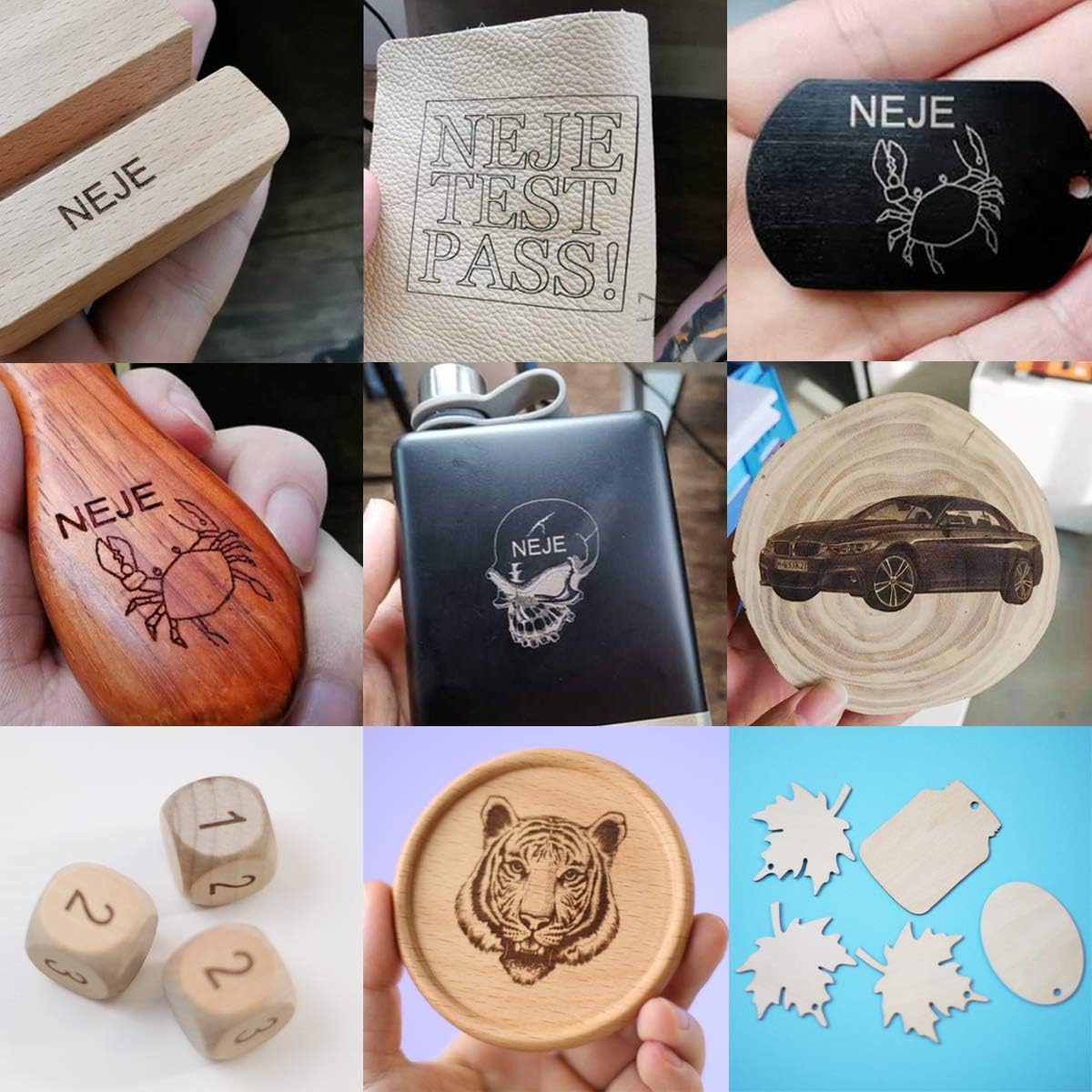
Image: A collage displaying various materials and objects successfully engraved by the NEJE Master 2 Mini, including wood, leather, and anodized metal, showcasing the engraver's versatility.
6. メンテナンス
Regular maintenance ensures the longevity and optimal performance of your NEJE Master 2 Mini.
- レンズの掃除: Periodically inspect the laser lens for dust or debris. Gently clean it with a soft, lint-free cloth and lens cleaning solution if necessary.
- Cleaning the Engraver: Use a soft brush or compressed air to remove dust and debris from the machine's frame and moving parts.
- ベルトの検査: Check the 6mm drive belt for any signs of wear or looseness. Ensure it is properly tensioned for accurate movement.
- 一般的なケア: Keep the engraver in a clean, dry environment away from direct sunlight and extreme temperatures.
The laser module itself is designed for minimal maintenance.

画像: 詳細な view of the NEJE Smart Laser Module, highlighting its components such as the fan, 4-pin input, built-in temperature sensor, and easy focus mechanism. The smart driver dynamically adjusts fan speed based on temperature.
7。 トラブルシューティング
If you encounter issues with your NEJE Master 2 Mini, refer to the following common problems and solutions.
| 問題 | 考えられる原因 | 解決 |
|---|---|---|
| Engraver not connecting to app/software | Bluetooth/USB not enabled, incorrect app version, device not powered on. | Ensure Bluetooth is on (for mobile), USB cable is connected securely (for PC), engraver is powered on, and you are using the correct NEJE app/software version. Restart both device and engraver. |
| Poor engraving quality / Laser not burning | Incorrect laser focus, wrong power/speed settings, incompatible material, dirty lens. | Re-focus the laser. Adjust power and speed settings in the software. Verify material compatibility. Clean the laser lens. |
| Engraver stops mid-job | Loose connection, software crash, overheating. | Check all cable connections. Restart the software and engraver. Ensure adequate ventilation. |
| マシンが応答しません | 電源の問題、ソフトウェア エラー。 | Check power supply. Restart the engraver and computer/mobile device. |
If the problem persists, please contact NEJE customer support for further assistance.
8. 仕様
Detailed technical specifications for the NEJE Master 2 Mini Laser Engraver.

Image: A comprehensive table detailing the specifications of the NEJE Master 2 Mini, including carving area, laser power, material compatibility, and software support.
| 特徴 | 詳細 |
|---|---|
| モデル | Master 2 Mini |
| メーカー | ネジ |
| 彫刻エリア | 120mm×110mm |
| レーザー出力 | Approximately 2.5W (Module Power: 10W) |
| レーザー波長 | 450nm |
| マザーボード | 1 x MCU + Wireless control IC + MEMS |
| 安全保護 | MEMS (Motion-sensitive protection) |
| Driving Structure | 6mmベルト |
| モーター | 42mm step motor |
| リミットスイッチ | はい |
| 機械材料 | Aluminum + Composite material |
| 正確さ | 高精度 |
| スピード | 高速 |
| 騒音レベル | 静かな |
| Engraving Max Depth | Max 2mm (NEJE Mode Easy Control) |
| カット機能 | Yes (G-code mode only, limited materials) |
| ソフトウェアサポート | NEJE Windows software, NEJE Android APP, NEJE Wireless APP (iOS/macOS) |
| 制御方法 | PC (USB), Mobile (Bluetooth), Offline |
| グラフィック形式 | G-CODE, BMP, JPG, PNG, NC, DXF |
| パッケージ寸法 | 33.6 x 29.8 x 19.1 cm |
| 重さ | 1.77キロ |
| 電池付属 | いいえ |
| 初回利用可能日 | 13年2020月XNUMX日 |
9. 保証とサポート
9.1 保証情報
The NEJE Master 2 Mini Laser Engraver comes with a 2年間保証 ご購入日から1年間有効です。本保証は、通常の使用における製造上の欠陥および故障を対象としています。保証請求の際は、購入証明書を保管してください。
The laser module also has a 2-year warranty service.
9.2 カスタマーサポート
NEJE offers lifetime customer service for the Master 2 Mini. If you have any questions, encounter issues not covered in this manual, or require technical assistance, please contact us.
- 連絡方法: Please refer to the official NEJE website or your purchase platform for the most up-to-date contact information (e.g., email, support portal).
- 当社はすべてのお問い合わせに 24 時間以内に回答することを目指しています。
For software updates and additional resources, visit the official NEJE Wiki or support pages.