
導入
This manual provides comprehensive instructions for the Vivitar Podcast and Social Media Microphone MIC918. This high-quality condenser microphone is designed for clear audio capture for various applications, including podcasting, live streaming, gaming, voice-overs, and vocal recording. It features a simple plug-and-play USB connection, integrated volume control, and a stable tripod stand for optimal positioning.
安全情報
- マイクを水や過度の湿気にさらさないでください。
- 極端な温度や直射日光を避けてください。
- マイクを分解したり改造したりしないでください。保証が無効になります。
- マイクを強い磁場から遠ざけてください。
- クリーニングには、柔らかく乾いた布のみを使用してください。
製品終了view
パッケージ内容
- Vivitar MIC918 Microphone Unit
- 三脚スタンド
- Integrated USB Connection Cable
マイクコンポーネント
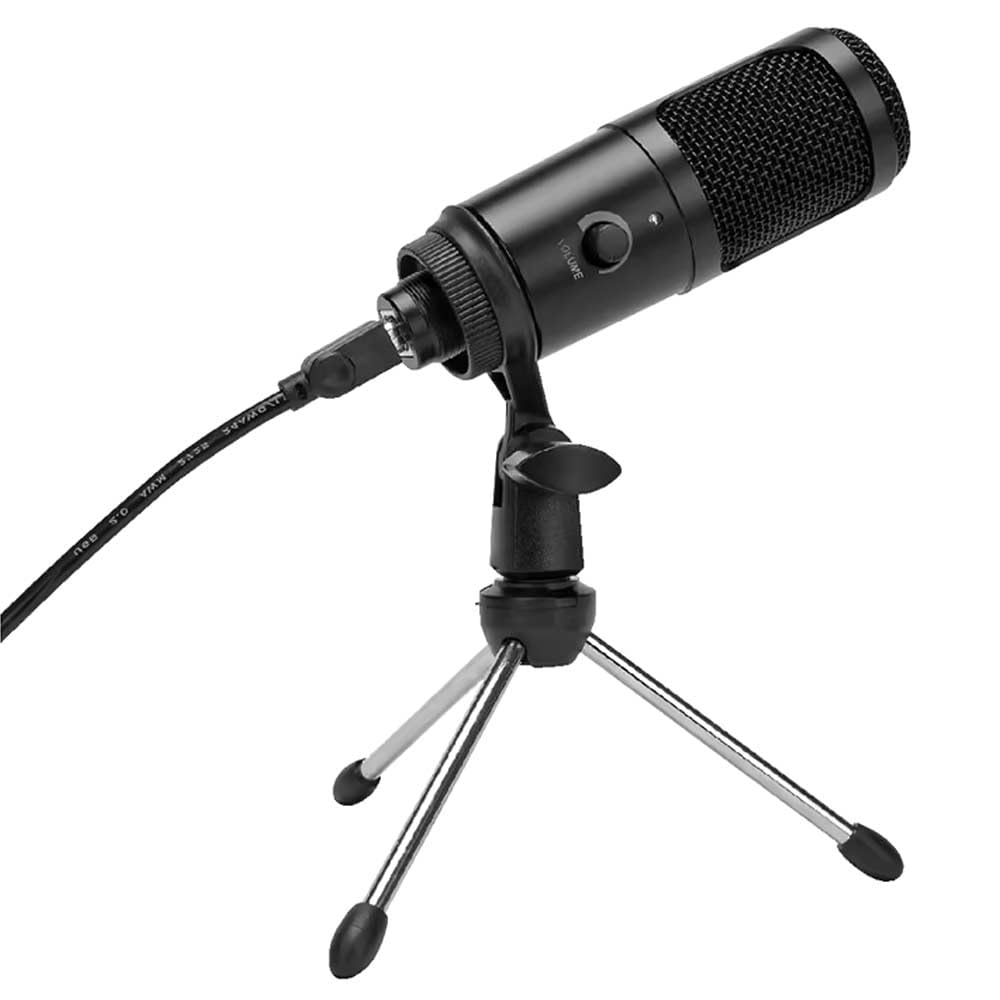
図1: Vivitar MIC918 Microphone unit attached to its tripod stand, showing the integrated USB cable.

図2: 側 view of the Vivitar MIC918 Microphone, highlighting the volume control knob and the Vivitar brand logo.
The microphone unit features a durable metal construction. The front side includes a volume control knob for easy audio level adjustments. The microphone is designed with a unidirectional polar pattern to focus on sound directly in front of it, reducing background noise.
設定
マイクを接続する
- スタンドを組み立てる: If not already assembled, unfold the tripod stand and ensure it is stable on a flat surface. Securely attach the microphone unit to the stand's mounting point. The rotating shaft ring allows for angle adjustment.
- デバイスに接続します: Plug the integrated USB cable from the microphone into an available USB port on your computer, laptop, or compatible gaming console.
- プラグアンドプレイ: The Vivitar MIC918 is a plug-and-play device. Your operating system (Windows, macOS, etc.) should automatically detect and install the necessary drivers. No additional software installation is typically required.
- 入力デバイスとして選択: After connecting, navigate to your device's sound settings or the audio settings within your recording/streaming software. Select the "Vivitar MIC918" or similar USB audio device as your primary input (microphone) device.
オペレーティング
音量の調整
The microphone features a built-in volume control knob located on its side (refer to Figure 2). Rotate this knob clockwise to increase the microphone's input sensitivity (volume) and counter-clockwise to decrease it. Adjust this to achieve the desired recording level without distortion.
マイクの配置
For optimal audio capture, position the microphone directly in front of the sound source (e.g., your mouth for speaking or singing). The tilting tripod stand allows you to adjust the microphone's angle to best suit your needs. Due to its unidirectional polar pattern, the microphone is most sensitive to sounds coming from the front and less sensitive to sounds from the sides or rear, helping to minimize ambient noise.
メンテナンス
- クリーニング: Use a soft, dry, lint-free cloth to wipe the microphone's exterior. Do not use liquid cleaners, aerosols, or solvents.
- ストレージ: 使用していないときは、マイクをほこりや極端な温度を避け、清潔で乾燥した場所に保管してください。
- 取り扱い: マイクは丁寧に扱ってください。落としたり、強い衝撃を与えたりしないでください。
トラブルシューティング
| 問題 | 考えられる原因 | 解決 |
|---|---|---|
| マイクから音声が出力されません。 | マイクが正しく接続されていません。 間違った入力デバイスが選択されました。 マイクの音量が低すぎます。 | Ensure USB cable is securely plugged into both the microphone and the device. Verify that "Vivitar MIC918" is selected as the input device in your system's sound settings or recording software. Increase the volume using the knob on the microphone and check system input levels. |
| Poor sound quality (e.g., muffled, too quiet, background noise). | マイクの位置が正しくありません。 周囲の騒音が大きい。 Input level too high or too low. | Position the microphone closer to the sound source and ensure it's facing directly towards it. 静かな環境で録音してください。 Adjust the microphone's volume knob and system input levels to an optimal range, avoiding clipping or being too faint. |
| マイクがコンピューターに認識されません。 | USB ポートまたはケーブルに障害があります。 システム ドライバーの問題。 | マイクをコンピュータの別の USB ポートに接続してみてください。 Restart your computer. If the issue persists, check your operating system's device manager for any driver conflicts or updates. |
仕様
| 特徴 | 仕様 |
|---|---|
| ブランド | のVivitar |
| モデル番号 | MIC918 |
| 接続性 | USB(プラグアンドプレイ) |
| マイクタイプ | コンデンサー |
| 極性パターン | 一方向 |
| 信号対ノイズ比 | 78デシベル |
| エンクロージャ材質 | 金属 |
| アイテム重量 | 0.95ポンド(約0.43kg) |
| 商品の寸法 (長さ x 幅 x 高さ) | 8.86 x 5.36 x 2.49インチ(約22.5 x 13.6 x 6.3 cm) |
| 電源 | コード式電気(USB経由) |
| 対応デバイス | Computers, Laptops, Gaming Consoles |
保証情報
The Vivitar Podcast and Social Media Microphone MIC918 comes with a 3-Year USA Warranty. For specific terms, conditions, and to register your product, please refer to the official Vivitar web公式サイトをご覧いただくか、カスタマーサポートに直接お問い合わせください。保証請求のために購入証明書を保管してください。
カスタマーサポート
For further assistance, technical support, or inquiries regarding your Vivitar MIC918 microphone, please visit the official Vivitar website or contact their customer service department. Contact information can typically be found on the Vivitar webサイトの「サポート」または「お問い合わせ」セクションをご覧ください。