
導入
This manual provides essential instructions for the proper use and maintenance of your Vikefon Type C Charging and Data Cable. This 1-meter cable is designed for efficient charging and high-speed data transfer between your Type C enabled devices and compatible power sources or computers.

Image: The Vikefon Type C Charging and Data Cable, featuring a standard USB-A connector on one end and a reversible USB-C connector on the other.
製品の特徴
- USB Connector Quality: Ensures reliable charging and high-speed data transmission.
- 出力: Supports up to 5V, 3 Amp 急速充電用。
- ユニバーサル互換性: Fully compatible with all Type C mobile devices for fast charging and syncing.
- Reversible USB Type-C Connector: Allows for quick and easy connections in any orientation.
- 耐久性に優れたデザイン: Features intricate nylon braiding for enhanced durability and longevity, outlasting standard cables.
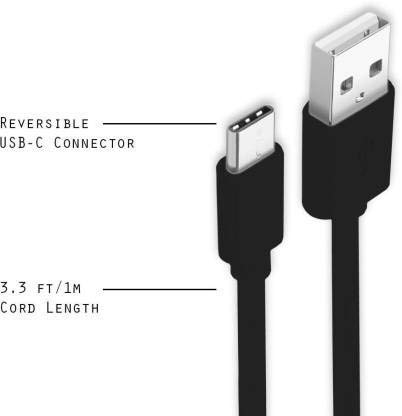
Image: A diagram illustrating the reversible nature of the USB-C connector and the cable's 1-meter (3.3 ft) cord length.
設定
- コネクタを識別します。 The cable has a standard USB-A connector on one end and a smaller, oval-shaped USB Type-C connector on the other.
- 電源/コンピューターに接続します: Insert the USB-A end of the cable into a compatible USB port on a wall adapter, power bank, car charger, or computer.
- デバイスに接続します: Insert the USB Type-C end into the charging/data port of your smartphone, tablet, or other Type C enabled device. The USB Type-C connector is reversible, so it can be inserted in either orientation.
- 接続を確認します: Ensure both ends are securely connected. Your device should indicate that it is charging or connected for data transfer.
操作手順
デバイスの充電
- Connect the USB-A end of the cable to a compatible USB power adapter (e.g., wall charger, car charger, power bank).
- Connect the USB Type-C end to your device's charging port.
- Ensure the power adapter is plugged into a live power outlet. Your device should begin charging.
データの転送
- ケーブルの USB-A 端子をコンピューターの USB ポートに接続します。
- Connect the USB Type-C end to your device.
- On your device, you may receive a prompt asking to allow data access or to select a USB connection mode (e.g., "File Transfer," "MTP"). Select the appropriate option to enable data transfer.
- デバイスはコンピュータ上でリムーバブルドライブまたはメディアデバイスとして表示され、転送できるようになります。 files.
メンテナンス
- 適切な取り扱い: Always grasp the connector head when plugging or unplugging the cable. Avoid pulling directly on the cable itself to prevent damage to the internal wires.
- 曲げを避ける: Do not excessively bend or crimp the cable, especially near the connectors, as this can cause internal wire breakage.
- ストレージ: Store the cable in a clean, dry place away from extreme temperatures and direct sunlight. Avoid tangling the cable.
- クリーニング: If necessary, gently wipe the cable and connectors with a dry, soft cloth. Do not use liquids or abrasive cleaners.

画像: クローズアップ view highlighting the durable metal heads of the Vikefon Type C cable connectors, designed for anti-oxidation and corrosion resistance.
トラブルシューティング
- デバイスが充電されない:
- ケーブルの両端がしっかりと接続されていることを確認してください。
- 電源アダプターが正しく機能しており、通電しているコンセントに接続されていることを確認します。
- 別の電源アダプタまたは USB ポートを使用してみてください。
- デバイスの充電ポートにゴミや損傷がないか確認してください。
- 遅い充電:
- Ensure you are using a power adapter that supports fast charging (e.g., 3A output).
- デバイス上の不要なバックグラウンド アプリケーションを閉じます。
- データ転送なし:
- Confirm the cable is properly connected to both your device and computer.
- On your device, check the notification panel for USB options and select "File 「転送」または「MTP」です。
- コンピューターの別のUSBポートに接続してみてください。
- デバイスとコンピュータの両方を再起動します。
仕様
| 特徴 | 詳細 |
|---|---|
| ブランド | Vikefon |
| モデル名 | タイプC |
| モデル番号 | タイプC 0129 |
| コネクタタイプ | USB タイプ C (オス - オス) |
| ケーブルタイプ | USB |
| 対応デバイス | Laptop, PC, Smartphone (e.g., Xiaomi Redmi 8A, Poco M2, Poco M2 Pro, Samsung, Motorola, Lenovo, Lava, Sony, HTC, LG, Karbonn, Maxx) |
| 特集 | Charging Wire, Durable, High Data Transfer Rate, High Quality, Long Length |
| データ転送速度 | Up to 0.48 Gigabits Per Second (480 Mbps) |
| 接続技術 | USB |
| 仕様が満たされました | ISO |
| 色 | 黒 |
| アイテムの形状 | ラウンド |
| Outer Material Type | Rubber (with Nylon Braiding) |
| ケーブル長さ | 1メートル |
保証とサポート
Specific warranty details for the Vikefon Type C Charging and Data Cable are not provided in this manual. For information regarding warranty coverage, returns, or technical support, please refer to the product packaging or contact the manufacturer directly through their official channels.


