
導入
The FlinQ Smart WLAN Doorbell with Camera and Intercom provides enhanced home security and convenience. Featuring Full HD video, two-way audio, motion detection, and night vision, it allows you to monitor your doorstep and communicate with visitors from anywhere using your smartphone. This manual provides detailed instructions for setup, operation, and maintenance of your new smart doorbell system.
パッケージ内容

Image: All components included in the FlinQ Smart WLAN Doorbell package, laid out on a white surface. This includes the doorbell unit, the indoor chime, two rechargeable batteries, a micro USB cable, an assembly kit, a safety wall mount, and the user manual.
以下にリストされているすべてのアイテムがパッケージに含まれていることを確認してください。
- FlinQ Smart Video Doorbell Unit
- Indoor Chime Unit (Receiver)
- 充電式バッテリー2個
- マイクロUSB充電ケーブル
- Safety Wall Mount
- Assembly Kit (Screws, Wall Plugs)
- ユーザーマニュアル
製品終了view

Image: The FlinQ Smart WLAN Doorbell, its plug-in indoor chime, and a smartphone displaying the doorbell's live video feed and control options.
The FlinQ Smart WLAN Doorbell is designed for ease of use and comprehensive security. Key components and features include:
- フルHDカメラ: 鮮明な 1920x1080 ビデオをキャプチャします。
- 広角 View: 155度 viewing angle ensures broad coverage of your doorstep.
- PIR Intelligent Motion Sensor: Detects movement and triggers alerts.
- ドアベルボタン: チャイムを鳴らし、通知を送信します。
- Infrared HD Night Vision: Provides clear video even in low-light conditions.
- 双方向オーディオ: Allows real-time communication with visitors.
- IP52防水等級: 屋外の環境に耐えられるよう設計されています。
- 充電式バッテリー: Powered by 2x 2500 mAh batteries, offering extended standby time.
- 屋内チャイム: Plugs into a standard outlet and offers multiple melodies.
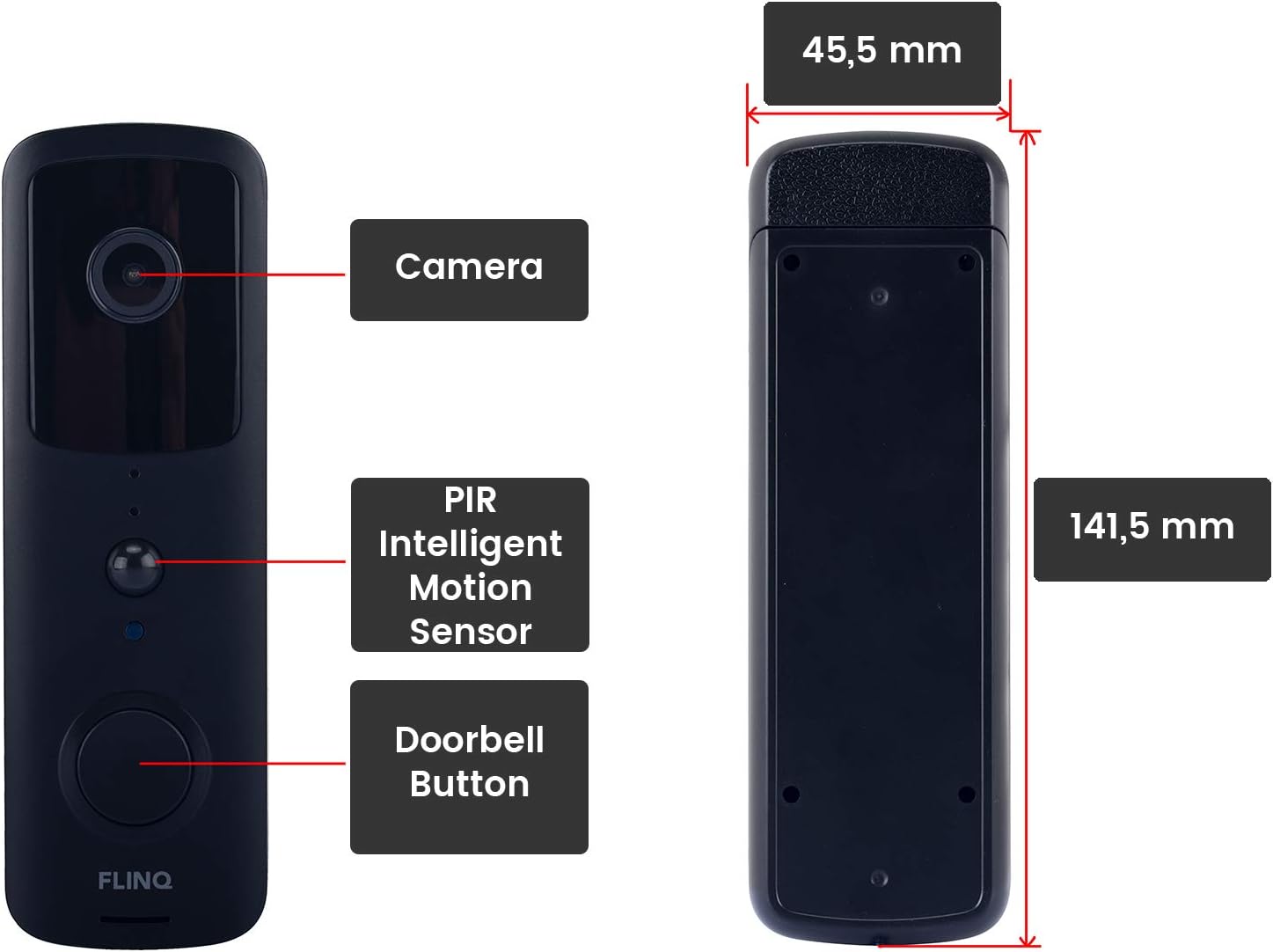
Image: A detailed diagram illustrating the front and side views of the FlinQ Smart WLAN Doorbell, highlighting its camera, PIR intelligent motion sensor, doorbell button, and overall dimensions (141.5 mm height, 45.5 mm width).

Image: A visual representation of the doorbell's 155-degree wide-angle view, showing its broad detection area and real-time HD video capabilities.
セットアップガイド
1. ドアベルの充電
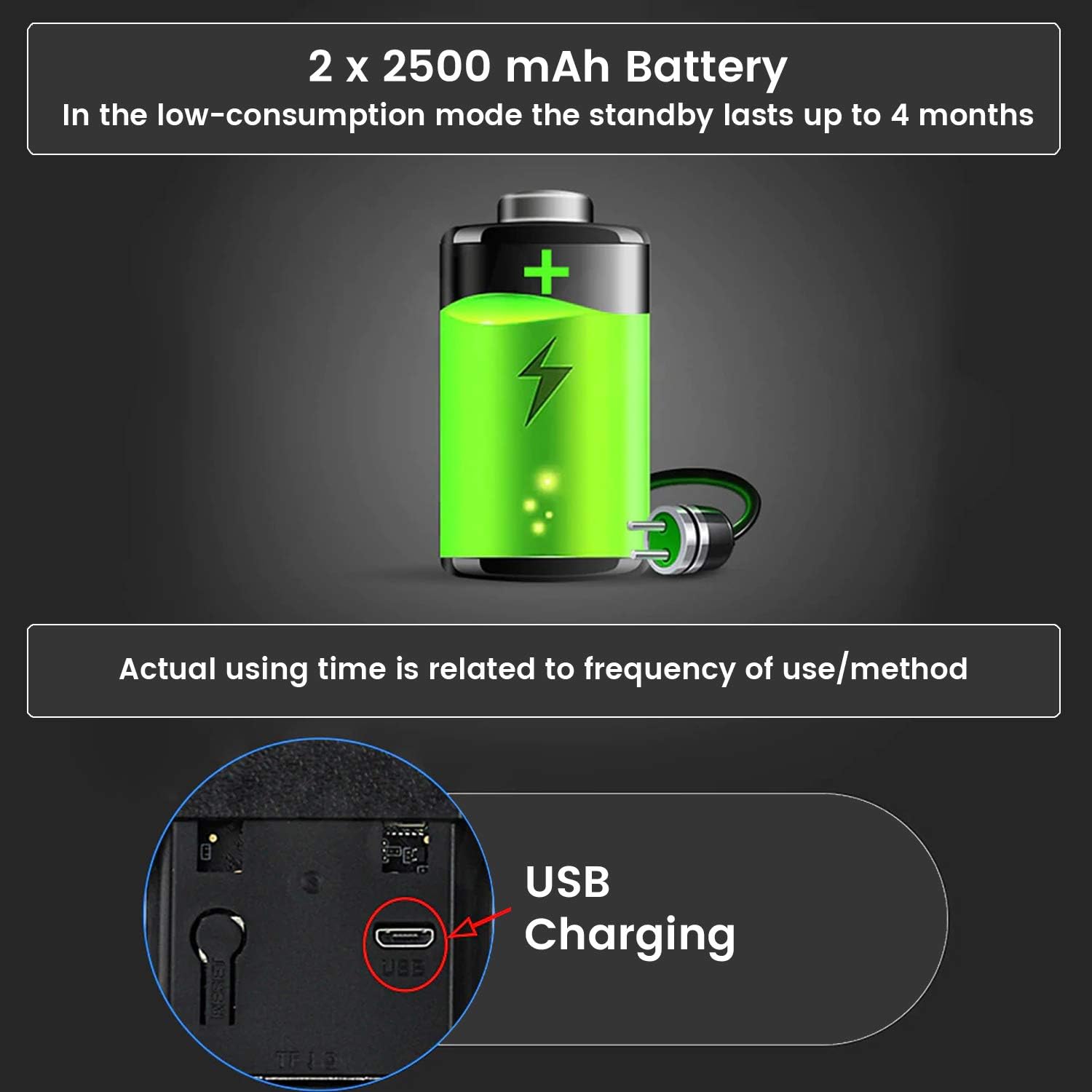
Image: An illustration of the doorbell's battery compartment and the micro USB charging port, indicating the 2x 2500 mAh battery capacity and typical standby time of up to 4 months.
Before initial use, fully charge the doorbell's batteries. Insert the two rechargeable batteries into the doorbell unit. Connect the supplied micro USB cable to the charging port on the doorbell and plug the other end into a standard USB power adapter (not included). The charging indicator light will show the charging status. A full charge can take several hours.
2.アプリのインストール
The FlinQ Smart Doorbell operates with the TUYA application. Download the "TUYA Smart" app from your smartphone's app store (Google Play Store for Android or Apple App Store for iOS).
- 検索する "TUYA Smart" in your app store.
- アプリをダウンロードしてインストールします。
- アプリを開いて新しいアカウントを登録するか、すでにアカウントをお持ちの場合はログインします。
3.デバイスのペアリング
Follow these steps to pair your doorbell with the TUYA Smart app:
- スマートフォンが2.4GHz Wi-Fiネットワークに接続されていることを確認してください。ドアベルは5GHz Wi-Fiには対応していません。
- Open the TUYA Smart app. Tap the "+" icon in the top right corner to add a device.
- Select "Video Surveillance" or "Smart Doorbell" from the device list.
- Follow the on-screen instructions to put the doorbell into pairing mode (usually by pressing and holding the doorbell button or a reset button until an indicator light flashes).
- プロンプトが表示されたら、Wi-Fi ネットワークのパスワードを入力します。
- The app will generate a QR code. Position your doorbell camera to scan this QR code on your phone screen. Hold it about 15-20 cm away until you hear a confirmation sound from the doorbell.
- 接続したら、ドアベルに名前を付けてセットアップを完了できます。
To pair the indoor chime: Plug the chime into a power outlet. Press the pairing button on the chime (refer to the chime's specific instructions if available) and then press the doorbell button on the outdoor unit. The chime should ring, indicating successful pairing.
4. 物理的な設置
Choose a suitable location for your doorbell, ideally near your front door, at a height that allows for optimal viewing. The doorbell is IP52 waterproof, suitable for outdoor installation.
- Mark the drilling points using the provided safety wall mount as a template.
- 必要に応じて穴を開け、壁プラグを挿入します。
- Secure the wall mount to the wall using the screws from the assembly kit.
- Attach the doorbell unit securely to the mounted bracket. Ensure it clicks into place.
操作手順
1. 双方向音声通信

Image: A visual representation of the real-time two-way audio feature, showing a person at the door and a smartphone user communicating directly.
When a visitor presses the doorbell button or motion is detected, you will receive a notification on your smartphone. Tap the notification to open the live view in the TUYA Smart app. From here, you can:
- 話す: Tap the microphone icon to speak to the visitor. Your voice will be projected through the doorbell's speaker.
- 聞く: The doorbell's built-in microphone allows you to hear the visitor.
2. 動きの検知とアラート
The integrated PIR motion sensor detects movement in front of your doorbell. When motion is detected, the doorbell will:
- スマートフォンに即座にプッシュ通知を送信します。
- Begin recording video (if configured).
You can adjust the motion detection sensitivity and set detection zones within the TUYA Smart app settings to minimize false alerts.
3. ナイトビジョン

Image: A visual representation of the doorbell's infrared HD night vision, showing how it provides clear visibility in dark conditions using 6 night vision lights and auto-sensing technology.
The FlinQ Smart Doorbell is equipped with infrared HD night vision. This feature automatically activates in low-light conditions, ensuring clear video recordings and live views even at night.
4. ビデオストレージ

Image: An illustration detailing the two available video storage methods for the doorbell: 7 days of cloud storage and local storage via a 32GB SD card.
Your video recordings can be stored using two methods:
- クラウドストレージ: The TUYA app offers cloud storage options, typically including a period of free storage (e.g., 7 days). Check the app for details on subscription plans for extended cloud storage.
- Micro-SD Card Storage: Insert a micro-SD card (up to 32GB, not included) into the designated slot on the doorbell unit for local storage of recordings. This allows you to review フーtage directly from the card.
5. Indoor Chime Operation
The indoor chime plugs into any standard wall outlet. When the doorbell button is pressed, the chime will ring, providing an audible alert inside your home. The chime unit comes with six different melodies. Refer to the chime's specific instructions (if separate) or the TUYA app settings to change melodies and adjust volume.
メンテナンス
1。 バッテリーの充電
The doorbell's battery life can last up to 4 months under optimal conditions and low usage. However, frequent motion detection events, live view access, and two-way audio usage will reduce battery life. When the battery level is low, you will receive a notification via the TUYA app. Recharge the doorbell using the micro USB cable as described in the Setup section.
Note: Some users report shorter battery life depending on usage frequency and environmental factors. Regular monitoring of battery status via the app is recommended.
2. 清掃
To maintain optimal performance, periodically clean the doorbell unit. Use a soft, damp cloth to wipe the camera lens and the body of the doorbell. Do not use harsh chemicals or abrasive cleaners, as these can damage the device or its waterproof sealing.
トラブルシューティング
| 問題 | 考えられる原因 | 解決 |
|---|---|---|
| Doorbell not connecting to Wi-Fi / App pairing fails. | Incorrect Wi-Fi band (5GHz), wrong password, weak signal, doorbell not in pairing mode. |
|
| バッテリー寿命が短い。 | Frequent motion detection, high traffic area, frequent live view access, cold weather. |
|
| Motion detection is unreliable or triggers false alarms. | Incorrect sensitivity settings, environmental factors (e.g., swaying trees, passing cars). |
|
| No audio or poor audio quality during two-way communication. | Weak Wi-Fi signal, app permissions, microphone/speaker obstruction. |
|
| 室内チャイムが鳴らない。 | Chime unplugged, not paired, out of range. |
|
仕様
| 特徴 | 詳細 |
|---|---|
| ブランド | フリンク |
| モデル (ASIN) | B08PD3YP2W |
| ビデオ解像度 | フルHD 1920 x 1080ピクセル |
| View角度 | 155度 |
| 接続性 | Wireless (WLAN 2.4G), Wired (for power, if applicable, though primarily battery) |
| 電源 | Battery powered (2x 2500 mAh rechargeable batteries) |
| 平均バッテリー寿命 | Up to 4 Months (usage dependent) |
| 耐水性レベル | IP52防水 |
| 特集 | Motion Sensor, Night Vision, Two-Way Audio, Cloud/SD Card Storage |
| 対応デバイス | Smartphone (via TUYA Smart App) |
| 寸法(ドアベル) | Approx. 141.5 mm (H) x 45.5 mm (W) |
| パッケージ寸法 | 26.3 x 8.7 x 7.7 cm; 370 g |
| 初回利用可能日 | 23年2020月XNUMX日 |
保証とサポート
For warranty information and technical support, please refer to the official FLINQ webご購入いただいた販売店にお問い合わせいただくか、ウェブサイトをご覧ください。保証請求の際に必要となりますので、購入証明書を保管してください。
For app-related issues, please consult the help section within the TUYA Smart app or visit the TUYA Smart support webサイト。