
1. はじめに
Thank you for choosing the Tbest CCD HD IP68 Reversing Camera. This manual provides detailed instructions for the installation, operation, and maintenance of your new reversing camera system. Please read this manual thoroughly before installation and use to ensure proper function and safety. This camera is designed to enhance your vehicle's safety by providing a clear view 後退時に車の後ろのエリアを確認します。
2.製品オーバーview
2.1 主な特徴
- High-Definition CCD Sensor: 鮮明でシャープな画像を提供します。
- IP68防水等級: さまざまな気象条件において耐久性と信頼性の高いパフォーマンスを保証します。
- 170度広角レンズ: 幅広い分野を提供 view 死角を最小限に抑えます。
- ナイトビジョン機能: Operates effectively in low-light conditions.
- Integrated License Plate Light Design: Replaces the original license plate light for a seamless, factory-like installation.
- 駐車ガイドライン: Assists with precise parking maneuvers.
- Universal RCA Connector: Compatible with most aftermarket car displays and head units.
2.2 パッケージ内容
- 1 x Tbest CCD HD Reversing Camera
- 1 x Video Cable (approx. 6 meters / 19.7 feet)
- 電源ケーブル x 1
- ユーザーマニュアル (本書) x 1

This image displays the complete set of cables provided with the camera, including the video cable (approximately 6 meters long) and the power cable.
3. 安全情報
次の安全上の注意事項を守ってください。
- 電気作業を行う前に必ず車両のバッテリーを外してください。
- ショートや損傷を防ぐために、すべての配線が適切に絶縁され、固定されていることを確認してください。
- 運転者の邪魔をしないでください view または、取り付け中に車両の制御を妨げないようにしてください。
- This camera is an aid for reversing and parking; it does not replace the driver's responsibility to check surroundings manually.
- インストールプロセスのいずれかの部分について不明な点がある場合は、専門家に相談してください。
4. セットアップとインストール
The Tbest Reversing Camera is designed for specific vehicle models, integrating into the license plate light housing. Compatible vehicles include Renault Fluence (2019-2014), Renault Duster (2009-2014), Dacia Duster (2010-2014), Renault Megane 3 (2008-2016), and Nissan Terrano (2010-2014).
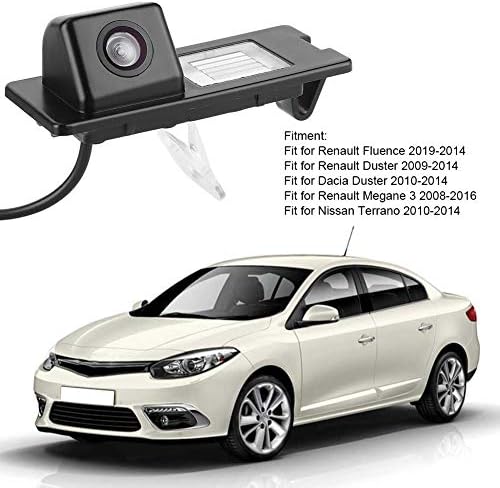
The camera unit is shown next to a list detailing compatible vehicle models, including Renault Fluence, Duster, and Megane, and Nissan Terrano.
4.1 インストール手順
- 車両を準備する: Ensure the vehicle is turned off and the parking brake is engaged. Disconnect the negative terminal of the car battery to prevent electrical shorts.
- Remove Original License Plate Light: Carefully remove the existing license plate light housing from your vehicle's rear. This usually involves unfastening screws or clips.
- カメラユニットをインストールします。 Insert the Tbest reversing camera unit into the vacant license plate light slot. Ensure it fits securely and the camera lens is facing outwards and downwards for optimal view角度。
- 接続電源: Connect the camera's power cable (red and black wires) to the vehicle's reverse light power supply. The red wire connects to the positive (+) lead of the reverse light, and the black wire connects to a ground (-) point. This ensures the camera activates automatically when reverse gear is engaged.
- ビデオケーブルの配線: Run the video cable (RCA connector) from the camera unit through the vehicle's interior to the location of your car's display screen (e.g., infotainment system, rearview mirror monitor). Ensure the cable is routed safely, away from moving parts or heat sources, and secured to prevent damage.
- ディスプレイに接続: Plug the RCA video cable into the video input port of your car's display unit.
- システムをテストする: Reconnect the car battery. Turn on the vehicle and engage reverse gear. The camera image should appear on your display screen. Adjust the camera's position slightly if needed to optimize the view.
- 安全な配線: Once tested and confirmed working, secure all wiring with cable ties or electrical tape to prevent rattling or damage.

The camera is shown integrated into a vehicle's rear license plate light housing, with the corresponding view on the car's display screen, complete with dynamic parking guidelines.
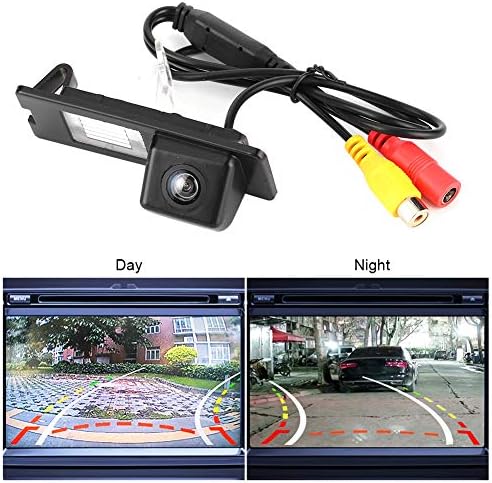
The camera unit is pictured with its RCA video and power cables. Below, two screens demonstrate the camera's performance in both bright daylight and low-light night conditions.
5. 操作手順
Once properly installed, the Tbest Reversing Camera operates automatically:
- 自動アクティベーション: When you shift your vehicle into reverse gear, the camera will automatically power on and transmit its video feed to your connected display screen.
- 駐車ガイドライン: The display will show dynamic parking guidelines overlaid on the camera's view, assisting you in judging distances and positioning your vehicle.
- 広角 View: Utilize the 170-degree wide-angle view to observe obstacles and surroundings that may not be visible in your rearview 鏡。
- ナイトビジョン: The camera's low-light capability ensures a clear view even in dark conditions.
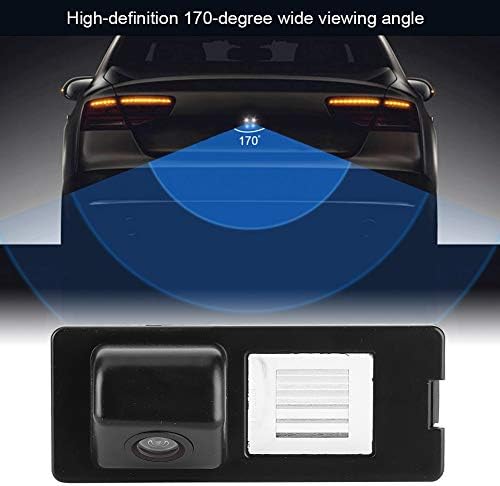
This diagram visually represents the camera's 170-degree wide viewing angle, highlighting the broad area it covers behind the vehicle for enhanced safety.
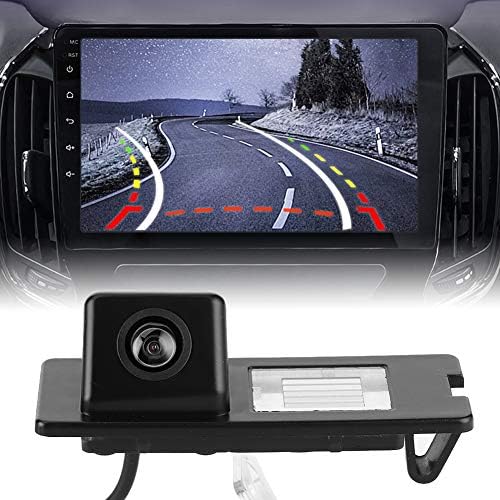
This image displays the Tbest reversing camera unit alongside a car's infotainment screen, illustrating the camera's output with parking guidelines.
6. メンテナンス
To ensure the longevity and optimal performance of your Tbest Reversing Camera, follow these maintenance guidelines:
- 定期清掃: カメラのレンズは定期的に柔らかくてきれいな布で拭いてください。amp 布で汚れ、ほこり、水滴を取り除き、 view研磨剤入りの洗剤は使用しないでください。
- 配線の検査: Occasionally check the wiring for any signs of wear, fraying, or loose connections. Secure any loose wires.
- 刺激の強い化学物質を避ける: Do not use strong chemical cleaners or solvents on the camera unit, as they may damage the housing or lens.
- 極端な温度: While designed for automotive use, prolonged exposure to extreme temperatures (hot or cold) can affect electronic components.

A detailed close-up of the camera unit, showing its compact design and lens.
7。 トラブルシューティング
If you encounter issues with your reversing camera, refer to the following troubleshooting guide:
- 表示される画像がありません:
- 車がバックギアに入っているかどうかを確認します。
- Verify all power and video cable connections are secure and correctly plugged in.
- ディスプレイユニットが正しいビデオ入力チャネルに設定されていることを確認します。
- Check the camera's power supply by testing the reverse light circuit with a multimeter.
- 画像のちらつきや歪み:
- ビデオ ケーブルに損傷や接続の緩みがないか検査します。
- カメラの電源が適切に接地されていることを確認してください。
- 他の車両の電子機器からの電磁干渉がないか確認します。
- Poor Image Quality (Blurry/Dark):
- カメラのレンズを徹底的に清掃してください。
- Ensure there is sufficient ambient light for optimal night vision performance.
- Verify the camera is securely mounted and not vibrating.
- 駐車線が間違っています:
- Parking lines are typically fixed and cannot be adjusted. Ensure the camera is mounted straight.
If the problem persists after following these steps, please contact Tbest customer support.
8. 仕様
| 特徴 | 仕様 |
|---|---|
| ブランド | ベスト |
| 対応デバイス | Renault Fluence, Duster, Megane |
| インストールタイプ | Surface Mount (License Plate Light Housing) |
| 巻tage | 12ボルト |
| 光センサー技術 | CCD |
| レンズタイプ | 広角 |
| 本物 View 角度 | 170度 |
| コネクタタイプ | RCA |
| 光学センサーサイズ | 1/3インチ |
| 分野 View | 170度 |
| 照度(ルクス) | 0.2 |
| Screen Capture Resolution | 720p |
| Effective Capture Resolution | 720 ピクセル |
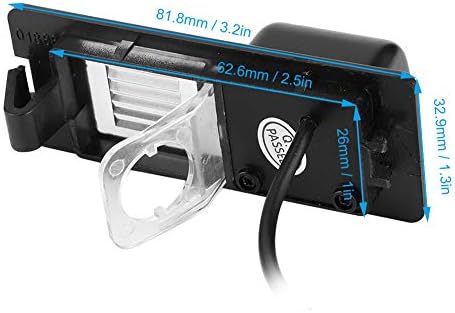
This image provides precise measurements of the camera unit, including its length, width, and height, in both millimeters and inches.
9. 保証とサポート
Tbest products are manufactured to high-quality standards. This product comes with a standard manufacturer's warranty. Please refer to the warranty card included with your purchase or visit the official Tbest web詳細な保証条件については、サイトをご覧ください。
For technical support, troubleshooting assistance, or warranty claims, please contact Tbest customer service through the retailer where you purchased the product or via the contact information provided on the official Tbest webサイト。