
導入
This manual provides comprehensive instructions for the assembly, operation, maintenance, and troubleshooting of your FLEXISPOT EN2 Whole-Piece Standing Desk. Please read this manual thoroughly before use to ensure safe and efficient operation.

Image: The FLEXISPOT EN2 Whole-Piece Standing Desk, showcasing its spacious white desktop, gray frame, and integrated clamp power strip. The desk is set up with multiple devices, highlighting its functionality.
安全上の警告
重要な安全情報:
- This desk has a maximum weight recommendation of 154 pounds (70 kg). Exceeding this weight limit could lead to damage or failure of the desk.
- The desk should be securely anchored to the wall if the combined weight of the desktop and objects placed on it exceeds 110 pounds (50 kg) to prevent tipping over.
- Always use caution when assembling the desk, and ensure all parts are securely fastened before use.
- Children should not be allowed to climb or play on the desk, as it poses a risk of injury.
- Regularly inspect the desk for any signs of wear, damage, or instability, and address any issues promptly to maintain safety.
製品の特徴
- 取り外し可能なデスクトップ電源コンセント: Equipped with 3 power outlets and 2 USB charging ports (5V/2A) for convenient device charging. Can be clipped to the back or side of the desk. Includes a cable management device for a tidy workspace.
- Ampホールピースデスクトップ: Features a 1-inch eco-friendly desktop providing generous space for computer setups, documents, and accessories. Note: Desktop dimensions may vary slightly by 0 to 1 inch due to hand measurements.
- 4つのメモリボタン: A 6-button digital controller allows easy switching between sitting and standing positions with 4 programmable memory presets. The motorized system adjusts smoothly from 28.1 inches to 45.7 inches with a quiet motor operating at less than 50 dB.
- 耐久性のある構造: Rigorously tested frame for performance, durability, and safety. Constructed from premium wood planks and a sturdy industrial-grade steel frame, supporting up to 176 pounds.

Image: Visual comparison illustrating the enhanced stability of a smooth, single-piece desktop compared to a less stable uneven two-piece design.
セットアップと組み立て
Your FLEXISPOT EN2 desk will arrive in two separate packages, which may be shipped separately. Assembly is designed to be straightforward, but an electric drill (not included) may be required for certain steps, such as attaching the crossbeam or cable tray.
- Ensure all components from both packages are present before beginning assembly.
- Follow the provided user guide carefully for step-by-step instructions. Pay close attention to the crossbeam adjustment in Step 2; ensure screws are only loose enough to extend the crossbar to the maximum sign, and tighten them only in Step 8 after the base is attached to the table.
- Use a battery-powered drill for self-tapping screws for predrilled holes for table legs and for the center holes on the crossbeam or cable tray.

Image: Illustration showing two separate packages for the desk, one containing the desktop and the other the desk frame, indicating they may arrive at different times.
操作手順
高さ調整
The FLEXISPOT EN2 features a motorized height adjustment system controlled by a 6-button digital panel. The desk can be smoothly adjusted from a minimum height of 28.1 inches to a maximum height of 45.7 inches.
- 使用 上(^) そして 下(動詞) arrow buttons on the control panel to manually adjust the desk height. The current height is displayed on the LED screen.
- The motor operates quietly (less than 50 dB) for minimal disruption.
メモリプリセット
The control panel includes four programmable memory presets (1, 2, 3, 4) to quickly switch between your preferred sitting and standing heights.
- 上/下矢印を使用して、デスクを希望の高さに調整します。
- を押す 「S」 button (Set) once. The LED display will flash.
- すぐに数字ボタン (1、2、3、または 4) のいずれかを押して、現在の高さをそのプリセットに保存します。
- 保存した高さを呼び出すには、対応する数字ボタンを押すだけです。デスクは自動的に保存された位置に移動します。
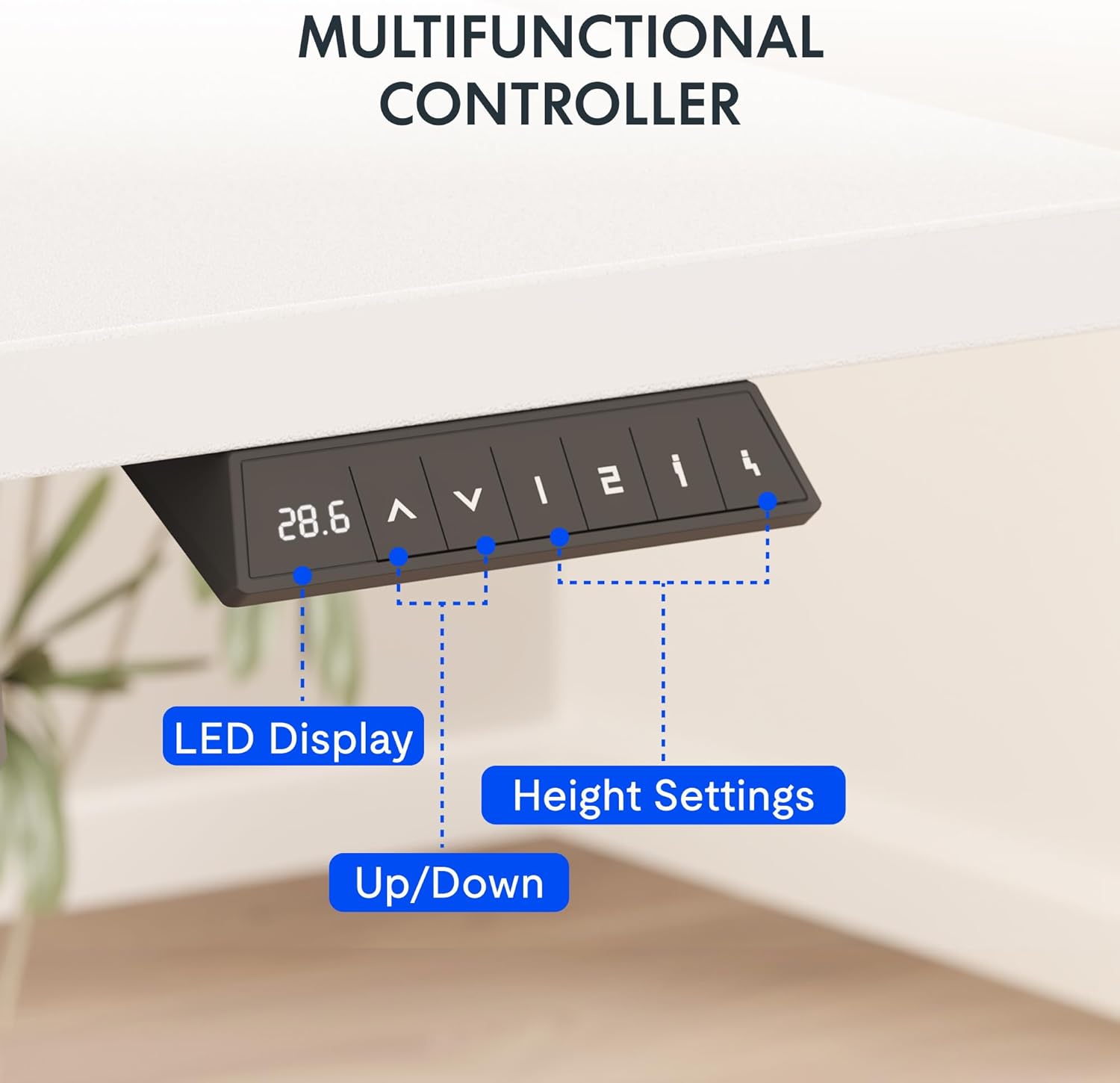
画像: 詳細な view of the desk's control panel, showing the LED display, up/down adjustment buttons, and four programmable memory preset buttons.
一体型電源コンセント
The removable desktop power outlet provides convenient access to power for your electronic devices. It includes 3 AC outlets and 2 USB charging ports (5V/2A).
- The power outlet can be clipped to the back or side of your desk.
- Use the USB ports for charging smaller devices like smartphones and tablets.
- The power outlet is designed for general electronic devices and may not support laptop charging.
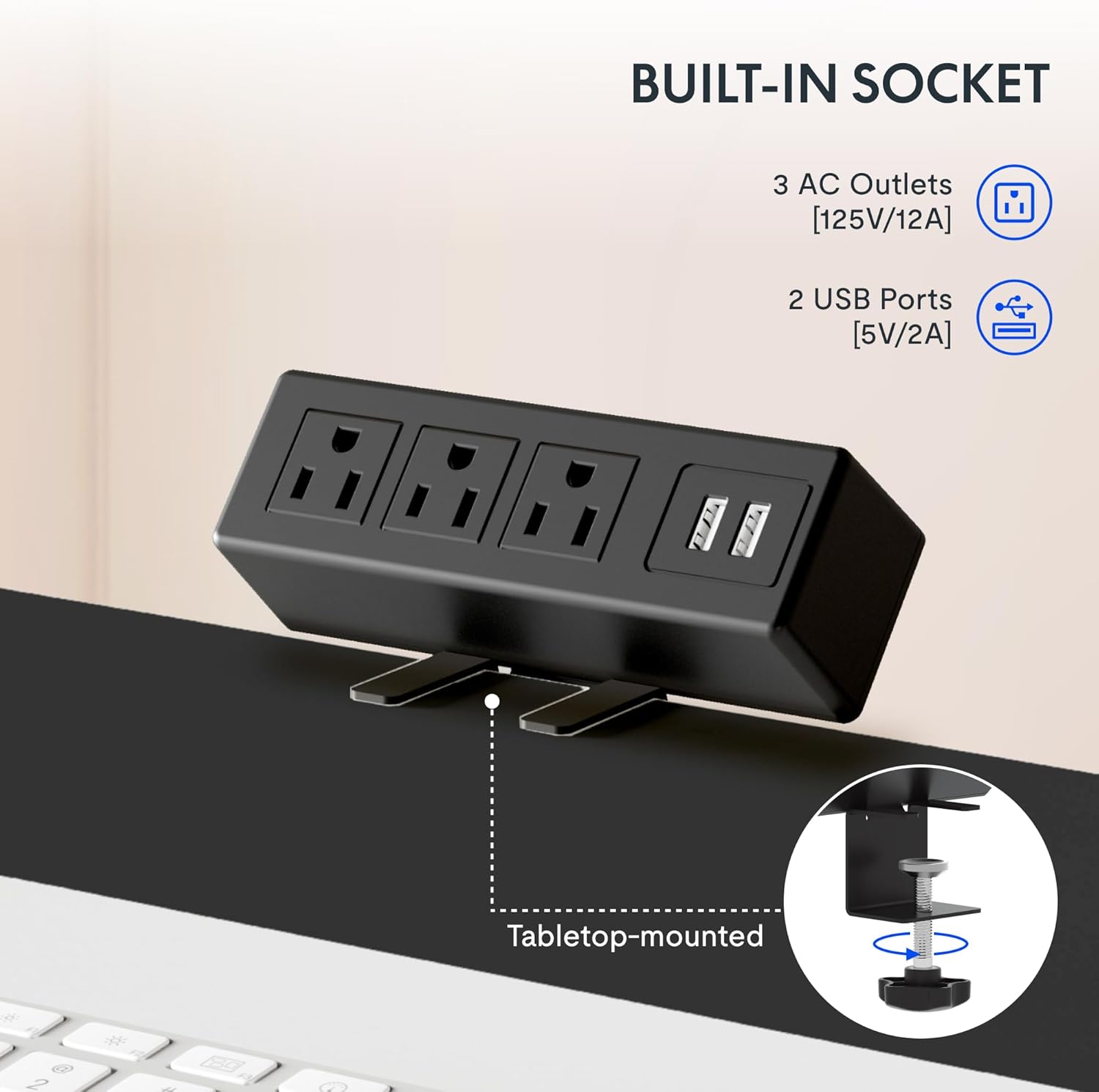
Image: A close-up of the integrated power strip, featuring three AC outlets and two USB ports, designed to clamp onto the desk edge for easy access.
メンテナンス
To ensure the longevity and optimal performance of your FLEXISPOT EN2 Standing Desk, follow these maintenance guidelines:
- クリーニング: デスクトップとフレームを柔らかくて乾いた布で拭きます。amp 布で拭いてください。仕上げを傷める可能性のある研磨剤入りの洗剤や刺激の強い化学薬品は使用しないでください。
- 検査: すべてのネジとボルトがしっかりと締まっているか定期的に確認してください。必要に応じて締め直してください。
- ケーブル管理 Utilize the provided cable management solutions to keep cords organized and prevent them from getting caught during height adjustments.
- 重量制限: Adhere strictly to the maximum weight recommendation of 176 pounds to prevent motor strain or structural damage.
トラブルシューティング
If you encounter any issues with your FLEXISPOT EN2 Standing Desk, refer to the following common troubleshooting tips:
- Desk Not Moving / Error Code "r5t": If the desk is unresponsive or displays an error code like "r5t", a system reset may be required.
- デスクの電源プラグをコンセントから抜きます。
- 少なくとも10〜15秒お待ちください。
- デスクを電源コンセントに差し込みます。
- Press and hold the "Down (v)" button until the desk reaches its lowest position and slightly rises, then releases. This typically initiates a reset.
- 問題が解決しない場合は、カスタマーサポートに連絡してください。
- 不均一な動き: Ensure the desk is placed on a level surface and that all leg components are securely fastened.
- Noise During Adjustment: A slight motor hum is normal. Excessive or unusual noises may indicate an issue; ensure no cables or objects are obstructing the lifting columns.
仕様
| 特徴 | 詳細 |
|---|---|
| ブランド | フレキシポット |
| モデル名 | EN2 |
| サイズ(現在の製品) | 60x24インチ |
| 色 | Gray Frame + White Top |
| スタイル | カジュアル |
| ベース素材 | 合金鋼 |
| 上部の材質の種類 | 木材 |
| 特集 | Adjustable, Electric, Ergonomic, Integrated Power Strip |
| 最小高さ | 28.1インチ |
| 最大高さ | 45.7インチ |
| 最大重量の推奨 | 176 ポンド |
| モーター騒音レベル | 50dB未満 |
| 必要な組み立て | はい |
保証とサポート
FLEXISPOT は、お客様に安心していただけるよう包括的な保証を提供します。
- 5年間保証: フレーム、モーター、その他の機械装置をカバーします。
- 2年間保証: コントローラー、スイッチ、電子機器をカバーします。
For customer support or warranty claims, please refer to the contact information provided with your product packaging or visit the official FLEXISPOT webサイト。
公式製品ビデオ
FLEXISPOT EN2 Whole-Piece Standing Desk Overview
ビデオ: 当局者がview of the FLEXISPOT EN2 Whole-Piece Standing Desk, demonstrating its features and functionality.
FLEXISPOT Standing Desk Features
Video: A promotional video from FLEXISPOT showcasing various features of their standing desks, including smooth height adjustment and sturdy design.
FlexiSpot Standing Desk - Healthier Lifestyle
Video: An official FlexiSpot video emphasizing the benefits of using a standing desk for a healthier lifestyle and improved work ergonomics.