
フレキシスポット EN2
FLEXISPOT EN2 電動高さ調節式スタンディングデスク 取扱説明書
モデル: EN2 | ブランド: FLEXISPOT
導入
This manual provides comprehensive instructions for the assembly, operation, and maintenance of your FLEXISPOT EN2 Electric Height Adjustable Standing Desk. Please read this manual thoroughly before use to ensure proper function and longevity of your product.
The FLEXISPOT EN2 features a whole-piece bamboo desktop, a removable power outlet with USB ports, a 6-button digital controller with 4 memory presets, and a durable steel frame designed for a stable and productive workspace.
安全情報
- 最大重量:176ポンド(80kg)。この制限を超えないようにしてください。
- Assembly requires an electric drill (not included). Exercise caution during assembly.
- デスクを操作する前に、すべての接続が安全であることを確認してください。
- 操作中は子供やペットをデスクから遠ざけてください。
- Avoid contact with water or abrasive materials during cleaning.
セットアップと組み立て
Your FLEXISPOT EN2 desk will arrive in two separate packages, which may be shipped separately. Assembly is required and is recommended for two people to facilitate handling of components. An electric drill is necessary for proper setup, but is not included.
コンポーネントオーバーview

図1:以上view of FLEXISPOT EN2 desk components. This image displays the various parts included for assembly, such as the desktop, leg frames, and hardware.
ケーブル管理
The desk includes a cable management device to help organize cords, contributing to a tidy workspace. Fasteners and Velcro straps are provided to secure cables neatly under the desktop.

Figure 2: Illustration of effective cable management. The "Before" section shows disorganized cables, while the "After" section demonstrates how the integrated cable management system tidies them.
アセンブリビデオ
Video 1: Flexispot Standing Desk - Embrace a Healthier Lifestyle. This official video demonstrates the desk's features and includes brief segments on assembly and operation.
操作手順
多機能コントローラ
The desk is equipped with a 6-button digital controller for easy height adjustment and memory preset functions. The controller features an LED display showing the current height.

図3:詳細 view of the multifunctional controller. It shows the LED display, up/down arrows, and four programmable height setting buttons.
高さ調整
- 使用 上(^) そして 下(動詞) arrows to manually adjust the desk height.
- The motorized system adjusts smoothly from 28.1 inches (71.4 cm) to 45.7 inches (116.1 cm).
- The motor operates quietly at less than 50 dB.
メモリプリセット
The controller allows you to save up to 4 preferred height settings for quick transitions between sitting and standing positions.
- 上/下矢印を使用して、デスクを希望の高さに調整します。
- を押す 「M」 ボタンを押します。LEDディスプレイが点滅します。
- 番号付きプリセットボタンの1つを押します(1、2、3、または4) while the display is flashing to save the current height to that preset.
- 保存した高さを呼び出すには、対応する番号のプリセット ボタンを押すだけです。
Removable Desktop Power Outlet
The desktop includes a removable power outlet with 3 AC outlets and 2 USB charging ports (5V/2A). This can be clipped to the back or side of your desk for convenient access.

Figure 4: The removable desktop power outlet, featuring 3 AC outlets (125V/12A) and 2 USB ports (5V/2A) for charging devices.
衝突防止システム
The desk is equipped with a smart anti-collision system. If the desk encounters an obstruction during height adjustment, it will stop and reverse slightly to prevent damage.
メンテナンス
- Dust regularly with a dry cloth to keep the desktop clean.
- Avoid contact with water or abrasive cleaning materials to prevent damage to the bamboo surface.
- すべてのネジと接続部がしっかりと固定されているか定期的に確認してください。
トラブルシューティング
If you encounter any issues with your FLEXISPOT EN2 desk, please refer to the following general advice:
- 机が動かない: Check all power connections and ensure the power outlet is functioning. Verify that the control panel is properly connected.
- 不均一な動き: Ensure the desk is placed on a level surface. Check that all leg components are securely fastened.
- 表示されるエラーコード: Consult the full troubleshooting guide available on the FLEXISPOT website or contact customer support for specific error code interpretations.
さらにサポートが必要な場合は、FLEXISPOT カスタマー サポートにお問い合わせください。
仕様
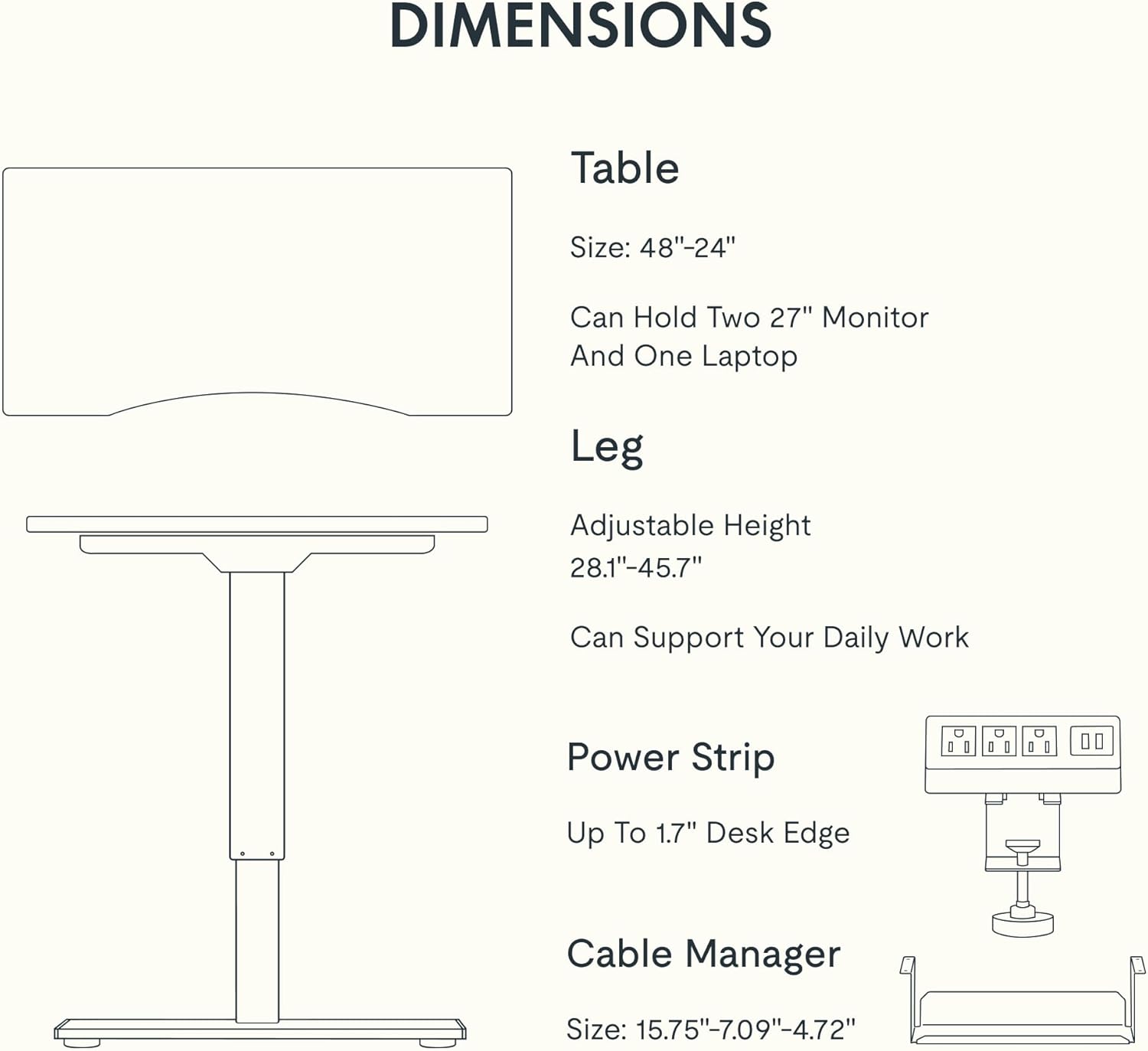
Figure 5: Dimensional specifications of the FLEXISPOT EN2 desk. This diagram illustrates the table size, adjustable height range, and dimensions of the power strip and cable manager.
| 特徴 | 詳細 |
|---|---|
| ブランド | フレキシポット |
| モデル番号 | EN2 |
| デスクトップ素材 | Whole-Piece Bamboo |
| フレーム素材 | 合金鋼 |
| 製品寸法(奥行き×幅×高さ) | 奥行き24インチ x 幅48インチ x 高さ28インチ (奥行き61cm x 幅122cm x 高さ71cm) |
| 高さ調節範囲 | 28.1インチ - 45.7インチ (71.4cm - 116.1cm) |
| 最大重量容量 | 176ポンド(80kg) |
| モーター騒音レベル | 50dB未満 |
| 電源コンセント | ACコンセント3個(125V/12A)、USB充電ポート2個(5V/2A) |
| 組み立てが必要 | Yes (Recommended 2 people, electric drill not included) |
保証とサポート
FLEXISPOT provides the following warranty for your EN2 standing desk:
- 5年間保証: フレーム、モーター、その他の機械装置をカバーします。
- 2年間保証: コントローラー、スイッチ、電子機器をカバーします。
For customer support, warranty claims, or additional product information, please visit the official FLEXISPOT web公式サイトをご覧いただくか、カスタマーサービスまでお問い合わせください。 AmazonのFLEXISPOTストア.
関連文書EN2


Ask a question about this manual
Ask about setup, troubleshooting, compatibility, parts, safety, or missing instructions. Manuals+ will review the question and use this page’s manual context to help answer it.