
導入
This manual provides detailed instructions for the setup, operation, and maintenance of your BUFFBEE Glow Alarm Clock HRS-BLACK. Please read this manual thoroughly before using the product to ensure proper function and longevity.
製品終了view
The BUFFBEE Glow Alarm Clock is a versatile device combining a digital alarm clock, FM radio, and a 7-color night light. It is designed to enhance your sleep and wake-up experience with customizable features.
主な特徴:
- 3-in-1 機能: Digital alarm clock, FM radio, and night light.
- 7色のナイトライト: Adjustable with 5 brightness levels.
- デュアルアラーム: Set two independent alarms with choice of FM radio, built-in beep, or bird sounds.
- Adjustable Display Dimmer: 0-100% brightness control for the time display.
- 点灯ボタン: For easy operation in low light conditions.
- お昼寝タイマー: Quick nap setting from 10 to 120 minutes.
- 自動オフスリープタイマー: Automatically turns off night light and FM radio after a set duration.
- USB充電ポート: 外部電子機器の充電に。
- 電源オプション: AC powered with AAA battery backup (batteries not included).
パッケージ内容:
- 1 x BUFFBEE Glow Alarm Clock
- 電源アダプター x 1
- ユーザーマニュアル x 1
コンポーネントの識別:
詳細は下の画像を参照view of the alarm clock's buttons and display.

画像: 正面 view of the BUFFBEE Glow Alarm Clock, showing the digital time display, alarm indicators, and control buttons on the top panel. The top edge features a light strip.
設定
1. 電源接続:
- 付属の電源アダプターを目覚まし時計の背面にある DC 入力ポートに接続します。
- アダプターを標準の壁コンセントに差し込みます。
2. バッテリーバックアップ(オプション):
停電時の連続運転tages, install 3 AAA batteries (not included) into the battery compartment on the bottom of the unit. The clock will maintain time and alarm settings, and the alarm will still function, but the display and night light may be limited to conserve power.

画像: 背面 view of the alarm clock showing the power input and battery compartment, alongside a power adapter and three AAA batteries (not included).
3. 初期時間設定:
- When first powered on, the display will show a default time.
- を押し続けます 時間設定 button (usually located on the top panel) until the hour digits flash.
- 使用 +/- buttons (or similar navigation buttons) to adjust the hour.
- プレス 時間設定 もう一度押して時間を確認し、分の調整に進みます。
- 使用 +/- 分を調整するためのボタン。
- プレス 時間設定 もう一度押して確認し、時間設定モードを終了します。
- 12時間形式と24時間形式を切り替えるには、 12/24時間 button (if available, often combined with time set or a dedicated button).
操作手順
1. アラームの設定(アラーム1とアラーム2)
時計は 2 つの独立したアラームをサポートします。
- を押す アラーム1 ボタン(または アラーム2) once to display the current alarm time.
- を押し続けます アラーム1 (または アラーム2) button until the hour digits flash.
- 使用 +/- 時間を調整するボタン。
- を押す アラーム もう一度ボタンを押すと時間が確定し、分の調整に移ります。
- 使用 +/- 分を調整するためのボタン。
- を押す アラーム button again to select the alarm sound: FM radio, built-in beep, or bird sounds. Use +/- オプションを循環します。
- を押す アラーム もう一度ボタンを押して確定し、アラームを起動します。ディスプレイにアラームアイコンが表示されます。
- 作動中のアラームをオフにするには、対応する アラーム ボタンを押します。アラームアイコンが消えます。
2. スヌーズ機能:
アラームが鳴ったら、大きな スヌーズ/ライト button on top to temporarily silence the alarm for 9 minutes. The alarm will sound again after the snooze period.
3. Night Light Operation:
The alarm clock features a 7-color night light with adjustable brightness.

Image: The alarm clock shown with its top light strip illuminated in various colors, demonstrating the 7-color night light feature.
- を押す ライト button (often combined with SNOOZE or a dedicated button) to turn the night light on/off.
- ナイトライトが点灯しているときに、 ライト button repeatedly to cycle through the 7 available colors.
- To adjust the brightness, use the +/- buttons while the night light is active. There are 5 brightness levels.
4. FMラジオ:
内蔵の FM ラジオで、お気に入りの放送局を聴くことができます。
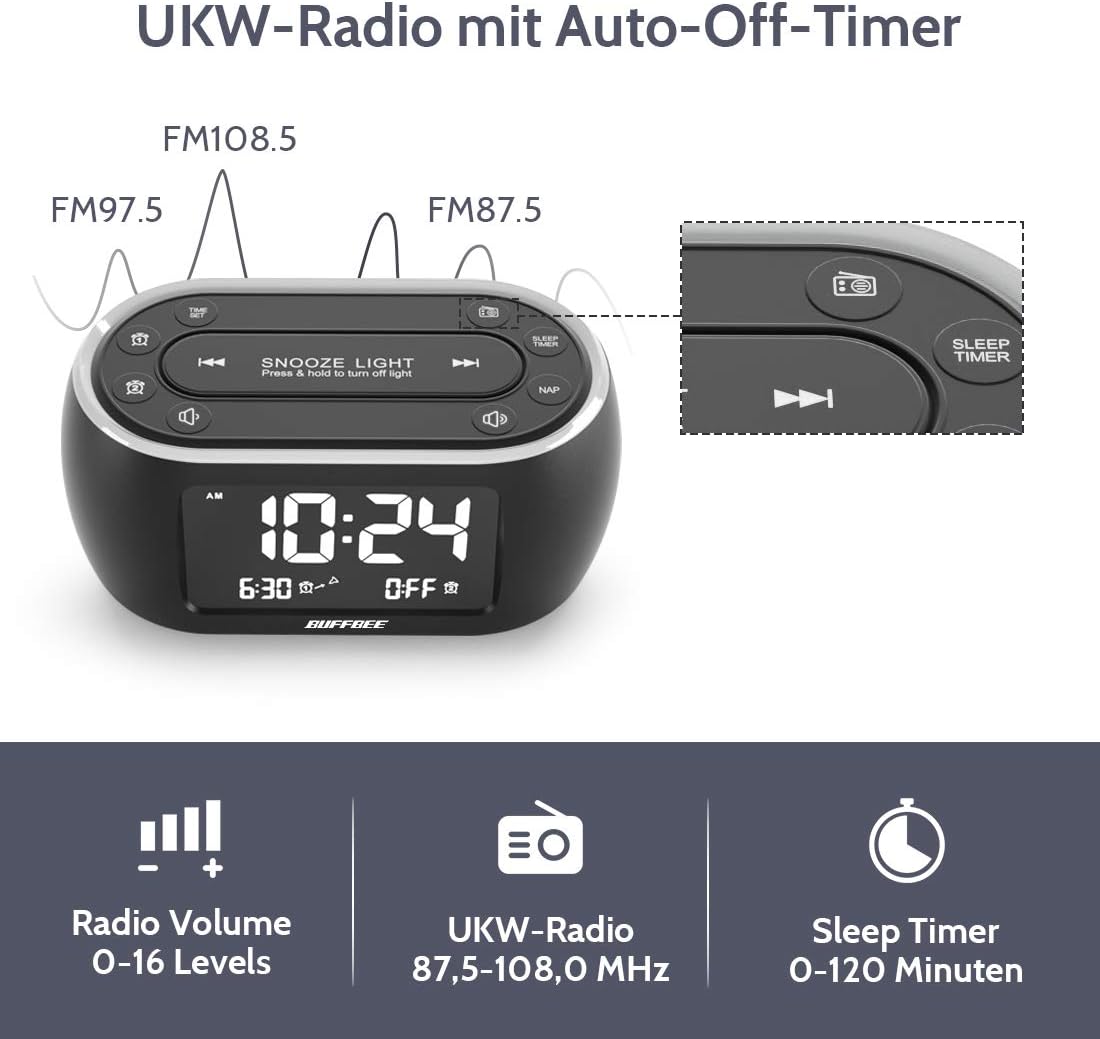
Image: The alarm clock display showing FM radio frequencies (FM108.5, FM97.5, FM87.5) and icons for radio volume and sleep timer.
- を押す 無線 button to turn the FM radio on/off.
- を押す スキャン button (or similar) to automatically scan and save available FM stations.
- 使用 前/次 保存した放送局間を移動したり、手動でチューニングしたりするためのボタン。
- を使用して音量を調整します ボリューム+/- buttons. The volume can be set from 0 to 16 levels.
5. Nap Timer:
The nap timer allows for quick, short sleep periods without affecting regular alarm settings.
- を押す 昼寝 button. The display will show the default nap time (e.g., 10 minutes).
- を押す 昼寝 button repeatedly to cycle through preset nap durations (e.g., 10, 20, 30, 60, 90, 120 minutes).
- The nap timer will start automatically after selection.
- To cancel the nap timer, press the 昼寝 「OFF」が表示されるまでボタンを押します。
6. Auto-Off Sleep Timer:
Set a timer for the night light and/or FM radio to automatically turn off after a specified duration.
- While the night light or FM radio is active, press the スリープタイマー ボタン。
- を押す スリープタイマー button repeatedly to cycle through available durations (e.g., 15, 30, 60, 90, 120 minutes, or OFF).
- The selected duration will be displayed, and the timer will begin. The night light and/or FM radio will turn off automatically when the timer expires.
7. ディスプレイ調光器:
Adjust the brightness of the main time display from 0% to 100%.

Image: Six different views of the alarm clock display, illustrating the range of brightness from very dim to fully bright, and also showing the night light dimmer.
専用を使う ディマー dial or 調光スイッチ+/- buttons (if available) to adjust the display brightness to your preference. This allows for comfortable viewあらゆる照明条件でも動作します。
8. USB充電ポート:
A USB port is located on the back of the unit for charging small electronic devices.

Image: The alarm clock with a smartphone plugged into its side USB port, indicating the charging function.
Connect your device's USB charging cable to the port. The clock must be powered by the AC adapter for the USB charging function to work.
メンテナンス
To ensure the longevity and optimal performance of your BUFFBEE Glow Alarm Clock, follow these maintenance guidelines:
- クリーニング: Wipe the unit with a soft, dry cloth. Do not use abrasive cleaners, waxes, or solvents as they may damage the surface.
- 力: Always disconnect the power adapter from the wall outlet before cleaning or if the unit will be unused for an extended period.
- 環境: 目覚まし時計は直射日光、熱源、湿気の多い場所に置かないでください。
- バッテリー交換: If using battery backup, replace AAA batteries annually or when the battery indicator suggests low power. Ensure correct polarity when inserting new batteries.
トラブルシューティング
If you encounter issues with your BUFFBEE Glow Alarm Clock, refer to the following common problems and solutions:
| 問題 | 考えられる原因 | 解決 |
|---|---|---|
| 時計の表示が空白または点滅します。 | No power or loose connection. Low battery backup. | Ensure the power adapter is securely plugged into the clock and the wall outlet. Check if AAA batteries are installed correctly and have sufficient charge. |
| アラームは鳴りません。 | アラームが作動しません。アラームの音量が低すぎます。 | Verify that the alarm icon is displayed. Check the alarm volume setting. Ensure the correct alarm time is set. |
| FMラジオの受信状態が悪いです。 | Weak signal. Antenna not extended. Interference. | Extend the FM antenna fully. Try repositioning the clock. Perform an auto-scan for stations again. |
| 夜間照明が機能していません。 | ライト機能がオフになりました。 | Press the LIGHT button to turn it on. Check if the brightness is set to 0%. |
| USB充電が機能しません。 | Clock not connected to AC power. Device not compatible. | Ensure the clock is powered by the AC adapter. Check if your device is compatible with standard USB charging. |
仕様
| 特徴 | 詳細 |
|---|---|
| ブランド | バフビー |
| モデル番号 | HRS-BLACK |
| 寸法(長さ×幅×高さ) | 12 x 3.81 x 6 cm(4.72 x 1.5 x 2.36インチ) |
| 重さ | 330 グラム (0.73 ポンド) |
| 電源入力 | AC 100-240V、50/60Hz |
| バッテリーバックアップ | 単3電池XNUMX本(別売) |
| 表示タイプ | デジタル |
| ディスプレイの明るさ | 0〜100%調整可能 |
| 夜間照明の色 | 7色 |
| 夜間照明の明るさ | 5段階調節可能 |
| FMラジオ周波数 | 87.5-108.0 MHz |
| アラーム音量 | 0~16レベル調整可能 |
| 特集 | Ambient light, Dual Alarm, Nap Timer, Sleep Timer, USB Charging Port |
保証とサポート
BUFFBEE products are designed for reliability and performance. For specific warranty information, please refer to the documentation included with your purchase or contact BUFFBEE customer support.
If you require technical assistance or have questions regarding your BUFFBEE Glow Alarm Clock, please visit the official BUFFBEE webメーカーのウェブサイトをご覧いただくか、カスタマーサービス部門にお問い合わせください。連絡先は通常、製品のパッケージまたはメーカーのウェブサイトに記載されています。 webサイト。