
Sorand AC 230V Floor Heating Thermostat
Sorand AC 230V Digital Programmable Floor Heating Thermostat User Manual
Model: AC 230V Floor Heating Thermostat
導入
This manual provides comprehensive instructions for the installation, operation, and maintenance of your Sorand AC 230V Digital Programmable Floor Heating Thermostat. Please read this manual carefully before installation and use to ensure proper function and safety.
The thermostat is designed for electronic floor heating systems and other electrical heating elements. It features a large LCD with backlight, programmable temperature settings, and internal/external temperature sensing capabilities.
安全情報
- 設置は資格のある電気技師が行う必要があります。
- 設置またはメンテナンスの前に、必ず電源を切ってください。
- サーモスタットを水や過度の湿気にさらさないでください。
- 指定したボリューム内で動作するtageと現在の制限。
パッケージ内容
パッケージにすべてのアイテムが揃っていることを確認します。
- 1 x Sorand AC 230V Digital Programmable Floor Heating Thermostat
- 1 x External Temperature Sensor Cable (approx. 3 meters)
- 取り付けネジ2本
- ユーザーマニュアル (本書) x 1

Image: Contents of the Sorand thermostat package, showing the main unit, external sensor cable, mounting screws, and the instruction manual.
セットアップとインストール
重要: Installation should only be carried out by a qualified electrician. Ensure the main power supply is turned off before commencing any wiring work.
配線図
Refer to the wiring diagram on the back of the thermostat unit for correct connections. The terminals are typically labeled as follows:
- L1, N1: Power input (AC 230V)
- LOAD (1, 2): Connection to the heating element
- NTC (5, 6): Connection for the external floor temperature sensor

画像: 背面 view of the Sorand thermostat, displaying the wiring terminals and a simplified diagram for electrical connections.
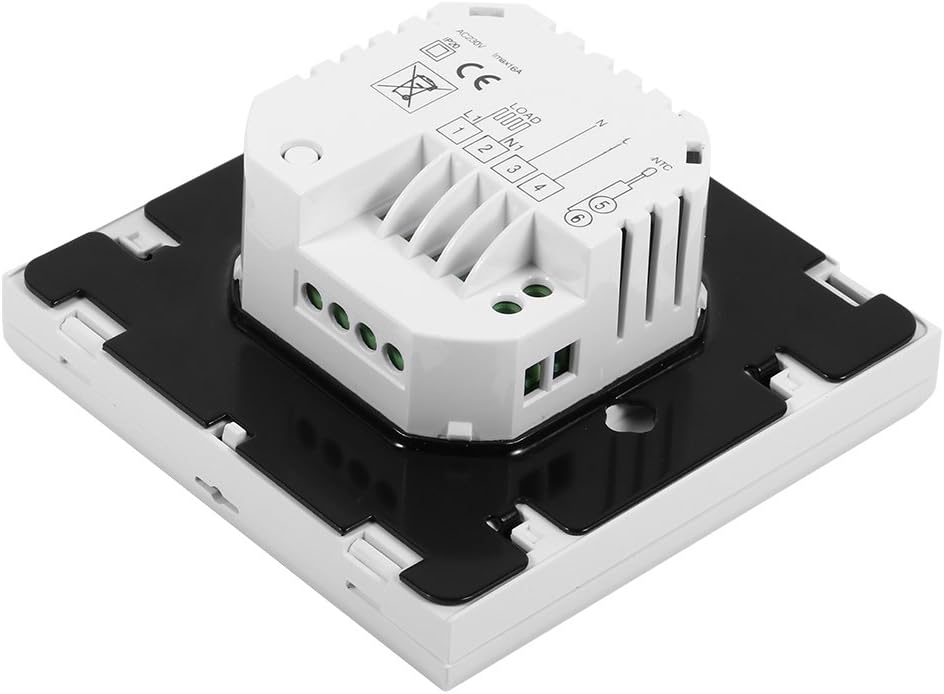
画像: サイド view of the Sorand thermostat, illustrating the internal components and ports for wiring connections.
取り付け
- Prepare a standard electrical wall box (86x86mm recommended).
- Connect the power supply, heating load, and external sensor wires according to the wiring diagram.
- Carefully push the wired thermostat into the wall box.
- 付属のネジを使用してサーモスタットを壁のボックスに固定します。
- サーモスタットの前面パネルを取り付けます。
操作手順
The thermostat features a large LCD and touch-sensitive buttons for easy operation.
ボタンの機能
- ⏻ (力): サーモスタットのオン/オフを切り替えます。
- ↻ (Mode/Cycle): 手動モードとプログラムモードを切り替えます。
- ⏱ (Clock/Time): Sets the time and enters programming mode.
- ▲ (Up Arrow): Increases temperature setting or adjusts values.
- ▼ (Down Arrow): Decreases temperature setting or adjusts values.

画像: 正面 view of the Sorand thermostat, highlighting the LCD screen and the five touch-sensitive control buttons below it.
時刻と曜日の設定
- を押し続けます ⏱ ボタンを3秒間押して、時刻設定モードに入ります。
- 使用 ▲ そして ▼ ボタンで時間を調整し、 ⏱ 確認して分、曜日に移動します。
- プレス ⏱ again to exit, or wait for 10 seconds for automatic exit.
手動モード操作
In manual mode, the thermostat maintains a constant temperature set by the user.
- を押す ↻ button to switch to manual mode (indicated by a hand icon or similar on the display).
- 使用 ▲ そして ▼ 希望の温度を設定するためのボタン。
- The thermostat will now maintain this temperature.
Programmable Mode Operation (6 Periods)
The thermostat allows for 6 programmable periods per day, enabling different temperature settings at different times.
- を押す ↻ button to switch to programmable mode (indicated by a clock icon or similar).
- を押し続けます ⏱ ボタンを3秒間押してプログラミングモードに入ります。
- The display will show the first period (e.g., "Period 1"). Use ▲ そして ▼ to set the start time and desired temperature for this period.
- プレス ⏱ to move to the next period and repeat the process for all 6 periods.
- After setting all periods, press ⏱ again or wait for automatic exit to save settings.
The thermostat will automatically follow the programmed schedule.
Sensor Selection (Internal/External)
The thermostat can use its internal sensor or the external floor sensor. The selection method is typically found in advanced settings or by a specific button combination. Refer to the on-screen indicators for the active sensor.
メンテナンス
- サーモスタットのディスプレイを清掃し、asin柔らかく乾いた布で拭いてください。研磨剤入りの洗剤や溶剤は使用しないでください。
- 最適なパフォーマンスを維持するために、サーモスタットにほこりやごみがないことを確認してください。
- 内部にはユーザーが修理可能な部品はありません。ユニットを開けたり修理したりしないでください。
トラブルシューティング
| 問題 | 考えられる原因 | 解決 |
|---|---|---|
| サーモスタットの電源が入りません。 | 電源が供給されていない、配線が間違っている。 | Check circuit breaker. Verify wiring connections (consult a qualified electrician). |
| 暖房がオン/オフにならない。 | Incorrect temperature setting; thermostat in OFF mode; wiring issue. | Adjust set temperature. Ensure thermostat is ON. Check heating element wiring. |
| 温度の読み取りが不正確です。 | Sensor malfunction; incorrect sensor selected. | Verify sensor connection. Check if internal or external sensor is active. |
| ディスプレイが空白またはちらつきます。 | 電力変動、内部故障。 | Reset power to the thermostat. If issue persists, contact support. |
仕様
| 特徴 | 詳細 |
|---|---|
| ブランド | Sorand |
| モデル | AC 230V Floor Heating Thermostat |
| ワーキングVoltage | AC 230V、50/60Hz |
| 負荷電流 | 12/16A (Electric Heating) |
| 正確さ | ±0.5℃ |
| Set-point Temperature Range | 5℃~35℃ |
| 制限温度範囲 | 5℃~99℃ |
| 消費電力 | <0.3W |
| 温度センサー | NTC (Internal and External) |
| Surface Size | 約86 x 86 x 40mm(3.4 x 3.4 x 1.6インチ) |
| External Sensor Cable Length | 約3メートル(9.8フィート) |
| 材料 | PC+ABS |
| 表示タイプ | バックライト付きデジタルLCD |
| 制御方法 | タッチパッドコントロール |
保証とサポート
This product is covered by the manufacturer's standard warranty. Please refer to the product packaging or your point of purchase for specific warranty terms and conditions.
テクニカルサポート、トラブルシューティング、または保証請求については、販売店またはメーカーに直接お問い合わせください。購入証明書として領収書を保管してください。
Ask a question about this manual
Ask about setup, troubleshooting, compatibility, parts, safety, or missing instructions. Manuals+ will review the question and use this page’s manual context to help answer it.