
1.製品オーバーview
Purline WS015 is a versatile weather station designed to provide detailed and current information regarding indoor and outdoor environmental conditions. This device monitors temperature, humidity, and offers a weather forecast. It also includes a digital clock with an alarm function and a calendar display.
Equipped for both indoor and outdoor use, the WS015 features a clear digital LCD display with animated symbols for weather forecasting. It stores maximum and minimum readings and tracks temperature trends over the past 12 hours. The main unit can also function as a USB charging hub for other devices.
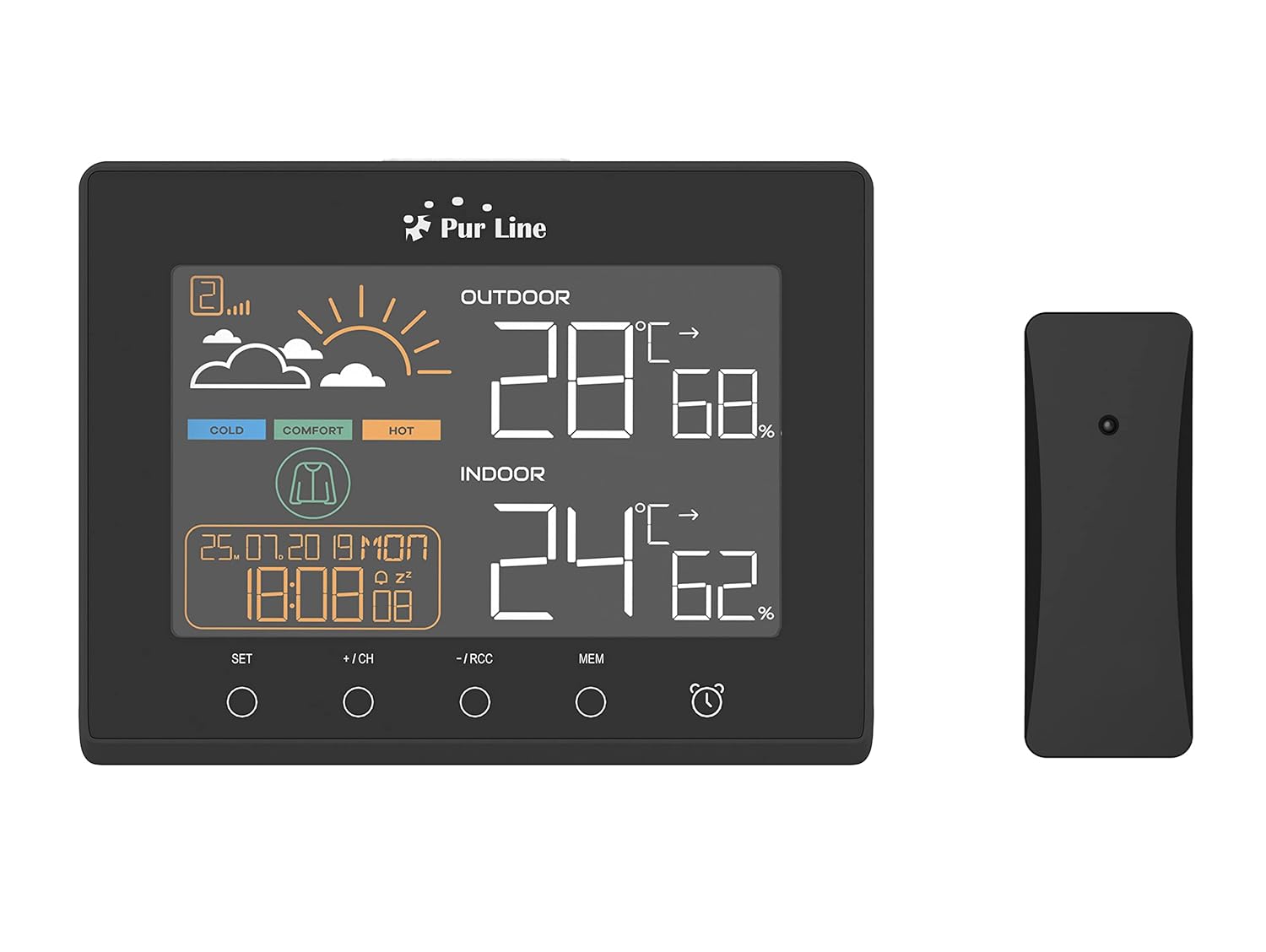
フロント view of the PUR LINE WS015 Weather Station display unit and its wireless outdoor sensor.
2. セットアップ手順
2.1. 開梱とコンポーネント
Carefully remove all components from the packaging. Ensure you have the main display unit and the wireless outdoor sensor.
2.2. 本体の電源供給
The main unit requires 3 AAA batteries (not included) or can be powered via a USB connection. To install batteries:
- 本体背面の電池カバーを開けます。
- 正しい極性 (+/-) に注意して、単 4 電池 3 本を挿入します。
- 電池ボックスのカバーを閉じます。
Alternatively, connect the main unit to a USB power source using a compatible USB cable (not included).
2.3. 屋外センサーの配置
The outdoor sensor is splash-proof (IP rated) but should be placed in a sheltered location to protect it from direct rain and prolonged sunlight, which can affect temperature readings. Ensure the sensor is within effective transmission range of the main unit (typically up to 30 meters in open air).
2.4. 初期同期
Once both the main unit and the outdoor sensor are powered, they should automatically synchronize. If synchronization does not occur, press the 'CH' button on the main unit to initiate a search for the sensor. Ensure the sensor is close to the main unit during initial setup.

後方 view of the PUR LINE WS015 Weather Station, showing the battery compartment and stand.
3. 操作手順
3.1. 表示終了view
LCDディスプレイには、次の情報が表示されます。
- 屋外の温度と湿度: ワイヤレス センサーからの読み取り値。
- 室内温度と湿度: 本体内部のセンサーからの読み取り値。
- 天気予報: Animated symbols indicating predicted weather conditions.
- 日時: 現在の時刻、曜日、日付。
- 快適さレベルインジケーター: Based on indoor temperature and humidity.
- 気温の傾向: Arrows indicating rising, falling, or stable temperature over the last 12 hours.

閉じる view of the PUR LINE WS015 Weather Station display, showing outdoor and indoor temperature, humidity, time, date, and weather forecast symbols.
3.2. ボタンの機能
本体にはいくつかのコントロール ボタンがあります。
- セット: Enters setting mode for time, date, and alarm. Confirms settings.
- +/CH: Increases values during setting. In normal mode, cycles through outdoor sensor channels or initiates sensor search.
- -/RCC: Decreases values during setting. In normal mode, manually initiates RCC (Radio Controlled Clock) signal reception.
- MEM: Displays maximum and minimum temperature/humidity records. Press again to clear records.
- アラームアイコン: アラーム機能を有効または無効にします。
3.3. 時刻と日付の設定
- を押し続けます セット 時刻表示が点滅するまでボタンを押します。
- 使用 + or - ボタンで時間を調整し、 セット 確認して議事録に進みます。
- 分、年、月、日について繰り返します。
- プレス セット 設定モードを終了します。
3.4.アラームの設定
- を押す アラームアイコン ボタンを1回押すとアラーム時刻が表示されます。
- を押し続けます アラームアイコン アラーム時刻が点滅するまでボタンを押します。
- 使用 + or - buttons to adjust the alarm hour, then press the アラームアイコン button to confirm and move to minutes.
- 数分間繰り返します。
- を押す アラームアイコン button to exit setting mode. Press it again in normal mode to toggle the alarm on/off.
3.5. USB Charging Outputs
The main unit is equipped with USB outputs that allow you to charge compatible electronic devices. Simply connect your device's USB charging cable to the USB port on the side of the weather station.

The PUR LINE WS015 Weather Station with two smartphones connected to its USB charging outputs.
4. メンテナンス
4.1. 清掃
To clean the weather station and sensor, use a soft, damp 布で拭いてください。研磨剤入りの洗剤や溶剤はディスプレイやコンピューターを損傷する恐れがあるため使用しないでください。asing. Ensure no liquid enters the device openings.
4.2. バッテリーの交換
When the display becomes dim or readings are inconsistent, it may be time to replace the batteries in the main unit and/or the outdoor sensor. Follow the battery installation steps outlined in Section 2.2 for the main unit. For the outdoor sensor, open its battery compartment, replace the old batteries with new ones of the correct type, and close the compartment securely.
5。 トラブルシューティング
よくある問題と解決策
- 本体にディスプレイが表示されない:
- 電池が正しく挿入されており、消耗していないかどうかを確認してください。
- Ensure the USB power cable (if used) is securely connected.
- Outdoor Readings Not Displaying or Incorrect:
- Check the batteries in the outdoor sensor.
- Ensure the outdoor sensor is within range of the main unit and free from major obstructions.
- を押す +/CH button on the main unit to re-initiate sensor search.
- Relocate the outdoor sensor to a more suitable position, away from direct sunlight or heat sources.
- Time Not Synchronizing (RCC):
- Ensure the unit is placed away from electronic interference.
- Manually initiate RCC signal reception by pressing the -/RCC ボタン。
- アラームが鳴らない:
- Verify that the alarm function is activated (alarm icon visible on display).
- アラーム時間が正しく設定されていることを確認してください。
6. 技術仕様
- モデル: WS015
- メーカー: Purlイン
- 寸法(長さ×奥行き×高さ): 17 x 3 x 13 cm(おおよそ)
- 電源(本体): 3 x AAA batteries (not included) or USB
- 電源(屋外センサー): Batteries (type not specified, typically AAA or AA)
- 材料: プラスチック
- 接続性: Wireless (sensor), USB (charging outputs)
- 特別な機能: Programmable alarm, Max/Min memory, Temperature trend, Weather forecast, USB charging outputs
- 表示タイプ: デジタルLCD
7. 保証とサポート
Information regarding product warranty and specific support contacts is not available in this document. For warranty claims or technical assistance, please refer to the documentation provided at the time of purchase or contact your retailer or the manufacturer directly.