
導入
This manual provides detailed instructions for setting up, operating, and maintaining your AIKELA Smart Watch ID205U. This device is designed to monitor various health metrics and track fitness activities, compatible with Android OS 4.4 / iOS 8.0 or above and Bluetooth 4.2 or above smartphones. It is not intended for use with PCs, iPads, or tablets.

Image: The AIKELA Smart Watch ID205U, featuring a black square display and a black silicone strap.
セットアップガイド
パッケージ内容
- AIKELA Smart Watch (Model ID205U) x 1
- 磁気充電ケーブル x 1
- ユーザーマニュアル x 1
デバイスの充電
Before initial use, fully charge your smartwatch. Connect the magnetic charging cable to the charging contacts on the back of the watch and plug the USB end into a power adapter (not included) or a computer's USB port. A full charge typically takes approximately 2.5 hours.
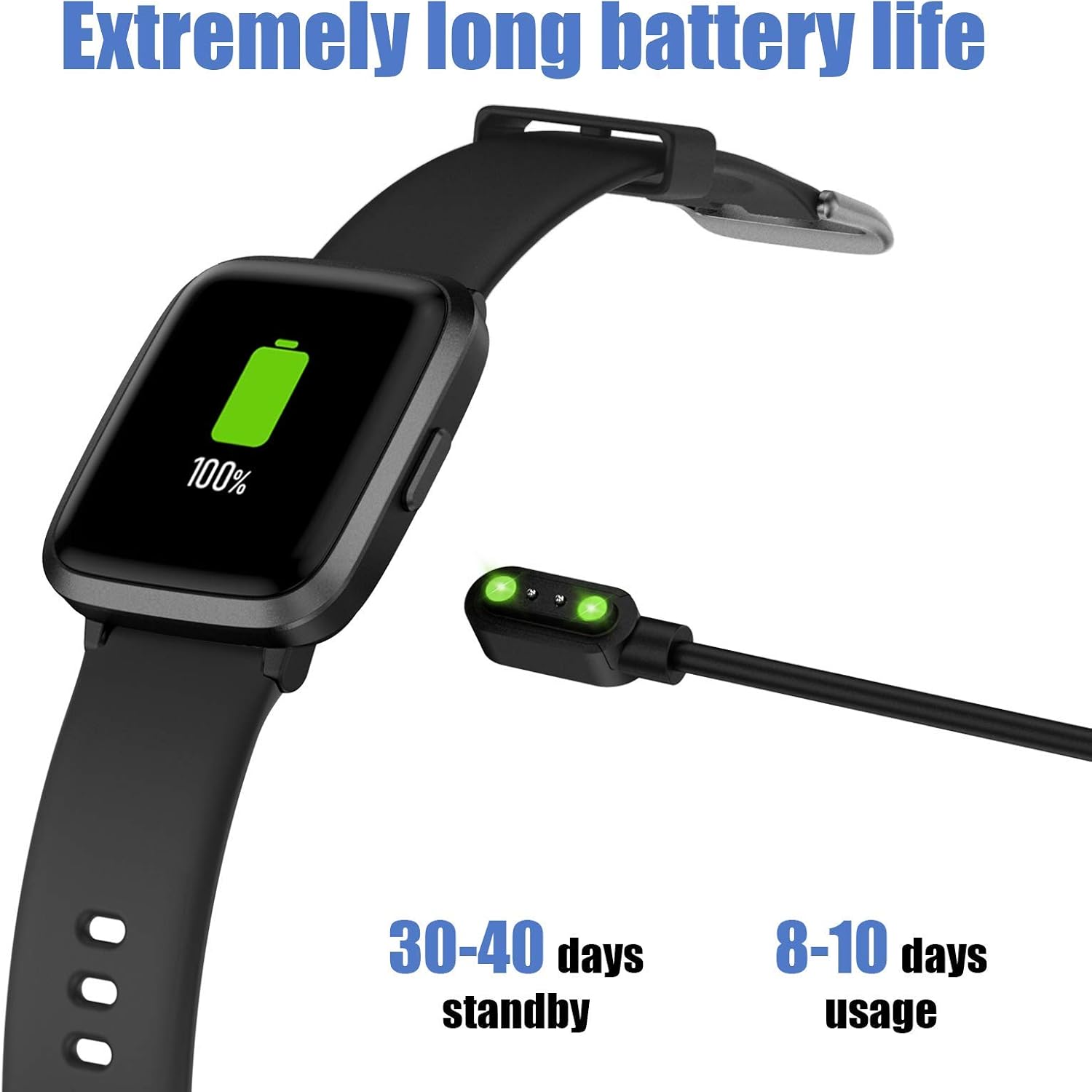
Image: The AIKELA Smart Watch connected to its magnetic charging cable, displaying a full battery icon.
Connecting to Your Smartphone (VeryFitPro App)
To utilize all features of your AIKELA Smart Watch, you must connect it to your smartphone using the "VeryFitPro" application. Ensure your smartphone meets the following requirements:
- Android OS 4.4以上
- iOS 8.0以上
- Bluetooth4.2以降
- アプリをダウンロード: Scan the QR code provided in the physical user manual or search for "VeryFitPro" in the Google Play Store (for Android) or Apple App Store (for iOS).
- BluetoothとGPSを有効にする: On your mobile phone, activate both Bluetooth and GPS services.
- Open VeryFitPro App: Launch the "VeryFitPro" application on your smartphone.
- バインディングの開始: On the home page of the app, look for a binding request or navigate to the "Device" section to add a new device.
- Select Device Model: Choose "ID205U" from the list of available devices.
- バインディングの確認: Follow the on-screen prompts and click "OK" to complete the binding process.
ペアリングが正常に完了すると、時計はデータをアプリと同期します。
操作手順
基本的なナビゲーション
- タッチスクリーン: The 1.3-inch TFT-LCD full touch screen allows for intuitive navigation. Swipe left/right, up/down, and tap to select options.
- ウォッチフェイス: Choose from 4 stylish clock faces directly on the watch or through the VeryFitPro app.
健康モニタリング機能
The AIKELA Smart Watch ID205U provides monitoring for several key health indicators. 注意: このデバイスによって収集されたデータは参考用であり、医療診断や治療には使用できません。
- 心拍数モニター: 一日を通して心拍数を継続的に追跡します。 View 時計でリアルタイムのデータを確認したり、アプリで詳細な傾向を確認したりできます。
- 血圧モニター: Measures your blood pressure. Ensure the watch is worn correctly for accurate readings.
- 血中酸素濃度(SpO2)モニター: 血中酸素飽和度を監視します。

Image: A man running, wearing the AIKELA Smart Watch which displays a blood oxygen level of 100% SpO2.

Image: Top shows a man checking his heart rate on the AIKELA Smart Watch. Bottom shows women doing push-ups, with the watch displaying a blood pressure measurement.
フィットネストラッキング
The watch records your daily activities and supports multiple sports modes.
- 終日アクティビティ追跡: Records steps taken, distance covered, calories burned, and active time.
- 9種類のスポーツモード: Select a mode before starting your workout for more accurate tracking. Available modes include:
- ウォーキング
- ランニング
- 自転車
- 紡糸
- トレッドミル
- ハイキング
- ヨガ
- クライミング
- フィットネス
- 睡眠モニター: Automatically tracks your sleep patterns, including total sleep, deep sleep, and awake time. View detailed analysis in the VeryFitPro app.

Image: The AIKELA Smart Watch interface showing icons for 9 different sports modes, alongside images of individuals engaged in running, hiking, and yoga.

Image: A woman sleeping, with the AIKELA Smart Watch on her wrist displaying the time. A smartphone next to her shows the VeryFitPro app interface with detailed sleep tracking data.
通知とリマインダー
Once connected to your smartphone, the watch can receive various notifications.
- 通話通知: Receive incoming call alerts directly on your watch. You can choose to decline calls from the watch.
- メッセージ通知: Read SMS messages and notifications from social media apps (e.g., Facebook, Instagram, Twitter, WhatsApp) on your watch screen.
- その他の注意事項: Set alarms, sedentary reminders, and other alerts through the VeryFitPro app.

Image: A woman holding a smartphone, with the AIKELA Smart Watch on her wrist displaying an incoming call notification. Icons for various social media and communication apps are shown in the background.
メンテナンス
耐水性
The AIKELA Smart Watch ID205U has a 5ATM waterproof rating, meaning it can withstand pressures equivalent to a depth of 50 meters. This makes it suitable for activities like washing hands, showering, and swimming. However, it is not suitable for diving, hot water activities, or saunas, as steam and high temperatures can damage the device.
クリーニングとお手入れ
- 定期的に時計とストラップを柔らかくて清潔な布で拭いてください。amp 布。
- 強力な化学薬品や研磨材の使用は避けてください。
- 腐食を防ぐため、充電する前に充電接点が清潔で乾燥していることを確認してください。
- 時計が濡れた場合は、充電または長時間使用する前に完全に乾かしてください。
バッテリー寿命と充電
The device features a 210mAh Lithium Polymer battery. A full charge provides approximately 7-9 days of working time, with a standby time of 30-40 days. Actual battery life may vary based on usage patterns and settings.
トラブルシューティング
よくある問題と解決策
- 時計が携帯電話とペアリングされない:
- 携帯電話で Bluetooth と GPS が有効になっていることを確認してください。
- Verify the "VeryFitPro" app is installed and running.
- 時計の電池が十分に充電されているかどうかを確認してください。
- 携帯電話と時計の両方を再起動します。
- アプリからデバイスのペアリングを解除し、再度ペアリングしてみてください。
- 不正確な健康データ:
- 時計が手首にぴったりとフィットし、手首の骨から指 1 本分上の位置に快適に装着されていることを確認します。
- 測定中は過度の動きを避けてください。
- 時計の裏側にあるセンサーを清掃してください。
- 通知が表示されない:
- Confirm the watch is connected to the app via Bluetooth.
- Check notification settings within the "VeryFitPro" app to ensure desired app notifications are enabled.
- Verify your phone's system notification settings allow the "VeryFitPro" app to display notifications.
- 短いバッテリー寿命:
- Frequent use of health monitoring features (e.g., continuous heart rate) or bright screen settings can reduce battery life.
- Reduce screen brightness or turn off unnecessary features.
- 毎回時計が完全に充電されていることを確認してください。
For further assistance, refer to the "Help" section within the VeryFitPro app or contact customer support.
仕様
| 特徴 | 詳細 |
|---|---|
| モデル | ID205U |
| 同期方法 | ブルートゥース4.2 |
| 画面 | 1.3" TFT LCD, Full Touch |
| 解決 | 240×240 |
| 重さ | 39g(1.37オンス) |
| 電池のタイプ | リチウムポリマー |
| バッテリー容量 | 210mAh |
| ワーキングVoltage | 3.8V |
| 防水等級 | 5気圧 |
| 勤務時間 | 7~9日 |
| 充電時間 | ≤ 2.5時間 |
| オペレーティングシステムの互換性 | Android OS 4.4 / iOS 8.0 or above |
| 特集 | Heart Rate Monitor, Blood Pressure Monitor, Blood Oxygen Monitor, Sleep Monitor, 9 Sports Modes, Call & Message Notifications, Alarm Clock |
保証とサポート
保証情報
Specific warranty details are typically provided with your purchase documentation or on the product packaging. Please retain your proof of purchase for warranty claims.
カスタマーサポート
For technical support, troubleshooting assistance, or any questions regarding your AIKELA Smart Watch ID205U, please refer to the "Help" section within the VeryFitPro application. You may also contact the retailer or manufacturer's customer service channels for further assistance.