
製品終了view
The XIAOMI Redmi 9I is a feature-rich smartphone designed for everyday use. This manual provides essential information for setting up, operating, maintaining, and troubleshooting your device.
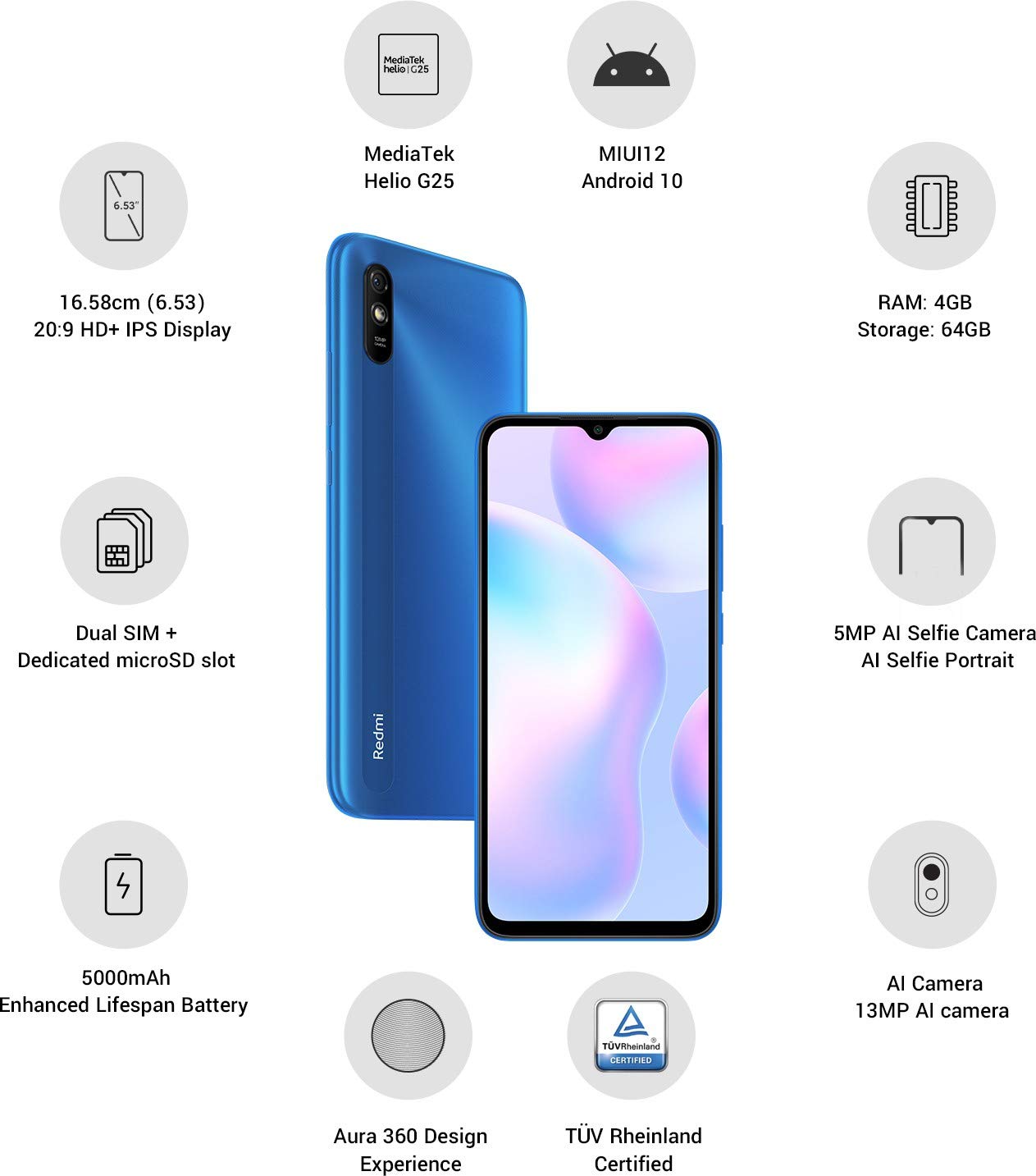
画像: 上view of the Xiaomi Redmi 9I highlighting key features such as the 6.53-inch HD+ IPS Display, MediaTek Helio G25 processor, MIUI12 Android 10, 4GB RAM, 64GB Storage, Dual SIM + dedicated microSD slot, 5000mAh battery, 5MP AI Selfie Camera, 13MP AI Camera, Aura 360 Design Experience, and TÜV Rheinland Certification.
セットアップガイド
1. 開梱と初期検査
すべての部品をパッケージから慎重に取り出してください。以下の部品が揃っていることを確認してください。
- XIAOMI Redmi 9I Smartphone
- 電源アダプター
- USB Type-Cケーブル
- SIM取り出しツール
- クイックスタートガイド(付属している場合)
2. SIMカードとMicroSDカードの挿入
Locate the SIM card tray on the side of your device. Use the provided SIM ejector tool to open the tray. Insert your Nano SIM card(s) and/or a microSD card into the designated slots. Ensure the cards are correctly oriented as shown in the diagram below. Gently push the tray back into the phone until it clicks into place.

画像: サイド view of the Xiaomi Redmi 9I, illustrating the location of the SIM card tray. The tray is designed to hold dual Nano SIM cards and a dedicated microSD card.
3. デバイスの充電
Before first use, fully charge your Redmi 9I. Connect the USB Type-C cable to the phone's charging port (located at the bottom) and the other end to the power adapter. Plug the adapter into a wall outlet. The charging indicator will appear on the screen.

画像: 下 view of the Xiaomi Redmi 9I, showing the USB Type-C charging port and speaker grille.
4. 電源投入と初期設定
Press and hold the Power button (located on the right side of the device) until the XIAOMI logo appears. Follow the on-screen instructions to complete the initial setup, including language selection, Wi-Fi connection, Google account setup, and security settings.

画像: サイド view of the Xiaomi Redmi 9I, clearly showing the power button and volume rocker on the right edge of the device.
操作手順
基本的なナビゲーション
- 触る: アイコンをタップしてアプリを開いたり、項目を選択したり、アクションを確認したりします。
- スワイプ: Slide your finger across the screen to scroll, switch between home screens, or navigate within apps.
- ピンチ: 2本の指を使って写真を拡大または縮小し、 web ページ。
- 長押し: 項目を長押しすると、追加のオプションが表示されたり、アイコンが移動したりします。
電話をかけたりメッセージを送信したりする
Tap the Phone icon to access the dialer. Enter a number or select a contact. Tap the Messages icon to compose and send text messages.
ネットワークへの接続
- Wi-Fi: へ移動 設定 > Wi-Fi、Wi-Fiをオンにして、ご希望のネットワークを選択します。パスワードを求められた場合は入力してください。
- ブルートゥース: へ移動 設定 > Bluetooth, turn Bluetooth on, and pair with compatible devices.
- モバイルデータ(4G): SIMカードがアクティブでモバイルデータが有効になっていることを確認してください 設定 > SIMカードとモバイルネットワーク.
カメラの使用
Tap the Camera icon to open the camera application. The Redmi 9I features a 13MP rear camera and a 5MP front camera. Switch between modes (Photo, Video, Portrait, etc.) by swiping across the screen. Tap the shutter button to capture photos or start/stop video recording.

画像: 背面 view of the Xiaomi Redmi 9I, showcasing the 13MP AI camera module and the Redmi branding.
メンテナンス
デバイスのクリーニング
Use a soft, lint-free cloth to clean the screen and body of your phone. Avoid using harsh chemicals or abrasive materials, which can damage the display or finish. For stubborn smudges, slightly damp布に水または電子機器用のスクリーンクリーナーを含ませて拭いてください。
ソフトウェアアップデート
最適なパフォーマンス、セキュリティ、新機能へのアクセスを確保するため、ソフトウェアアップデートを定期的に確認し、インストールしてください。 設定 > 端末情報 > MIUIバージョン 更新を確認します。
バッテリーケア
The Redmi 9I is equipped with a 5000 mAh Lithium-Polymer battery. To prolong battery life:
- 極端な温度を避けてください。
- 頻繁に充電する前にバッテリーを完全に使い切らないようにしてください。
- 純正の充電器とケーブルを使用してください。
- バッテリー使用量を最適化する 設定 > バッテリーとパフォーマンス.
ストレージ管理
お使いのデバイスには64GBの内部ストレージが搭載されています。ストレージを効率的に管理するには、以下の手順に従ってください。
- 不要なものを定期的に削除する file、写真、ビデオ。
- 使用していないアプリケーションをアンインストールします。
- クラウド ストレージ サービスを活用します。
- 大きく動かす files to an inserted microSD card.
トラブルシューティング
This section addresses common issues you might encounter with your Redmi 9I.
デバイスの電源が入っていない
- バッテリーが充電されていることを確認してください。携帯電話を充電器に少なくとも30分間接続してください。
- 強制的に再起動するには、電源ボタンを 10 ~ 15 秒間押し続けます。
ネットワーク接続が悪い
- SIM カードが正しく挿入されているかどうかを確認してください。
- Toggle Airplane Mode on and off (swipe down from the top for Quick Settings).
- デバイスを再起動します。
- Verify your mobile data plan is active and you are in an area with network coverage.
アプリケーションがクラッシュまたはフリーズする
- 問題のあるアプリを閉じて再度開きます。
- アプリのキャッシュとデータを消去します(設定 > アプリ > アプリの管理 > [アプリ名] > データを消去).
- アプリが最新バージョンに更新されていることを確認してください。
- 携帯電話を再起動してください。
画面が応答しない
- 電源ボタンを押し続け、デバイスを強制的に再起動します。
- 問題が解決しない場合は、工場出荷時設定へのリセット(警告:この操作により、携帯電話のすべてのデータが消去されます。重要なデータは必ずバックアップしてください。 へ移動 [設定] > [電話について] > [工場出荷時設定にリセット]).
仕様
| 特徴 | 詳細 |
|---|---|
| ブランド | 小米 |
| モデル | Redmi 9I |
| オペレーティング·システム | Android 9.0 (MIUI12) |
| ラム | 4ギガバイト |
| 内部ストレージ | 64ギガバイト |
| プロセッサ | Snapdragon (2 GHz CPU Speed) |
| 表示タイプ | 液晶 |
| 画面サイズ | 6.53インチ |
| リアカメラ | 13 MP |
| フロントカメラ | 5 MP |
| バッテリー容量 | 5000ミリamp Hours (Lithium-Polymer) |
| SIMカードスロット | デュアルSIM(ナノ) |
| 接続性 | 4G, Wi-Fi, Bluetooth, USB Type C |
| GPS | グロナス |
| 材料 | プラスチック |
| 耐水性レベル | 耐水性 |
保証情報
The XIAOMI Redmi 9I comes with a 1年間のメーカー保証 from the date of purchase. This warranty covers manufacturing defects under normal use. For detailed terms and conditions, please refer to the warranty card included in your product packaging or visit the official XIAOMI support webサイト。
カスタマーサポート
If you encounter issues not covered in this manual or require further assistance, please contact XIAOMI customer support. You can typically find contact information (phone numbers, email, chat support) on the official XIAOMI webサイトまたはデバイスの設定内のサポート セクションからアクセスできます。
Before contacting support, please have your device's model number (Redmi 9I) and serial number ready. The serial number can usually be found in 設定 > 電話について > ステータス.


