
1. はじめに
Thank you for choosing the Sinopé TH1310WF Smart Wi-Fi Thermostat. This device is designed to provide precise and efficient control over your in-floor heating system, enhancing comfort and energy savings. It integrates seamlessly with various smart home platforms, offering convenient control via mobile applications and voice commands.
This manual provides detailed instructions for the installation, operation, and maintenance of your TH1310WF thermostat. Please read it thoroughly before installation and keep it for future reference.

Figure 1: Sinopé TH1310WF Smart Wi-Fi Thermostat
The image displays the front of the Sinopé TH1310WF thermostat, a white rectangular device with a black digital display showing time, indoor temperature, and outdoor temperature. Below the screen, the Sinopé logo is visible, along with two circular buttons.
2. 安全情報
警告: Risk of electric shock. This product must be installed by a qualified electrician in accordance with local and national electrical codes. Disconnect power at the circuit breaker before installation or any maintenance.
- Ensure the power supply is OFF before handling any wiring.
- 濡れた手で、または濡れた表面に立ったままサーモスタットを設置しないでください。
- このサーモスタットは屋内専用に設計されています。
- サーモスタットのボリュームを確認してくださいtageとwattage ratings match your heating system's requirements (240V, 3600W max).
3.製品オーバーview
3.1 主な特徴
- ハブは必要ありません: Connects directly to your Wi-Fi network.
- In-floor Heating Compatibility: Works with heating cables and heating cable mats. Includes a 15-foot floor sensor.
- 補助出力: Features a second output for controlling an auxiliary heating system or connecting up to 10 expansion units (TR1310) for systems exceeding 15 A.
- スマートホーム統合: Compatible with Apple HomeKit, Amazon Alexa, Google Home, and Neviweb.
- ネヴィweb アプリ: Offers advanced features such as automations, scenes, geofencing, and real-time energy reports.

図2: スマートホームプラットフォームの互換性
This image shows the Sinopé TH1310WF thermostat alongside logos of compatible smart home platforms: Neviweb, SmartThings, Apple HomeKit, Amazon Alexa, and Google Home, highlighting its versatile integration capabilities.
3.2 コンポーネント
- TH1310WF Thermostat Unit
- 15-foot Floor Sensor
- 取り付けネジ
4. セットアップ
4.1 設置と配線
Installation of the TH1310WF thermostat involves electrical wiring and should only be performed by a qualified electrician. Ensure the power is disconnected at the main circuit breaker before beginning any wiring.
The thermostat is designed for a 240V AC power source and can handle up to 3600 watts. Connect the heating cables or mats to the LOAD terminals and the power supply to the LINE terminals. The included floor sensor should be installed within the heating mat area to accurately measure floor temperature.

Figure 3: Thermostat Wiring Terminals
This image shows the back of the Sinopé TH1310WF thermostat, highlighting the LOAD (120/240V, 15A max) and LINE (L1, L2(N)) wiring terminals. A strip gauge is also visible for proper wire preparation.

Figure 4: Thermostat Back Panel and Sensor Ports
The image displays the back panel of the Sinopé TH1310WF thermostat, showing regulatory information (FCC, IC, cETLus certification) and the auxiliary (Aux 1, Aux 2) and sensor (Sonde) connection ports.
4.2 初期設定とWi-Fi接続
After physical installation, power on the thermostat. Follow the on-screen prompts to set the date, time, and initial operating mode. To enable smart features, connect the thermostat to your Wi-Fi network.
- 母斑をダウンロードweb スマートフォンのアプリ ストアからアプリをダウンロードします (iOS および Android で利用可能)。
- Create a Neviweb アカウントを作成するか、すでにアカウントをお持ちの場合はログインしてください。
- Follow the in-app instructions to add your new TH1310WF thermostat to your account. This typically involves putting the thermostat into pairing mode and connecting it to your home Wi-Fi network.
5. 操作
5.1 Basic On-Device Control
The thermostat features a clear LCD display and two physical buttons for basic control. You can adjust the setpoint temperature, switch between operating modes (e.g., Manual, Program), and view current temperature readings directly on the device.
5.2 Neviweb アプリコントロール
ネヴィweb app provides comprehensive control and advanced features for your thermostat:
- リモートコントロール: どこからでも設定を調整できます。
- スケジュール: 一日や週のさまざまな時間帯に合わせてカスタム暖房スケジュールを作成します。
- 自動化: Set up triggers and actions based on schedules or other events.
- シーン: Activate personalized ambiances with a single tap.
- ジオフェンシング: Automatically adjust heating based on your proximity to home.
- エネルギーレポート: Monitor your energy consumption and savings in real-time.
- 複数拠点の管理: Control thermostats in multiple properties from one account.

Figure 5: Neviweb App Device List
This image shows a smartphone screen displaying the Neviweb app interface, which lists various connected smart devices and their current status, allowing users to manage their smart home ecosystem.

Figure 6: Neviweb App Multi-Location Management
The image displays a smartphone screen with the Neviweb app open to the 'Locations' section, showing icons for 'Home', 'Cabin', and other properties, illustrating the ability to manage multiple locations from a single account.
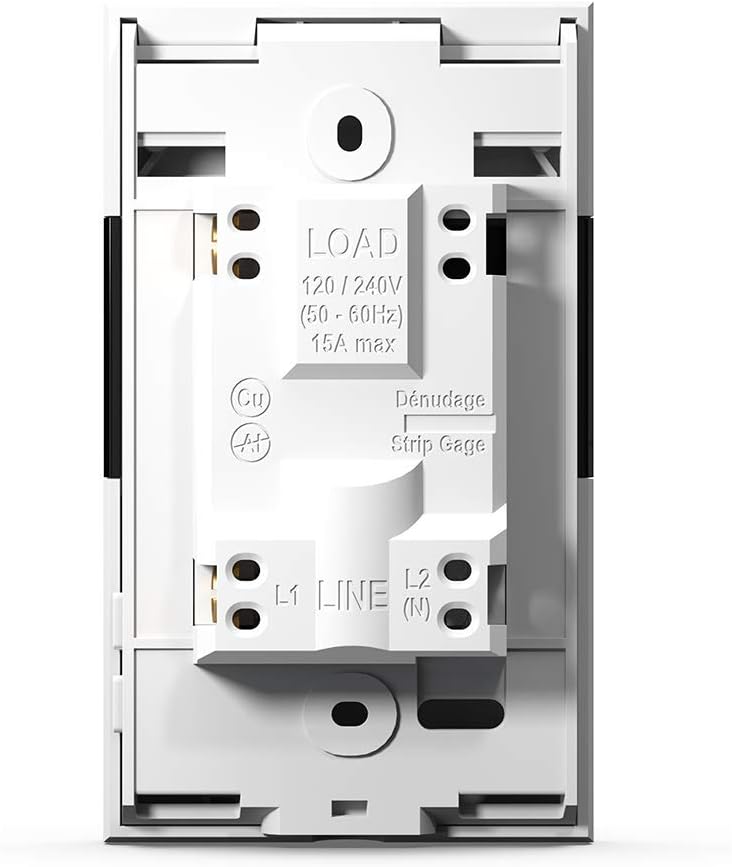
Figure 7: Neviweb App Energy Report
This image shows a smartphone displaying the Neviweb app's energy report feature, presenting a bar graph of energy consumption over time (24 hours, 30 days, 24 months) and estimated costs, allowing users to track their energy savings.
5.3 音声制御
The TH1310WF thermostat can be controlled using voice commands through compatible smart assistants:
- アマゾンアレクサ: "Alexa, set the living room thermostat to 72 degrees."
- Google ホーム: "Hey Google, what's the temperature in the kitchen?"
- Appleホームキット: Use Siri to control your thermostat once added to HomeKit.

図8: 音声アシスタントの統合
The image features an Amazon Echo Dot smart speaker on a kitchen shelf, illustrating how users can interact with their thermostat using voice commands through compatible voice assistants.
6. メンテナンス
The Sinopé TH1310WF thermostat requires minimal maintenance. Keep the device clean by wiping it with a soft, dry cloth. Do not use abrasive cleaners or solvents. Ensure the vents are free from dust accumulation to maintain proper operation.
There are no user-serviceable parts inside the thermostat. Any repairs should be performed by qualified personnel.
7。 トラブルシューティング
| 問題 | 考えられる原因 | 解決 |
|---|---|---|
| サーモスタットのディスプレイが空白です。 | 電源がありません。 | Check circuit breaker. Ensure proper wiring connections. |
| Wi-Fiに接続できません。 | Incorrect Wi-Fi password; Thermostat too far from router; Router issues. | Verify Wi-Fi password. Move thermostat closer to router or use a Wi-Fi extender. Restart router. |
| 暖房システムが応答しません。 | Thermostat in OFF mode; Wiring issue; Heating system malfunction. | Check thermostat mode. Verify wiring. Consult a qualified electrician or HVAC technician. |
| 温度の読み取りが不正確です。 | Floor sensor not properly installed or damaged. | Ensure floor sensor is correctly placed within the heating mat. Inspect sensor for damage. |
8. 仕様
| 特徴 | 仕様 |
|---|---|
| モデル番号 | TH1310WF |
| 巻tage | 240ボルト |
| ワットtage | 3600ワット |
| 現在 | 15A max |
| 接続性 | Wi-Fi |
| コントローラータイプ | Amazon Alexa, Apple HomeKit, Google Assistant, Neviweb |
| 温度範囲 | 華氏41度から97度 |
| 含まれるコンポーネント | Floor sensor - 15 ft |
| 寸法 | 4.8 x 2.83 x 1.02インチ |
| アイテム重量 | 13オンス |
| 材料 | プラスチック |
| 表示タイプ | 液晶 |
| 取り付けタイプ | 壁掛け |
9. 保証とサポート
9.1 保証情報
The Sinopé TH1310WF Smart Wi-Fi Thermostat is covered by a 3年間のメーカー保証 ご購入日から1年間有効です。本保証は、通常の使用における材料および製造上の欠陥を対象とします。不適切な取り付け、事故、誤用、乱用、または許可されていない改造に起因する損傷は保証の対象外となります。
保証請求のために購入証明書を保管してください。
9.2 カスタマーサポート
For technical assistance, troubleshooting, or warranty inquiries, please contact Sinopé Technologies customer support:
- Webサイト: www.sinopetech.com
- メールアドレス: support@sinopetech.com
- 電話: Refer to the contact section on the official Sinopé web地域の電話番号のサイト。
When contacting support, please have your product model number (TH1310WF) and purchase date available.