
1. はじめに
ご購入ありがとうございますasing the Casio IQ-1106J Radio Wave Wall Clock. This clock features an analog display within an octagonal wooden frame, designed to provide accurate timekeeping through radio wave reception. This manual will guide you through the installation, operation, and maintenance of your new clock.
主な特徴:
- Radio Wave Reception: 精度を保つために時間を自動的に調整します。
- アナログ表示: Classic and easy-to-read time presentation.
- Octagonal Wooden Frame: Adds a warm and elegant touch to any room.
- Step Second Hand: Provides clear second-by-second movement.

画像: クローズアップ view of the clock face, highlighting the warm wooden frame and the step second hand movement.
2. パッケージ内容
パッケージに以下のすべてのアイテムが含まれていることを確認してください。
- Casio IQ-1106J Wall Clock
- 単3アルカリ電池(1本)
- 壁取り付けネジ
- 吊り金具
- 取扱説明書(本書)
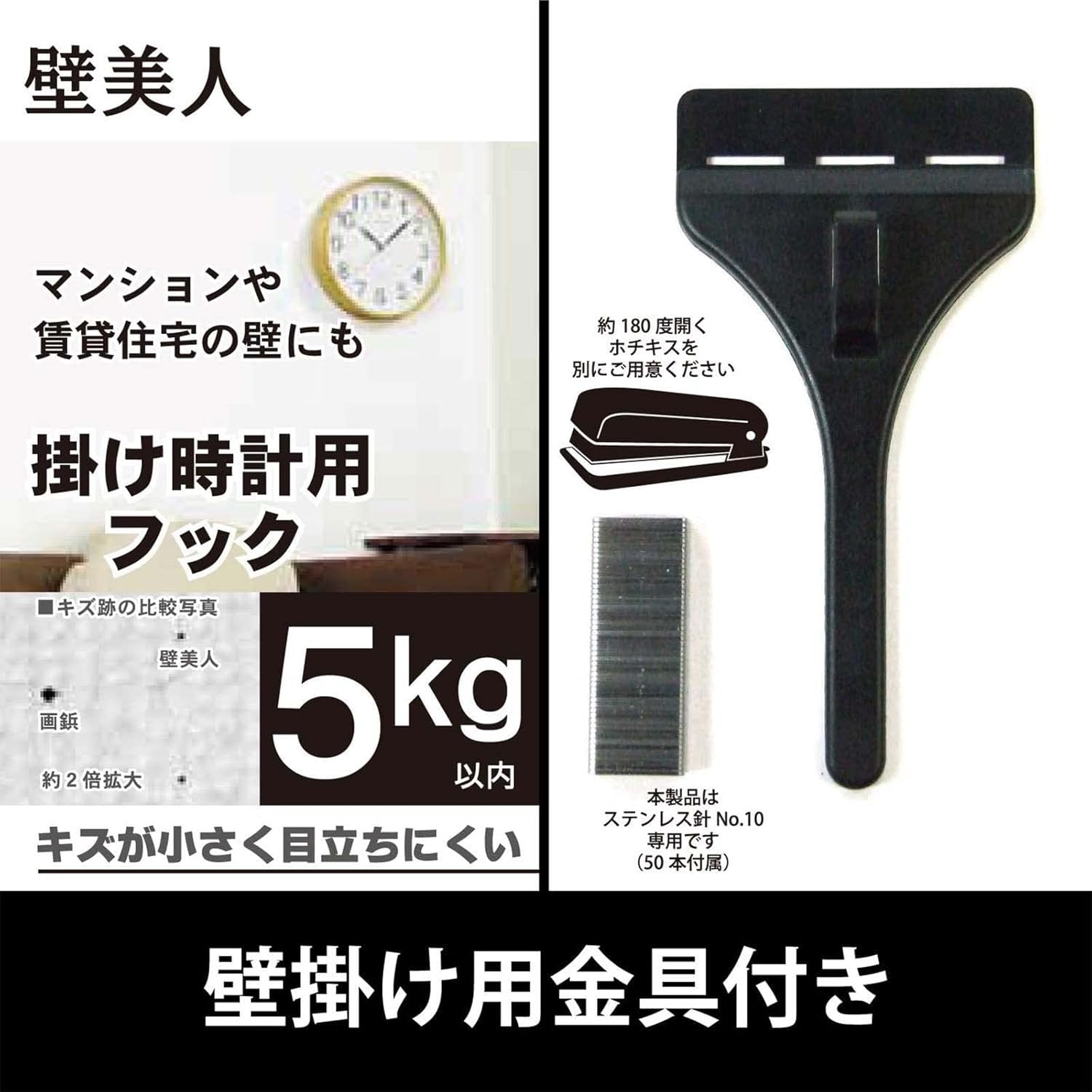
Image: The included wall hanging hardware, designed for secure installation.
3. 安全情報
- バッテリーの安全性: Use only the specified AA alkaline battery. Do not mix old and new batteries, or different types of batteries. Remove batteries if the clock will not be used for an extended period. Dispose of batteries according to local regulations.
- 取り付けの安全性: Ensure the wall surface is strong enough to support the clock's weight (approximately 940g) and the hanging hardware. Use appropriate tools and follow mounting instructions carefully to prevent the clock from falling.
- 配置: Avoid placing the clock in direct sunlight, near strong magnetic fields, or in areas with extreme temperatures or high humidity, as this may affect performance and longevity.
4. セットアップ
4.1 バッテリーの取り付け
- 時計の裏側にある電池収納部を見つけます。
- 電池ボックスのカバーを開きます。
- Insert one (1) AA alkaline battery, ensuring the positive (+) and negative (-) terminals are aligned correctly according to the diagram inside the compartment.
- 電池カバーをしっかりと閉じてください。

画像: 背面 view of the clock, indicating the battery compartment and control buttons.
4.2 Initial Time Setting and Radio Wave Reception
After installing the battery, the clock will automatically attempt to receive the time calibration signal. This process may take several minutes. Place the clock in an area with good signal reception, away from electronic devices that may cause interference.
- The clock hands will move to the 12 o'clock position and then begin searching for the radio signal.
- A radio wave reception lamp (if present, refer to the back of the clock) will indicate the status of the reception.
- 信号が正常に受信されると、時計は自動的に正しい時刻に設定されます。
4.3 壁面への取り付け
Use the provided hanging hardware and screws to securely mount the clock on a wall.
- 丈夫な壁の適切な場所を選択してください。
- Mark the desired position for the hanging hardware.
- Install the wall mounting screws and hanging hardware according to the instructions provided with the hardware, ensuring it is firmly secured. The hook can hold up to approximately 5kg.
- Carefully hang the clock onto the installed hardware, ensuring it is stable and level.
5. 操作手順
5.1 Radio Reception Function
The Casio IQ-1106J clock is equipped with a radio wave reception function to maintain accurate time.
- 自動受信: The clock will periodically attempt to receive the time calibration signal to ensure accuracy. This typically occurs overnight.
- 手動受信: If you need to force a time adjustment, you can initiate manual reception. Refer to the buttons on the back of the clock (e.g., 'WAVE CEPTOR' or 'RECEIVE' button) and press it to start manual reception. The radio wave reception lamp will indicate the reception status.
- Radio Wave Reception ON/OFF Function: Some models may include a switch or button to enable or disable the radio wave reception. If you are in an area with poor reception or wish to conserve battery life, you may turn this function OFF. Remember to turn it ON for automatic time synchronization.

Image: The 'Wave Ceptor' feature, illustrating the clock's ability to receive radio signals for precise timekeeping.
5.2 時間表示
The clock features a clear analog display with hour, minute, and second hands. The time is automatically adjusted via radio wave reception, eliminating the need for manual time setting under normal operating conditions.
6. メンテナンス
6.1 クリーニング
- 時計の表面を柔らかく乾いた布で拭いてください。
- 頑固な汚れには、軽くamp布に水と中性洗剤を含ませ、すぐに拭いて乾かしてください。
- 研磨剤入りのクリーナー、溶剤、化学スプレーは、仕上げや内部コンポーネントを損傷する恐れがあるので使用しないでください。
6.2 電池の交換
When the clock hands stop moving or the time becomes inaccurate despite good radio reception, it is likely time to replace the battery.
- 壁から時計を取り外します。
- 背面のバッテリーコンパートメントを開きます。
- Remove the old AA alkaline battery.
- Insert a new AA alkaline battery, observing the correct polarity (+/-).
- Close the battery compartment and re-hang the clock. The clock will then attempt to receive the time signal.
7。 トラブルシューティング
| 問題 | 考えられる原因 | 解決 |
|---|---|---|
| Clock hands do not move or display incorrect time. | Low battery; Poor radio signal reception; Radio reception OFF. | Replace battery. Move clock to a location with better signal (e.g., near a window, away from electronics). Ensure radio reception function is ON. Initiate manual reception. |
| Radio wave reception lamp does not light up or flashes. | 無線信号が弱いか、またはありません。 | Relocate the clock to an area with stronger signal. Wait for automatic reception or attempt manual reception. |
| 時計は時間を遅らせたり進めたりしています。 | Interference with radio signal; Faulty battery; Malfunction. | Ensure clock is not near strong interference sources. Replace battery. If problem persists, contact customer support. |
8. 仕様
| 特徴 | 詳細 |
|---|---|
| モデル番号 | IQ-1106J |
| 製品寸法(高さ x 幅 x 奥行き) | 約11.6×11.6×2.4インチ(29.5×29.5×6.0cm) |
| 重さ | 約。 32.0g |
| 材料 | Wood, Resin, Glass |
| 表示タイプ | アナログ |
| 動き | 石英 |
| 電源 | 1×AAアルカリ電池 |
| 特集 | Radio reception function (automatic/manual), Radio wave reception ON/OFF function, Radio wave reception lamp |
| 屋内/屋外での使用 | 屋内 |

Image: The clock displaying its physical dimensions and weight for reference.
9. 保証とサポート
Casio products are manufactured to high-quality standards. For information regarding warranty coverage, please refer to the warranty card included with your purchase or visit the official Casio webサイト。
For further assistance, troubleshooting, or to inquire about replacement parts, please contact Casio customer support or visit the official Casio store online: