
1. はじめに
This manual provides detailed instructions for the installation, operation, and maintenance of your Cooler Master MasterFan MF200R ARGB 200mm fan. This fan is designed to provide efficient cooling for your PC system while offering customizable Addressable RGB lighting effects.

画像1.1:正面 view of the Cooler Master MasterFan MF200R ARGB 200mm fan, showcasing its customizable lighting.
2 製品の特徴
- アドレス指定可能なRGB照明: Experience full color customization with Addressable RGB (ARGB) technology. Compatible with popular motherboard ARGB software such as Asus Aura Sync, ASRock Polychrome Sync, and MSI Mystic Light Sync. Note: Requires a +5V, 3-pin ARGB header.
- サイレント冷却テクノロジー: Engineered with noise reduction technologies and sound-absorbing materials to ensure quiet operation, even under heavy workloads. Features a durable rifle bearing for an extended lifespan.
- ハイブリッドブレード設計: A unique combination of jet engine and helicopter blade designs provides optimal static air pressure without compromising airflow, ensuring effective heat dissipation.
- Smart Fan Sensor for Jam Protection: Integrated sensors protect your cables and internal components by automatically stopping the fan rotation if an obstruction is detected, preventing damage.

Image 2.1: Multiple MasterFan MF200R ARGB fans demonstrating various lighting effects.

Image 2.2: Illustration of the fan's hybrid blade design, combining jet engine and helicopter blade elements.
3. パッケージ内容
パッケージにすべてのアイテムが含まれていることを確認してください。
- 1 x Cooler Master MasterFan MF200R ARGB Cooling Fan
- 取り付けネジ4本
- Small mounting accessories (e.g., additional screws, 3-pin to 4-pin adapter, small instruction sheet)
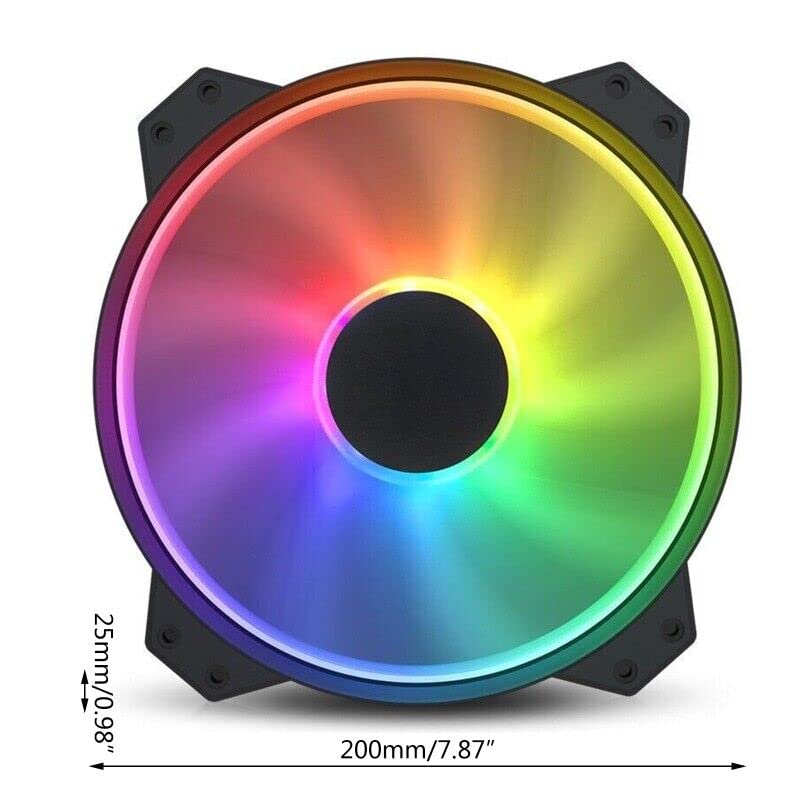
Image 3.1: Included accessories with the MasterFan MF200R ARGB fan.
4. 仕様
| RGBプロfile | Addressable RGB (+5V, 3-pin) |
| ファン寸法 | 200 x 200 x 25 mm(7.9 x 7.9 x 1インチ) |
| ファン重量 | 259g(XNUMXポンド) |
| ファン速度 | 800±150回転 |
| ファンの風量 | 90.3 CFM ± 10% |
| ファン空気圧 | 0.88mmH2O |
| ファンの騒音レベル | 28dBA |
| MTTF(平均故障時間) | 160,000時間 |
| ベアリングタイプ | ライフルベアリング |
| 電源コネクタ | 3-Pin (4-pin with 3rd pin blocked) |
| ファン定格巻tage | 12V直流 |
| ファン定格電流 | 0.3A |
| 消費電力 | 4.08±0.2W |

Image 4.1: Technical specifications of the MasterFan MF200R ARGB.
5. 重要な互換性に関する注意事項
- The Addressable RGB (ARGB) lighting function しなければならない be connected to an Addressable RGB (+5V, 3-pin) capable motherboard header or a compatible Addressable RGB (+5V, 3-pin) controller.
- このファンは ない compatible with 4-pin RGB or standard RGB+12V headers. Connecting to an incompatible header may cause damage to the fan or motherboard.
- For Gigabyte RGB Fusion Addressable RGB capable motherboards, an additional Gigabyte Adapter Cable may be required. This adapter is 別売り.
- このファンは ない compatible with the Cooler Master HAF XB EVO chassis.
6. セットアップとインストール
6.1物理的な設置
- Identify the desired mounting location for the 200mm fan within your PC case. Ensure adequate clearance.
- Align the fan's mounting holes with the corresponding screw holes on your PC case.
- Secure the fan using the four provided mounting screws. Do not overtighten.
6.2 電気接続
- 電源接続: Locate the 3-pin fan power connector on the MasterFan MF200R. Connect this to an available 3-pin or 4-pin fan header on your motherboard. If connecting to a 4-pin header, ensure the 3rd pin on the fan connector is blocked as indicated in the specifications.
- ARGB照明接続: Locate the 3-pin ARGB connector on the MasterFan MF200R. Connect this to a +5V, 3-pin Addressable RGB header on your motherboard or a compatible ARGB controller. Refer to your motherboard manual for the exact location of the ARGB header.

Image 6.1: Identification of the 3-pin power and 5V 3-pin ARGB connectors.

Image 6.2: Connecting the 5V 3-pin ARGB connector to a motherboard header.

画像6.3: 詳細 view of a 5V 3-pin ARGB header on a motherboard.
7. 操作手順
7.1 ファン操作
Once connected, the fan will operate at its rated speed of 800 ± 150 RPM, providing consistent airflow for cooling your system.
7.2 ARGB照明制御
To customize the Addressable RGB lighting effects, install and use the appropriate software provided by your motherboard manufacturer. Examp含まれるもの:
- Asus オーラシンク
- ASRock ポリクロームシンク
- MSI ミスティックライトシンク
These software applications allow you to select various lighting modes, colors, and synchronization options for your ARGB components.
8. メンテナンス
定期的なメンテナンスを行うことで、ファンの最適なパフォーマンスと寿命が確保されます。
- クリーニング: Periodically inspect the fan blades and housing for dust buildup. With the PC powered off and unplugged, use compressed air or a soft, dry cloth to gently remove any dust. Avoid using liquid cleaners directly on the fan.
- 検査: Check mounting screws periodically to ensure they remain secure.
9。 トラブルシューティング
If you encounter issues with your MasterFan MF200R ARGB, refer to the following common solutions:
- ファンが回転しない:
- Ensure the 3-pin power connector is securely plugged into a functional fan header on your motherboard.
- マザーボードの BIOS/UEFI 設定をチェックして、ファン ヘッダーが有効になっていて、正しく構成されていることを確認します。
- ARGB 照明が機能しない:
- Verify that the 3-pin ARGB connector is securely plugged into a +5V, 3-pin ARGB header on your motherboard or controller.
- Confirm that you are using compatible motherboard ARGB software and that it is correctly installed and configured.
- Ensure the fan is not connected to a 4-pin RGB or +12V RGB header, as this is incompatible and can prevent lighting from functioning.
- 過度の騒音:
- Check for any cables or obstructions that might be interfering with the fan blades.
- Ensure the fan is securely mounted and that all mounting screws are tightened appropriately.
- Dust buildup can cause noise; clean the fan as described in the Maintenance section.
10. 保証とサポート
For warranty information and technical support regarding your Cooler Master MasterFan MF200R ARGB fan, please refer to the official Cooler Master webサイトをご覧いただくか、カスタマー サポートに直接お問い合わせください。
For purchase-related inquiries or issues, please contact the seller, Toptekits, through your original point of purchase.