
1. はじめに
1.1 製品終了view
The Renkforce RF-HC-100 is a compact 16-megapixel trail camera designed for outdoor monitoring. It features a time-lapse function, night vision capabilities, and a durable, camouflage brown housing. This camera is suitable for wildlife observation, property surveillance, and other outdoor recording needs.
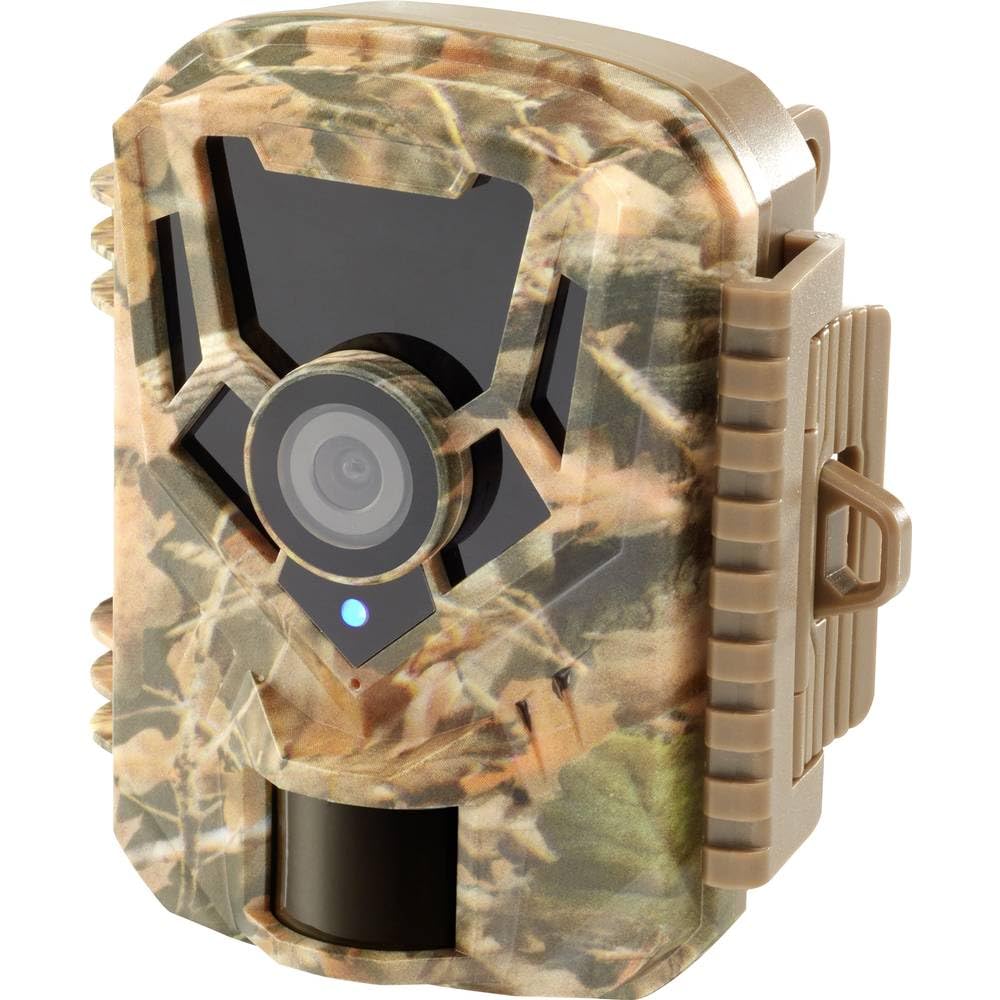
画像: 前面 view of the Renkforce RF-HC-100 Trail Camera, showcasinコンパクトなデザインと迷彩柄が特徴。

画像: 正面 view of the Renkforce RF-HC-100 Trail Camera, highlighting the main lens and motion sensor.
1.2 パッケージ内容
- 1 x Renkforce RF-HC-100 Trail Camera Unit
- Note: Additional accessories such as mounting straps, USB cables, or user manuals may be included depending on the specific package.
2. 安全情報
- デバイスを操作する前に、すべての指示をよくお読みください。
- Do not expose the camera to extreme temperatures, direct sunlight for prolonged periods, or corrosive liquids.
- Ensure the battery compartment is properly sealed to maintain the IP65 weather resistance.
- 電池は地域の条例に従って廃棄してください。古い電池と新しい電池、または異なる種類の電池を混ぜて使用しないでください。
- デバイスを子供の手の届かない場所に保管してください。
- カメラを分解または改造しないでください。保証が無効になり、損傷の原因となる可能性があります。
3 製品の特徴
The Renkforce RF-HC-100 Trail Camera offers the following key features:
- 高解像度画像: 16 Megapixel effective capture resolution for clear photos and 1080p video recording.
- ナイトビジョン: Equipped with color night vision for monitoring in low-light conditions.
- タイムラプス機能: 設定された間隔で画像をキャプチャして、長期的なイベントを観察します。
- SDカードスロット: Supports external SD cards for amp写真とビデオの保存に最適です。
- 耐候性: IP65 international protection rating ensures durability in various outdoor environments.
- コンパクトなデザイン: Miniature form factor with a camouflage brown finish for discreet placement.
- 広角 View: 90-degree angle of view 広い範囲をカバーする。
- 接続性: Features wired connectivity (USB, AV ports) and Wi-Fi protocol for data transfer and control via application.
- 取り付けオプション: Includes support for wall mounting.
4. セットアップ
4.1 バッテリーの取り付け
- サイドクリップを外してカメラハウジングを開きます。
- バッテリー収納部を見つけます。
- Insert the required number of AA batteries (not included) according to the polarity markings (+/-).
- 電池ケースをしっかりと閉めてください。
4.2SDカードのインストール
- カメラハウジングを開いたら、SD カード スロットを見つけます。
- Insert a compatible SD card (up to 32GB, Class 10 recommended) into the slot with the metal contacts facing down until it clicks into place.
- To remove, push the SD card in again until it springs out.

Image: The Renkforce RF-HC-100 Trail Camera with its housing open, revealing the control panel, USB, AV, and DC ports, and the ON/SETUP/OFF switch.
4.3カメラの取り付け
The camera can be mounted using a strap or a wall mount bracket (if included or purchased separately).
- ストラップ取り付け: Thread a mounting strap through the slots on the back of the camera and secure it to a tree or pole.
- 壁掛け: Use the integrated mounting points or a compatible wall mount bracket to attach the camera to a flat surface. Ensure the camera is stable and pointed in the desired direction.
5. 操作手順
5.1 電源のオン/オフとモードの選択
Locate the ON/SETUP/OFF switch inside the camera housing.
- OFF: カメラの電源をオフにします。
- セットアップ: Enters setup mode, allowing you to configure settings via the internal display.
- に: Activates the camera for recording based on the configured settings.
5.2 設定の構成
In SETUP mode, use the navigation buttons (if available) to access the menu and adjust parameters such as:
- 写真/ビデオ解像度
- PIRセンサー感度
- 検出遅延
- タイムラプス間隔
- 日時
- Recording Mode (Photo, Video, Photo+Video, Time-Lapse)
5.3 データ検索
記録にアクセスするには files:
- USB経由: Connect the camera to a computer using a USB cable. The camera will appear as a removable disk.
- SDカード経由: Remove the SD card from the camera and insert it into a computer's card reader.
6. メンテナンス
- クリーニング: Use a soft, dry cloth to clean the camera lens and housing. For stubborn dirt, a slightly damp 布を使用することもできますが、デバイス内に水分が入らないようにしてください。
- バッテリー交換: 電池残量低下インジケーターが表示されたり、パフォーマンスが低下したりした場合は、電池を交換してください。
- SDカード管理: Regularly format the SD card (after backing up important data) to maintain optimal performance and prevent errors.
- ストレージ: 長期間使用しない場合は、電池を取り外し、直射日光を避けて涼しく乾燥した場所にカメラを保管してください。
7。 トラブルシューティング
| 問題 | 考えられる原因 | 解決 |
|---|---|---|
| カメラの電源が入りません。 | Low or dead batteries; incorrect battery installation; power switch in OFF position. | Replace batteries; ensure correct polarity; set switch to ON or SETUP. |
| 画像/ビデオの品質が悪い。 | レンズが汚れている、光が弱い、解像度の設定が正しくない。 | Clean the lens; ensure adequate lighting or use night vision; adjust resolution settings. |
| カメラが録画していません。 | SD card full or faulty; incorrect mode selected; PIR sensor blocked. | Format or replace SD card; select appropriate recording mode; clear sensor path. |
| コンピューターに接続できません。 | Faulty USB cable; camera not in correct mode; driver issues. | Try a different USB cable; ensure camera is in connection mode (if applicable); try another computer or card reader. |
8. 仕様
| モデル名 | RF-HC-100 (RF-4466574) |
| Effective Capture Resolution | 16メガピクセル |
| ビデオ解像度 | 1080p |
| 寸法(長さ×幅×高さ) | 21 x 12 x 9 cm(8.27 x 4.72 x 3.54インチ) |
| 重さ | 186グラム(0.41ポンド) |
| 接続技術 | Wired (USB, AV), Wi-Fi Protocol (for control/transfer) |
| 特集 | Local Recording, Night Vision (Color Night Vision) |
| 使用環境 | 屋外 |
| 国際保護格付け | IP65 |
| 電源 | Manual Operation (Battery-powered, batteries not included) |
| ワットtage | 1.5ワット |
| View 角度 | 90度 |
| 色 | Camouflage Brown |
| 材料 | Metal (internal) |
| マウントタイプ | ウォールマウントサポート |
9. 保証とサポート
Renkforce provides support for its products. Spare parts availability is indicated for 1 year from the date of purchase. For technical assistance, troubleshooting beyond this manual, or warranty claims, please refer to the contact information provided with your product packaging or visit the official Renkforce webサイト。