
EARISE M15
EARISE M15 カラオケマシン ユーザーマニュアル
モデル: M15
導入
ご購入ありがとうございますasing the EARISE M15 Karaoke Machine. This portable PA loudspeaker system is designed to provide high-quality audio for various entertainment and public address needs. Featuring powerful sound output, versatile connectivity options, and vibrant LED lights, the M15 is perfect for parties, gatherings, and karaoke sessions. Please read this manual thoroughly before operating the device to ensure proper use and to maximize its lifespan.
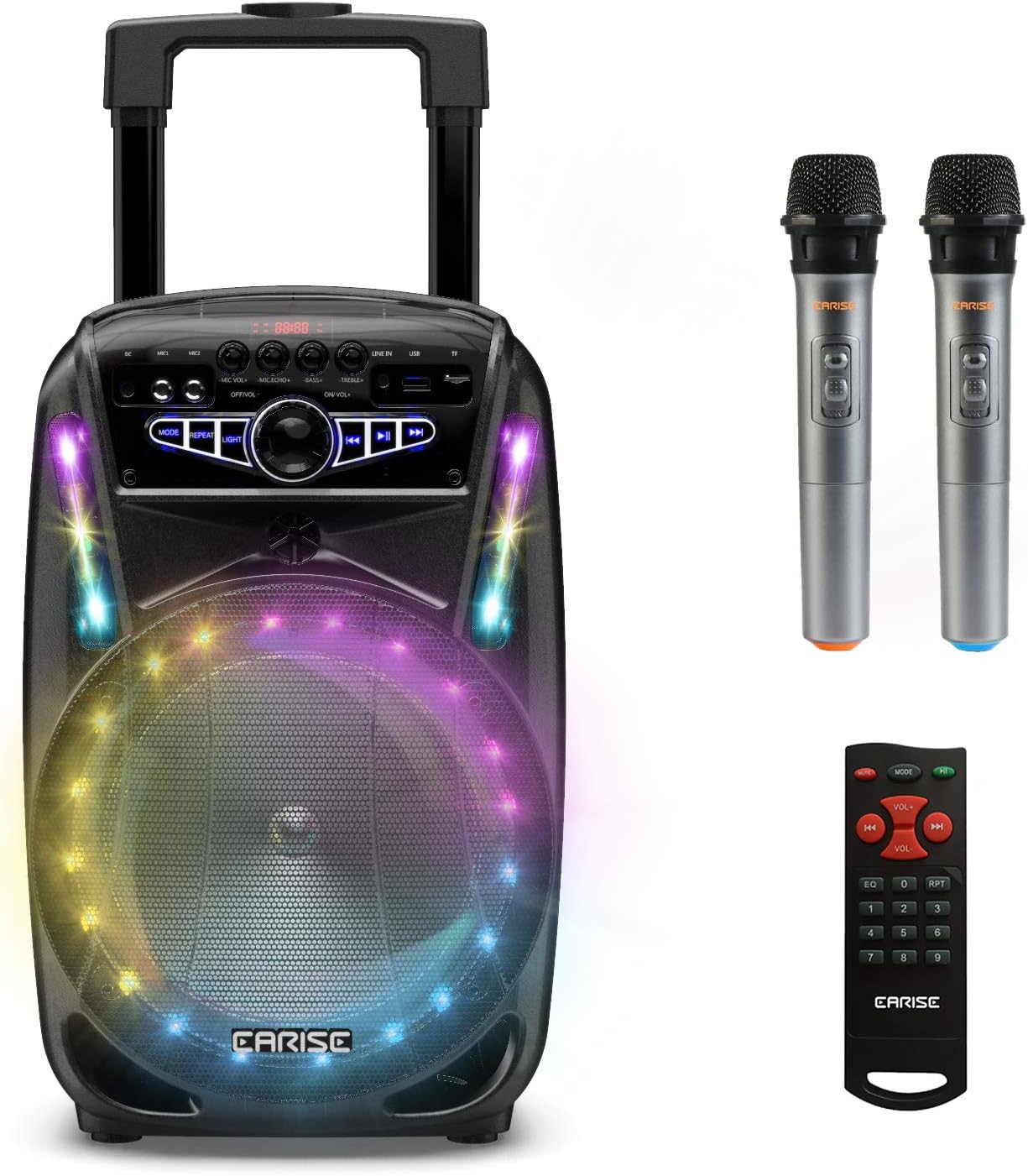
Image: The EARISE M15 Karaoke Machine, a black portable speaker with colorful LED lights on the front, shown with two wireless microphones and a remote control.
箱の中身
パッケージの内容を確認し、すべてのアイテムが揃っていて良好な状態であることを確認してください。
- M1トロリーPAシステム x 15
- ワイヤレスマイク 2 個 (電池は付属しません)
- リモコン x 1
- 1 x電源コード
- 1 x AUXケーブル
- ユーザーマニュアル (本書) x 1

Image: A visual representation of the package contents, showing the M15 speaker, two wireless microphones, a remote control, an AUX cable, and a charging cable.
セットアップガイド
1.ユニットの充電
Before first use, fully charge the M15 Karaoke Machine. The built-in 3600mAh 7.4V Lithium rechargeable battery provides portability. A full recharge takes approximately 3 hours.
- Connect the included power cord to the DC Charging Port (6) on the back of the unit.
- Plug the other end of the power cord into a standard AC 100-240V power outlet.
- The charging indicator light will illuminate. Once fully charged, the light may change color or turn off depending on the unit's design.
2. マイクの電池の取り付け
The wireless microphones require batteries (not included). Open the battery compartment of each microphone and insert the required batteries, ensuring correct polarity.
3. 初回電源投入
Locate the Power On/Off switch (15) on the control panel. Turn the switch to the "ON" position to power on the unit.
操作手順
コントロールパネルオーバーview
最適な操作のためにコントロール パネルの使い方をよく理解してください。

Image: Close-up of the M15's control panel, highlighting various buttons and ports with corresponding numbers for easy identification.
- 表示画面: Shows current mode, track number, and other information.
- マイクの音量: 接続されたマイクの音量を調整します。
- マイクエコー: マイクのエコー効果を制御します。
- ベース: オーディオ出力の低音レベルを調整します。
- 高音: オーディオ出力の高音レベルを調整します。
- DC充電ポート: For connecting the power adapter to charge the unit.
- Mic 1 Port: 有線マイクの入力。
- Mic 2 Port: Input for a second wired microphone.
- Line In Port (AUX): AUX ケーブルを介して外部オーディオ デバイスを接続します。
- USBフラッシュドライブスロット: オーディオ再生用 file■USBドライブから。
- TF/SDカードスロット: オーディオ再生用 files from a TF or SD card.
- モード: Switches between Bluetooth, USB, TF, AUX, and FM Radio modes.
- 繰り返す: 現在のトラックまたはプレイリストを繰り返します。
- ライト: Toggles or changes the LED light patterns.
- Power On/Off, Master Volume: Turns the unit on/off and adjusts the overall volume.
- 前のトラック: 前のトラックにスキップします。
- 再生/一時停止: 現在のトラックを再生または一時停止します。
- 次のトラック: 次のトラックにスキップします。
1.Bluetoothペアリング
Connect your smartphone, tablet, or other Bluetooth-enabled device to the M15 for wireless audio streaming.
- Power on the M15 unit.
- を押す モード button (12) until "Bluetooth" or "BT" appears on the Display Screen (1).
- Enable Bluetooth on your device and search for "EARISE M15" in the list of available devices.
- Select "EARISE M15" to pair. A confirmation sound will indicate successful pairing.
- You can now play audio from your device through the M15.

Image: A person sitting outdoors, connecting their smartphone to the EARISE M15 speaker via Bluetooth, indicated by the Bluetooth logo.
2. USB/TFカードの再生
音声を再生 files directly from a USB flash drive or TF/SD card.
- Insert a USB flash drive into the USB Flash Drive Slot (10) or a TF/SD card into the TF/SD Card Slot (11).
- The unit should automatically switch to USB or TF mode and begin playing compatible audio fileそうでない場合は、 モード ボタン(12)を押して正しいモードを選択します。
- 使用 前のトラック (16) 再生/一時停止 (2)そして 次のトラック (18)再生を制御するボタン。
3.AUX入力
Connect external audio devices that do not have Bluetooth capability using the AUX cable.
- Connect one end of the included AUX cable to the Line In Port (9) on the M15.
- AUX ケーブルのもう一方の端を外部デバイス (MP3 プレーヤー、ラップトップなど) のオーディオ出力ジャックに接続します。
- を押す モード button (12) until "AUX" or "LINE" appears on the Display Screen (1).
- 外部デバイスからの再生を制御します。
4. マイクの使用方法
The M15 supports up to two wireless microphones and two wired microphones simultaneously for karaoke fun.
- ワイヤレスマイク: Turn on the wireless microphones. They should automatically connect to the M15.
- 有線マイク: Plug wired microphones into Mic 1 Port (7) or Mic 2 Port (8).
- Adjust the Microphone Volume (2) and Microphone Echo (3) knobs to achieve desired sound effects.

Image: A group of people enjoying karaoke, with the EARISE M15 speaker providing sound and multiple microphones in use, demonstrating its multi-user capability.
5. LEDライト
Enhance your party atmosphere with the M15's colorful LED disco lights.
- を押す ライト button (14) to toggle the LED lights on/off or to cycle through different light patterns.

Image: The EARISE M15 speaker with its front-facing LED lights glowing in multiple colors, creating a vibrant visual effect.
6. リモコンの使用
付属のリモコンで遠くからでも便利に操作できます。
- リモコンに動作する電池があることを確認してください。
- Point the remote control towards the front of the M15 unit.
- Use the buttons on the remote to control volume, mode, track selection, EQ, and other functions.
メンテナンス
Proper maintenance will ensure the longevity and optimal performance of your EARISE M15 Karaoke Machine.
- クリーニング: 本体の外側は、柔らかく乾いた布で拭いてください。研磨剤入りの洗剤、ワックス、溶剤は表面の仕上げを傷める可能性があるため、使用しないでください。
- バッテリーのケア: To prolong battery life, avoid fully discharging the battery frequently. If storing the unit for an extended period, charge it to about 50% every few months.
- ストレージ: 直射日光、極端な温度、高湿度を避け、涼しく乾燥した場所に保管してください。
- 取り扱い: While the unit is portable with wheels and a handle, avoid dropping or subjecting it to strong impacts.

Image: A person demonstrating the portability of the EARISE M15 by pulling it with its retractable handle and built-in wheels.
トラブルシューティング
If you encounter issues with your M15, please refer to the following common problems and solutions.
| 問題 | 考えられる原因 | 解決 |
|---|---|---|
| 電源が入らない/ユニットがオンになりません。 | 電池が消耗しています。 電源コードが正しく接続されていません。 | ユニットを完全に充電します。 Ensure power cord is securely connected to both the unit and the power outlet. |
| スピーカーから音が出ません。 | 音量が低すぎます。 間違ったモードが選択されました。 外部デバイスの音量が低いです。 | Increase the Master Volume (15). を押す モード button (12) to select the correct input source (Bluetooth, USB, AUX). Increase volume on the connected external device. |
| マイクが機能しません。 | Microphone batteries are dead or incorrectly inserted. マイクの音量が低すぎます。 Wireless microphone not paired. | Replace microphone batteries, ensuring correct polarity. Increase Microphone Volume (2). Ensure wireless microphones are turned on and within range. |
| Bluetoothのペアリングに失敗しました。 | M15 is not in Bluetooth mode. Device is too far from M15. デバイスの Bluetooth がオフになっています。 | プレス モード button (12) to select Bluetooth mode. Move your device closer to the M15. デバイスで Bluetooth を有効にします。 |
| USB/TF カードが再生されません。 | 正しくない file 形式。 カード/ドライブが正しく挿入されていません。 Unit not in USB/TF mode. | 音声を確認する file互換性のある形式 (例: MP3) である。 USB ドライブまたは TF カードをしっかりと再度挿入します。 プレス モード button (12) to select USB or TF mode. |
仕様
Detailed technical specifications for the EARISE M15 Karaoke Machine.
| 特徴 | 仕様 |
|---|---|
| モデル | M15 |
| 出力 | 最大400W |
| R.Frequency | 90Hz-20KHz |
| リチウムイオン電池 | 3.7V / 2600mAh (Built-in) |
| ドライブユニット | 8" 4Ω*1 + 1" tweeter*1 |
| S/N比 | ≥60dB |
| 電源 | 交流100-240V |
| 製品寸法(長さ x 幅 x 高さ) | 27.94 x 25.4 x 40.64 cm(11 x 10.4 x 16.3インチ) |
| アイテム重量 | 4.08キロ |
| 接続技術 | ブルートゥース、USB、AUX |
| 対応デバイス | ノートパソコン、スマートフォン |

Image: A diagram illustrating the physical dimensions of the EARISE M15 speaker, showing its height, width, and depth.
保証とサポート
For warranty information or technical support, please refer to the contact details provided with your purchase documentation or visit the official EARISE webサイトでご確認ください。保証請求の際は購入証明として領収書を保管してください。
Ask a question about this manual
Ask about setup, troubleshooting, compatibility, parts, safety, or missing instructions. Manuals+ will review the question and use this page’s manual context to help answer it.