
1. はじめに
This manual provides essential instructions for the safe and efficient operation of your Lenco DIR-250 Internet Radio. Please read this manual thoroughly before using the device and retain it for future reference. The Lenco DIR-250 is a versatile audio system offering Internet Radio, DAB+, FM radio, Bluetooth connectivity, Spotify Connect, and USB playback.
2. 安全情報
- 火災や感電を防ぐため、ユニットを雨や湿気にさらさないでください。
- 適切な換気を確保してください。通気口を塞がないでください。
- ユニットに付属の電源アダプタのみを使用してください。
- cを開けないでくださいasing. すべての修理は資格を持った担当者に依頼してください。
- ユニットを直射日光、熱源、強い磁場から遠ざけてください。
- ユニットの上に重い物を置かないでください。
3. パッケージ内容
開梱時にすべてのアイテムが揃っていることを確認します。
- Lenco DIR-250 Internet Radio Unit
- 電源アダプター
- リモートコントロール
- ユーザーマニュアル(このドキュメント)
- Antennas (2 included)
4.製品オーバーview

図4.1: フロント view of the Lenco DIR-250 Internet Radio and its remote control.

図4.2: Close-up of the right side of the front panel, featuring the TFT LCD display, volume control knob, Dimmer, and Alarm buttons.
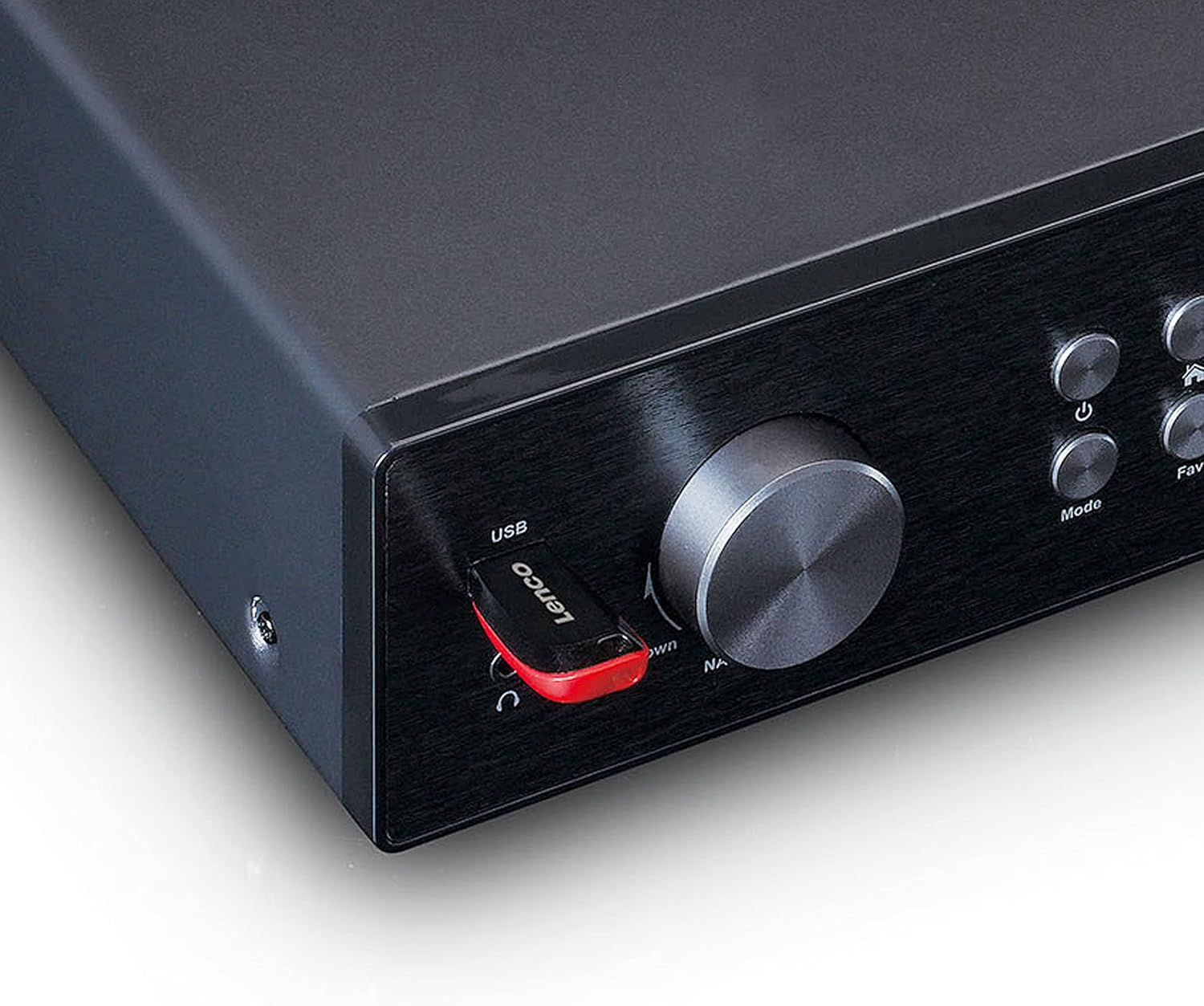
図4.3: Close-up of the left side of the front panel, showing the USB port, headphone jack, Navigate/OK knob, Mode, and Favorite buttons.

図4.4: Rear panel connections, including DC IN, Audio Output (RCA), Analog Input/Output, Optical Output, Coaxial Output, LAN (RJ45), and Antenna ports.
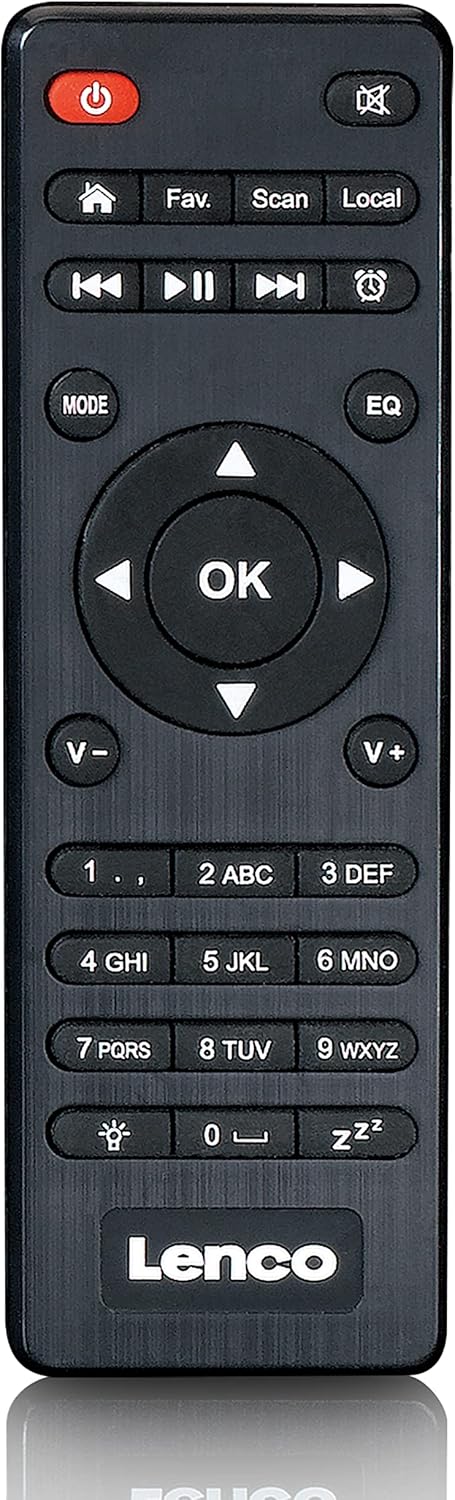
図4.5: The included remote control for convenient operation of the Lenco DIR-250.
5. セットアップ
5.1. 電源接続
- Connect the supplied power adapter to the DC IN port on the rear of the unit.
- 電源アダプタを壁のコンセントに差し込みます。
5.2.アンテナ接続
For optimal reception of DAB+ and FM radio, connect the provided antennas to their respective ports on the rear panel. Extend the telescopic antenna fully for best results.
5.3. ネットワーク接続
The DIR-250 supports both Wi-Fi and Ethernet connections for Internet Radio and Spotify Connect.
- Wi-Fi: Upon first power-on, the unit will guide you through the Wi-Fi setup. Select your network from the list and enter the password using the navigation knob and OK button, or the remote control.
- イーサネット: Connect an Ethernet cable from your router to the LAN port on the rear of the unit. The device will automatically detect the wired connection.
5.4. 初期セットアップウィザード
The first time you power on the DIR-250, an initial setup wizard will appear on the display. Follow the on-screen prompts to configure language, time, date, and network settings. This ensures the device is ready for use.
6.運用
6.1. 基本的な操作
The DIR-250 can be operated using the front panel controls or the included remote control.
- 電源ボタン: Turns the unit on/off or puts it into standby mode.
- ボリュームノブ: 回して音量を調整します。押すとミュート/ミュート解除になります。
- Navigate/OK Knob: Rotate to scroll through menus and options. Press to confirm a selection.
- モードボタン: Cycles through available modes (Internet Radio, DAB+, FM, Bluetooth, USB, AUX).
- Fav. Button: Accesses your list of favorite stations or saves the current station as a favorite.
- 調光ボタン: ディスプレイの明るさを調整します。
- アラームボタン: Sets or manages alarms.
6.2. インターネットラジオ
Access thousands of radio stations worldwide via your internet connection.
- を押す モード 「インターネットラジオ」が選択されるまでボタンを押します。
- 使用 Navigate/OK knob or remote control to browse stations by location, genre, or search.
- プレス OK ステーションを選択します。
- ステーションをお気に入りとして保存するには、 Fav。 ボタン。
6.3. DAB+ラジオ
高品質のデジタルラジオ放送をお楽しみください。
- を押す モード button until "DAB+" is selected.
- ラジオは利用可能な DAB+ 局を自動的にスキャンします。
- 使用 Navigate/OK knob or remote to select a station from the list.
6.4. FMラジオ
従来のアナログ FM ラジオ局を聴いてみましょう。
- を押す モード button until "FM" is selected.
- 使用 スキャン リモコンのボタンまたは Navigate/OK knob to search for stations.
- プレス OK to listen to a selected station.
6.5.Bluetoothモード
スマートフォン、タブレット、その他の Bluetooth 対応デバイスからオーディオをワイヤレスでストリーミングします。
- を押す モード button until "Bluetooth" is selected. The display will show "Pairing".
- On your external device, enable Bluetooth and search for "Lenco DIR-250".
- Select the device to pair. Once connected, you can play audio from your device through the radio.
6.6. Spotify コネクト
Control your music directly from the Spotify app on your smartphone or tablet.
- Ensure your Lenco DIR-250 and your smartphone/tablet are connected to the same Wi-Fi network.
- デバイスで Spotify アプリを開きます。
- 曲を再生し、「利用可能なデバイス」アイコン(通常はスピーカーまたはコンピュータのアイコン)をタップします。
- Select "Lenco DIR-250" from the list of available devices.
6.7.USB再生
音声を再生 files (MP3, WAV, AAC) from a USB flash drive.
- フロントパネルの USB ポートに USB フラッシュ ドライブを挿入します。
- を押す モード 「USB」が選択されるまでボタンを押します。
- 使用 Navigate/OK knob or remote to browse and select audio files.
6.8.AUX入力
3.5mm オーディオ ケーブルを使用して外部オーディオ デバイスを接続します。
- Connect your external audio device to the AUX IN port on the rear panel.
- を押す モード button until "AUX" is selected.
- 接続されたデバイスからオーディオを再生します。
6.9. アラームとスリープタイマー
Set alarms to wake up to your favorite radio station or use the sleep timer to automatically turn off the radio.
- アラーム: を押す アラーム button on the front panel or remote. Follow the on-screen instructions to set alarm time, source, and volume.
- 目覚まし時計: を押す 寝る button on the remote control repeatedly to cycle through available sleep timer durations (e.g., 15, 30, 60 minutes, Off).
7. メンテナンス
7.1. 清掃
To clean the unit, wipe it with a soft, dry cloth. Do not use abrasive cleaners, waxes, or solvents as these may damage the surface. Ensure the unit is unplugged before cleaning.
7.2. ストレージ
If you plan not to use the unit for an extended period, unplug it from the power outlet and store it in a cool, dry place, away from direct sunlight and extreme temperatures.
8。 トラブルシューティング
| 問題 | 考えられる原因 | 解決 |
|---|---|---|
| 電源なし | 電源アダプターが接続されていないか、コンセントに障害があります。 | 電源の接続を確認してください。別のコンセントを試してください。 |
| 音が出ない | Volume too low, muted, or incorrect input selected. | Increase volume. Check if muted. Select correct input mode. |
| Wi-Fiに接続できません | パスワードが間違っている、範囲外、またはルーターの問題です。 | Verify Wi-Fi password. Move unit closer to router. Restart router. |
| インターネットラジオのバッファリング/切断 | Weak Wi-Fi signal or slow internet connection. | Improve Wi-Fi signal strength. Check internet speed. Try wired Ethernet connection. |
| DAB+/FMの受信状態が悪い | Antenna not properly connected or extended. | Ensure antennas are fully extended and positioned for best reception. |
| Bluetoothペアリングの問題 | デバイスがペアリング モードになっていないか、すでに別のデバイスとペアリングされています。 | Ensure DIR-250 is in Bluetooth mode. Disconnect from other devices. |
| ユニットがフリーズしたり、応答しなくなったりする | 一時的なソフトウェアの不具合。 | Unplug the power adapter, wait 10 seconds, then plug it back in to restart the unit. |
9. 仕様
| ブランド | レンコ |
| モデル番号 | A004231 |
| ディスプレイ技術 | 液晶 |
| 接続性 | Bluetooth V5.0, Ethernet (RJ45), Wi-Fi |
| サポートされている無線帯域 | インターネットラジオ、DAB+、FM |
| 特集 | Spotify Connect, USB Playback, Alarm, Sleep Timer |
| 寸法(長さ×幅×高さ) | 43 x 28.7 x 7.2 cm |
| 重さ | 1.5キログラム |
| 電源 | 有線(ACアダプター) |
| 対応デバイス | Tablet, Smartphone, USB storage devices |
10. 保証
This product comes with a manufacturer's warranty of 24 months from the date of purchase. Please retain your proof of purchase for warranty claims. The warranty covers defects in materials and workmanship under normal use. It does not cover damage caused by misuse, accidents, unauthorized modifications, or normal wear and tear.
11. サポート
For technical support, service, or further inquiries regarding your Lenco DIR-250 Internet Radio, please visit the official Lenco website or contact their customer service department. Contact information can typically be found on the Lenco webサイトまたは製品に付属の保証書に記載されています。
Lenco Official Webサイト: www.lenco.com