
1. はじめに
The Korg SoundLink MW-1608 is a 16-channel hybrid mixer designed for a wide range of audio applications, including studio recording and live sound reinforcement. This mixer integrates both analog and digital processing to provide comprehensive control over audio signals. It features high-quality components such as HiVolt microphone preamps, Velvet Sound AD/DA converters, and ALPS faders.
Key functionalities include per-channel 3-band equalizers, 1-knob compressors, mute groups, a dedicated monitor section, feedback suppression, all-XLR speaker outputs, a built-in spectrum analyzer, and a suite of Korg digital effects. This manual provides essential information for the proper setup, operation, maintenance, and troubleshooting of your MW-1608 mixer.
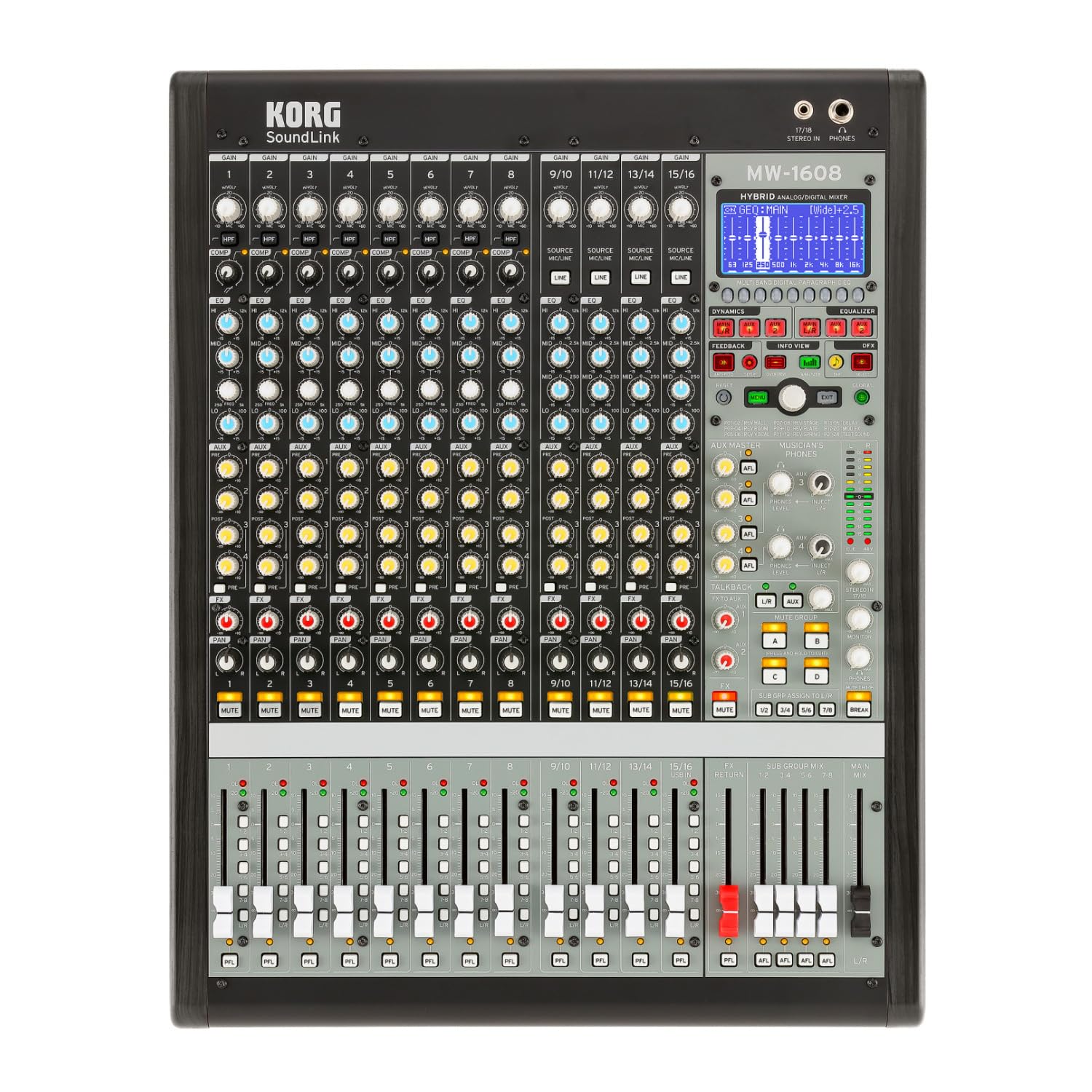
図1: 前面 view of the Korg SoundLink MW-1608 mixer, showing the control surface with faders, knobs, and display.
2. セットアップ
Before operating the Korg SoundLink MW-1608, ensure all connections are made correctly and securely. This section outlines the basic steps for setting up your mixer.
2.1開梱と配置
- Carefully remove the mixer from its packaging. Retain all packaging materials for future transport or storage.
- Place the mixer on a stable, flat surface with adequate ventilation. Avoid placing it near heat sources or in direct sunlight.
- Ensure sufficient space around the unit for cable connections and heat dissipation.
2.2電源接続
- The MW-1608 operates on a "Corded Electric" power source.
- Connect the supplied AC power cord to the mixer's power input on the rear panel.
- Plug the other end of the power cord into a suitable electrical outlet. Ensure the power switch is in the OFF position before connecting.
2.3オーディオ接続
The MW-1608 offers various input and output options. Refer to the rear panel diagram below for connection points.

図2:背面 view of the Korg SoundLink MW-1608 mixer, showing various input and output connectors.
- マイク入力: Connect microphones to the XLR inputs (channels 1-12, 15/16, 13/14, 11/12, 9/10, 7, 6, 5, 4, 3, 2, 1) using balanced XLR cables.
- ライン入力: Connect line-level devices (e.g., keyboards, media players) to the 1/4-inch TRS or RCA line inputs.
- 主な出力: メインスピーカーまたは電源を接続します amplifier to the MAIN OUT (XLR L/R) connectors. The mixer features "XLR" output connector type.
- 補助出力: Use the AUX OUT (XLR) connectors for monitor mixes or external effects processors.
- グループ出力: Utilize the GROUP OUT (XLR) for sub-mixes.
- USB接続: The USB port allows for connection to a computer for recording or playback.
3. 操作手順
このセクションでは、view of the Korg SoundLink MW-1608's operational features and controls.
3.1 チャンネルコントロール
- 入力ゲイン: Adjust the input sensitivity for each channel to achieve optimal signal levels.
- 3バンドEQ: Each channel features a 3-band equalizer for tone shaping. Adjust the HIGH, MID, and LOW frequency bands as needed.
- 1ノブコンプレッサー: Engage and adjust the built-in compressor on individual channels to control dynamics and add punch.
- Aux 送信: Route channel signals to auxiliary outputs for monitor mixes or external effects.
- パンコントロール: Position the channel's signal within the stereo field.
- 消音ボタン: チャンネルの出力を無音にします。
- チャンネルフェーダー: Controls the volume level of the individual channel in the main mix.
3.2 マスターセクション
- メインミックスフェーダー: ステレオ メイン ミックスの全体的な出力レベルを制御します。
- グループフェーダー: Adjust the output levels of the 8-bus groups.
- Monitor Section: Provides control over headphone and control room outputs. The "Musician's Phone Feature" allows for dedicated monitoring.
- デジタルエフェクト: Access and apply Korg's studio-quality digital effects to your mix.
- フィードバック抑制: Utilize the integrated feedback suppression system to prevent unwanted audio feedback.
- スペクトラムアナライザー: The built-in spectrum analyzer provides visual feedback on the frequency content of your audio.
4. メンテナンス
Proper maintenance ensures the longevity and optimal performance of your Korg SoundLink MW-1608 mixer.
- クリーニング: Use a soft, dry cloth to wipe down the exterior of the mixer. For stubborn dirt, a slightly damp 中性洗剤を含ませた布で拭き、その後乾いた布で拭いてください。研磨剤入りの洗剤や溶剤の使用は避けてください。
- 防塵: When not in use, cover the mixer with a dust cover to prevent dust and debris from accumulating on controls and inside the unit.
- 環境条件: Operate and store the mixer in a clean, dry environment. Avoid extreme temperatures, high humidity, and direct exposure to liquids.
- ケーブル管理 コネクタやポートの損傷を防ぐために、ケーブルがきちんと整理され、張力がかかっていないことを確認してください。
5。 トラブルシューティング
This section addresses common issues you might encounter with your MW-1608 mixer. If the problem persists after attempting these solutions, contact Korg customer support.
- 電源なし:
- Ensure the power cord is securely connected to both the mixer and a working electrical outlet.
- 背面パネルの電源スイッチを確認してください。
- 別のデバイスを接続して、電源コンセントが機能していることを確認します。
- サウンド出力なし:
- すべての入力および出力ケーブルの接続を確認してください。
- Ensure channel faders, group faders, and main mix faders are raised.
- チャンネルがミュートされていないことを確認します。
- Check the gain settings for each input channel.
- 接続されているスピーカーまたは ampライフファイアは電源が入っており、機能しています。
- 歪んだオーディオ:
- Reduce input gain levels if the signal is clipping (indicated by peak LEDs).
- 損傷したケーブルや不良なコネクタがないか確認してください。
- Ensure output levels are not overdriving connected devices.
- Channel or Group Functionality Issues:
- Verify routing assignments for channels to groups or main mix.
- Ensure mute buttons are disengaged for relevant channels/groups.
- Check if any effects or processing are inadvertently applied.
6. 仕様
| 特徴 | 詳細 |
|---|---|
| モデル番号 | MW-1608 |
| ブランド | コルグ |
| チャンネル数 | 16 |
| 接続技術 | 補助 |
| 出力コネクタタイプ | XLR |
| 電源 | コード式電気 |
| アイテム重量 | 3.41ポンド |
| 製品寸法(長さ x 幅 x 高さ) | 18.9 x 7.36 x 20.91インチ |
| ASIN | B08FSYXMW9 |
7. 保証とサポート
For detailed warranty information, please refer to the warranty card included with your product or visit the official Korg webサイトをご覧ください。保証条件は地域によって異なる場合があります。
For technical support, service, or additional product information, please visit the official Korg support website or contact their customer service department. Keep your product's model number (MW-1608) and serial number (if applicable) ready when seeking support.
公式コルグ Webサイト: www.korg.com


