
1.製品オーバーview
The iFlight Albatross 5.8GHz FPV Antenna is designed for use with FPV goggles and drones, providing reliable signal transmission and reception. This package includes two Albatross 5.8GHz 150mm antennas, available in various connector types and polarizations to suit different FPV setups.

Figure 1.1: Two iFlight Albatross 5.8GHz FPV Antennas. These antennas are designed for optimal performance in the 5.8GHz frequency band, commonly used in FPV systems.
主な特徴:
- 周波数範囲: 5000-6000MHz
- ゲイン: 3dBi
- Axial Ratio: 0.7
- Cable Type: RG141
- 寸法: 16×150mm
- Interface Options: RHCP SMA, RHCP RP-SMA, LHCP RP-SMA
- Polarization: RHCP/LHCP
- SWR: ≤1.5 (ON 5.8GHz)
2. セットアップとインストール
Proper installation of your iFlight Albatross antenna is crucial for optimal performance. Ensure that the antenna's connector type matches the port on your FPV goggles or drone's video transmitter (VTX).
2.1 コネクタの種類の識別
The Albatross antenna is available with RHCP SMA, RHCP RP-SMA, or LHCP RP-SMA interfaces. Verify the connector type of your antenna and device before attempting to connect.
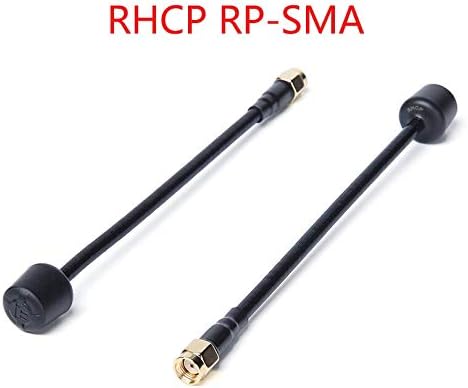
Figure 2.1: Albatross Antennas with RHCP RP-SMA and SMA Male Connectors. It is important to match the antenna's connector to the corresponding port on your FPV equipment.
2.2 アンテナの接続
- Carefully align the antenna's connector with the corresponding port on your FPV goggles (e.g., Fatshark EV200D) or drone's VTX.
- Gently screw the antenna onto the port. Do not overtighten, as this can damage the connector. Hand-tightening is usually sufficient.
- Ensure the connection is secure to prevent signal loss during operation.

Figure 2.2: Antenna Connected to FPV Goggles. The antenna should be securely attached to the video receiver (VRX) port on your goggles for clear video reception.
2.3 Polarization Matching
For best signal quality, ensure that the polarization of your transmitting antenna (on the drone) matches the polarization of your receiving antenna (on the goggles). Both should be either Right-Hand Circularly Polarized (RHCP) or Left-Hand Circularly Polarized (LHCP).
3. 運用ガイドライン
The iFlight Albatross antenna is designed for 5.8GHz FPV systems. Adhere to the following guidelines for optimal performance:
- 周波数範囲: Operate within the 5000-6000MHz frequency range for which the antenna is optimized.
- 視線: Maintain a clear line of sight between your drone's transmitting antenna and your FPV goggles' receiving antenna for the strongest signal.
- アンテナの向き: While circular polarization reduces multipath interference, orienting your antennas generally towards each other can improve signal strength, especially at longer distances.
- 障害物を避けてください: Physical obstructions like trees, buildings, or dense foliage can significantly degrade signal quality.
4. メンテナンスとケア
To ensure the longevity and consistent performance of your iFlight Albatross antennas, follow these maintenance tips:
- クリーンコネクタ: Periodically inspect and clean the gold-plated connectors to remove any dirt, dust, or corrosion. Use a soft, dry cloth or a cotton swab with isopropyl alcohol if necessary.
- 曲げを避ける: While the antenna cable is flexible (RG141), avoid sharp bends or excessive force that could damage the internal wiring or the connector joint.
- ストレージ: Store antennas in a clean, dry environment away from extreme temperatures and direct sunlight when not in use.
- 物理検査: Regularly check the antenna for any signs of physical damage, such as frayed cables, bent connectors, or cracks in the housing.

Figure 4.1: Flexible Design of Albatross Antennas. While flexible, avoid extreme bending to prevent internal damage.
5。 トラブルシューティング
If you experience issues with your iFlight Albatross antenna, consider the following troubleshooting steps:
- Poor Signal/Video Breakup:
- Ensure both transmitting and receiving antennas have matching polarization (RHCP to RHCP, LHCP to LHCP).
- Check all connections for tightness and cleanliness. A loose or dirty connection can significantly degrade signal.
- Verify that your FPV system is operating on the correct frequency channel.
- Reduce distance to the drone or move to an area with fewer obstructions.
- Inspect antennas for physical damage. Even minor damage can affect performance.
- Antenna Not Fitting:
- Confirm that you have the correct connector type (SMA vs. RP-SMA) for your device. SMA and RP-SMA connectors are similar but not interchangeable.
6. 仕様
Detailed technical specifications for the iFlight Albatross 5.8GHz FPV Antenna:
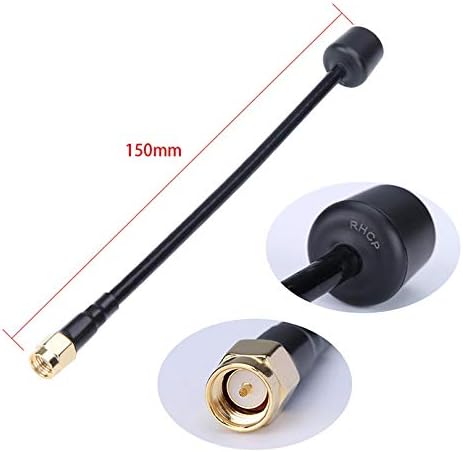
Figure 6.1: Antenna Dimensions and Connector Detail. The 150mm length provides flexibility in mounting, and the robust connector ensures a reliable link.
| 属性 | 価値 |
|---|---|
| モデル | Albatross 5.8GHz FPV Antenna |
| 周波数範囲 | 5000-6000MHz |
| 得 | 3dBi |
| 軸比 | 0.7 |
| ケーブルタイプ | RG141 |
| 重さ | 10.9g (per antenna) |
| 寸法 | 16×150mm |
| インターフェースオプション | RHCP SMA, RHCP RP-SMA, LHCP RP-SMA |
| 偏光 | RHCP/LHCP |
| スワロフスキー | ≤1.5 (ON 5.8GHz) |
| パッケージ寸法 | 6.2 x 1.1 x 0.39インチ |
| 商品重量(パッケージ) | 1.12オンス |
| メーカー | iFlight |
| モデル番号 | MC36557-9-2 |
| 初回利用可能日 | 7年2020月XNUMX日 |
| アイテム数 | 2 (Antennas) |
7. 保証とサポート
Specific warranty information for the iFlight Albatross 5.8GHz FPV Antenna is not provided in this manual. For details regarding warranty coverage, terms, and conditions, please refer to the official iFlight webサイトをご覧いただくか、カスタマー サポートに直接お問い合わせください。
For technical support, product inquiries, or assistance with troubleshooting beyond the scope of this manual, please visit the iFlight Store on Amazon or the official iFlight support channels.