
PowerPac PPFS212B 2-in-1 Dual-Usage Stand Fan Instruction Manual
Model: PPFS212B
1. 重要な安全情報
本製品をご使用になる前に、すべての取扱説明書をよくお読みになり、大切に保管してください。これらの取扱説明書に従わない場合、感電、火災、または重傷を負う可能性があります。
- ボリュームを確保するtag定格ラベルに表示されているeは主電源の供給電圧と一致していますtage.
- ファン、プラグ、コードを水やその他の液体に浸さないでください。
- Unplug the fan from the power outlet before cleaning, assembling, or disassembling parts.
- ファンが作動しているときは、指、鉛筆、またはその他の物体をファン グリルに近づけないでください。
- コードやプラグが損傷している状態でファンを作動させないでください。修理は資格のあるサービス担当者にご連絡ください。
- This appliance is equipped with thermal fuse protection against overheating. If the fan stops working unexpectedly, unplug it and allow it to cool before attempting to restart.
- この機器は、安全に責任を負う人物による機器の使用に関する監督または指示がない限り、身体的、感覚的、または精神的能力が低下している人、あるいは経験と知識が不足している人(子供を含む)による使用を想定していません。
2.製品オーバーview
The PowerPac PPFS212B is a versatile 2-in-1 dual-usage stand fan designed for efficient cooling in indoor environments. It features 7 blades for maximum airflow, 3-speed settings, and an oscillation function for wider air distribution. The fan is equipped with thermal fuse protection for enhanced safety.
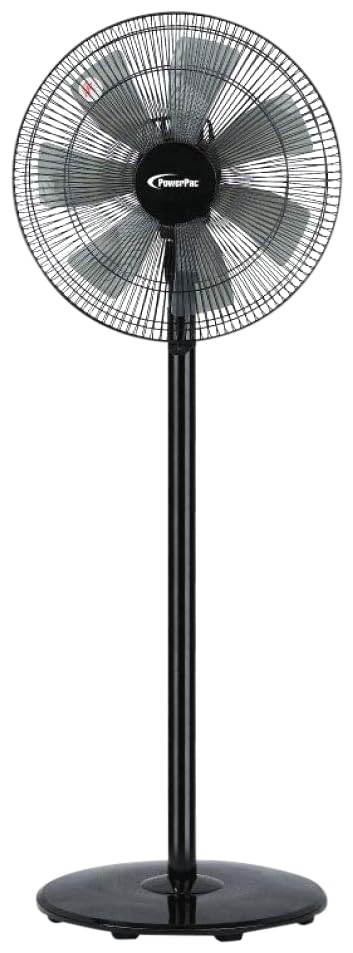
Image: PowerPac PPFS212B 2-in-1 Dual-Usage Stand Fan, showcasing its black finish and stand configuration.
3. パッケージ内容
開封したらパッケージの内容を確認し、すべての部品が揃っていて損傷がないことを確認してください。
- 1 x PowerPac PPFS212B Stand Fan (includes fan head, stand pole, and base)
4. 組み立て手順
Follow these steps to assemble your PowerPac PPFS212B fan:
- すべてのコンポーネントをパッケージから慎重に取り出します。
- Attach the stand pole to the fan base. Ensure it is securely fastened according to the markings or locking mechanism.
- Mount the fan head assembly onto the top of the stand pole. Align the connection points and secure it firmly.
- Ensure all screws and fasteners are tightened to prevent wobbling during operation.
- 組み立てたファンを安定した平らな面に置きます。
Image: Illustrative diagram of the PowerPac PPFS212B fan assembly, showing the base, stand, and fan head components.
5. 操作手順
To operate your PowerPac PPFS212B fan:
- 電源コードを適切な電源コンセントに差し込みます。
- 電源オン/オフ: Press the 'ON/OFF' button (or corresponding button) on the control panel to turn the fan on or off.
- 速度調整: Press the 'SPEED' button repeatedly to cycle through the 3 available speed settings (Low, Medium, High).
- 振動機能: Press the 'OSC' button (or corresponding button) to activate or deactivate the oscillation feature, which allows the fan head to sweep from side to side.
- When finished, press the 'ON/OFF' button to turn off the fan and unplug it from the power outlet.
6. メンテナンスと清掃
Regular cleaning and maintenance will help ensure optimal performance and longevity of your fan:
- 清掃する前に、必ずファンを電源から抜いてください。
- 柔らかくてamp cloth to wipe the exterior surfaces of the fan. Do not use abrasive cleaners, solvents, or harsh chemicals.
- To clean the fan blades, carefully remove the front grille (if detachable) according to the product design. Wipe the blades with a soft cloth. Ensure all parts are dry before reassembling.
- モーターハウジング内に水が滴下しないようにしてください。
- 長期間使用しない場合は、ファンを涼しく乾燥した場所に保管してください。
7。 トラブルシューティング
ファンに問題が発生した場合、一般的な問題と解決策については次の表を参照してください。
| 問題 | 考えられる原因 | 解決 |
|---|---|---|
| ファンが作動しません。 | 電源がありません。 Thermal fuse activated. | プラグがコンセントにしっかりと差し込まれているか確認してください。 電源コンセントが機能していることを確認してください。 Unplug and allow the fan to cool down for 30 minutes before restarting. |
| 空気の流れが弱い、または全くない。 | ファン速度の設定が低すぎます。 ファンブレードが汚れています。 | ファン速度設定を上げます。 Unplug the fan and clean the blades as per maintenance instructions. |
| ファンは振動しません。 | 発振機能はオフです。 | Press the 'OSC' button to activate oscillation. |
| 動作中に異常な音がする。 | 部品が緩んでいる。 妨害。 | Unplug the fan and check for any loose components or obstructions around the blades or motor. Tighten any loose parts. |
これらの解決策を試しても問題が解決しない場合は、カスタマー サポートにお問い合わせください。
8. 仕様
| 特徴 | 仕様 |
|---|---|
| ブランド | パワーパック |
| モデル番号 | PPFS212B |
| タイプ | 2-in-1 Dual-Usage Stand Fan |
| ブレード数 | 7 |
| 速度の数 | 3 |
| 電源 | コード式電気 |
| ワットtage | 50ワット |
| 制御方法 | プッシュボタン |
| 特集 | Oscillating, Thermal Fuse Protection |
| 材料 | プラスチック |
| 屋内/屋外での使用 | 屋内 |
| 色 | 黒 |
9. 保証とサポート
This PowerPac PPFS212B fan comes with a 2年間保証 ご購入日から有効です。この保証は、通常の使用条件下での製造上の欠陥を対象としています。
For warranty claims, technical support, or any inquiries regarding your product, please contact PowerPac customer service. Keep your proof of purchase for warranty validation.