
1.製品オーバーview
The Cello C2220FSDE is a compact 22-inch Full HD LED television designed for versatile use. It features an integrated DVD player and a triple tuner (DVBT2/S2) for comprehensive signal reception. Its sleek design makes it suitable for various environments, including guest rooms, motorhomes, caravans, trucks, or boats.
Key features include HDMI and USB inputs for connecting external devices like game consoles and hard drives. The USB functionality also supports recording live television and playing stored media. This TV can also function as a monitor for laptops or desktop computers.

画像1.1: The integrated DVD player allows for direct playback of DVDs without additional devices.

画像1.2: Experience clear and detailed images with Full HD 1080p resolution.
2. セットアップとインストール
2.1 開梱と内容物
すべての部品をパッケージから慎重に取り出します。以下のものがすべて揃っていることを確認してください。
- 1 x Cello 22-inch LED TV
- 電源コード
- リモートコントロール
- クイックスタートガイド
- 単2電池XNUMX本
- テレビスタンド
2.2 スタンドの取り付け
Place the TV screen face down on a soft, clean surface to prevent scratches. Align the stand with the mounting holes on the bottom of the TV and secure it using the provided screws.
2.3 Connecting Power and Antenna
- 電源コードをテレビの電源入力に接続し、次に壁のコンセントに接続します。
- Connect your TV aerial cable to the 'TV Aerial' input on the back of the TV.
- For satellite reception, connect a satellite dish cable (not supplied) to the 'DVB-S2' input.

画像2.1: 後方 view of the TV showing power, antenna, and other connectivity ports.
2.4 外部デバイス接続
このテレビには、外部デバイスを接続するためのさまざまなポートがあります。
- HDMI: Blu-ray プレーヤー、ゲーム コンソール、セットトップ ボックスなどの高解像度デバイスを接続します。
- USB: メディアの再生または録音のために USB ストレージ デバイスを接続します。
- VGA: コンピューターを接続してモニターとして使用します。
- 3.5mm オーディオ出力: 外部ヘッドフォンまたはスピーカーを接続します。

画像2.2: Illustration of HDMI and USB ports for connecting various devices.

画像2.3: The integrated satellite tuner allows connection to a satellite dish for satellite TV reception.
3. 操作手順
3.1 初回電源投入とチャンネルスキャン
- リモコンに単 XNUMX 形電池を挿入します。
- リモコンまたはテレビの電源ボタンを押して電源を入れます。
- Follow the on-screen instructions for initial setup, including language selection and automatic channel scanning for DVB-T2 (terrestrial) and DVB-S2 (satellite) signals.
3.2 テレビの基本機能
- チャンネル選択: Use the 'CH+' / 'CH-' buttons or the numeric keypad on the remote control.
- 音量コントロール: Use the 'VOL+' / 'VOL-' buttons.
- ソースの選択: Press the 'SOURCE' button to switch between inputs (TV, HDMI, USB, DVD).
- メニューナビゲーション: Use the 'MENU' button to access settings and navigation arrows to browse.
3.3 Integrated DVD Player Operation
- テレビの電源がオンになっており、入力ソースが「DVD」に設定されていることを確認します。
- Gently insert a DVD disc into the slot on the side of the TV, label side facing the mirror side (as indicated on the slot).
- The DVD should load automatically. Use the remote control for playback functions (Play, Pause, Stop, Skip).
3.4 USB Recording and Media Playback
- メディア再生: Insert a USB storage device into the USB port. Select 'USB' as the input source. Navigate through your files (photos, music, videos) using the remote control.
- USB Recording (PVR): While watching live TV, insert a USB storage device. Press the 'RECORD' button on the remote to start recording. You can also use the 'PAUSE' function for time-shifting live TV.
ビデオ3.1: This video demonstrates the physical controls on the TV and the various input/output ports available on the back and side of the unit, including the DVD slot, USB, HDMI, and antenna connections.
4. メンテナンス
4.1 テレビの掃除
- 掃除をする前に必ずテレビの電源プラグをコンセントから抜いてください。
- 画面とキャビネットの汚れは、柔らかく乾いた布で拭いてください。頑固な汚れには、軽く拭いてください。amp布に水または低刺激性の非研磨性のスクリーンクリーナーを含ませます。
- Do not use alcohol, benzene, thinners, or other volatile substances, as they may damage the screen or finish.
4.2 DVD Player Care
- Keep the DVD slot free from dust and debris.
- Only insert clean, undamaged discs.
5。 トラブルシューティング
If you encounter issues with your Cello TV, refer to the following common problems and solutions:
| 問題 | 考えられる原因 | 解決 |
|---|---|---|
| 電源なし | 電源コードが接続されていない、電源コンセントに障害がある | 電源コードの接続を確認し、別のコンセントを試してください |
| 映像はないが、音声はある | 入力ソースが正しく選択されていません。ケーブル接続に問題があります。 | Press 'SOURCE' to select correct input; check HDMI/VGA cable connections |
| 音はないが、映像は表示される | Volume too low or muted; external audio device issue | Increase volume; check mute status; ensure external audio devices are connected correctly |
| 画質が悪い(テレビチャンネル) | Weak antenna signal; incorrect antenna connection | Adjust antenna position; check antenna cable connection; perform a channel rescan |
| DVDが再生されない | Disc inserted incorrectly; dirty or damaged disc; incorrect source selected | Re-insert disc correctly; clean or replace disc; select 'DVD' source |
| リモコンが動作しない | Batteries depleted or inserted incorrectly; obstruction between remote and TV | Replace batteries; ensure correct polarity; remove obstructions; point remote directly at TV sensor |
For further assistance, please refer to the support section or the full instruction manual available online.
6. 仕様
Below are the detailed technical specifications for the Cello C2220FSDE 22-inch Full HD LED TV:
| 特徴 | 仕様 |
|---|---|
| 画面サイズ | 22インチ(対角54.6cm) |
| ブランド | チェロ |
| ディスプレイ技術 | 導かれた |
| 解決 | 1080p (Full HD, 1920 x 1080 pixels) |
| リフレッシュレート | 60Hz |
| 特集 | 統合DVDプレーヤー |
| 接続技術 | HDMI、USB、VGA |
| アスペクト比 | 16:9 |
| 製品寸法(奥行き×幅×高さ) | 幅5cm×奥行50.4cm×高さ34.2cm |
| アイテム重量 | 2.55キログラム |
| コントラスト比 | 600:1 |
| 最大輝度 | 180 NIT Coating |
| HDR サポート | 高画質 |
| 応答時間 | 10ミリ秒 |
| チューナータイプ | DVB-C、DVB-S2、DVB-T2 |
| オーディオ出力モード | ステレオ |
| スピーカーの説明 | 2 x 3 W Pitch Perfect Sound |
| 消費電力 | 21kWh |
| 巻tage | 230 Volts (100-240 V AC 50-60 Hz) |
| VESAマウント規格 | 100×100ミリ |
| モデル年 | 2023 |
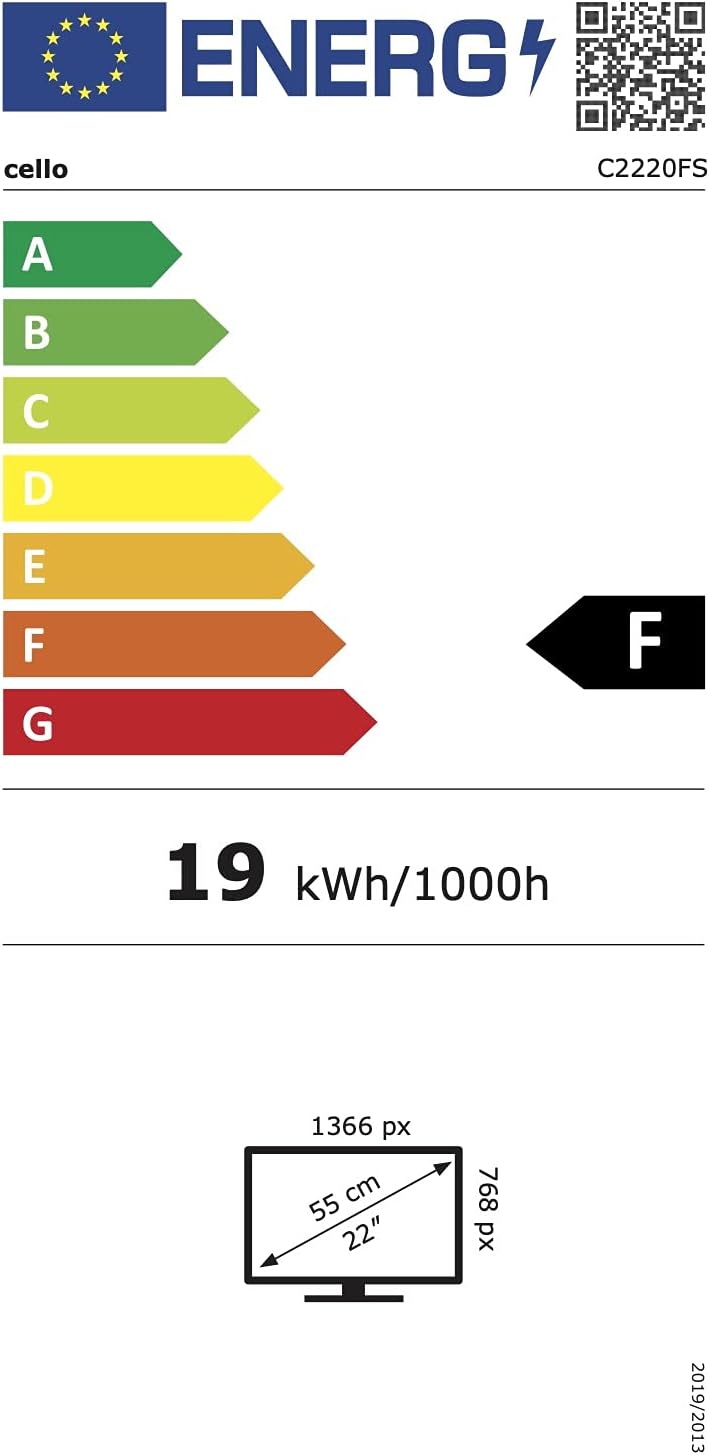
画像6.1: Energy efficiency label for the Cello C2220FSDE TV. For more details, visit EPRELデータベース.

画像6.2: Detailed product information sheet. For more details, visit EPRELデータベース.
7. 保証とサポート
7.1 保証情報
This Cello TV comes with a 1年間の限定保証保証請求のために購入証明書を保管してください。
7.2 カスタマーサポート
For technical support or customer service, please contact Cello Electronics:
- Webサイト: www.celloelectronics.de
- メールアドレス: consumersupport@celloelectronics.com
- 電話: 03334330312
- 住所: Dovecot Hills, Bishop Auckland, DL14 6XW Durham, United Kingdom
You can also download the full instruction manual for your device in your preferred language from the official Cello webサイト: https://celloelectronics.de/instruction-books/.