
MERCUSYS MR50G
Mercusys MR50G AC1900 Dual-Band Wi-Fi 5 Router User Manual
モデル: MR50G
導入
This manual provides comprehensive instructions for setting up, operating, maintaining, and troubleshooting your Mercusys MR50G AC1900 Dual-Band Wi-Fi 5 Router. The MR50G is designed to deliver high-speed wireless connectivity with AC1900 speeds, Gigabit Ethernet ports, and advanced features like MU-MIMO and Beamforming.

画像: 正面 view of the Mercusys MR50G router, illustrating its dual-band capabilities with 5GHz (1300 Mbps) and 2.4GHz (600 Mbps) speeds.
セットアップガイド
1. パッケージ内容
パッケージに次のアイテムが含まれていることを確認してください。
- Mercusys MR50G AC1900 Dual-Band Wi-Fi 5 Router
- 電源アダプター
- イーサネットケーブル
- Quick Installation Guide (User Guide)
2. 物理的な接続
ルーターを接続するには、次の手順に従ってください。
- 電源を切る: モデムとルーターの電源を外します(該当する場合)。
- モデムをルーターに接続します。 Connect one end of the provided Ethernet cable to the WAN port (usually blue) on your MR50G router and the other end to your modem's Ethernet port.
- デバイスを接続する(オプション): For wired connections, connect your computer or other devices to the LAN ports (yellow) on the MR50G router using Ethernet cables.
- 電源オン: Connect the power adapter to the router's power port and plug it into a power outlet. Power on your modem, then power on the MR50G router.
- インジケーターを待つ: Wait for the router's LED indicators to stabilize. The Power LED should be solid green.
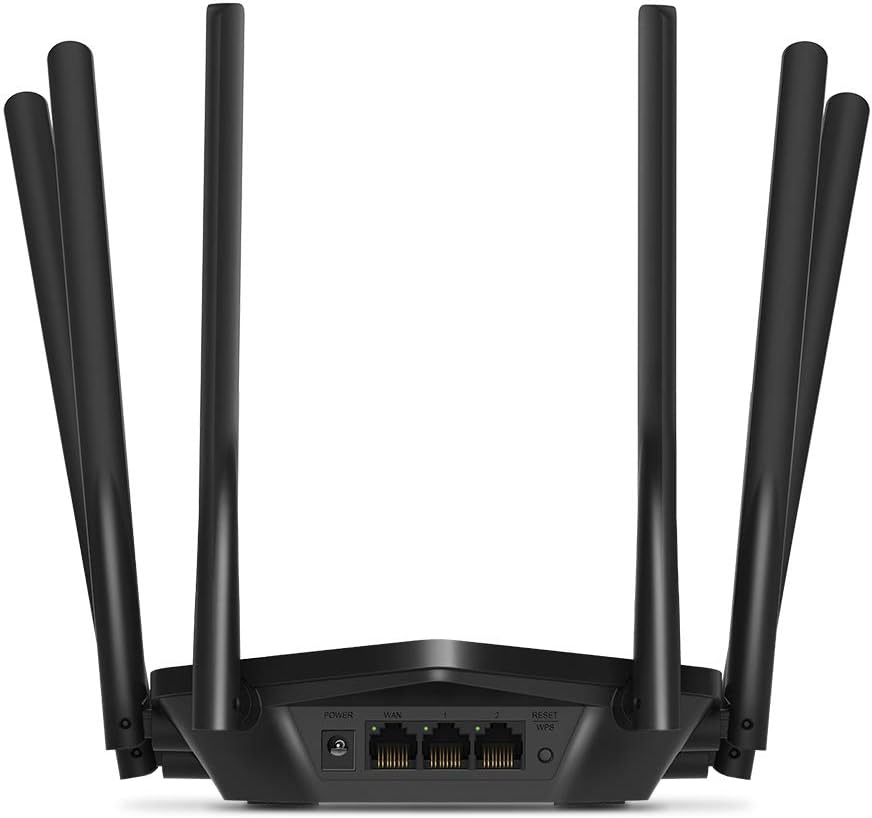
画像: 背面 view of the Mercusys MR50G router, illustrating the power input, WAN port (blue), and three LAN ports (yellow) for wired connections, along with the Reset/WPS button.
3. 初期設定
ルーターを初めて設定するには:
- Wi-Fiに接続します: Connect your computer or mobile device to the router's default Wi-Fi network (SSID and password are typically printed on a label on the bottom of the router).
- アクセス Web インタフェース: 開く web ブラウザとタイプ
mwlogin.netor192.168.1.1アドレスバーに入力します。 - ログインパスワードを作成: Follow the on-screen instructions to create a login password for the router's management page.
- クイックセットアップに従ってください: The Quick Setup wizard will guide you through basic internet and wireless settings.
操作手順
1. Basic Wi-Fi Settings
ログイン後 web インタフェース:
- ネットワーク名(SSID): Navigate to the Wireless settings to change your Wi-Fi network names (SSIDs) for both 2.4 GHz and 5 GHz bands.
- パスワード: Set a strong, unique password for your Wi-Fi networks. The MR50G supports WPA3 for enhanced security.
- セキュリティの種類: It is recommended to use WPA2-PSK/WPA3-Personal for optimal security.
2. デュアルバンド操作
The MR50G operates on two frequency bands:
- 2.4GHz: より広い範囲をカバーし、壁をよりよく貫通するので、一般的なインターネットの使用や古いデバイスに適しています。
- 5GHz: Offers faster speeds and less interference, ideal for bandwidth-intensive activities like 4K streaming and online gaming, but with a shorter range.
You can configure separate SSIDs for each band or use Smart Connect to combine them into a single SSID, allowing the router to automatically assign devices to the optimal band.
3. アクセスポイントモード
To use the MR50G as an Access Point (AP) to extend an existing wired network:
- 接続する: Connect an Ethernet cable from your existing router's LAN port to one of the MR50G's LAN ports (not the WAN port).
- 設定: Log into the MR50G's web interface, navigate to the Operation Mode settings, and select "Access Point Mode". Follow the prompts to complete the setup.
4. 高度な機能
- MU-MIMO: Multi-User, Multiple-Input, Multiple-Output technology allows the router to communicate with multiple devices simultaneously, improving network efficiency.
- ビームフォーミング: Wi-Fi 信号を接続されたデバイスに集中させ、信号強度と範囲を強化します。
- VPN サポート: The router supports VPN functionality, allowing for secure remote access or connection to VPN services. Refer to the router's web interface for specific VPN client/server configurations.
- ペアレンタルコントロール: 特定のデバイスまたはユーザーのインターネット アクセスを管理および制限します。
- ゲストネットワーク: メインネットワークを安全に保ちながら、ゲスト用に別の Wi-Fi ネットワークを作成します。
メンテナンス
1. ファームウェアのアップデート
Regularly check for and install firmware updates to ensure optimal performance, security, and access to new features. Firmware updates can typically be found in the router's web interface under System Tools or Advanced settings.
2. ルーターのリセット
If you encounter persistent issues or forget your login password, you may need to reset the router to its factory default settings:
- With the router powered on, press and hold the Reset/WPS button on the back panel for approximately 5-10 seconds until the LED indicators flash.
- ボタンを放し、ルーターが再起動するまでお待ちください。すべての設定が工場出荷時のデフォルトに復元されます。
3. 最適な配置
For the best Wi-Fi coverage and performance:
- Place the router in a central location in your home or office.
- Wi-Fi 信号に干渉する可能性のある厚い壁、金属物、大型家電 (電子レンジ、冷蔵庫) などの障害物の近くに置かないでください。
- Wi-Fi 信号は下方向に広がる傾向があるため、可能であればルーターを高く設置してください。

Image: Mercusys MR50G router positioned on a table, demonstrating a typical placement for optimal signal distribution within a living space.
トラブルシューティング
1. インターネットアクセスなし
- 接続を確認してください: すべてのイーサネット ケーブルが正しいポート (WAN からモデム、LAN からデバイス) にしっかりと接続されていることを確認します。
- デバイスを再起動します。 Power cycle your modem, then the router, and then your connected devices.
- WAN LED を確認します。 Verify that the WAN LED on the router is lit, indicating a connection to the modem.
- ISP ステータス: インターネットサービスプロバイダ(ISP)に問い合わせて、サービスが停止していないことを確認してください。tagあなたの地域のes。
2. Wi-Fi速度が遅い
- ルーターの配置: Ensure the router is placed optimally (refer to "Optimal Placement" section).
- 干渉: 干渉を引き起こす可能性のある他の電子機器からルーターを離してください。
- バンドの選択: For speed-critical applications, ensure your device is connected to the 5 GHz band.
- チャネル最適化: ルーターの web インターフェースで、2.4 GHz 帯域と 5 GHz 帯域の両方の Wi-Fi チャネルを混雑の少ないものに変更してみてください。
- ファームウェア: ルーターのファームウェアが最新であることを確認してください。
3. ルーターの管理ページにアクセスできない
- IPアドレス: 正しいアドレスを使用していることを確認してください(
mwlogin.netor192.168.1.1). - 有線接続: Try accessing the page from a computer connected directly to the router via an Ethernet cable.
- ブラウザのキャッシュをクリアする: クリアする web ブラウザのキャッシュと Cookie を削除するか、別のブラウザを試してください。
- ファイアウォール/ウイルス対策: アクセスをブロックしている可能性のあるコンピューター上のファイアウォールまたはウイルス対策ソフトウェアを一時的に無効にします。
- ルーターをリセット: If all else fails, perform a factory reset (refer to "Resetting the Router" section).
仕様
| モデル | MR50G (EU) |
| ワイヤレス規格 | IEEE 802.11a / b / gに/ nを/交流 |
| 頻度 | 2.4 GHz と 5 GHz (デュアルバンド) |
| データレート | AC1900 (2.4GHzで600Mbps、5GHzで1300Mbps) |
| イーサネットポート | ギガビット WAN ポート x 1、ギガビット LAN ポート x 3 |
| アンテナ | 6x Fixed Omni-Directional Antennas |
| 安全 | WPA-PSK / WPA2-PSK / WPA3-Personal |
| 寸法(幅×奥行き×高さ) | 15.72 x 17.56 x 4.5 cm |
| 重さ | 450グラム |
| 特集 | MU-MIMO, Beamforming, Access Point Mode, VPN Support, Parental Controls, Guest Network |
| 電源入力 | 100-240V ~ 50/60Hz |
保証とサポート
Mercusys products come with a limited warranty. For detailed warranty information, please refer to the warranty card included with your product or visit the official Mercusys webサイト。
For technical support, firmware updates, and additional resources, please visit the Mercusys support webサイト。通常、連絡先情報やよくある質問はそこに記載されています。
Official Mercusys Webサイト: www.mercusys.com