
1. はじめに
The KETOTEK DC 6.5-100V 20A Voltmeter Ammeter is a versatile 4-in-1 digital multimeter designed for measuring voltage, current, active power, and energy consumption in DC electrical systems. This device is suitable for indoor use and can monitor batteries, solar systems, electric bike generators, and other DC applications. It features a large LCD with backlight, voltage alarm function, energy reset, and power-off data storage. An integrated shunt simplifies installation.
2. パッケージ内容
パッケージにすべてのアイテムが揃っていることを確認してください:
- 1 x KETOTEK DC Voltmeter Ammeter (Model: KT-D132)
- ユーザーマニュアル x 1
3 製品の特徴
- 4 in 1測定: ボリュームを同時に表示tage、電流、有効電力、エネルギー。
- 広い測定範囲: DC 6.5-100V電圧tage, 0-20A current, 0-2kW active power, and 0-9999kWh energy.
- LCDディスプレイ: Large, clear LCD with blue backlight for easy readability.
- 巻tageアラーム: User-configurable voltage alarm threshold with flashing display.
- エネルギーリセット機能: Allows resetting accumulated energy data.
- データストレージ: Automatically saves data when power is off.
- Integrated Shunt: No external shunt required for current measurement up to 20A.

Image 1: The KETOTEK DC Voltmeter Ammeter displaying its four measurement parameters: voltage, current, power, and energy, along with their respective ranges.

Image 2: Visual representation of the meter's key functions: backlight control, voltage alarm, energy reset, and power-off data saving.
4. 仕様
| パラメータ | 価値 |
|---|---|
| ブランド | ケトテック |
| モデル | KT-D132 |
| スタイル | DC20A |
| 巻tag測定範囲 | DC 6.5V - 100V |
| 現在の測定範囲 | 0A - 20A |
| 有効電力測定範囲 | 0W - 2kW |
| エネルギー測定範囲 | 0kWh - 9999kWh |
| 最小稼働量tage | 6.5ボルトDC |
| 最大稼働量tage | 100ボルトDC |
| 電源 | Battery Powered (from measured circuit) |
| 表示タイプ | バックライト付きLCD |
| 寸法(長さ×幅×高さ) | 8.5 x 5 x 2.4 cm |
| アイテム重量 | 100グラム |
| 色 | 黒 |
| コンプライアンス | CE, 3C, FCC |
| 欧州連合 | 723260104911 |
| メーカー部品番号 | KT-0132 |
注記: The 20A current rating is for short-term loads. For continuous operation exceeding 15A, consider a higher amperage version (e.g., 50A or 100A) to prevent damage to the device.

Image 3: Detailed dimensions of the KETOTEK DC Voltmeter Ammeter (Model KT-D132).
5. 安全上の注意
- このデバイスは、 屋内使用のみ. Do not use it outdoors.
- Ensure the load does not exceed the rated voltage and current of the device (DC 6.5-100V, 20A).
- Always connect the device according to the provided wiring diagram. Incorrect wiring can lead to product damage or malfunction.
- If you intend to use a different connection method, consult with a qualified professional or contact customer support first.
- デバイスを水、湿気、極端な温度から遠ざけてください。
- デバイスを分解または変更しようとしないでください。
6.設置と配線
The KETOTEK DC Voltmeter Ammeter features an integrated shunt, simplifying the wiring process. Follow the diagram below for correct installation.
配線図
Connect the power supply and load as shown in the diagram. The device measures voltage across its input terminals and current through the integrated shunt.

Image 4: Wiring diagram for the KETOTEK DC Voltmeter Ammeter (Model KT-D132). Connect the positive and negative terminals of the DC input to the power supply, and the load in series with the current measurement path.
- Connect the positive terminal of your DC power supply to the '+' (DC input) terminal of the meter.
- Connect the negative terminal of your DC power supply to the '-' (DC input) terminal of the meter.
- Connect the positive terminal of your load to the '+' (Load) terminal of the meter.
- Connect the negative terminal of your load to the '-' (Load) terminal of the meter.
- 電源を入れる前に、すべての接続が安全かつ正しいことを確認してください。
7. 操作手順
The device operates automatically once connected to a DC power source within its specified voltage range. The LCD will display voltage, current, power, and energy simultaneously.
ボタンの機能
The meter features a single button on the right side of the display for various functions:
- ショートプレス: バックライトのオン/オフを切り替えます。
- 長押し(3秒): Resets the accumulated energy (kWh) data. The energy value will flash, then reset to 0.
- 長押し(5秒): Enters the voltage alarm setting mode.
巻tageアラーム設定
ボリュームを設定するにはtage alarm threshold:
- Press and hold the button for 5 seconds until the voltage value on the display starts flashing. This indicates you are in alarm setting mode.
- Short press the button to adjust the voltage alarm threshold. Each short press will increment the value.
- Once the desired threshold is set, press and hold the button again for 3 seconds to save the setting and exit the alarm mode.
- 測定された体積tage falls below the set alarm threshold, the display will flash to indicate a low voltag状態。
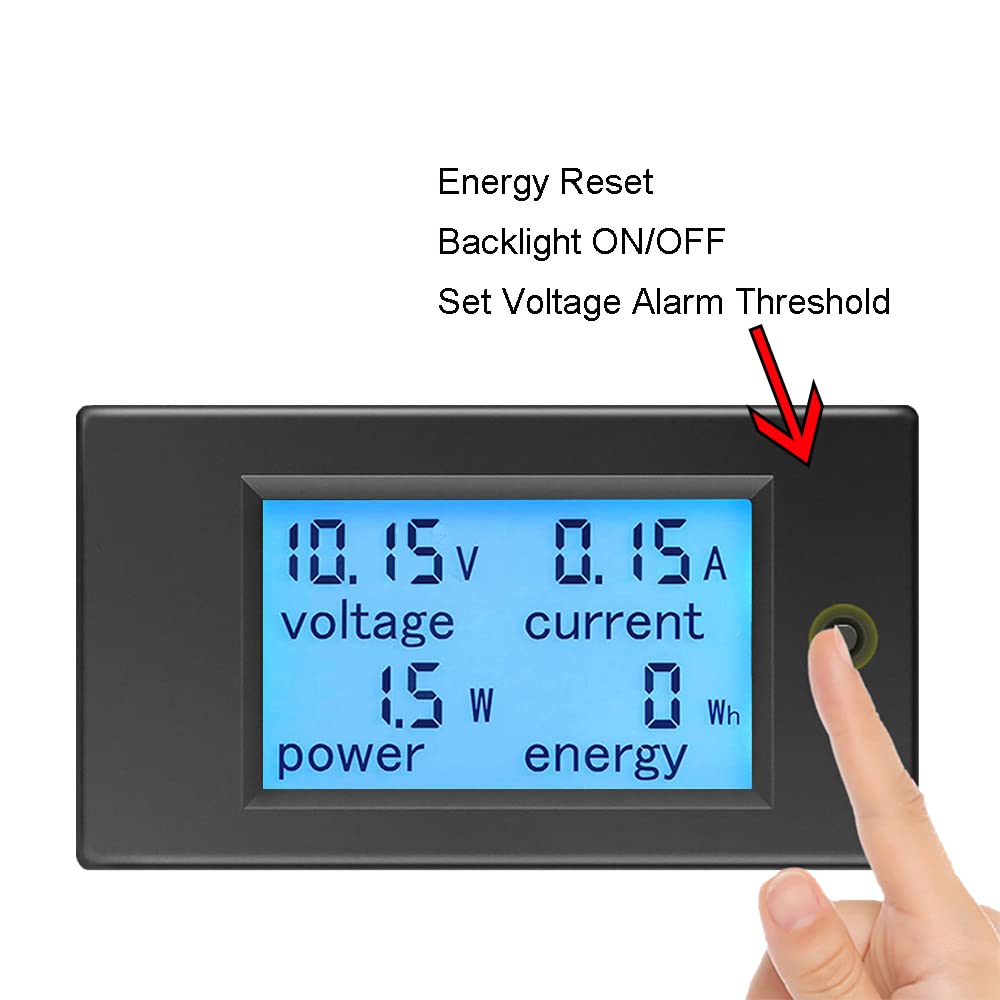
Image 5: Demonstrates the interaction with the control button for backlight, energy reset, and voltagアラーム設定。
8. メンテナンス
- Keep the device clean and dry. Use a soft, dry cloth to wipe the display and casing.
- 研磨剤入りのクリーナーや溶剤の使用は避けてください。
- デバイスを使用しないときは、涼しく乾燥した場所に保管してください。
- 配線接続部の締め付け具合や摩耗の兆候を定期的に確認してください。
9。 トラブルシューティング
- 表示なし:
- Check if the DC input voltage is within the 6.5V-100V range. The device requires at least 6.5V to power on.
- すべての配線接続が正しく安全であることを確認します。
- Ensure the power supply is active.
- 間違った読み方:
- Confirm the wiring matches the diagram precisely. Incorrect current path can lead to inaccurate readings.
- Ensure the load current does not exceed 20A for continuous operation. Overloading can affect accuracy or damage the device.
- 接続が緩んでいないか、またはワイヤーが損傷していないか確認してください。
- Energy (kWh) Not Resetting:
- Ensure you are pressing and holding the button for approximately 3 seconds until the energy value flashes and resets.
- 巻tage Alarm Not Working:
- Verify the alarm threshold is set correctly by entering the alarm setting mode (long press for 5 seconds).
- Ensure the measured voltage is actually below the set threshold.
10. 保証とサポート
KETOTEK products are manufactured to high-quality standards. For warranty information, please refer to the terms and conditions provided at the time of purchase or contact your retailer. If you encounter any issues or require technical assistance, please contact KETOTEK customer support through the official website or your purchase platform. Provide your product model (KT-D132) and a detailed description of the issue for efficient support.