
1. はじめに
The T'nB Mood in-ear headphones (Model ESMOODBK) are designed for audio playback and hands-free communication. Featuring an integrated universal microphone and a flat, tangle-free cable, these earphones offer a convenient and reliable audio experience for various devices with a 3.5mm audio jack.

Image 1: T'nB Mood in-ear headphones showing the earbuds, inline microphone, and 3.5mm audio jack.
2. パッケージ内容
パッケージに以下の項目が含まれているか確認してください。
- 1 x T'nB Mood In-Ear Headphones (Model ESMOODBK)
- ユーザーガイド x 1
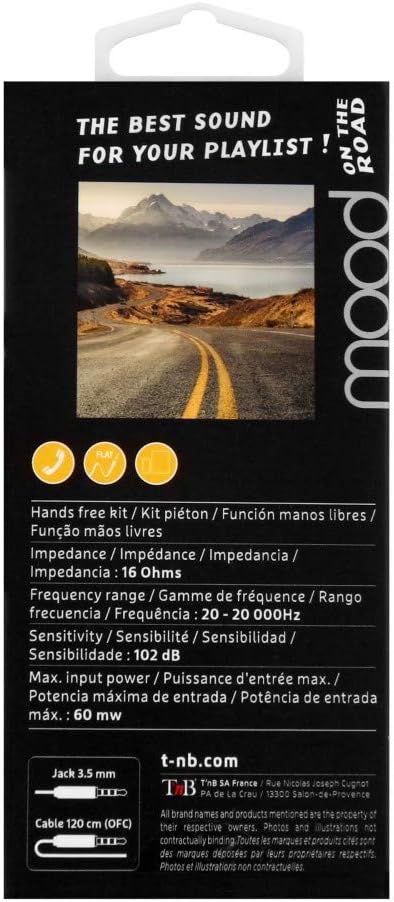
Image 2: Retail packaging for T'nB Mood headphones, highlighting key features and specifications.
3 製品の特徴
- Integrated Universal Microphone: ハンズフリー通話と音声コマンド用。
- Flat OFC Cable: Designed to prevent tangles and enhance durability.
- 3.5mm Jack Connector: 幅広いオーディオデバイスと互換性があります。
- 10mm Driver Diameter: クリアなオーディオ出力を実現します。
- 広い周波数範囲: 20 - 20,000 Hz for comprehensive sound reproduction.
- Optimal Impedance: 16 Ohms for efficient power usage.
- 120 cm Cable Length: 提供する amp快適な使用のためにリーチします。
4. セットアップ
- ヘッドフォンを開梱します。 Carefully remove the T'nB Mood headphones and user guide from the packaging.
- オーディオデバイスに接続します: Insert the 3.5mm audio jack firmly into the headphone port of your smartphone, tablet, computer, or other compatible audio device.
- イヤホンの位置: Place the earbuds comfortably into your ears. Ensure a snug fit for optimal sound quality and bass response.
- 音量を調整: オーディオを再生する前に、接続されたデバイスの音量を快適な聴取レベルに調整してください。
5. 操作手順
5.1 オーディオ再生
- Once connected, play audio from your device. Sound will be routed through the headphones.
- 接続されたデバイスから直接、再生 (再生/一時停止、トラックのスキップ) と音量を制御します。
5.2 Using the Universal Microphone
The T'nB Mood headphones feature an inline universal microphone for hands-free communication.
- 通話への応答/終了: When a call comes in, press the button on the inline microphone to answer. Press it again to end the call.
- 音声コマンド: Depending on your device, you may be able to activate voice assistants (e.g., Siri, Google Assistant) by pressing and holding the microphone button. Refer to your device's manual for specific instructions.
- マイクの配置: Ensure the microphone is positioned close to your mouth for clear voice transmission during calls.
6. メンテナンス
適切な手入れをするとヘッドフォンの寿命が延びます。
- イヤホンのクリーニング: 柔らかく乾いた、糸くずの出ない布でイヤホンを優しく拭いてください。刺激の強い化学薬品や研磨剤は使用しないでください。
- ケーブルのお手入れ: Avoid excessive pulling, twisting, or bending of the cable. The flat design helps prevent tangles, but proper handling is still recommended.
- ストレージ: 使用しない時は、ヘッドフォンを清潔で乾燥した場所に保管し、極端な温度や直射日光を避けてください。ケーブルをきつく巻きすぎないようにしてください。
- 湿気を避ける: ヘッドフォンを水や過度の湿気にさらさないでください。
7。 トラブルシューティング
If you encounter issues with your T'nB Mood headphones, please refer to the following common solutions:
- 音が出ない、または音量が小さい:
- 3.5mm ジャックがデバイスのオーディオ ポートに完全に挿入されていることを確認します。
- Check the volume level on your connected device and ensure it is not muted.
- Test the headphones with another audio device to rule out a device-specific issue.
- 音質が悪い(歪み、雑音):
- イヤホンが清潔でゴミなどがないことを確認してください。
- Verify the earbuds are properly seated in your ears for a good seal.
- 別のオーディオソースを試すか、 file to check if the issue is with the content.
- マイクが機能しない:
- Ensure the 3.5mm jack is fully inserted. A loose connection can affect microphone functionality.
- デバイスのオーディオ入力設定をチェックして、外部マイクが選択されていることを確認してください。
- 別のアプリケーションまたはデバイスでマイクをテストします。
8. 仕様
| ブランド | T'nB |
| モデル番号 | ESMOODBK |
| 色 | 黒 |
| フォームファクター | インイヤー |
| 接続技術 | 有線 |
| ヘッドホンジャック | 3.5ミリジャック |
| ドライバー直径 | 10ミリメートル |
| 周波数範囲 | 20~20,000Hz |
| インピーダンス | 16オーム |
| 最大入力電力 | 60mW |
| 感度 | 102デシベル |
| ケーブル長さ | 120センチ |
| 材料 | プラスチック |
| 含まれているコンポーネント | 1 x MOOD Earphones, 1 x User Guide |
9.保証とサポート
Specific warranty details for the T'nB Mood headphones are not provided within this manual. For information regarding warranty coverage, terms, and conditions, please refer to the documentation included with your purchase or contact T'nB customer support directly.
For technical support or further assistance, please visit the official T'nB webサイトまたは顧客サービス部門に連絡してください。