
導入
Thank you for choosing the T'nB Feat True Wireless Bluetooth Earbuds. This manual provides essential information for the proper setup, operation, and maintenance of your device. Please read it carefully before use and retain it for future reference.
パッケージ内容
パッケージにすべてのアイテムが揃っていることを確認します。
- T'nB Feat True Wireless Bluetooth Earbuds (Left and Right)
- 充電ケース
- マイクロUSB充電ケーブル
- ユーザーマニュアル(このドキュメント)
製品終了view
The T'nB Feat earbuds are designed for comfortable, wire-free audio. The compact charging case protects your earbuds and recharges them on the go.
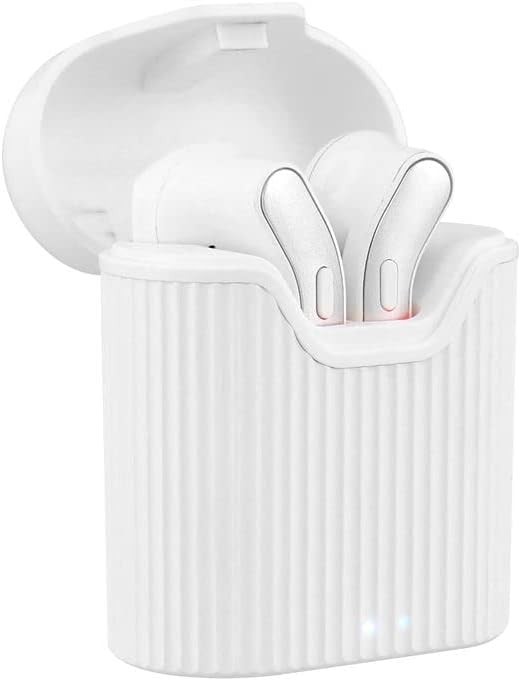
Image: T'nB Feat True Wireless Earbuds placed inside their open charging case, showing the earbuds and the interior of the case.

Image: The T'nB Feat True Wireless Earbuds charging case in a closed position, displaying its compact and portable design.
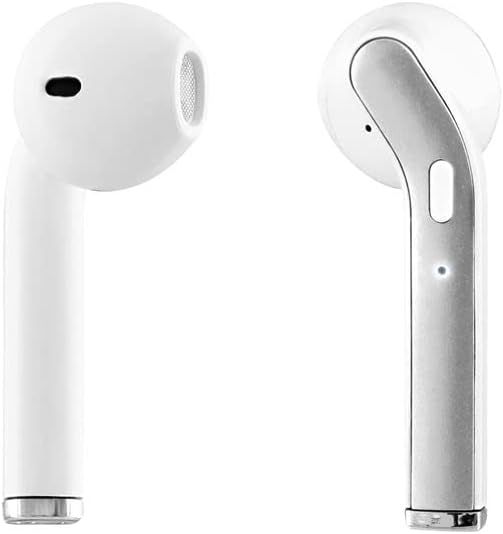
画像: クローズアップ view of the individual T'nB Feat True Wireless Earbuds, highlighting their ergonomic in-ear design.
設定
1. イヤホンとケースの充電
初めて使用する前に、イヤホンと充電ケースを完全に充電してください。
- イヤホンを充電ケースに入れます。充電ピンに正しく接触するように正しく装着されていることを確認してください。
- Connect the Micro USB charging cable to the charging port on the case and the other end to a USB power source (e.g., computer USB port, wall adapter).
- The indicator lights on the case and/or earbuds will show the charging status. Refer to the indicator light section for details (if applicable, otherwise assume standard behavior).
- 完全に充電されたら、充電ケーブルを取り外します。
注記: A full charge provides approximately 5 hours of operating time for the earbuds.
2. Bluetoothデバイスとのペアリング
The earbuds use Bluetooth 5.0 for a stable wireless connection.
- イヤホンが充電されていることを確認します。
- Open the charging case and remove both earbuds. They will automatically power on and enter pairing mode. You may hear an audio prompt or see flashing indicator lights.
- Bluetooth 対応デバイス (スマートフォン、タブレットなど) で、Bluetooth 設定に移動し、Bluetooth をオンにします。
- 検索する available devices. You should see "T'nB FEAT" or a similar name appear in the list.
- Select "T'nB FEAT" to connect. Once connected, you will hear a confirmation tone or the indicator lights will change.
- The earbuds are now paired and ready for use. They will automatically reconnect to the last paired device when removed from the case, if Bluetooth is enabled on the device.
イヤホンの操作
電源オン/オフ
- 電源オン: イヤホンを充電ケースから取り出します。自動的に電源が入ります。
- 電源を切る: イヤホンを充電ケースに戻します。自動的に電源がオフになり、充電が開始されます。
音楽再生に
The earbuds feature intuitive controls for music management. (Specific control actions may vary slightly based on earbud design, typically involving taps or presses on the earbud surface.)
- 再生/一時停止: どちらかのイヤフォンをXNUMX回タップします。
- 次のトラック: 右のイヤフォンをダブルタップします。
- 前のトラック: 左のイヤフォンをダブルタップします。
通話管理
With the built-in microphone, you can manage calls directly from your earbuds.
- 通話の応答/終了: Tap once on either earbud during an incoming call or an active call.
- 通話を拒否: 着信中にどちらかのイヤホンを約 2 秒間押し続けます。
メンテナンス
To ensure the longevity and optimal performance of your T'nB Feat earbuds, follow these maintenance guidelines:
- クリーニング: イヤホンと充電ケースのお手入れには、柔らかく乾いた糸くずの出ない布をご使用ください。研磨剤入りの洗剤、アルコール、化学溶剤は使用しないでください。
- ストレージ: 使用しないときは、イヤホンを充電ケースに入れて、ほこりや損傷から保護してください。涼しく乾燥した場所に保管してください。
- 水を避ける: イヤホンは防水ではありません。水、湿気、極端な温度にさらさないでください。
- 充電: 頻繁に使用しない場合でも、バッテリーの状態を維持するために定期的にデバイスを充電してください。
トラブルシューティング
イヤホンで問題が発生した場合は、次の一般的な解決策を参照してください。
| 問題 | 解決 |
|---|---|
| イヤホンがペアリング/接続されない |
|
| イヤフォンから音が出ない |
|
| イヤホンの接続が頻繁に切れる |
|
| 充電ケースが充電されない |
|
仕様
- モデル名: EBEATWH
- 接続性: 真のワイヤレスBluetooth5.0
- フォームファクター: インイヤー
- インピーダンス: 32オーム
- 感度: 95デシベル
- 営業時間: 約5時間
- マイクロフォン: Built-in Universal Microphone
- 充電ポート: マイクロUSB(ケース用)
- 特別な機能: Universal application, Cable-free design

Image: The retail packaging for the T'nB Feat True Wireless Earbuds, displaying key features and specifications.
保証とサポート
T'nB products are covered by a manufacturer's warranty. For specific warranty terms and conditions, please refer to the documentation provided with your purchase or visit the official T'nB website. For technical support or further assistance, please contact T'nB customer service through their official channels.