
1. はじめに
This manual provides detailed instructions for the setup, operation, and maintenance of your Metronic 477039 Digital Alarm Clock. Please read this manual thoroughly before using the device to ensure proper function and to maximize your user experience. Keep this manual for future reference.
2. 安全情報
- 電源アダプターがお住まいの地域の電源と互換性があることを確認してください。
- デバイスを水、湿気、または極端な温度にさらさないでください。
- デバイスを熱源の近くや直射日光の当たる場所に置かないでください。
- ご自身でユニットを分解したり修理したりしないでください。すべての修理は資格のある専門家にご依頼ください。
- お子様の手の届かない場所に保管してください。
- Use only the specified battery type (2 x AAA LR3, 1.5V) for backup. Ensure correct polarity when inserting batteries.
3. パッケージ内容
パッケージにすべてのアイテムが揃っていることを確認します。
- Metronic 477039 Digital Alarm Clock
- 電源アダプター
- ユーザーマニュアル(このドキュメント)
Note: AAA LR3 batteries for backup are not included and must be purchased separately.
4.製品オーバーview および機能
The Metronic 477039 is a versatile digital alarm clock designed for convenience and functionality. Key features include:
- AM/FM チューナー: Access up to 10 preset FM radio stations (frequency: 87.5 to 108.0MHz) with automatic search.
- 180° Projector: Project the time onto a wall or ceiling. The projection angle is adjustable from -90° to 90° for optimal viewing。
- デュアルアラーム: Set two independent alarms, choosing to wake up to a traditional buzzer or your favorite radio station.
- Sleep/Snooze Functions: The sleep timer allows you to fall asleep to the radio, which will automatically turn off after a set duration (10 to 90 minutes). The snooze function provides temporary alarm suspension.
- 調整可能なバックライト: The large red LED display offers adjustable brightness settings (strong, medium, or off) for comfortable viewing。
- バッテリーバックアップ: Optional 2x AAA LR3 (1.5V) batteries (not included) preserve time and alarm settings during power outages。

図1: 前面 view of the Metronic 477039 Digital Alarm Clock, displaying the time 8:00 in red LED digits.
5. セットアップ
5.1電源接続
- 付属の電源アダプターを目覚まし時計の背面にある DC 入力ポートに接続します。
- 電源アダプタを標準の電源コンセントに差し込みます。ディスプレイが点灯します。
5.2 バッテリバックアップのインストール
For uninterrupted timekeeping during power interruptions, install backup batteries:
- 本体下部の電池ボックスの位置を確認します。
- 電池ボックスのカバーを開きます。
- Insert two (2) AAA LR3 (1.5V) batteries, observing the correct polarity (+/-) as indicated inside the compartment.
- 電池カバーをしっかりと閉じてください。
Note: Batteries are for backup only and do not power the main functions of the clock.
5.3 初期時間設定
初回電源投入時または長時間電源を切った後tage without backup batteries, you may need to set the time:
- を押し続けます 時間設定 button (location may vary, refer to device diagram if available).
- 保持しながら 時間設定、使用 時間 そして 分 buttons (often labeled with arrows or +/-) to adjust the hour and minute respectively.
- リリース 時間設定 時間を確認するボタン。
6. 操作手順
6.1 Time Display and Brightness
- The current time is displayed on the large red LED screen.
- To adjust display brightness, press the ディマー button (or similar labeled button). Cycle through strong, medium, and off settings.
6.2 ラジオの操作(AM/FM)
- オン/オフ: を押す 無線 ラジオのオン/オフを切り替えるボタン。
- バンドを選択: 該当する場合は、 バンド button to switch between AM and FM. (This model specifies FM only, 87.5-108.0MHz).
- 自動ステーション検索: を押し続けます スキャン or チューン+/- button for a few seconds to automatically search for and store available FM stations. The device can store up to 10 stations.
- 手動チューニング: 短く押すと チューン+/- 周波数を手動で調整するためのボタン。
- プリセットの呼び出し: を押す プリセット or メモリ ボタンを押す チューン+/- 保存したステーション間を循環します。
- 音量調整: 使用 ボリューム+/- dial or buttons to adjust the sound level.
6.3 アラーム設定
The device supports two independent alarms (AL1 and AL2).
- アラーム時間の設定:
- を押し続けます アラーム1 or アラーム2 ボタン。
- 使用 時間 そして 分 ボタンを押して希望のアラーム時間を設定します。
- Release the alarm button to confirm.
- Select Alarm Source (Buzzer/Radio):
- アラーム時間を設定したら、 アラーム1 or アラーム2 button repeatedly to cycle through alarm modes: Buzzer, Radio, or Off. An indicator icon (e.g., bell for buzzer, radio tower for radio) will appear on the display.
- スヌーズ機能: アラームが鳴ったら、を押します スヌーズ button to temporarily silence it. The alarm will sound again after a few minutes (typically 9 minutes).
- アラーム停止: To turn off the alarm completely until the next set time, press the アラームオフ button or the corresponding アラーム1/2 ボタンを1回押します。
6.4 投影関数
The integrated projector displays the time onto a surface.

Figure 2: The alarm clock projecting the time onto a surface, illustrating the projection feature.
- 有効化/無効化: を押す プロジェクター button (or similar icon) to turn the projection on or off.
- 角度の調整: Manually rotate the projector lens barrel (located on top of the unit) to adjust the projection angle up to 180 degrees.
- フォーカスを調整する: プロジェクター レンズの周りのフォーカス リングを回転させると、投影された画像が鮮明になります。

図 3: 拡大図 view of the projector lens on the Metronic 477039, showing the adjustable focus ring.
6.5スリープタイマー
スリープ タイマーを使用すると、ラジオは設定された時間再生された後、自動的にオフになります。
- ラジオの再生中に、 寝る ボタンを繰り返し押すと、利用可能なスリープ タイマーの長さ (例: 10、20、30、60、90 分、またはオフ) が切り替わります。
- 選択した時間が経過するとラジオは自動的にオフになります。
7. メンテナンス
- クリーニング: 柔らかく乾いた布で拭いてください。研磨剤入りの洗剤や溶剤は使用しないでください。
- バッテリー交換: If using backup batteries, replace them annually or when the display shows signs of instability during power outages。
- ストレージ: ユニットを長期間保管する場合は、液漏れを防ぐためにバックアップ電池を取り外してください。
8。 トラブルシューティング
| 問題 | 考えられる原因 | 解決 |
|---|---|---|
| No display/Unit not powering on | 電源アダプターが接続されていないか故障しています。コンセントが機能していません。 | 電源アダプターの接続を確認してください。別のコンセントをお試しください。 |
| アラームが鳴らない | Alarm not activated. Alarm volume too low (if radio alarm). Incorrect alarm time set. | Ensure alarm is set to Buzzer or Radio mode. Increase radio volume. Verify alarm time. |
| ラジオの受信状態が悪い | Antenna not extended or positioned correctly. Interference from other electronics. | Extend and adjust the FM wire antenna for better reception. Move the unit away from other electronic devices. |
| 予測時間が不明瞭 | Projection focus not adjusted. | Rotate the focus ring around the projector lens until the image is clear. |
| Time loses accuracy | 内部クロックのドリフト。 | This may indicate a unit defect. If persistent, contact customer support. Regularly reset the time if necessary. |
9. 仕様
| モデル番号 | 477039 |
| ブランド | メトロニック |
| 表示タイプ | デジタルLED(赤) |
| 無線周波数 | FM: 87.5 - 108.0 MHz |
| 電源 | AC Power Adapter (main), 2 x AAA LR3 1.5V batteries (backup, not included) |
| 製品寸法(長さ x 幅 x 高さ) | 18.8 x 6.2 x 8.2 cm(約) |
| 重さ | 440g(約) |
| 特集 | 180° Projector, Dual Alarm, Sleep Timer, Snooze Function, Adjustable Display Brightness, 10 FM Presets |
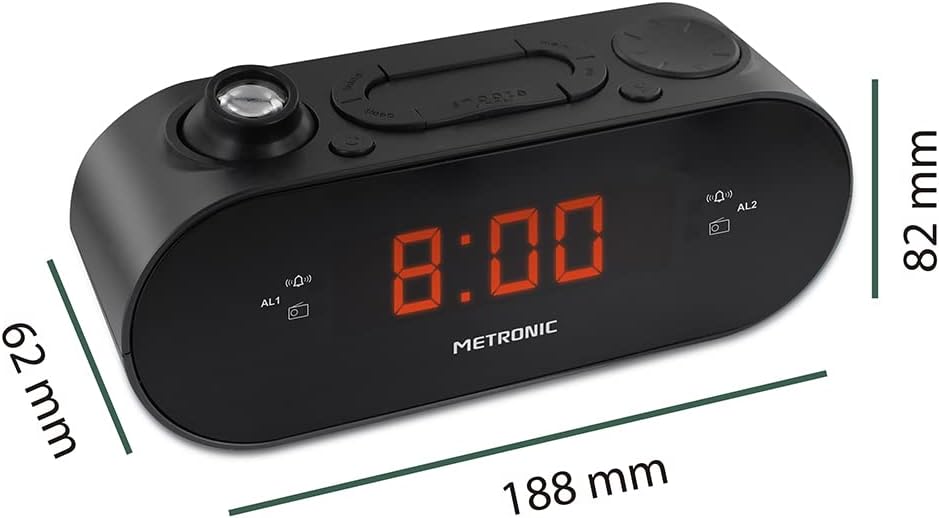
Figure 4: Diagram showing the dimensions of the Metronic 477039 Digital Alarm Clock: 188mm length, 62mm width, and 82mm height.
10. 保証とサポート
Metronic products are designed for reliability and performance. For warranty information or technical support, please refer to the warranty card included with your purchase or visit the official Metronic webサイトをご覧ください。サポートにお問い合わせの際は、モデル番号(477039)と購入の詳細をご用意ください。
さらに詳しいサポートが必要な場合は、 Metronic Brand Store on Amazon.