
エレクダーD19
ELECDER D19 完全ワイヤレスイヤホン ユーザーマニュアル
モデル: D19 | ブランド: ELECDER
1. はじめに
The ELECDER D19 True Wireless Earbuds are designed to provide a superior audio experience with advanced features such as Bluetooth 5.0 connectivity, noise cancellation, and IPX7 waterproofing. This manual provides comprehensive instructions for setting up, operating, and maintaining your earbuds to ensure optimal performance and longevity.
主な特徴:
- Bluetooth 5.0: Fast and stable wireless transmission with CVC8.0 noise cancellation for clear calls.
- Premium Hi-Fi Stereo Audio: APTX audio for lossless transmission, delivering immersive sound with crystal clarity and deep bass.
- IPX7防水性: Resistant to sweat, water, and rain, ideal for workouts and outdoor activities.
- 人間工学に基づいたデザイン: Lightweight (5g per earbud) with flexible silicone ear-fins and S/M/L ear caps for a secure and comfortable fit.
- Quick Pairing Technology: Automatic power-on and pairing upon removal from the charging case.
- USB Quick Charge & Wireless Charging: Up to 4.5 hours of music on a single charge, with an additional 18 hours from the charging case, supporting both USB and wireless charging.
2.製品オーバーview

Figure 2.1: ELECDER D19 True Wireless Earbuds in their charging case. The earbuds are black, sleek, and designed for in-ear use, while the compact charging case is also black with a smooth finish.
箱の中身:
- ELECDER D19 True Wireless Earbuds (Left and Right)
- 充電ケース
- USB充電ケーブル
- イヤーチップ(S/M/Lサイズ)
- ユーザーマニュアル(このドキュメント)
3.セットアップガイド
3.1 イヤホンとケースの充電
Before first use, fully charge the earbuds and the charging case. The charging case supports both USB cable charging and wireless charging.
- USB充電: Connect the provided USB cable to the charging port on the case and plug the other end into a USB power source (e.g., computer, wall adapter). The indicator light on the case will show charging status.
- ワイヤレス充電: Place the charging case on a compatible wireless charging pad. The indicator light will flash to confirm charging.

Figure 3.1: The ELECDER D19 charging case being charged wirelessly on a charging pad, also showing the Micro USB port for wired charging. This image highlights the dual charging capabilities of the case.
A full charge for the earbuds provides approximately 4.5 hours of music playback, and the charging case provides an additional 18 hours of battery life.
3.2 デバイスとのペアリング
The ELECDER D19 earbuds feature quick pairing technology for seamless connection.
- ステップ1: 充電ケースを開けて両方のイヤホンを取り出します。自動的に電源が入り、ペアリングされます。
- ステップ2: スマートフォンまたは Bluetooth 対応デバイスで、Bluetooth 設定に移動します。
- ステップ3: 検索する available devices and select "Elecder D19" from the list to connect.
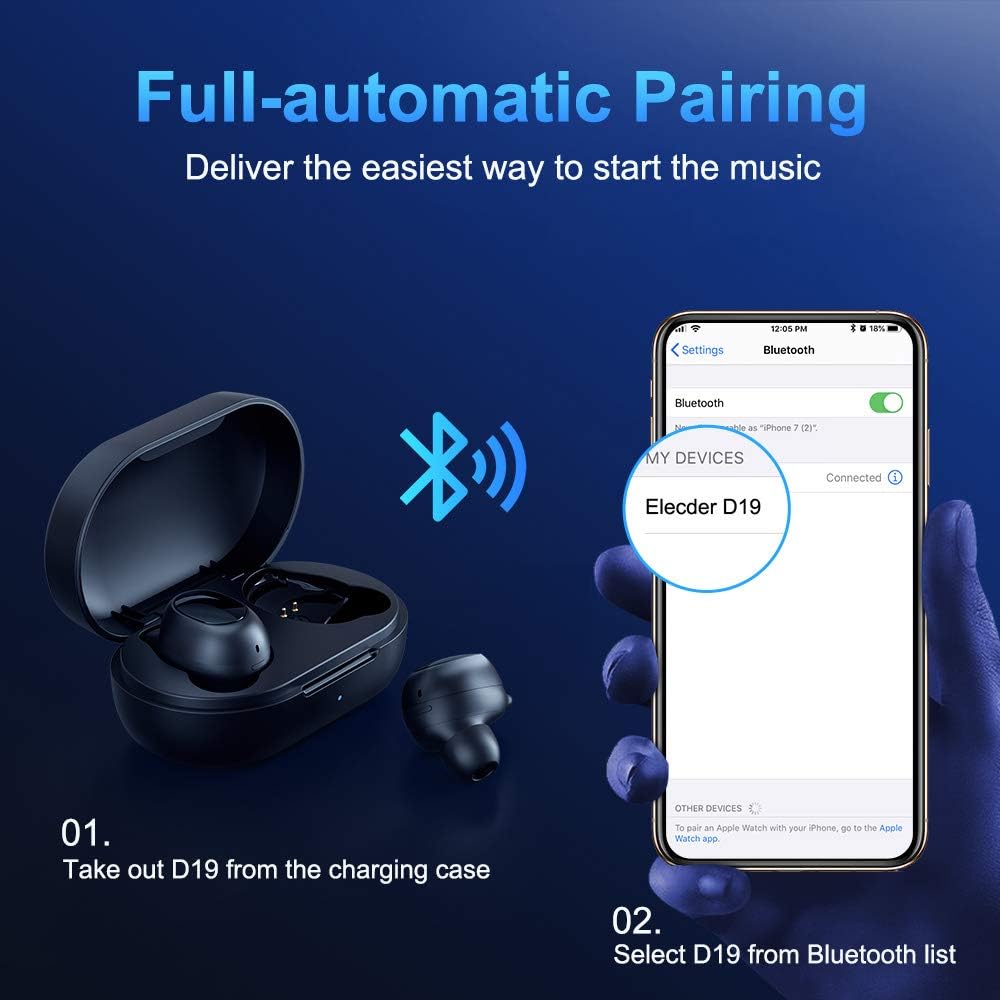
Figure 3.2: A visual guide demonstrating the automatic pairing process. The image shows the earbuds being taken out of the case and then the "Elecder D19" option appearing in a smartphone's Bluetooth settings for connection.
最初のペアリング後、イヤホンは充電ケースから取り出すと最後にペアリングしたデバイスに自動的に接続されます。

Figure 3.3: An illustration showing the stable Bluetooth connection between the ELECDER D19 earbuds and various smart devices, including smartphones and tablets.
4. 操作手順
4.1 イヤホンの装着
For optimal sound quality and comfort, choose the ear tips that best fit your ears. The earbuds come with S, M, and L sizes. Insert the earbuds into your ears and gently rotate them to find a secure and comfortable fit. The ergonomic ear-fin design helps ensure stability during movement.
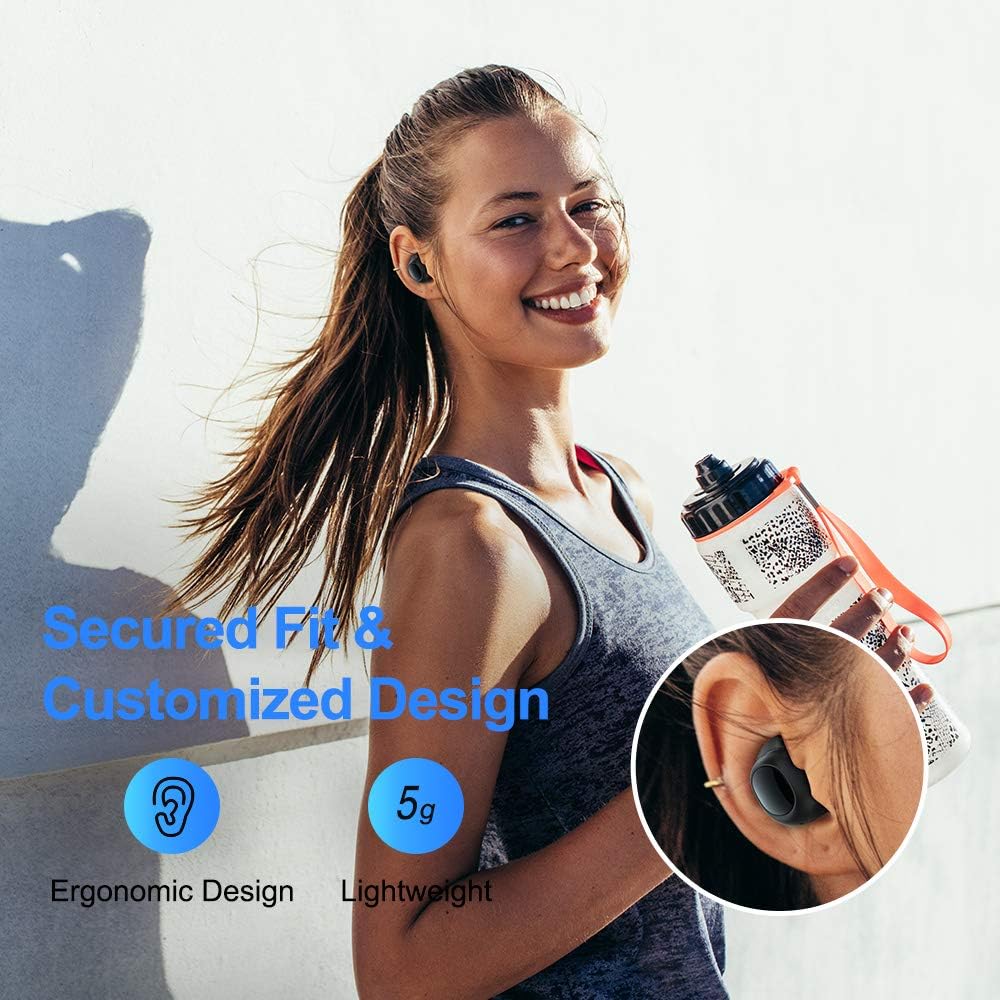
Figure 4.1: A person wearing the ELECDER D19 earbuds during a workout, demonstrating the secure and comfortable fit provided by the ergonomic design and customizable ear tips.
4.2 メディア制御
The ELECDER D19 earbuds feature physical buttons for media control. Specific button functions may vary slightly based on the device and operating system, but common controls include:
- 再生/一時停止: どちらかのイヤホンを 1 回押します。
- 次のトラック: 右のイヤホンを2回押します。
- 前のトラック: 左のイヤホンを2回押します。
- ボリュームアップ: 右のイヤホンを3回押します。
- ボリュームダウン: 左のイヤホンを3回押します。
4.3 通話管理
Manage your calls directly from the earbuds:
- 通話の応答/終了: どちらかのイヤホンを 1 回押します。
- 通話を拒否: どちらかのイヤフォンを2秒間押し続けます。
- 音声アシスタントを有効にする: どちらかのイヤホンを 3 秒間押し続けます (例: Siri、Google アシスタント)。
5. メンテナンスとケア
Proper maintenance ensures the longevity and optimal performance of your ELECDER D19 earbuds.
5.1 クリーニング
- イヤホンと充電ケースは、柔らかく乾いた糸くずの出ない布で定期的に清掃してください。
- イヤーチップを取り外し、中性洗剤と水で洗浄し、完全に乾かしてから再度取り付けます。
- Use a cotton swab or small brush to gently clean the charging contacts on both the earbuds and the case.
- 研磨剤、アルコール、化学洗剤の使用は避けてください。
5.2 防水性能(IPX7)
The ELECDER D19 earbuds are IPX7 waterproof, meaning they can withstand submersion in up to 1 meter of water for 30 minutes. This makes them suitable for protection against sweat, rain, and accidental splashes.

Figure 5.1: The ELECDER D19 earbuds shown with water droplets, illustrating their IPX7 waterproof rating, which protects them from sweat, rain, and splashes.
注記: The charging case is not waterproof. Ensure earbuds are dry before placing them back into the charging case.
5.3 ストレージ
使用しないときは、イヤホンを保護し、充電を保つために充電ケースに収納してください。ケースは、極端な温度や直射日光を避け、涼しく乾燥した場所に保管してください。
6。 トラブルシューティング
If you encounter issues with your ELECDER D19 earbuds, refer to the following common solutions:
| 問題 | 考えられる原因 | 解決 |
|---|---|---|
| イヤホンがデバイスとペアリングされません。 | デバイスの Bluetooth がオフになっています。イヤホンがペアリング モードになっていません。以前ペアリングしたデバイスが干渉しています。 | Ensure Bluetooth is enabled. Place earbuds back in case, then take them out to re-enter pairing mode. Forget "Elecder D19" from your device's Bluetooth list and re-pair. |
| イヤホンが片方しか機能しません。 | Earbuds not paired with each other; low battery on one earbud. | Place both earbuds back into the charging case, close the lid, wait a few seconds, then open and take them out again. Ensure both earbuds are charged. |
| 音が出ない、または音量が低い。 | Device volume too low; ear tips not properly sealed; debris in earbud nozzle. | Increase volume on your device. Adjust earbud position or try different sized ear tips for a better seal. Clean earbud nozzles. |
| 充電ケースが充電されません。 | Faulty cable/charger; improper placement on wireless charger. | Try a different USB cable and power adapter. Ensure the case is correctly aligned on the wireless charging pad. |
| Bluetooth接続が不安定です。 | Interference; distance from device; low earbud battery. | Reduce distance between earbuds and device. Avoid environments with strong Wi-Fi or other Bluetooth signals. Ensure earbuds are fully charged. |
7. 仕様
Detailed technical specifications for the ELECDER D19 True Wireless Earbuds:
| 特徴 | 詳細 |
|---|---|
| モデル名 | エレクダーD19 |
| 接続技術 | ワイヤレス(Bluetooth 5.0) |
| Bluetooth範囲 | 33フィート |
| 耳の位置 | 耳に装着 |
| フォームファクター | 耳に装着 |
| 騒音制御 | アクティブノイズキャンセリング(CVC8.0) |
| マイクロフォン | 含まれるもの |
| 耐水性レベル | IPX7防水 |
| バッテリー寿命(イヤホン) | Up to 4.5 hours (music) / 4 hours (calling) |
| 充電ケースでさらに長く遊べる | 18時間 |
| 充電時間 | 約2時間 |
| 充電インターフェース | Micro USB, Wireless Charging |
| アイテム重量 | 1.92 ounces (total) / 5g (each earbud) |
| 製品寸法 | 3.89 x 3.89 x 1.65インチ |
| 対応デバイス | iOSおよびAndroidスマートフォン |
| 材料 | シリコン(イヤーチップ) |
| 色 | 黒 |

Figure 7.1: An infographic detailing the battery life of the ELECDER D19 earbuds and charging case, showing 4 hours for calls, 4.5 hours for music, and a total of 18 hours with the 500mAh charging case.
8. 保証とサポート
ELECDER products are manufactured to high quality standards. For information regarding warranty coverage, technical support, or service inquiries, please refer to the contact information provided with your product packaging or visit the official ELECDER webサイト。
さらにサポートが必要な場合は、製品を購入した小売店に問い合わせることもできます。
Ask a question about this manual
Ask about setup, troubleshooting, compatibility, parts, safety, or missing instructions. Manuals+ will review the question and use this page’s manual context to help answer it.