
1.製品オーバーview
The SXFJF 4K Ultra HD WiFi Action Camera is designed for capturing high-quality video and photos during various outdoor and sports activities. It features 4K video recording, a wide-angle lens, electronic image stabilization, and a waterproof design, making it suitable for adventures both on land and underwater.
主な特徴:
- Ultra HD Video: Records crystal clear 4K video and high-quality images with a wide-angle lens.
- 手ぶれ防止機能: Built-in electronic image stabilization ensures smooth and steady footage even during fast-moving activities.
- 防水設計: Equipped with a waterproof case, allowing for underwater use in sports like swimming, surfing, and diving.
- 長いバッテリー寿命: Rechargeable batteries provide extended recording time.
- 多彩なアクセサリ: Comes with various accessories for adapting to different indoor and outdoor activities.
- 接続性: Features Wi-Fi and HDMI output for easy sharing and viewing。

Image 1.1: The SXFJF 4K Ultra HD WiFi Action Camera, showcasinコンパクトなデザインと主レンズが特徴です。
2. はじめに: セットアップ
2.1 開梱して内容物を確認する
Before using your camera, please ensure all components are present in the package:
- SXFJF 4K Ultra HD WiFi Action Camera
- 防水ケース
- 充電式バッテリー
- 各種取り付けアクセサリ
- USBケーブル
- ユーザーマニュアル(このドキュメント)
2.2 バッテリーの取り付けと充電
- カメラのバッテリー収納部を見つけます。
- Open the compartment cover and insert the rechargeable battery, ensuring the correct orientation according to the polarity indicators.
- 電池カバーをしっかりと閉じてください。
- To charge, connect the camera to a power source using the provided USB cable. The charging indicator light will illuminate.
- A full charge typically takes approximately 2-3 hours. The indicator light will change or turn off once charging is complete.
2.3 マイクロSDカードの挿入
The camera requires a Micro SD card (not included) for storing photos and videos. A Class 10 or UHS-I (U1) or higher speed rating is recommended for 4K recording.
- カメラの側面または底面にある Micro SD カード スロットを見つけます。
- 金色の接点をカメラの前面に向けて、カチッと音がするまで Micro SD カードを挿入します。
- 取り外すには、カードが飛び出すまでゆっくりと内側に押します。
2.4 防水ケースの使用
The included waterproof case allows the camera to be used underwater. Before first use, perform a waterproof test without the camera inside.
- Open the waterproof case latch and carefully place the camera inside, ensuring it fits snugly.
- ラッチをしっかりと閉じて、防水シールを作ります。
- Always ensure the rubber seal is clean and free of debris before closing the case.
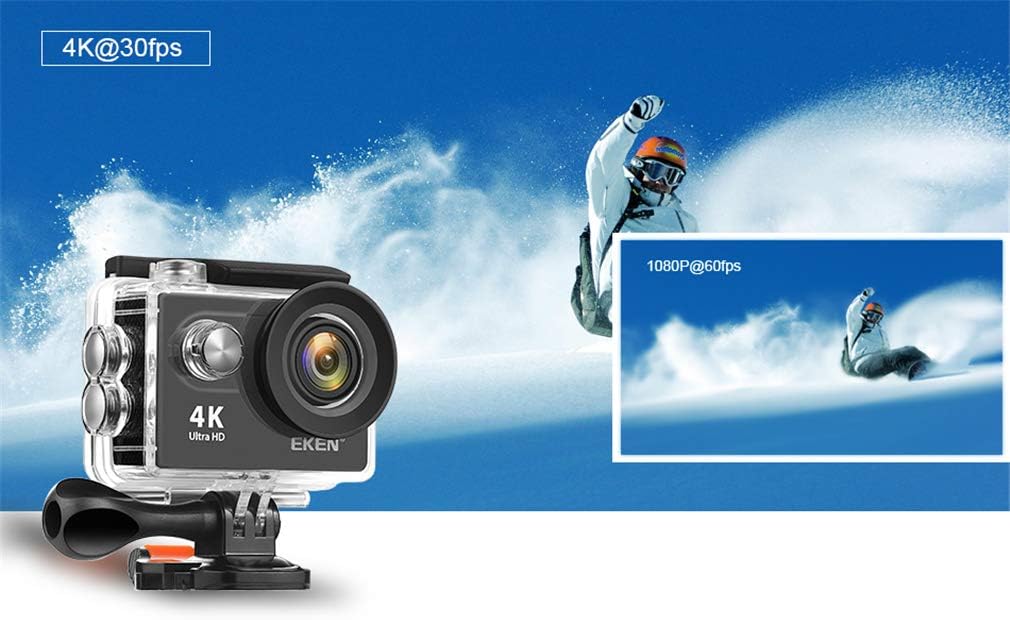
Image 2.1: The action camera enclosed in its waterproof housing, highlighting its 4K and 1080P video recording capabilities for various action shots.
2.5 Attaching Mounting Accessories
The camera comes with various mounts for different scenarios. Refer to the accessory guide for specific attachment instructions. Generally, mounts attach to the waterproof case or directly to the camera via a standard tripod screw mount.
3. カメラの操作
3.1 電源のオン/オフ
- 電源オン: 画面が点灯するまで、電源/モードボタンを数秒間押し続けます。
- 電源を切る: Press and hold the Power/Mode button again until the screen turns off.
3.2 モード選択
電源/モード ボタンを繰り返し押して、さまざまなモードを切り替えます。
- ビデオモード: ビデオ録画用tage.
- 写真モード: For taking still images.
- 再生モード: 再のためにviewing recorded videos and photos.
- 設定モード: To adjust camera settings.
3.3 ビデオ録画と写真撮影
- ビデオを録画するには: In Video Mode, press the Shutter/OK button to start recording. Press it again to stop. A red indicator light will usually flash during recording.
- 写真を撮る: In Photo Mode, press the Shutter/OK button to capture an image.

Image 3.1: The action camera highlighting its 12-megapixel photo capability, suitable for capturing detailed images in various environments.
3.4 Wi-Fi接続
The camera can connect to your smartphone via Wi-Fi for remote control and file 転送。
- Enable Wi-Fi on the camera through the Settings menu.
- Download the dedicated camera app (refer to the camera's display or packaging for the app name) on your smartphone.
- スマートフォンでカメラのWi-Fiネットワークに接続します(SSIDとパスワードはカメラの画面に表示されます)。
- Open the app to control the camera remotely, view ライブfootage、ダウンロード files.
3.5 リモコンの使用
2.4Gリモコンにより、遠くからでも便利に操作できます。
- Ensure the remote control is paired with the camera (refer to the camera's settings for pairing instructions).
- リモコンの指定されたボタンを使用して、録画を開始/停止したり、写真を撮影したりします。
3.6 画像安定化
The camera features electronic image stabilization (EIS) to reduce blur and shakiness in your videos. This feature is typically enabled by default or can be toggled in the camera's video settings menu for smoother footage.
3.7 HDMI出力
Connect the camera to an HDMI-compatible display (e.g., TV, monitor) using an HDMI cable (not included) to view 録画した内容を大きな画面で表示します。

Image 3.2: The action camera demonstrating its various features including 4K video, 12MP photos, waterproof capability, Wi-Fi, and remote control, shown in an active outdoor setting.
4. メンテナンス
4.1 カメラとケースのクリーニング
- Use a soft, lint-free cloth to clean the camera body and lens. For stubborn smudges, a slightly damp 布で拭いた後、乾いた布で拭いてください。
- Clean the waterproof case, especially the rubber seal, after each use, particularly after exposure to saltwater, sand, or dirt. Rinse with fresh water and allow to air dry.
- 洗浄には強力な化学薬品や研磨剤を使用しないでください。
4.2バッテリーケア
- バッテリーを使用しないときは、涼しく乾燥した場所に保管してください。
- Avoid fully discharging batteries regularly to prolong their lifespan.
- 長期間保管する場合は、バッテリーを約 50% の容量まで充電してください。
4.3 ストレージ
When not in use, store the camera and accessories in a protective case in a cool, dry environment, away from direct sunlight and extreme temperatures.
5。 トラブルシューティング
カメラに問題が発生した場合は、次の一般的な解決策を参照してください。
| 問題 | 考えられる原因 / 解決策 |
|---|---|
| カメラの電源が入りません。 | バッテリーが消耗しているか、正しく挿入されていません。バッテリーを充電するか、再度挿入してください。 |
| ビデオを録画したり、写真を撮ったりできません。 | Micro SD card is full, not inserted, or corrupted. Format the card (this will erase all data) or replace it. Ensure the camera is in the correct mode. |
| ビデオ/写真の品質が悪い。 | Lens may be dirty. Clean the lens. Ensure sufficient lighting. Check resolution settings. |
| Wi-Fi接続の問題。 | Ensure Wi-Fi is enabled on the camera and smartphone. Check app permissions. Restart both devices. |
| 防水ケースに水漏れあり。 | Rubber seal is dirty, damaged, or case not closed properly. Clean the seal, inspect for damage, and ensure the latch is securely fastened. |
問題が解決しない場合は、カスタマー サポートにお問い合わせください。
6. 仕様
Detailed technical specifications for the SXFJF 4K Ultra HD WiFi Action Camera:
| 特徴 | 仕様 |
|---|---|
| ブランド | SXFJF |
| ビデオキャプチャ解像度 | 4K |
| フラッシュメモリタイプ | マイクロSD |
| ビデオキャプチャフォーマット | MP4 |
| 画面サイズ | 2インチ |
| 接続技術 | HDMI、Wi-Fi |
| 特集 | ポータブル、防水 |
| ビデオカメラの種類 | アクションカメラ |
| 含まれるコンポーネント | バッテリー |
| 耐水性レベル | 防水 |
| 画像安定化 | 電子 |
| フォームファクター | コンパクト |
| バッテリーの平均寿命 | 60分(約) |
| レンズタイプ | 広角 |
| フォーカスタイプ | オートフォーカス |
| ディスプレイ解像度最大 | 4K フルHD |
| 対応デバイス | Smartphone, TV |
| ビデオ解像度 | 4K |
| 撮影モード | タイムラプス |
| 画像のアスペクト比 | 16:9 |
| サポートされている画像形式 | JPEG |
| File 形式 | MP4 |
| ズーム | 光学 |
7. 保証とサポート
For warranty information, please refer to the documentation included with your purchase or contact the retailer. For technical support or further assistance, please reach out to SXFJF customer service through their official webサイトまたは製品に付属の連絡先情報を参照してください。