
1. はじめに
This manual provides essential information for the installation, operation, and maintenance of your Flysky Telemetry Data Modules. These modules are designed to enhance your remote control experience by providing real-time data such as voltage, temperature, height, and RPM directly to compatible Flysky transmitters. Please read this manual thoroughly before using the modules to ensure proper function and safety.
2.製品オーバーview
The Flysky Telemetry Data Modules are a series of sensors and receivers designed to integrate with Flysky RC systems, providing valuable real-time feedback. Each module serves a specific purpose:
- FS-CPD01 RPMテレメトリモジュール(磁気式) Monitors rotational speed up to 60,000 RPM/min. Power: 4.0-6.5V DC. Weight: 6.6g. Size: 31x15x8.5mm.
- FS-CPD02 RPMテレメトリモジュール(光誘導/光学式) Monitors rotational speed up to 60,000 RPM/min. Power: 4.0-6.5V DC. Weight: 6.8g. Size: 31x15x8.5mm.
- FS-CTM01 温度取得モジュール: Monitors temperature range from -40 to 250°C. Power: 4.0-6.5V DC. Weight: 6.8g. Size: 31x15x8.5mm.
- FS-CVT01 巻tage 取得モジュール: モニターボリュームtage range from 0-100V DC. Power: 4.0-6.5V DC. Weight: 6g. Size: 31x15x8.5mm.
- FS-CEV04 i-BUSシリアルバスレシーバー: 4 Channels, with i-BUS PORT. Weight: 8.1g. Power: 4.0-6.5V DC. Size: 30x25.6x13mm.
- FS-CAT01 Height Acquisition Module: Provides altitude data.
These modules are compatible with iA4B (directly), iA6B (directly), and iA10 (requires conversion cable) receivers. The FS-CAT01 module is compatible with NV14, PL18, iT4S, and i10 transmitters, but not with FS-i6 or FS-i6X transmitters.
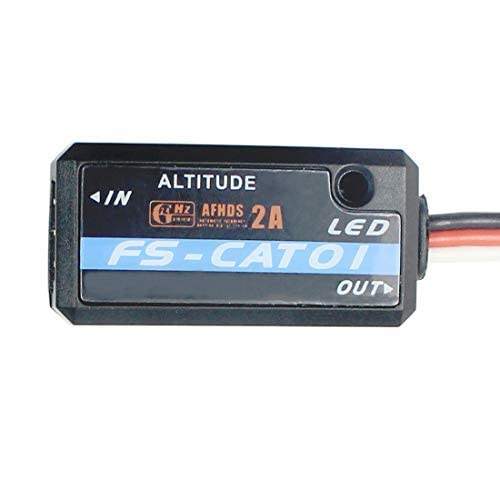
Figure 2.1: Flysky FS-CAT01 Height Acquisition Module. This image shows the compact black module with its connection wires.

Figure 2.2: Flysky FS-CAT01 Module with its standard connection cable. The module is black with a blue label indicating 'FS-CAT01' and 'ALTITUDE'.
3. セットアップ
Proper setup is crucial for accurate telemetry data. Follow these general guidelines for connecting your Flysky Telemetry Data Modules:
- 互換性チェック: Ensure your receiver (e.g., iA4B, iA6B, iA10B) and transmitter (e.g., NV14, PL18, iT4S, i10) are compatible with the specific telemetry module you intend to use. Refer to the 'Product Overview' section for module-specific compatibility.
- 電源接続: All modules require a power input of 4.0-6.5V DC. Connect the module to a stable power source within this range.
- i-BUS Connection: Connect the telemetry module to the i-BUS port on your compatible Flysky receiver. Some receivers like the iA10 may require a conversion cable (not included with the module).
- Sensor Specific Connections:
- RPM Modules (FS-CPD01/FS-CPD02): Connect the magnetic or optical sensor to the rotating part you wish to monitor. Ensure the sensor is securely mounted and aligned for accurate readings.
- Temperature Module (FS-CTM01): Securely attach the temperature probe to the component you want to monitor (e.g., motor, ESC). Ensure good thermal contact.
- 巻tage Module (FS-CVT01): ボリュームを接続するtage input wires to the battery or power source you intend to monitor, observing correct polarity.
- Height Module (FS-CAT01): This module typically connects directly to the i-BUS port and does not require additional external sensors for height measurement.
- 送信機のセットアップ: Once connected, power on your receiver and transmitter. Navigate to the telemetry settings on your transmitter to enable and configure the newly connected sensors. Refer to your transmitter's manual for detailed instructions on telemetry setup.
Video 3.1: This video demonstrates the Flysky FS-i6X RC Transmitter with an FS-iA6B Receiver, showcasing the basic operation and interface of a compatible Flysky system. It provides context for how telemetry modules integrate with the transmitter.
4. 操作手順
After successful setup, your telemetry data modules will transmit real-time information to your compatible Flysky transmitter. Here's how to operate and interpret the data:
- 電源オン: Ensure your RC model and transmitter are powered on. The telemetry modules will automatically begin transmitting data once powered.
- Accessing Telemetry Data: On your Flysky transmitter, navigate to the telemetry or sensor display screen. The exact menu path varies by transmitter model (e.g., FS-i6, i10, iT4S, NV14, PL18). Consult your transmitter's user manual for specific instructions.
- 監視データ: The transmitter screen will display the real-time data from your connected modules:
- 回転数: Displays the current rotational speed of the monitored component.
- 温度: Shows the current temperature in degrees Celsius.
- 巻tage: Indicates the real-time voltage of the monitored power source.
- 身長: Provides altitude readings.
- Data Alarms: Many Flysky transmitters allow you to set custom alarms for telemetry data (e.g., low voltage, high temperature). Configure these alarms in your transmitter's settings to receive alerts during operation.
Video 4.1: This video features the GoolRC Flysky Noble NB4+ 8CH RC Transmitter, demonstrating its features and user interface. This transmitter is compatible with Flysky telemetry modules and shows how data might be displayed.
Video 4.2: This video, titled 'Smart Flashing Light', showcases an RC accessory. While not directly a telemetry module, it illustrates the type of additional components that can be integrated into an RC system, often requiring similar power and signal connections.
5. メンテナンス
To ensure the longevity and reliable performance of your Flysky Telemetry Data Modules, follow these maintenance guidelines:
- 乾燥を保つ: Protect all modules from moisture and humidity. Water damage can lead to malfunction.
- 清潔さ: Periodically clean the modules and their sensors with a soft, dry cloth. Avoid using solvents or harsh chemicals. For optical RPM sensors, ensure the lens is clear of dust and debris.
- 接続を検査する: Regularly check all wiring and connectors for signs of wear, corrosion, or loose connections. Secure any loose connections to prevent intermittent data transmission.
- 物理検査: Inspect the module casings for any cracks or damage. Ensure sensors (e.g., temperature probe, RPM sensor) are securely mounted and not obstructed.
- ストレージ: When not in use, store the modules in a cool, dry place away from direct sunlight and extreme temperatures.
6。 トラブルシューティング
If you encounter issues with your telemetry data modules, consider the following troubleshooting steps:
- テレメトリデータが表示されない:
- Check all connections: Ensure the module is securely connected to the i-BUS port on the receiver and that the receiver is properly powered.
- Verify power: Confirm the module is receiving adequate power (4.0-6.5V DC).
- Transmitter settings: Ensure telemetry is enabled and the correct sensors are selected in your transmitter's menu.
- Compatibility: Double-check that your transmitter and receiver are compatible with the specific telemetry module.
- 不正確な読み取り:
- Sensor placement: Ensure the sensor (e.g., RPM, temperature) is correctly positioned and has good contact with the monitored component.
- Interference: Keep telemetry modules and wiring away from high-current wires or other sources of electromagnetic interference.
- Calibration: Some transmitters or modules may require calibration for optimal accuracy. Refer to your transmitter's manual.
- 断続的なデータ:
- Loose connections: Inspect all wiring for loose or damaged connections.
- Range: Ensure you are operating within the effective range of your RC system.
- Power fluctuations: Verify that the power supply to the module is stable.
If issues persist after following these steps, contact Flysky customer support or your retailer for further assistance.
7. 仕様
| 特徴 | 仕様 |
|---|---|
| ブランド | フライスカイ |
| 材質タイプ | プラスチック |
| 電源入力 | 4.0-6.5V DC (for all modules) |
| FS-CPD01 RPM Module (Magnetic) | |
| Monitor Range (Speed) | 60,000回転/分 |
| 重さ | 6.6グラム |
| サイズ | 31x15x8.5mm |
| FS-CPD02 RPM Module (Optical) | |
| Monitor Range (Speed) | 60,000回転/分 |
| 重さ | 6.8グラム |
| サイズ | 31x15x8.5mm |
| FS-CTM01 Temperature Module | |
| Monitor Range (Temperature) | -40~250℃ |
| 重さ | 6.8グラム |
| サイズ | 31x15x8.5mm |
| FS-CVT01 巻tageモジュール | |
| Monitor Range (Voltage) | 0-100V DC |
| 重さ | 6g |
| サイズ | 31x15x8.5mm |
| FS-CEV04 i-BUS Receiver | |
| チャンネル | 4 |
| 重さ | 8.1グラム |
| サイズ | 30x25.6x13mm |
| i-BUSポート | はい |
8. 保証情報
Flysky products are manufactured to high-quality standards. For specific warranty terms and conditions, please refer to the warranty card included with your product or visit the official Flysky website. Warranty coverage typically includes defects in materials and workmanship under normal use. Please retain your proof of purchase for any warranty claims.
9. サポート
For technical support, troubleshooting assistance, or inquiries regarding your Flysky Telemetry Data Modules, please contact:
- Flysky Official Support: 公式Flyskyをご覧ください webFAQ、ファームウェアの更新、および連絡先情報が記載されたサイト。
- 販売店: 製品を購入した店舗またはオンラインベンダーにお問い合わせください。
サポートにお問い合わせいただく際は、製品のモデル番号と購入情報をお手元にご用意ください。