導入
This manual provides detailed instructions for the operation and maintenance of your GTMEDIA Z3 Portable DAB+/FM RDS Radio. Please read this manual thoroughly before using the device to ensure proper functionality and to maximize your listening experience.
重要な安全情報
- デバイスを雨、湿気、または極端な温度にさらさないでください。
- 落としたり、強い衝撃を与えないでください。
- ご自身でユニットを分解したり修理したりしないでください。すべての修理は資格のある専門家にご依頼ください。
- 指定された充電ケーブルと電源アダプターのみを使用してください。
- お子様の手の届かない場所に保管してください。
パッケージ内容
パッケージにすべてのアイテムが揃っていることを確認します。
- 1 x GTMEDIA Z3 DAB+/FM Radio
- USB充電ケーブル x 1
- ユーザーマニュアル x 1

Image: The GTMEDIA Z3 radio, its retail box, USB charging cable, and user manual.
製品終了view
The GTMEDIA Z3 is a portable DAB+/FM RDS radio featuring a 2.4-inch TFT-LCD screen. It supports 60 preset stations for both DAB+ and FM, and includes functions such as clock, alarm, and sleep timer. The device is powered by a rechargeable 18650 lithium battery.
フロントパネルのコントロールとディスプレイ
- 電源/スタンバイボタン: Turns the radio on/off or puts it in standby mode.
- スキャンボタン: Initiates station scanning.
- DAB/FMボタン: DAB+ モードと FM モードを切り替えます。
- メニューボタン: メインメニューにアクセスします。
- EQボタン: イコライザー設定を調整します。
- プリセットボタン: プリセットされた放送局にアクセスします。
- 音量/選択ノブ: Adjusts volume and navigates/selects menu options.
- 2.4-inch TFT-LCD Display: ステーションの情報、時間、メニュー オプションを表示します。
背面パネルとポート
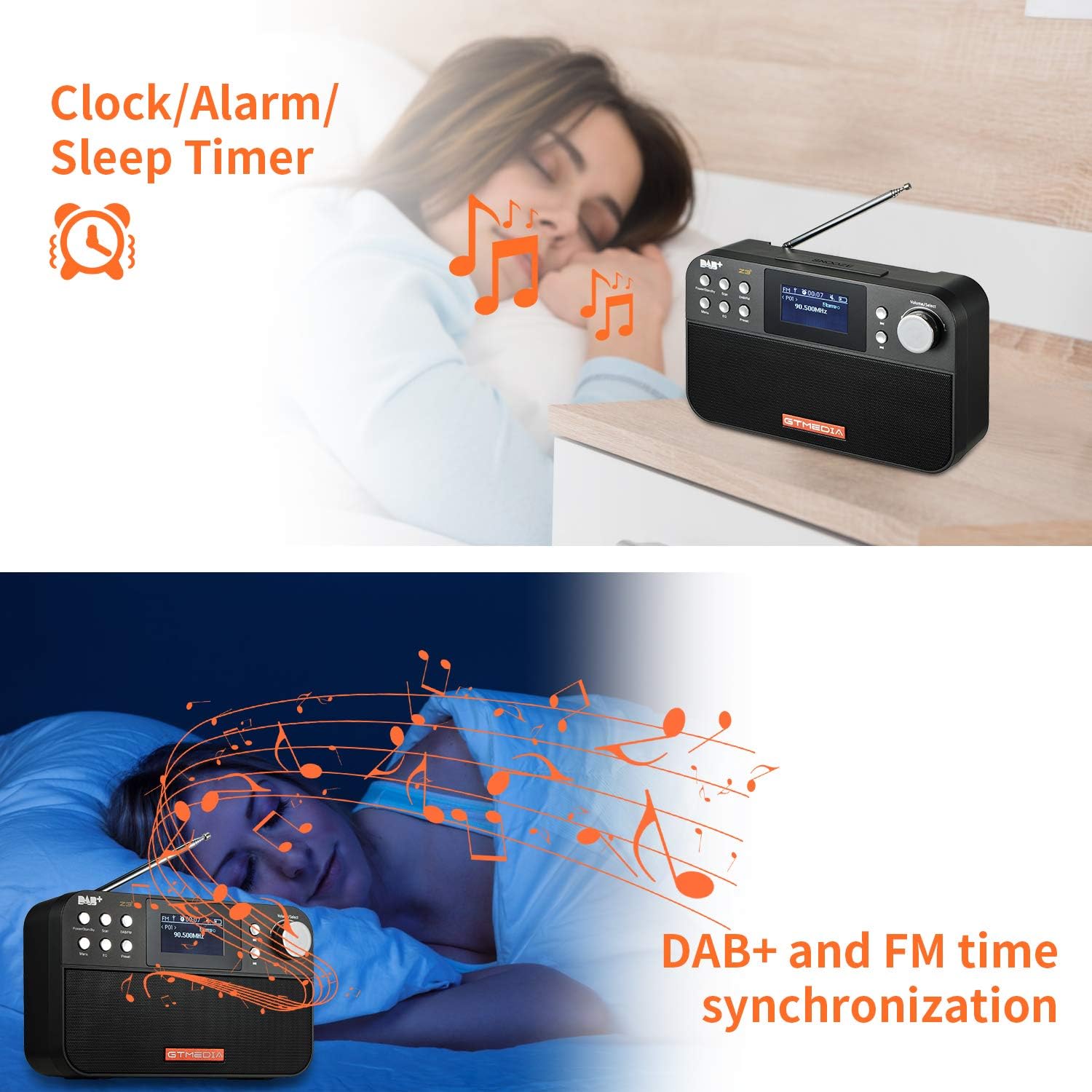
Image: The back of the GTMEDIA Z3 radio, highlighting the 18650 lithium battery compartment and the DC 5V USB charging port.
- 18650 Lithium Battery Compartment: 充電式バッテリーを収納します。
- DC 5V USB Charging Port: デバイスの充電用。
セットアップガイド
1. バッテリーの充電
- Locate the USB charging port on the rear of the radio.
- Connect the provided USB charging cable to the radio and to a compatible USB power adapter (DC 5V, ≥1500mA) or a computer USB port.
- The battery indicator on the display will show charging status. A full charge typically provides 4-7 hours of operation.
Image: The GTMEDIA Z3 radio's rear panel, illustrating the USB charging port and battery specifications.
2. 初回電源投入と言語選択
- を押し続けます 電源/スタンバイ ラジオをオンにするボタン。
- Upon first use, you may be prompted to select a language. Use the 音量/選択 knob to navigate and press to confirm your choice. English is the default language.
3. 時刻同期
The clock can be set manually or synchronized automatically with DAB+ or FM signals.
- 自動同期: When tuned to a DAB+ or FM station that broadcasts time information, the radio will automatically update its clock.
- 手動調整: Access the system settings via the メニュー button to manually set the time and date.
操作手順
1. Radio Modes (DAB+/FM)
スイッチングモード:
を押す DAB / FM DAB+ と FM ラジオ モードを切り替えるボタン。
ステーションのスキャン:
- 自動スキャン(FM): FMモードでは、 スキャン 利用可能な放送局を自動的に検索して保存するボタン。
- Local Scan (DAB+): DAB+モードでは、 スキャン button to perform a local scan for DAB+ stations. Manual tuning is also supported.
プリセットステーション:
The radio supports 60 preset stations for both FM and DAB+ (10 quick access presets). To save a station:
- 希望の放送局にチューニングします。
- を押し続けます プリセット ボタン。
- 使用 音量/選択 knob to choose a preset number and press to confirm.
プリセットされた放送局を呼び出すには、 プリセット ボタンを押して 音量/選択 ノブを押して選択します。
FM RDS Station Name Display:
When tuned to an FM station broadcasting RDS (Radio Data System) information, the 2.4-inch TFT-LCD screen will display the station name and other relevant data.
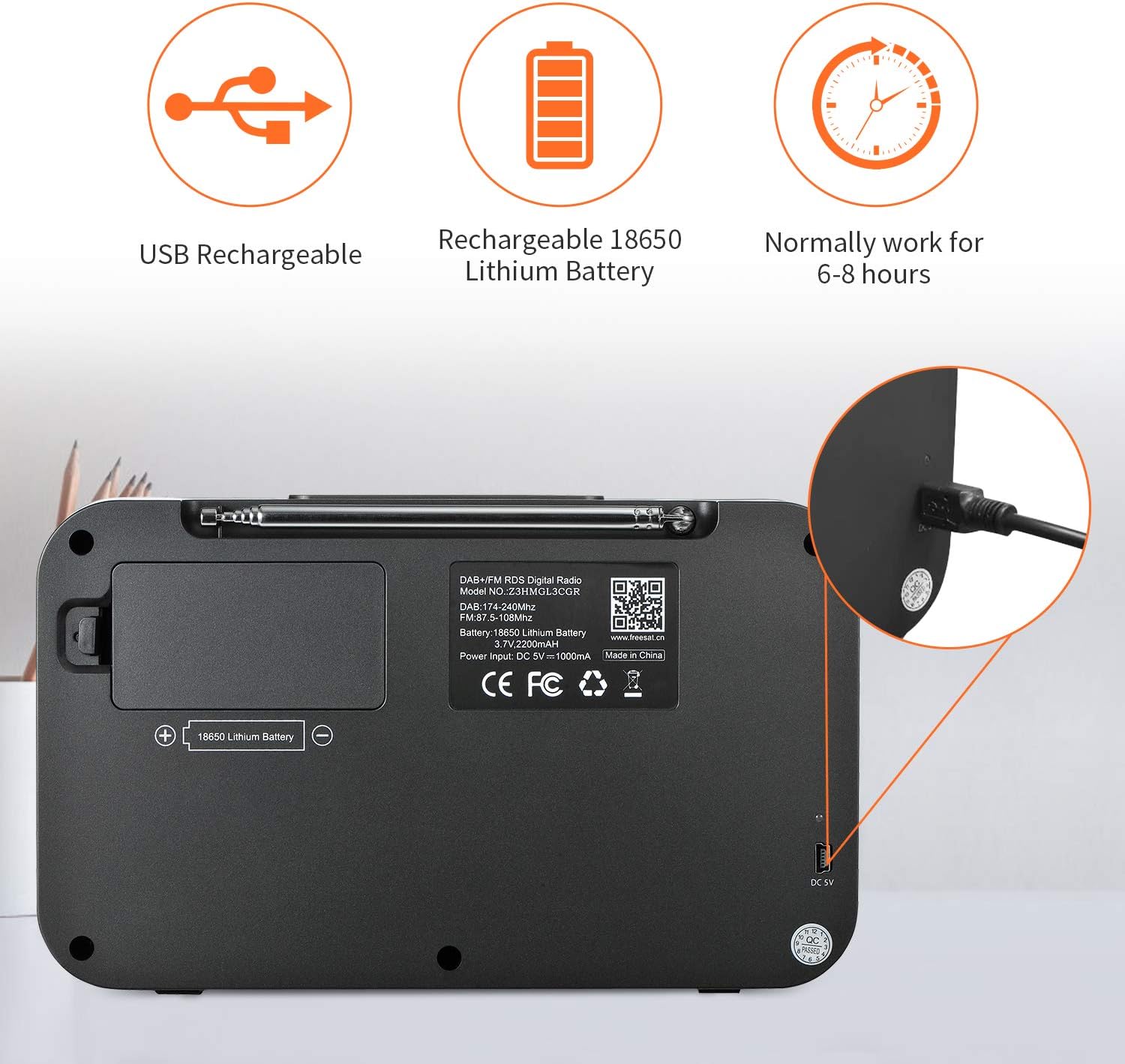
Image: The GTMEDIA Z3 radio's display showing "FM" and "90.500MHz" along with a station name, demonstrating the RDS feature.
2. 時計、アラーム、スリープタイマー
The GTMEDIA Z3 radio includes integrated clock, alarm, and sleep timer functions for enhanced convenience.

Image: The GTMEDIA Z3 radio with icons representing clock, alarm, and sleep timer functions, depicted in a bedroom setting.
アラームの設定:
- を押す メニュー button and navigate to the "Alarm" settings.
- 使用 音量/選択 knob to set the alarm time, duration, and alarm source (e.g., buzzer, DAB+, FM).
- 設定を確認してください。
スリープタイマーの設定:
- を押す メニュー button and navigate to the "Sleep Timer" settings.
- 使用 音量/選択 knob to choose the desired sleep duration (e.g., 15, 30, 60 minutes).
- 設定された時間が経過するとラジオは自動的にオフになります。
3.音楽の再生
The GTMEDIA Z3 supports playback of various music formats including MP3, FLAC, and WAV. Playback modes include single play, repeat, and shuffle. Specific instructions for accessing and controlling music playback are typically found within the device's menu system.
メンテナンス
クリーニング:
- ラジオを柔らかく乾いた布で拭いてください。
- 液体クリーナーや研磨剤は使用しないでください。
バッテリーのケア:
- バッテリーの寿命を延ばすには、バッテリーを頻繁に完全に放電しないようにしてください。
- ラジオを頻繁に使用しない場合でも、定期的にバッテリーを充電してください。
- 長期間使用しない場合は、ラジオを涼しく乾燥した場所に保管してください。
トラブルシューティング
| 問題 | 考えられる原因 | 解決 |
|---|---|---|
| 電源なし | バッテリーが放電しました。 | 付属の USB ケーブルを使用してバッテリーを充電します。 |
| ラジオの受信状態が悪い | 信号が弱い。アンテナが伸びていない。 | Extend the telescopic antenna fully. Try repositioning the radio. Perform a new scan for stations. |
| 音が出ない | 音量が低すぎます。ミュートが有効になっています。 | を使用して音量を上げます。 音量/選択 knob. Check if mute is active in settings. |
| 表示が鮮明でない | 明るさの設定が低すぎます。 | Adjust LCD brightness in the system settings. |
仕様
| 特徴 | 詳細 |
|---|---|
| ブランド | GTMEDIA |
| モデル | Z3 |
| チューナーテクノロジー | DAB Plus, FM RDS |
| サポートされている無線バンド | DAB+ (174.92-239.20 MHz), FM (87.5-108 MHz) |
| 画面 | 2.4-inch TFT-LCD (240 x 320 pixels) |
| プリセットステーション | 60 FM、60 DAB + |
| 電源 | 電池駆動 |
| 電池のタイプ | 18650リチウム電池(3.7V 2200mAh) |
| 営業時間 | 4-7 hours (typical) |
| 充電入力 | DC 5V, ≥1500mA (via USB) |
| 接続技術 | USB |
| 特集 | Portable, Clock, Alarm, Sleep Timer, USB Upgradeable |
| アイテム重量 | 620グラム |
| 製品寸法 | 20 x 5 x 12 cm |
| 動作温度 | 0〜 + 45°C |
| 保管温度 | -10〜+60°C |
| 音楽フォーマット | MP3、FLAC、WAV |

Image: Dimensions of the GTMEDIA Z3 radio, showing approximate measurements of 200mm x 120mm x 50mm.
ファームウェアのアップグレード
The GTMEDIA Z3 radio supports firmware upgrades via a USB connection to a PC. For the latest firmware and detailed instructions, please visit the official support webサイト。

Image: The GTMEDIA Z3 radio connected to a laptop via a USB cable, indicating its upgradeable feature.
保証とサポート
For technical support, warranty information, or any questions regarding your GTMEDIA Z3 radio, please visit the official GTMEDIA support webサイト:


