
Meike MK-A7R IV
Meike MK-A7R IV Professional Vertical Battery Grip
User Manual for Sony Alpha A7IV, A7RIV, and A9II Cameras
導入
This manual provides comprehensive instructions for the proper use and care of your Meike MK-A7R IV Professional Vertical Battery Grip. Designed to enhance the handling and battery life of your Sony Alpha A7IV, A7RIV, and A9II cameras, this grip offers extended shooting time and improved ergonomics for vertical photography. Please read this manual thoroughly before using the product to ensure optimal performance and longevity.
安全上の注意
- Do not attempt to disassemble or modify the product. Unauthorized modifications can lead to malfunction and void the warranty.
- Keep the battery grip away from water, moisture, and extreme temperatures.
- Use only compatible batteries as specified by your camera manufacturer.
- Ensure the battery grip is securely attached to the camera before use to prevent accidental detachment.
- Turn off the camera and remove batteries when the grip is not in use for extended periods.
- Avoid dropping the grip or subjecting it to strong impacts.
パッケージ内容
パッケージにすべてのアイテムが含まれていることを確認してください。
- Meike MK-A7R IV Vertical Battery Grip
- Battery Holder for NP-FZ100 batteries (x2)
- 取扱説明書(本書)
各部の名称と機能
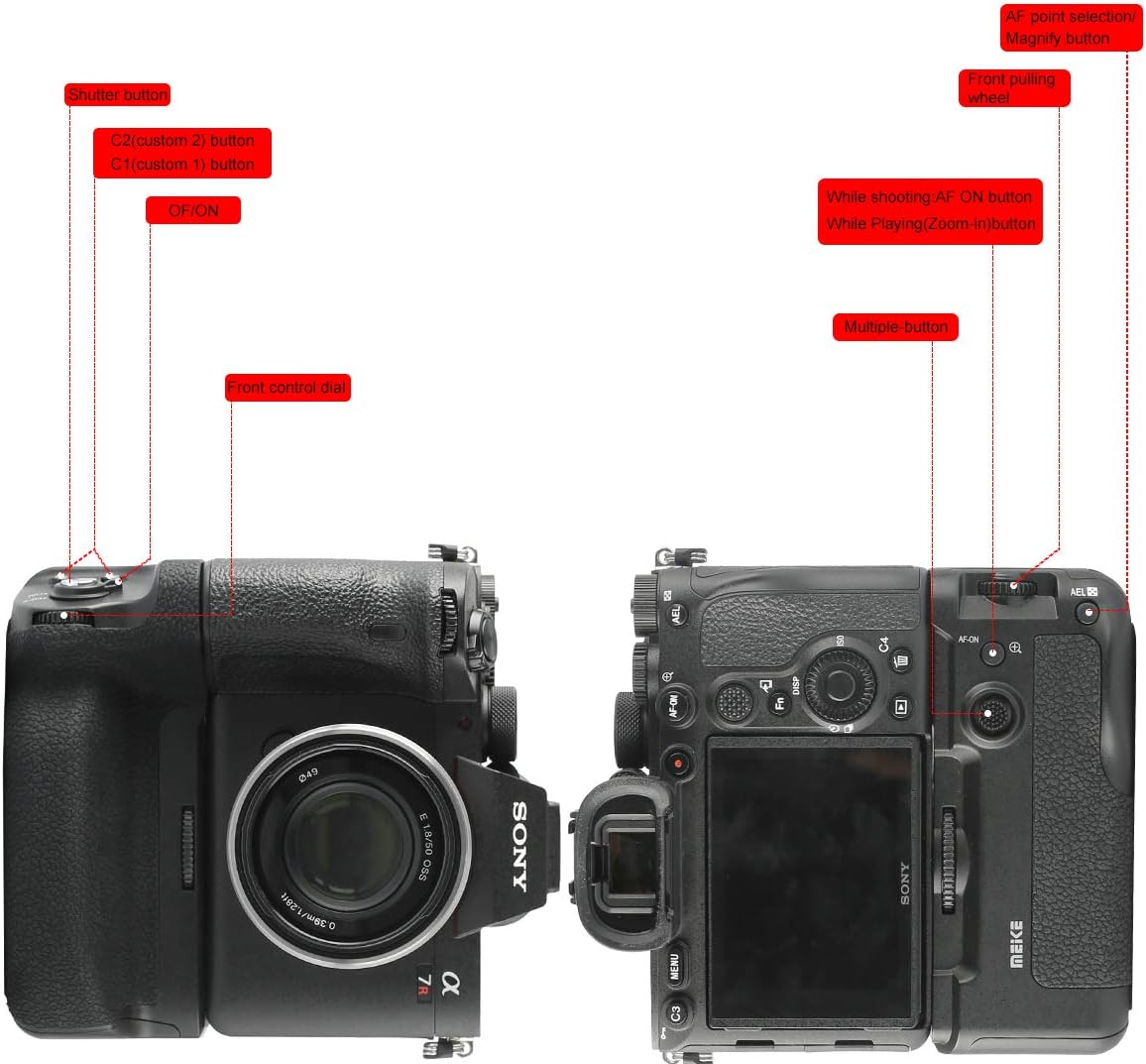
図1:以上view of the Meike MK-A7R IV Battery Grip controls and their functions.
- シャッターボタン: Functions identically to the camera's shutter button for vertical shooting.
- C1/C2 Custom Buttons: Programmable buttons that mirror the camera's custom functions.
- オン/オフスイッチ: Powers the grip's controls on or off. Note: This switch controls the grip's buttons, not the camera's power.
- Front Control Dial: Adjusts camera settings such as aperture or shutter speed.
- AF-ONボタン: オートフォーカスを有効にします。
- Magnify Button: Magnifies the image during playback or live view.
- Multiple Button (Joystick): Used for navigating menus and selecting AF points.
- AELボタン: Activates Auto Exposure Lock.


図2:詳細 view of the grip's custom buttons, ON/OFF switch, joystick, and AF-ON button.
設定
Attaching the Battery Grip to the Camera

Figure 3: The battery grip securely mounted to a compatible Sony Alpha camera.
- カメラの電源がオフになっていることを確認してください。
- Open the battery compartment door on your camera. Remove the camera's battery.
- Detach the camera's battery compartment door. Most cameras allow this door to be removed and stored within the grip to prevent loss.
- バッテリーグリップの取り付けネジをカメラの三脚ソケットに合わせます。
- Insert the grip's electrical contact into the camera's battery compartment.
- Tighten the mounting screw on the grip until it is firmly secured to the camera. Do not overtighten.

Figure 4: Detail of the mounting screw for attaching the grip to the camera.
バッテリーの取り付け
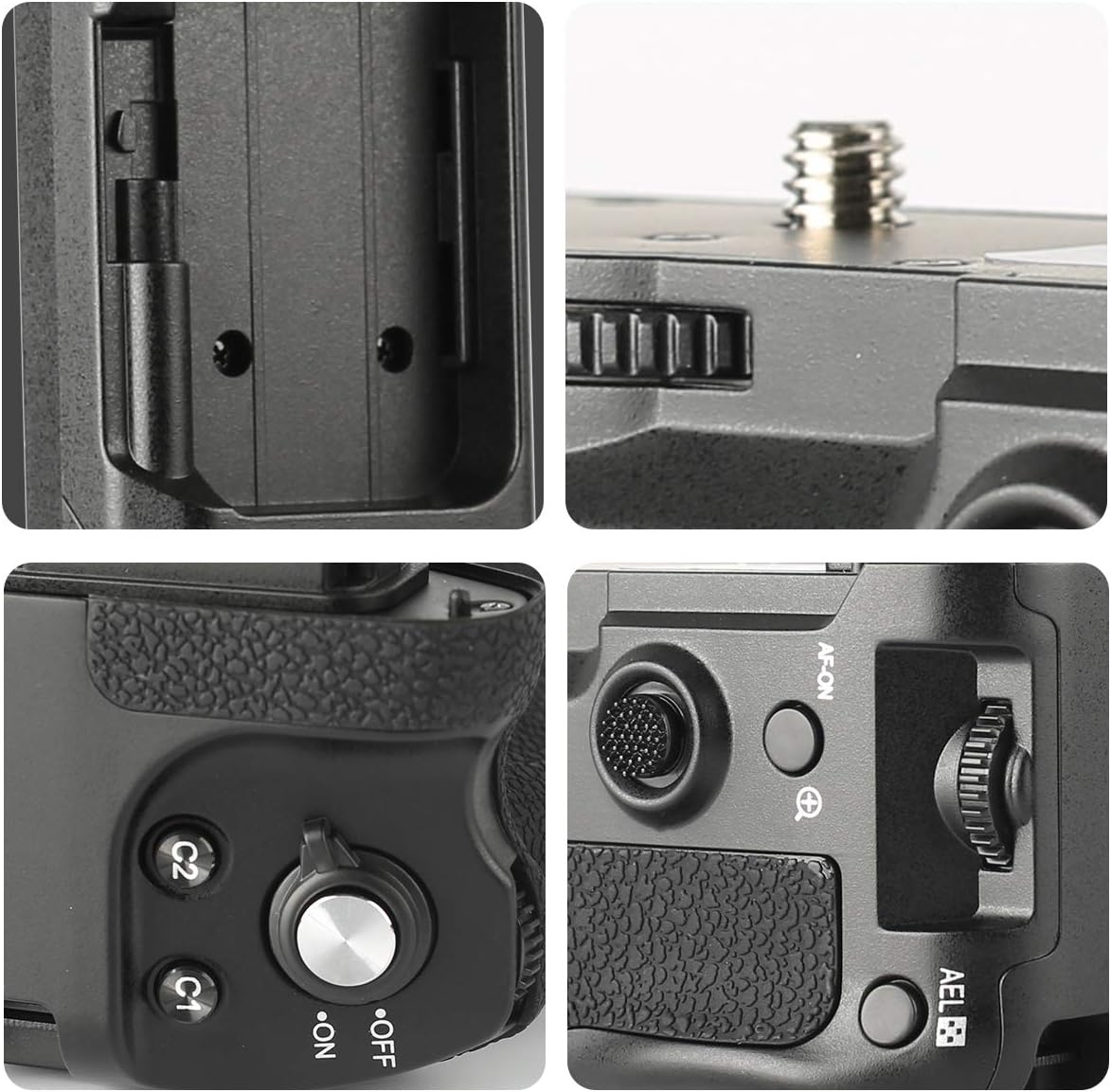
Figure 5: Visual guide for inserting batteries into the grip's tray.
- Ensure the grip's ON/OFF switch is in the OFF position.
- Open the battery tray cover on the grip.
- Insert up to two NP-FZ100 batteries into the battery holder, ensuring correct polarity.
- Slide the battery holder firmly into the grip until it locks into place.
- バッテリートレイカバーをしっかりと閉じます。

Figure 6: Detail of the battery compartment door and latch mechanism.
バッテリーグリップの操作
縦撮り

Figure 7: The battery grip provides enhanced ergonomics for comfortable vertical shooting.
The primary benefit of the vertical battery grip is to provide a comfortable and stable grip for shooting in portrait orientation. The grip's integrated controls allow for seamless operation without needing to contort your wrist.
コントロールの使用
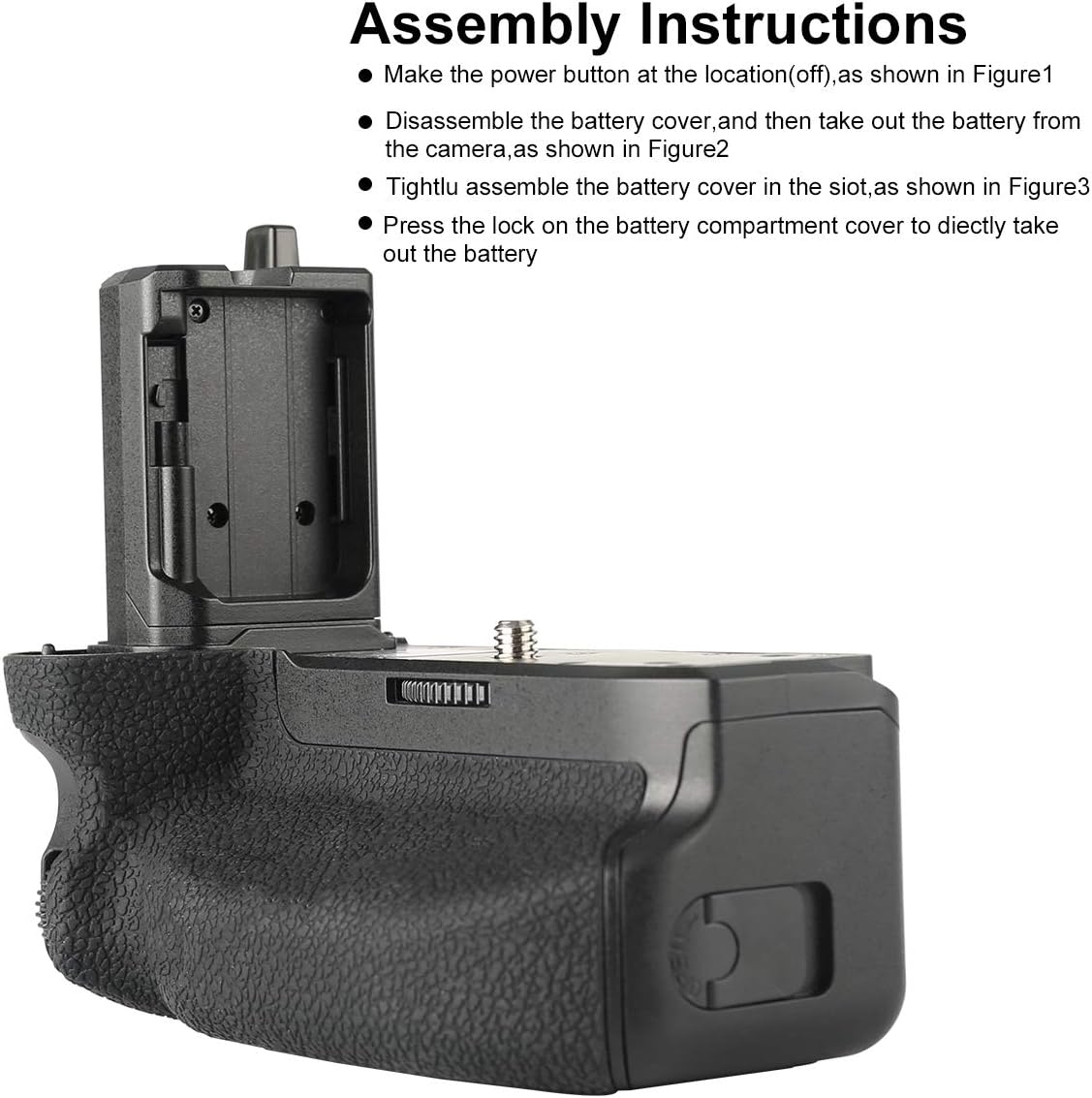
図 8: 拡大図 view of the grip's operational controls.
- 電源のオン/オフ: After attaching the grip and inserting batteries, turn on your camera. Then, slide the ON/OFF switch on the grip to the 'ON' position to activate the grip's controls. Remember to turn it OFF when not actively using the grip's buttons to prevent accidental presses.
- シャッターボタン: 半押しするとフォーカスし、完全に押すと写真を撮影します。
- コントロールダイヤル: Rotate the front control dial to adjust settings as configured on your camera (e.g., aperture, shutter speed).
- Custom Buttons (C1/C2): These buttons replicate the functionality of your camera's C1 and C2 buttons. Their functions are determined by your camera's custom settings.
- Joystick/Multiple Button: Use this to navigate menus, select autofocus points, or perform other functions assigned in your camera settings.
メンテナンス
- クリーニング: グリップの外側は、柔らかく乾いた布で拭いてください。頑固な汚れには、軽く湿らせた布で拭いてください。amp 布で拭き、すぐに乾かしてください。強力な洗剤や溶剤は使用しないでください。
- ストレージ: When not in use for extended periods, remove batteries from the grip and store it in a cool, dry place, away from direct sunlight.
- 連絡先: Periodically check the electrical contact points on both the grip and your camera for dust or debris. Clean gently with a dry, lint-free cloth if necessary.
トラブルシューティング
| 問題 | 考えられる原因 | 解決 |
|---|---|---|
| Grip controls are unresponsive. |
|
|
| "Incompatibility battery error" message. |
|
|
| Camera crashes or stops recording. |
|
|
| Grip feels loose or wobbly. | Mounting screw is not fully tightened. | Tighten the mounting screw until the grip is firmly attached to the camera. |
仕様
| モデル | MK-A7R IV (ZN-A7RIV) |
| 対応カメラ | Sony Alpha A7IV, A7RIV, A9II, A7SIII, A1 |
| 互換性のあるバッテリー | 2x NP-FZ100 (not included) |
| 動作温度 | 0°C ~ 40°C (32°F ~ 104°F) |
| 寸法 | 約5 x 2.64 x 4.33インチ(127 x 67 x 110 mm) |
| 重さ | 約9.9オンス(280グラム)(電池なし) |
| メーカー | メイケ |
保証とサポート
Meike products are designed for reliability and performance. For specific warranty information and support inquiries, please refer to the warranty card included with your product or visit the official Meike webサイト。を訪問することもできます。 Meike Store on Amazon 追加の製品情報およびカスタマー サービス オプションについては、こちらをご覧ください。
Ask a question about this manual
Ask about setup, troubleshooting, compatibility, parts, safety, or missing instructions. Manuals+ will review the question and use this page’s manual context to help answer it.