
導入
The Edifier TWS NB2 True Wireless Active Noise Canceling Earbuds are designed to provide a superior audio experience with advanced noise cancellation technology. These earbuds offer hybrid ANC for effective noise reduction, ensuring clear audio in various environments. Key features include crystal-clear calls with dual microphones, infrared wearing detection for automatic playback control, and convenient one-touch pairing. The ambient sound pass-through mode allows users to stay aware of their surroundings without removing the earbuds. With an extended playback time, the TWS NB2 is ideal for daily use, commuting, and workouts.
箱の中身
パッケージを開けると、次のコンポーネントが見つかります。
- Edifier TWS NB2 Earbuds
- 充電ケース
- USB Type-C充電ケーブル
- Spare Eartips (S/M/L sizes)
- ユーザーマニュアル
ビデオ: Unboxing the Edifier TWS NB2 Earbuds. This video demonstrates the contents of the product packaging, including the earbuds, charging case, charging cable, and various eartip sizes.
製品終了view
The Edifier TWS NB2 earbuds are designed for comfort and high-quality audio performance. Below are some key features and components:

画像: The Edifier TWS NB2 earbuds resting in their open charging case, showcasin洗練されたデザインとコンパクトなフォームファクターが特徴です。

画像: Visual representation highlighting the Hi-Res Audio Wireless capability, promising an immersive sound effect and HiFi enjoyment.

画像: An individual using the earbuds, illustrating the Tri-MIC phone call feature designed for clear communication even in windy conditions.

画像: A user wearing the earbuds in an outdoor setting, demonstrating the Environment Monitoring Mode which allows hearing surroundings for safety.
画像: The charging case with water droplets, indicating the IP54 dust and water resistance, making the earbuds suitable for outdoor activities.

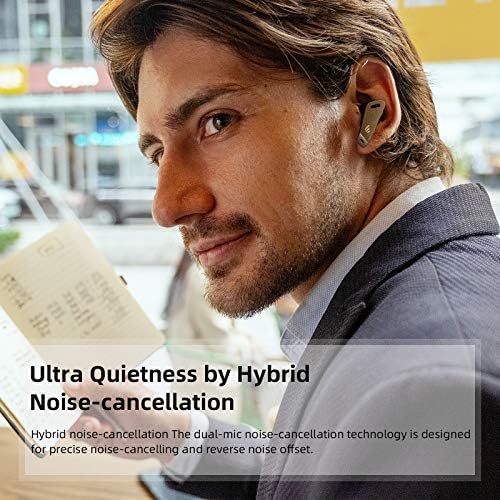
画像: A person wearing the earbuds in a cafe, highlighting the Ultra Quietness achieved through Hybrid Noise-cancellation technology.

画像: The earbuds in their case with a speed gauge background, illustrating the extended playback time of up to 32 hours.
ビデオ: Edifier TWS NB2 Active Noise Cancelling Lifestyle Video. This video showcases the earbuds' active noise cancellation and ambient sound features in various daily scenarios.
設定
1. イヤホンとケースの充電
Before first use, fully charge the earbuds and the charging case. Place the earbuds into the charging case. Connect the USB Type-C charging cable to the charging port on the case and a power source. The indicator lights on the case will show the charging status. A full charge typically takes approximately 1.5 hours for the earbuds and 2 hours for the case.
2.Bluetoothペアリング
To pair your Edifier TWS NB2 earbuds with a device:
- イヤホンが充電ケースに入っており、ケースの蓋が開いていることを確認します。
- デバイス(スマートフォン、タブレットなど)で Bluetooth を有効にします。
- The earbuds will automatically enter pairing mode. Look for 'TWS NB2' in your device's Bluetooth settings.
- Select 'TWS NB2' to connect. Once connected, a voice prompt will confirm successful pairing.
ビデオ: Bluetooth Connection Guide for Edifier TWS NB2. This video illustrates the steps to connect your earbuds to a mobile device via Bluetooth.
操作手順
The Edifier TWS NB2 earbuds feature intuitive touch controls. Here’s how to operate them:
| 関数 | アクション | イヤホン |
|---|---|---|
| 再生/一時停止 | ダブルタップ | 左か右か |
| 次のトラック | トリプルタップ | 右 |
| 前のトラック | トリプルタップ | 左 |
| 音量を上げる | Press and hold (Right) | 右 |
| 音量を下げる | Press and hold (Left) | 左 |
| 通話の応答/終了 | ダブルタップ | 左か右か |
| 通話を拒否 | 2秒間押し続けます | 左か右か |
| 音声アシスタントを有効にする | Quadruple-tap | 左か右か |
| Toggle ANC/Ambient Sound | Double-tap (Left) | 左 |
Infrared Wearing Detection: The music will automatically pause playback when the earbuds are removed from your ears and resume when you put them back on.
メンテナンス
To ensure the longevity and optimal performance of your Edifier TWS NB2 earbuds, follow these maintenance guidelines:
- クリーニング: イヤホンと充電ケースは、柔らかく乾いた布で定期的に拭いてください。研磨剤や刺激の強い化学薬品の使用は避けてください。
- ストレージ: 使用しないときは、ほこりや損傷から保護するために、イヤホンを充電ケースに保管してください。
- 耐水性: The earbuds are IP54 rated for dust and water resistance. This means they are protected against limited dust ingress and water spray from any direction. Do not submerge them in water or expose them to heavy rain. Dry them thoroughly if they get wet.
- 充電: Use only the provided USB Type-C cable for charging. Avoid extreme temperatures during charging and storage.
- 衝撃を避ける: 内部の部品が損傷する恐れがあるため、イヤホンを落としたり、強い衝撃を与えたりしないでください。
トラブルシューティング
If you encounter issues with your Edifier TWS NB2 earbuds, refer to the following common solutions:
- イヤホンがペアリングされない: Ensure both earbuds are charged and in the case with the lid open. Turn off and on your device's Bluetooth. If issues persist, try resetting the earbuds (refer to the full user manual for specific reset instructions).
- 片方のイヤホンから音が出ない: 両方のイヤホンを充電ケースに戻し、蓋を閉めて数秒待ってから再び開けてください。多くの場合、これで再同期されます。
- 充電に関する問題: 充電ケーブルとアダプターを確認してください。イヤホン本体とケース内部の充電端子が清潔で、ゴミなどが付着していないことを確認してください。
- 音質が悪い: Ensure the eartips provide a good seal in your ear. Try different sized eartips. Check for any obstructions in the earbud nozzles.
- 断続的な接続: Keep your device within the Bluetooth range (up to 10 meters). Avoid strong electromagnetic interference.
For more detailed troubleshooting or persistent issues, please contact Edifier customer support.
仕様
| 仕様 | 詳細 |
|---|---|
| モデル名 | TWS NB2 |
| 騒音制御 | アクティブノイズキャンセリング |
| 接続技術 | ワイヤレス(Bluetooth 5.0) |
| バッテリー寿命 | 32時間(充電ケース使用時) |
| コントロールタイプ | タッチコントロール |
| 耐水性レベル | IP54防水 |
| アイテム重量 | 1.9オンス |
| 色 | 白 |
| 材料 | プラスチック |
| Bluetooth範囲 | 10メートル |
| メーカー | 教旨 |
保証とサポート
Edifier products typically come with a limited warranty covering manufacturing defects. For specific warranty terms and conditions, please refer to the warranty card included in your product packaging or visit the official Edifier webサイト。
If you require technical assistance, have questions about your product, or need to claim warranty service, please contact Edifier customer support through their official channels. You can usually find contact information on the Edifier webサイトまたは製品のユーザー マニュアルをご覧ください。