
1. 重要な安全情報
組み立ておよび使用前にすべての説明書をよくお読みください。説明書に従わない場合、怪我をしたり、製品が損傷したりする可能性があります。
- このデスクは屋内でのみ使用するように設計されています。
- Ensure all screws are tightened securely before use. Periodically check and re-tighten all fasteners.
- 机に過度の荷重をかけないでください。推奨最大重量は176ポンド(80 kg)です。
- 操作中は子供やペットをデスクから遠ざけてください。
- Avoid placing the desk in direct sunlight or in damp 環境。
- デスクの電気部品を分解したり改造したりしないでください。修理についてはカスタマーサポートにお問い合わせください。
Warning: The product will arrive in two separate packages and may be shipped separately. Do not discard any packaging until assembly is complete and the desk is fully functional.
2. パッケージ内容
Your FLEXISPOT EN2 Electric Standing Desk is shipped in two packages. Please ensure you have received both packages before beginning assembly.
- パッケージ1: Desktop (48" Mahogany Top)
- パッケージ2: Desk Frame (Gray Frame), Motor, Control Panel, Power Strip, Cable Management Tray, Hardware, and User Manual.

Figure 2.1: The FlexiSpot EN2 desk components are shipped in two separate packages for safe delivery.
3. セットアップと組み立て
Assembly typically requires one person and approximately 30-60 minutes. An electric drill (not included) may be helpful for certain steps.
- コンポーネントを解凍します: Carefully remove all parts from both packages and lay them out on a soft, clean surface to prevent scratches. Verify all components are present against the packing list.
- デスクフレームの組み立て: Attach the lifting columns to the feet. Ensure the crossbeam is correctly oriented.
- Attach Crossbeam: Secure the crossbeam to the lifting columns. Note that while some holes are pre-drilled for legs, the center holes for the crossbeam and cable tray may require self-tapping screws. Apply firm pressure with an electric drill for easy installation.
- モーターとコントロールボックスをインストールします。 Follow the manual to connect the motor cables to the control box and secure the control box to the frame.
- デスクトップを添付: Carefully place the desktop onto the assembled frame. Align the pre-drilled holes on the desktop with the frame and secure with screws.
- Install Control Panel and Power Strip: Mount the 6-button digital control panel and the clamp-on power strip to the desired location on the desktop. The power strip can be clipped to the back or side.
- ケーブル管理 Utilize the included cable management device to organize and secure all power and data cables underneath the desk. This helps prevent cables from snagging during height adjustments.

Figure 3.1: Assembled FLEXISPOT EN2 Electric Standing Desk.

Figure 3.2: Effective cable management keeps your workspace tidy and safe.
4. 操作手順
The desk features a 6-button digital controller for easy height adjustment and memory presets.
4.1 高さ調整
- デスクを上げる: Press and hold the 'Up' arrow button (▲) to raise the desk. The LED display will show the current height.
- 下机: Press and hold the 'Down' arrow button (▼) to lower the desk. The LED display will show the current height.
- The motorized system adjusts smoothly from 28.1 inches to 45.7 inches. The motor operates quietly at less than 50 dB.
4.2 メモリプリセット
The controller features 4 programmable memory presets to quickly switch between your preferred sitting and standing heights.
- Adjust the desk to your desired height using the Up/Down arrow buttons.
- 「M」(メモリー)ボタンを押します。ディスプレイに「S-」と表示されます。
- Press one of the number buttons (1, 2, 3, or 4) within 3 seconds. The display will show 'S-1', 'S-2', etc., indicating the height is saved to that preset.
- 保存した高さを呼び出すには、対応する数字ボタン(1、2、3、または4)を押すだけです。デスクは自動的に保存した位置に移動します。
4.3 Integrated Power Strip and USB Ports
The desktop is equipped with a removable power strip for convenient device charging and power access.
- 電源タップには、AC コンセント 3 個 (125V/12A) と USB 充電ポート 2 個 (5V/2A) が付いています。
- It can be clipped to the back or side of your desk to suit your setup.

Figure 4.1: Digital control panel for height adjustment and memory presets.

図 4.2: AC コンセントと USB 充電ポートを備えた統合型電源タップ。
4.4 Timer Function (if available on your model)
Some models may include a timer function to remind you to switch between sitting and standing positions. Refer to your specific model's manual for details on setting and using this feature.
5. 特徴
- ホールピースデスクトップ: The 1-inch eco-friendly desktop provides a seamless and spacious work surface, offering enhanced stability compared to multi-piece desktops.
- 耐久性のある構造: Constructed with an industrial-grade steel frame and solid tabletop, the desk can support up to 176 pounds (80 kg). Each frame undergoes rigorous testing for performance and durability.
- 丸い角: The desktop features rounded corners for safety and to prevent accidental bumps or damage.
- 静かな動作: The motor operates at less than 50 dB, ensuring a quiet work environment during height adjustments.

Figure 5.1: The whole-piece desktop offers enhanced stability and a smooth surface.

Figure 5.2: The desk operates with a quiet motor, producing less than 50 dB of noise.

Figure 5.3: The desk's robust construction supports up to 176 lbs.
6. メンテナンス
- クリーニング: デスクトップとフレームを柔らかくて乾いた布で拭きます。amp 布。 仕上げを損傷する可能性がある研磨剤入りのクリーナーや刺激の強い化学薬品は避けてください。
- 検査: すべてのネジとボルトがしっかりと締まっているか定期的に確認してください。必要に応じて締め直してください。
- ケーブル管理 Ensure cables remain neatly organized and are not pinched or strained during height adjustments.
7。 トラブルシューティング
- 机が動かない: Check all cable connections, especially the power cord and motor cables. Ensure the power outlet is functional.
- 不均一な動き: Perform a reset procedure (refer to the full user manual for specific steps). Ensure the desk is not overloaded or obstructed.
- エラーコード: If an error code appears on the LED display, consult the comprehensive user manual for specific troubleshooting steps related to that code.
8. 仕様
| 特徴 | 詳細 |
|---|---|
| ブランド | フレキシポット |
| モデル番号 | EN2 |
| デスクトップサイズ | 48"D x 24"W (Dimensions may vary slightly by 0 to 1") |
| デスクトップ素材 | Wood (Mahogany Top) |
| フレーム素材 | Alloy Steel (Gray Frame) |
| 高さ調整範囲 | 28.1インチから45.7インチ |
| 昇降機構 | 電気 |
| モーター騒音レベル | 50dB未満 |
| 最大積載量 | 176ポンド(80kg) |
| コントロールパネル | 4つのメモリプリセットを備えた6ボタンデジタルコントローラー |
| 電源コンセント | 3 AC outlets (125V/12A) |
| USB充電ポート | 2 USB ports (5V/2A) |
| 組み立てが必要 | はい |
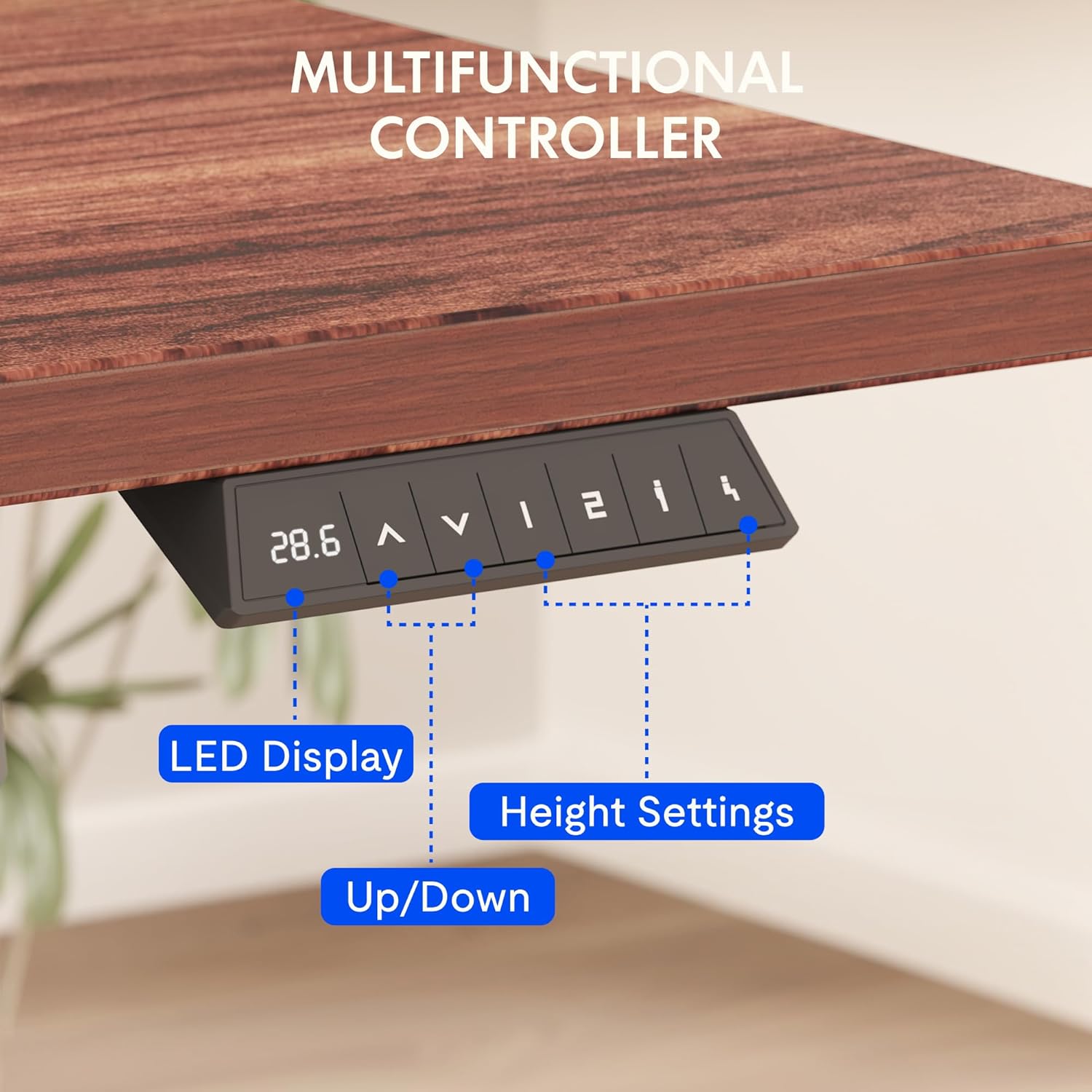
Figure 8.1: Key dimensions and features of the FLEXISPOT EN2 desk.
9. 保証とサポート
FLEXISPOT は、EN2 電動スタンディングデスクに対して包括的な保証を提供します。
- 5年間保証: フレーム、モーター、その他の機械装置に適用されます。
- 2年間保証: コントローラー、スイッチ、電子機器に適用されます。
For customer support, troubleshooting assistance, or warranty claims, please visit the official FLEXISPOT webサイトをご覧いただくか、カスタマー サービス部門に直接お問い合わせください。
10. 公式製品ビデオ
10.1 Computer Workstation Table Test
Video 10.1: A demonstration of the FLEXISPOT EN2 desk's stability and functionality as a computer workstation.
10.2 Flexispot Classic Height Adjustable Standing Desk Series
ビデオ10.2: オーバーview of the FlexiSpot Classic Height Adjustable Standing Desk Series, highlighting key features and design.
10.3 FLEXISPOT Brand Introduction
Video 10.3: A brief introduction to the FLEXISPOT brand and its commitment to ergonomic solutions.