1.製品オーバーview
The WishRing HB-6A (3rd Gen) is a Bluetooth wireless adaptor and PTT (Push-to-Talk) headset system designed for two-way radios. It provides wireless communication capabilities, enhancing convenience and mobility for users of compatible K-plug handheld walkie-talkies. The system includes a Bluetooth V4.0 headset and a wireless PTT button.
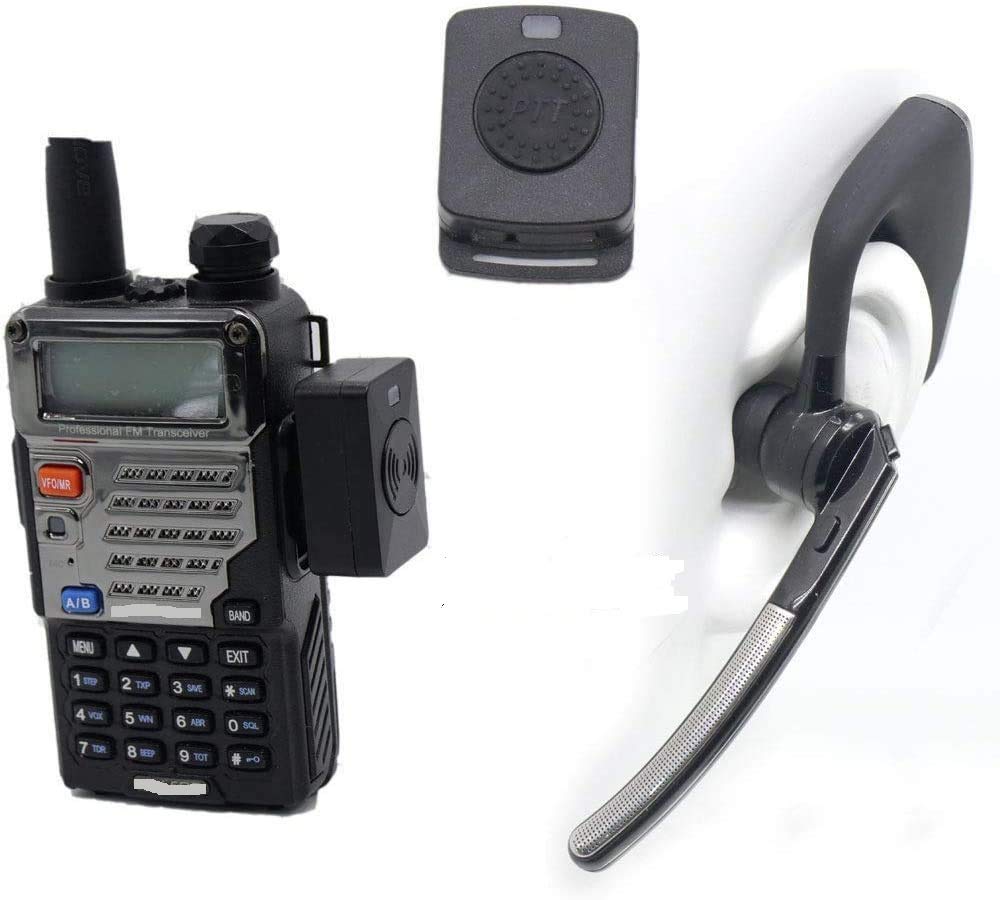
Image: The complete WishRing HB-6A (3rd Gen) system, including the wireless adapter, Bluetooth headset, and wireless PTT button, shown with a hand demonstrating the PTT ring.
パッケージ内容
パッケージに以下のすべての項目が含まれていることを確認してください。
- Two-way radio wireless adapter
- Bluetooth headset v4.0
- Wireless PTT button
- USB充電ケーブル
- ユーザーマニュアル
- 耳栓(各種サイズ)
- Belt (for PTT or adapter)

Image: All components included in the product package: Headset, Manual, Earplug, Belt, USB Charger, Adapter, and PTT.
2. セットアップとペアリング
2.1 デバイスの充電
Before initial use, ensure both the Bluetooth headset and the wireless PTT button are fully charged. Use the provided USB charging cable to connect them to a compatible USB power source. The charging time for both devices is approximately 2 hours.
2.2 Connecting the Wireless Adaptor to Your Radio
- Locate the K-plug earphone hole on your two-way radio.
- Insert the wireless adapter's K-plug connector firmly into the radio's earphone hole. Ensure a secure connection.
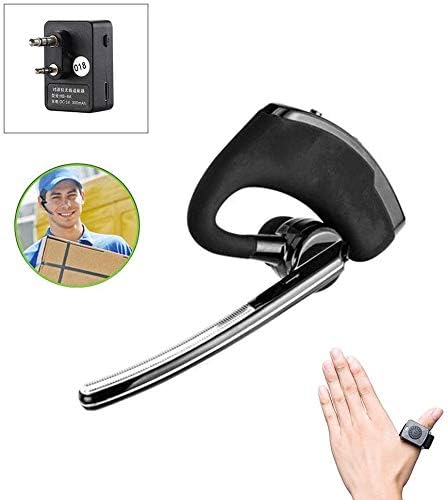
画像: クローズアップ view of the wireless adapter, showing its K-plug connectors and charging port.

Image: Step 1 illustrates plugging the wireless adapter into the walkie-talkie's earphone hole. Step 2 shows the adapter's LED indicators: flashing red and blue for pairing, blue light flashing for successful pairing, and steady red when the radio is in intercom mode. It also shows pressing the power button on the adapter and its charging port.
2.3 Pairing the Headset and PTT Button
- Power On the Adapter: Press the power button on the wireless adapter. The adapter's indicator light will flash red and blue, indicating it is in pairing mode.
- ヘッドセットの電源オンとペアリング: Power on the Bluetooth headset. The headset's indicator light will flash blue, indicating it is searching for a connection. Once paired successfully with the adapter, the blue light will flash steadily.
- Pair Wireless PTT: Press the PTT button on the wireless PTT device. The adapter's indicator light will turn red momentarily, then release the PTT button. The adapter's blue light will flash, confirming successful pairing with the PTT.
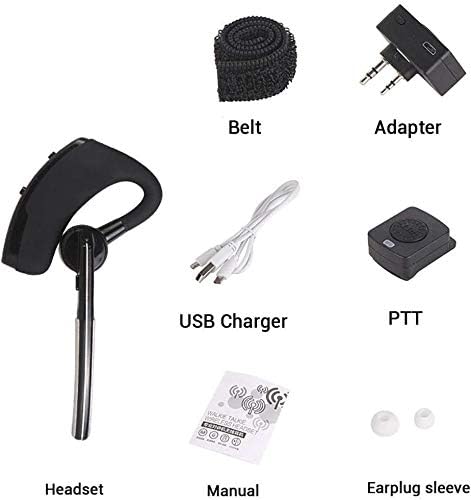
Image: Step 3 shows powering up the headset and its charging interface, with blue flashing red indicating pairing and blue flashes after successful pairing. Step 4 illustrates the headset's volume control and how to press the PTT button to initiate a call.
3. 操作手順
3.1 ヘッドセットの装着
The headset is designed for comfortable wear and can be adjusted for either the left or right ear.

Image: The Bluetooth headset is shown worn on a mannequin head, demonstrating its ergonomic fit.

Image: An illustration highlighting the comfortable design of the headset, emphasizing its 'double points' for stability.

Image: An illustration demonstrating the headset's ability to rotate 180 to 270 degrees, allowing it to be worn comfortably on either the left or right ear. Examples of users wearing the headset are also shown.
3.2 PTT機能の使用
Once the wireless PTT button is paired, simply press and hold it to transmit your voice through the radio. Release the button to stop transmitting and listen for incoming communication.
3.3 ボリュームコントロール
Adjust the volume directly on the Bluetooth headset using its integrated volume controls. Refer to the headset's specific buttons for increasing または decreasing audio levels.
4. 互換性
The WishRing HB-6A (3rd Gen) is compatible with K-plug handheld walkie-talkies, including models from Kenwood, TYT, and Baofeng UV5R series. The Bluetooth headset can also pair with iPhone, Android, and other Bluetooth-enabled devices for general audio use.

Image: A two-way radio (Baofeng UV-5RE) with the wireless adapter attached, alongside the Bluetooth headset and wireless PTT button, demonstrating a complete setup.
5. メンテナンス
5.1 クリーニング
Wipe the devices with a soft, dry cloth. Avoid using harsh chemicals or abrasive cleaners. Do not immerse any part of the system in water.
5.2バッテリーケア
To prolong battery life, avoid fully discharging the devices frequently. Recharge them when the battery indicator is low. Store the devices in a cool, dry place when not in use for extended periods.
6。 トラブルシューティング
6.1 デバイスがペアリングされない
- Ensure both the adapter and headset/PTT are powered on and fully charged.
- Confirm the adapter is flashing red and blue, indicating pairing mode.
- デバイスを互いに近づけます(1メートル以内)。
- Restart both the adapter and the headset/PTT and attempt pairing again.
6.2 No Audio or Intermittent Connection
- Check the connection of the wireless adapter to the radio's K-plug port. Ensure it is fully inserted.
- Verify that the headset and adapter are successfully paired (steady blue light on adapter after pairing).
- Ensure the radio's volume is set appropriately.
- Check the headset's volume control.
- Ensure the devices are within the operational range (up to 10 meters). Obstacles can reduce range.
6.3 PTT Button Not Responding
- Ensure the wireless PTT button is charged.
- Re-pair the PTT button with the wireless adapter as described in Section 2.3.
7. 仕様
| モデル名 | HB-6A (3rd Gen) |
| 接続技術 | ワイヤレス(Bluetooth) |
| 無線通信技術 | Bluetooth V4.0 クラス2 |
| 対応デバイス | Two-Way Radios (K-plug), Smartphones, Bluetooth Devices |
| 制御方法 | プッシュボタン |
| Bluetooth範囲 | 最大10メートル(33フィート) |
| 充電時間 | 約2時間 |
| 勤務時間 | 5~8時間 |
| 待機時間 | 100時間未満 |
| ノイズ制御機能 | ノイズキャンセリング |
| アイテム重量 | 7.1オンス |
| パッケージ寸法 | 3.15 x 1.97 x 1.18インチ |
| バッテリー | 1 リチウムポリマー電池 (付属) |
8. 保証とサポート
保証情報およびテクニカルサポートについては、ご購入時に付属の説明書をご参照いただくか、販売元に直接お問い合わせください。保証請求の際に必要となるため、購入証明書は保管してください。