
イキキンM16
iKiKin M16 HUD カーヘッドアップディスプレイ ユーザーマニュアル
Model: M16 | Brand: iKiKin
1. はじめに
The iKiKin M16 Head-Up Display (HUD) is an advanced vehicle accessory designed to enhance driving safety and convenience by projecting essential driving data directly into the driver's line of sight. Utilizing GPS technology, it provides accurate information such as vehicle speed, compass direction, altitude, driving time, and mileage. The M16 features a 3.5-inch HD display with integrated shading for clear readability in various lighting conditions and includes intelligent alarm functions to alert drivers to potential hazards.

Figure 1.1: iKiKin M16 HUD device displaying speed and compass information.
2.製品オーバーview
2.1 主な特徴
- 3.5インチHDディスプレイ: Clear and bright display with integrated lens cover to prevent image duplication.
- 自動明るさ調整: Built-in light sensor adjusts display brightness based on ambient light.
- GPS Data Display: Shows speed, GPS compass, altitude, mileage, and driving time.
- 安全アラーム: Includes over-speed alarm and fatigue driving reminder.
- ユニバーサル互換性: Works with all vehicle types (cars, trucks, motorcycles, new energy vehicles, hybrid cars).
- 耐久性のある素材: Constructed from PC + ABS material, resistant to extreme temperatures (-100°F to 170°F).
- USB電源: Low power consumption, no power theft when vehicle is turned off.
2.2 パッケージ内容
パッケージに以下の項目が含まれているか確認してください。
- iKiKin M16 HUD Unit
- USB電源ケーブル
- 滑り止めマット
- Reflective Film (optional for clearer projection)
- ユーザーマニュアル(このドキュメント)

Figure 2.1: The iKiKin M16 HUD is designed for universal compatibility across various vehicle types.
3. セットアップとインストール
Follow these steps to properly set up and install your iKiKin M16 HUD:
- 配置: Choose a suitable flat surface on your dashboard where the HUD will not obstruct your view of the road. Ensure the surface is clean and dry.
- デバイスを保護する: Place the provided anti-slip mat on the chosen dashboard location. Then, place the iKiKin M16 HUD unit on the mat to secure it.
- 接続電源: Connect the supplied USB power cable to the HUD unit's power input port. Plug the other end of the USB cable into your vehicle's USB port or a 5V USB car charger (not included). The device will power on automatically with the vehicle's ignition.
- 反射フィルム(オプション): If you experience a double image or prefer a clearer projection, you can apply the reflective film to your windshield.
- Clean the windshield area where the HUD will project.
- Peel off the protective layer from the reflective film.
- Carefully apply the film to the windshield, ensuring no air bubbles. Use a card to smooth it out.
- ポジショニング: Adjust the angle of the HUD unit so that the display is clearly visible and aligned with your driving position.
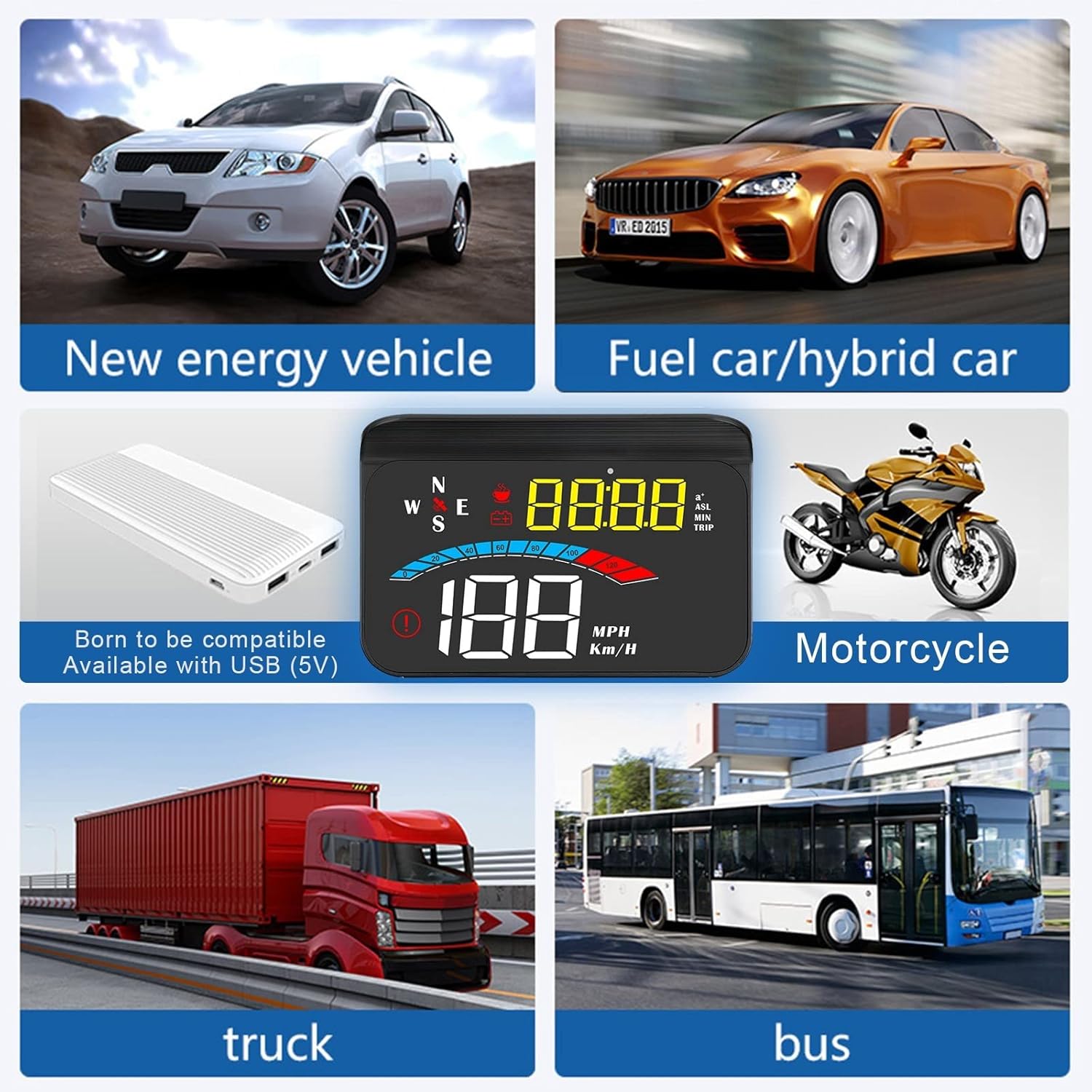
Figure 3.1: The iKiKin M16 HUD is compatible with a wide range of vehicles, connecting via USB (5V).
4. 操作手順
The iKiKin M16 HUD provides various driving data and functions. The device automatically adjusts brightness based on ambient light, but manual adjustment is also possible.
4.1 表示モードとデータ
The HUD can display multiple types of data. Use the control button (usually a scroll wheel or button on the side/back) to cycle through display modes.
- スピード: Displays current vehicle speed in MPH or Km/H.
- GPSコンパス: Shows current driving direction (N, S, E, W, NE, NW, SE, SW).
- 高度: Displays current altitude based on GPS data.
- 走行距離: Tracks trip mileage. This resets when the device is powered off.
- 運転時間: Shows the duration of the current trip. This also resets when the device is powered off.
- システム時刻: Displays the current time, synchronized via satellite.
- 100km Acceleration Test: Measures the time it takes to accelerate from 0 to 100 km/h.
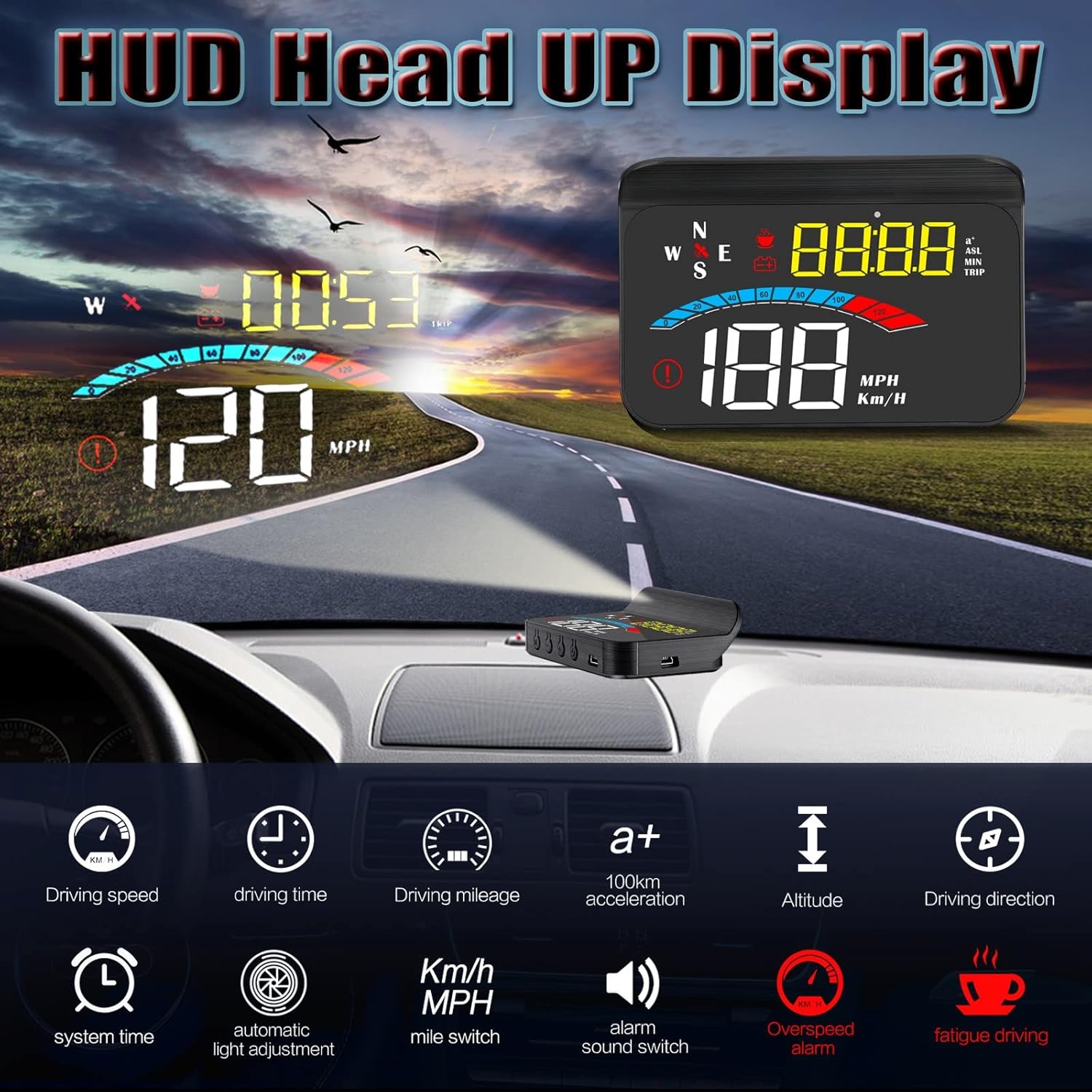
図4.1:以上view of data display modes and functions available on the iKiKin M16 HUD.
4.2つのアラーム機能
The M16 HUD includes two important safety alarm functions:
- 速度超過アラーム: The device will emit an audible alert and/or visual warning if your vehicle exceeds a preset speed limit. This limit can typically be adjusted in the settings.
- 疲労運転の注意: After a continuous period of driving (e.g., 4 hours), the device will remind you to take a break to prevent fatigue.

Figure 4.2: The iKiKin M16 HUD provides both over-speed and fatigue driving alarm functions for enhanced safety.
4.3 設定調整
To access and adjust settings (e.g., speed unit, alarm thresholds, brightness):
- Locate the control button/wheel on the device.
- Press and hold the button (or follow specific instructions in the quick start guide if provided with the product) to enter the settings menu.
- Use the button/wheel to navigate through options and adjust values.
- Press and hold again (or short press to confirm and exit) to save changes and exit the settings menu.
Note: Specific button functions and menu navigation may vary slightly. Refer to the quick start guide included with your product for detailed button operations.
5. メンテナンス
Proper care and maintenance will ensure the longevity and optimal performance of your iKiKin M16 HUD.
- クリーニング: Use a soft, dry cloth to wipe the display and exterior of the unit. Do not use abrasive cleaners, solvents, or chemical sprays, as these can damage the device.
- 温度: While the device is designed for wide temperature ranges, avoid exposing it to extreme heat or cold for prolonged periods when not in use.
- ストレージ: デバイスを長期間保管する場合は、電源を外して涼しく乾燥した場所に保管してください。
- 水を避ける: The device is not waterproof. Keep it away from water and excessive moisture.
6。 トラブルシューティング
If you encounter issues with your iKiKin M16 HUD, please refer to the following common problems and solutions:
| 問題 | 考えられる原因 | 解決 |
|---|---|---|
| ディスプレイが表示されない/デバイスの電源が入らない | No power supply; Loose cable connection; Vehicle's USB port not active. | Check USB cable connection. Ensure vehicle's ignition is on. Try a different USB port or 5V car charger. |
| 不正確な速読 | GPS signal interference; Speed calibration needed. | 明確にする view of the sky for GPS signal. Calibrate speed in settings if discrepancy persists (refer to quick start guide for calibration steps). |
| Double image on windshield | Windshield material; No reflective film applied. | 付属の反射フィルムをフロントガラスに貼り付けます。HUDユニットの角度を調整します。 |
| GPS signal not found/slow to connect | 妨害された view of sky; Device moved during startup. | デバイスにクリアな view of the sky. Wait a few minutes after starting the vehicle for GPS acquisition. Avoid moving the device during startup. |
| ディスプレイが暗すぎる/明るすぎる | Automatic brightness sensor issue; Manual brightness setting. | Ensure the light sensor on the device is not obstructed. Adjust brightness manually through the settings menu. |
これらの解決策を試しても問題が解決しない場合は、カスタマー サポートにお問い合わせください。
7. 仕様
| 特徴 | 詳細 |
|---|---|
| モデル番号 | M16 |
| ブランド | iKiKin |
| 表示サイズ | 3.5インチ |
| 寸法(長さ×幅×高さ) | 14.2 x 9.2 x 5.2 cm(5.59 x 3.62 x 2.05インチ) |
| 重さ | 180グラム(0.4ポンド) |
| 材料 | アクリロニトリルブタジエンスチレン(ABS) |
| 電源 | USB(5V) |
| 動作温度 | -100°F~170°F(約-73°C~77°C) |
| GPSモジュール | はい |
| 欧州連合 | 724873493591 |
8. 保証とサポート
8.1 保証情報
iKiKin provides a 1年間の保証 for the M16 HUD Car Head-Up Display from the date of purchase. This warranty covers manufacturing defects and malfunctions under normal use. Additionally, a 90-day free refund or replacement is offered for product issues.
以下の原因による損傷は保証の対象外となります。
- Accident, misuse, abuse, or improper operation.
- 許可されていない修理または改造。
- Damage from natural disasters or external causes.
8.2 カスタマーサポート
For any questions regarding the product, accessories, or if you encounter any issues not covered in the troubleshooting section, please contact iKiKin customer support. Please have your purchase details and product model number (M16) ready when contacting support.
Contact information for iKiKin customer support can typically be found on the product packaging, official webサイトまたは購入場所からご購入いただけます。
Ask a question about this manual
Ask about setup, troubleshooting, compatibility, parts, safety, or missing instructions. Manuals+ will review the question and use this page’s manual context to help answer it.