
1. はじめに
This manual provides detailed instructions for the installation, operation, and maintenance of the Fafeicy TM626 DIN Rail Mount AC220V Power Timer Switch. This digital timer is designed for precise time control of electrical appliances and systems, offering programmable on/off cycles for various applications.
The TM626 is suitable for controlling street lights, factory equipment, advertising signs, production machinery, radio and television equipment, stage lighting, and other power equipment that requires regular automated switching.
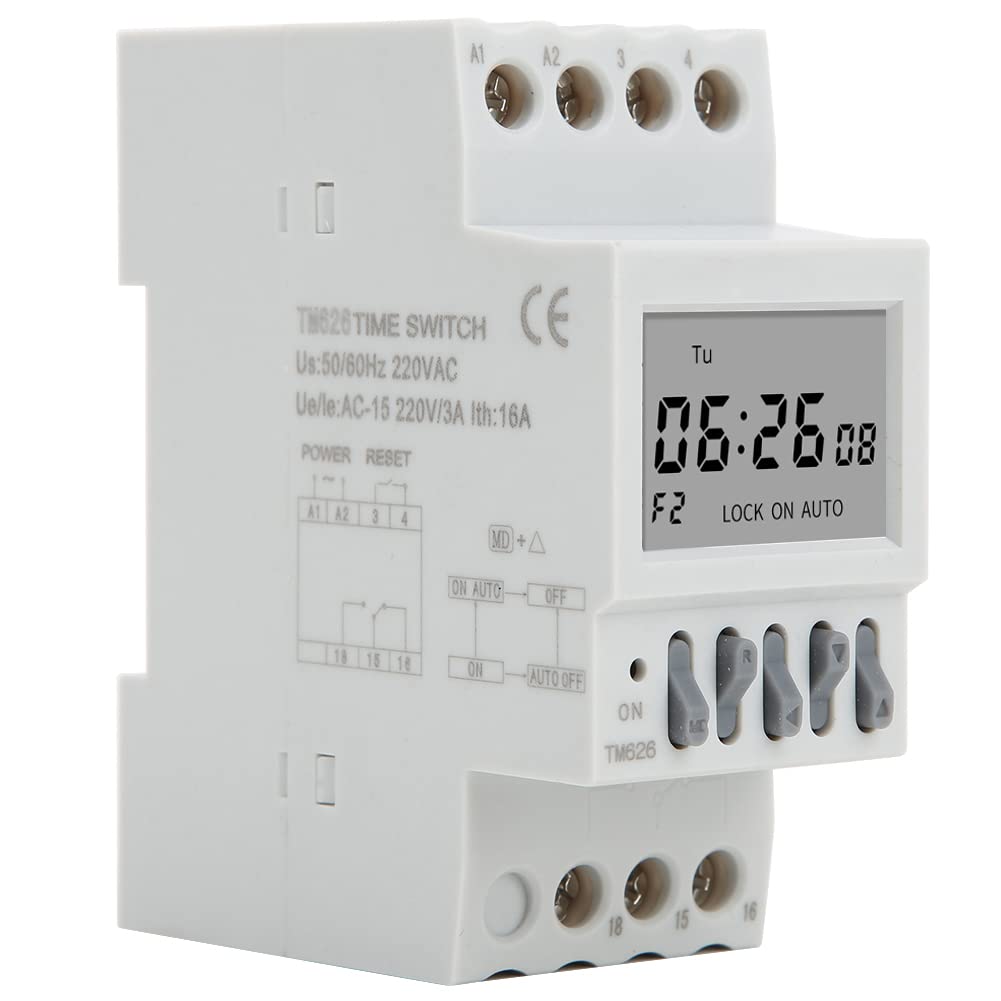
画像1.1: 角度付き view of the Fafeicy TM626 Power Timer Switch, showing the display and terminal connections.

Image 1.2: The TM626 timer switch is ideal for automating various applications, including street lighting, industrial equipment, and advertising displays.
2. 安全情報
本装置を設置または操作する前に、すべての安全に関する指示をよく読んで理解してください。指示に従わない場合、感電、火災、または重傷を負う可能性があります。
- 設置やメンテナンス作業を行う前に、必ず電源を切ってください。
- 設置作業は資格のある電気技師のみが行う必要があります。
- 指定された容量を超えないでくださいtage (AC220V) and current (16A) ratings.
- デバイスを水や湿度の高い環境に置かないでください。
- ご自身でデバイスを開けたり修理したりしないでください。修理については、資格のある担当者にご相談ください。
3.製品オーバーview
The Fafeicy TM626 is a compact digital timer switch designed for DIN rail mounting. It features a clear LCD display for time and program settings, along with intuitive control buttons.
3.1 コンポーネント
- LCDディスプレイ: 現在の時刻、日付、プログラミングのステータスを表示します。
- コントロールボタン: Used for setting time, programming, and manual override.
- 端子台: For connecting power input and load output.
- DIN Rail Clips: 標準の DIN レールにしっかりと取り付けます。

画像3.1:正面 view of the TM626 timer switch, highlighting the LCD display and control buttons.

画像3.2: 側面 view of the TM626, illustrating the integrated DIN rail mounting clips.
4. 仕様
| 特徴 | 仕様 |
|---|---|
| ブランド | Fafeicy |
| モデル番号 | TM626 (Fafeicy txusog0m3i) |
| 営業巻tage | AC220V(50/60Hz) |
| 定格電流 | 16A |
| 画面サイズ | 1.6インチ |
| 機械生命 | ≥ 30,000回 |
| 電気寿命 | ≥ 10,000回 |
| 寸法(約) | Width: 35mm (1.4in), Height: 82mm (3.2in), Depth: 68mm (2.7in) |
| 取り付け | DINレール |
| 原産国 | 中国 |

Image 4.1: Dimensional drawing of the TM626 timer switch, showing key measurements.

Image 4.2: The TM626 timer switch, illustrating its robust design for long mechanical and electrical life.
5. セットアップとインストール
Follow these steps for proper installation and initial setup of your TM626 timer switch.
5.1 取り付け
- Ensure the main power supply is OFF before mounting.
- Locate a standard 35mm DIN rail within your electrical panel.
- Align the DIN rail clips on the back of the TM626 with the DIN rail.
- Press the timer firmly onto the rail until it clicks into place.
5.2配線
Refer to the wiring diagram on the device and below for correct connections. Incorrect wiring can damage the device or cause electrical hazards.

画像5.1: 側面 view of the TM626 showing the wiring terminals and a simplified internal diagram. Terminals A1 and A2 are for power input (AC220V). Terminals 15, 16, 18 are for load output (15: Common, 16: Normally Closed, 18: Normally Open).
- Connect the AC220V power supply to terminals A1 そして A2.
- Connect the common wire of your load to terminal 15.
- For normally open operation (load turns ON when timer activates), connect the load's live wire to terminal 18.
- For normally closed operation (load turns OFF when timer activates), connect the load's live wire to terminal 16.
- すべての接続が安全で絶縁されていることを確認してください。
5.3 初期電源投入
After wiring, restore power. The display should light up. If the display is blank, check power connections. The timer may require an initial charge if it has been stored for a long time; allow it to be powered for a few minutes.
6. 操作手順
The TM626 timer switch allows you to set the current time and program multiple on/off cycles.
6.1 現在の時刻と日付の設定
- を押す クロック button (if available, or a similar button for time setting).
- 使用 D+ (Day), H+ (Hour), and M+ (Minute) buttons to adjust the current day, hour, and minute.
- プレス クロック もう一度保存して終了します。
6.2 オン/オフサイクルのプログラミング
The TM626 typically supports multiple ON/OFF programs. The exact number may vary, but common models support 8-16 programs.
- を押す プログラム ボタンを押します。ディスプレイに「1 ON」と表示されます。
- 使用 D+ to select the day(s) for this ON event (e.g., Mon-Fri, Sat-Sun, every day, specific days).
- 使用 H+ そして M+ 希望するオン時間を設定します。
- プレス プログラム もう一度押してください。ディスプレイに「1 OFF」と表示されます。
- 使用 D+, H+、 そして M+ to set the desired OFF time for the first program.
- Repeat steps 1-5 for additional ON/OFF programs (e.g., "2 ON", "2 OFF", etc.).
- 必要なプログラムをすべて設定したら、 クロック button to exit programming mode and save settings.
6.3手動オーバーライド
の マニュアル or オン/オート/オフ button allows you to manually override the programmed settings.
- Pressing this button cycles through modes: ON (常時オン)、 オート (follows programs), オフ (always off).
- 選択 オート for the timer to execute its programmed schedules.
6.4 リセット機能
すべての設定をクリアしてタイマーを工場出荷時の状態に戻すには、小さな リセット button (often recessed) and press it using a pointed object (e.g., a pen tip). This will erase all time and program settings.
7. メンテナンス
The Fafeicy TM626 timer switch requires minimal maintenance to ensure long-term reliable operation.
- クリーニング: デバイスの外側を拭く際は、柔らかく乾いた布を使用してください。研磨剤入りの洗剤や溶剤は使用しないでください。
- 検査: 配線接続部の締め付け具合や摩耗、損傷の兆候がないか定期的に確認してください。
- バッテリーバックアップ: The device typically includes an internal battery for retaining settings during power outages. This battery is usually non-replaceable by the user and recharges when the device is powered.
8。 トラブルシューティング
If you encounter issues with your TM626 timer switch, refer to the following common problems and solutions:
| 問題 | 考えられる原因 | 解決 |
|---|---|---|
| 表示が空白です。 | 電源が供給されていません。内部バッテリーが放電しています。 | Check power connections to A1/A2. Allow device to be powered for several minutes to charge the internal battery. |
| 負荷がプログラムどおりにオン/オフになりません。 | Incorrect programming; timer in manual ON/OFF mode; incorrect wiring; faulty load. | Verify program settings. Ensure the timer is in オート mode. Check wiring connections (15, 16, 18). Test the load independently. |
| 時間が間違っています。 | Time not set correctly; power interruption (though internal battery should prevent this). | Reset and re-set the current time and day. Ensure the internal battery is charged. |
| ボタンが反応しません。 | Device malfunction; temporary software glitch. | Perform a full reset using the recessed RESET button. If the issue persists, contact support. |
9. 保証とサポート
For warranty information or technical support, please refer to the documentation provided with your purchase or contact Fafeicy customer service through their official channels. Keep your purchase receipt as proof of purchase.
一般的なお問い合わせは、 Fafeicy Brand Store.