
FLINQ 8720168680396
FlinQ Mobile Air Conditioner User Manual
モデル: 8720168680396
1. 重要な安全上の注意事項
Please read all instructions carefully before using this appliance and retain them for future reference. Failure to follow these instructions may result in electric shock, fire, or serious personal injury.
- ユニットは必ずアースされた電源コンセントに接続してください。
- コードやプラグが損傷した状態で本機を操作しないでください。
- ユニットを可燃性物質や火気から遠ざけてください。
- 動作中はユニット周囲の換気が適切であることを確認してください。
- 吸気口や排気口に物を差し込まないでください。
- 清掃やメンテナンスを行う前に、ユニットのプラグを抜いてください。
- この機器は、安全に責任を負う人物による機器の使用に関する監督または指示がない限り、身体的、感覚的、または精神的能力が低下している人、あるいは経験と知識が不足している人(子供を含む)による使用を想定していません。
2.製品オーバーview
The FlinQ Mobile Air Conditioner is a versatile unit designed to provide cooling, dehumidification, and fan functions for your living space. It is equipped with an energy-efficient design and comes with a window kit for easy installation.

図2.1: 前面 view of the FlinQ Mobile Air Conditioner, showing the main air outlet and control panel area.

Figure 2.2: The mobile air conditioner unit, displaying its energy efficiency label (Class A) and the included remote control for convenient operation.
3. コンポーネントと部品
Familiarize yourself with the main components of your mobile air conditioner:
- 本体(コントロールパネル付き)
- 排気ホース
- Window Sealing Kit (adjustable window slider/plate)
- リモートコントロール
- Drain Hose (for continuous drainage in dehumidification mode)
- Air Filters (located on the back/side)
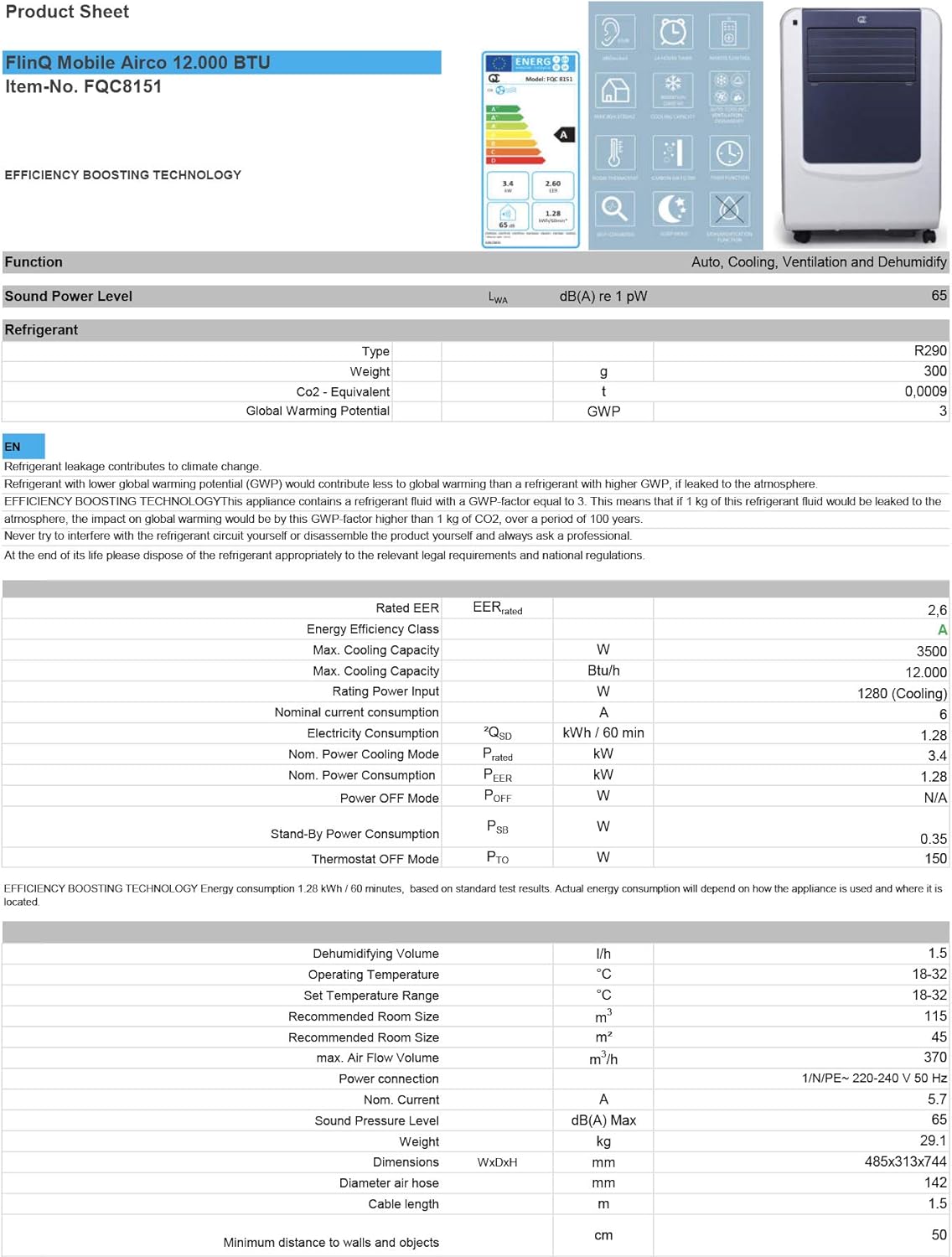
Figure 3.1: The remote control and a visual representation of the unit's key features, including noise level (65dB), 24-hour timer, cooling capacity (12000 BTU/h), room thermostat, carbon air filter, self-diagnosis, sleep mode, remote control function, timer function, auto cooling/fan/dehumidification, and dehumidification function.
4. セットアップとインストール
4.1 開梱
Carefully remove the air conditioner and all accessories from the packaging. Inspect for any damage during transit. Keep the original packaging for future storage or transport.
4.2 配置
Place the unit on a flat, stable surface. Ensure there is at least 30 cm (12 inches) of clear space around the unit for proper airflow. Do not place it near heat sources or in direct sunlight.
4.3 ウィンドウキットの取り付け
To ensure efficient cooling, the hot air extracted by the unit must be vented outside. Use the provided window sealing kit for this purpose.
- 排気ホースコネクタをユニット背面の排気口に取り付けます。
- Extend the exhaust hose and attach the window adapter to the other end.
- Adjust the window slider/plate to fit your window opening.
- Insert the window adapter into the opening of the window slider/plate.
- Close the window as much as possible to seal the opening around the kit, minimizing air leakage.

図4.1:側面 view of the mobile air conditioner, illustrating the connection point for the exhaust hose, which expels hot air from the room.
5. 操作手順
5.1 コントロールパネル
The control panel is located on the top of the unit and features various buttons and an LED display for setting modes, temperature, and timer functions.
5.2リモコン
The remote control allows you to operate all functions of the air conditioner from a distance. Ensure the remote control batteries are inserted correctly.
5.3動作モード
「モード」ボタンを押すと、利用可能な動作モードが切り替わります。
- 冷却モード: For cooling the room. Set your desired temperature using the temperature adjustment buttons.
- 除湿モード: Removes excess moisture from the air. The fan speed is typically fixed in this mode. Consider connecting a drain hose for continuous drainage.
- ファンモード: Circulates air without cooling. You can adjust the fan speed (Low, Medium, High).

図 5.1: 拡大図 view of the adjustable louvers on the air conditioner's front panel, which direct the airflow.
6. メンテナンス
定期的なメンテナンスにより、最適なパフォーマンスが確保され、エアコンの寿命が延びます。
6.1 エアフィルターの清掃
The air filters should be cleaned every two weeks or more frequently depending on usage and air quality. Dirty filters reduce efficiency and can damage the unit.
- エアコンの電源プラグをコンセントから抜いてください。
- Locate and remove the air filters (usually on the back or side of the unit).
- Wash the filters under running water (warm, not hot) or use a vacuum cleaner to remove dust.
- Allow the filters to air dry completely before reinserting them. Do not expose them to direct sunlight.

Figure 6.1: Illustration of how to remove the air filter from the mobile air conditioner for cleaning, highlighting the accessible filter panel.
6.2 排水
The unit collects condensed water during cooling and dehumidification. The internal tank will fill up, and the unit may stop operating when full. Drain the water regularly.
- 排水口(通常はユニットの下部背面)の下に浅い鍋またはトレイを置きます。
- 排水プラグを外して水を排出します。
- For continuous drainage in dehumidification mode, attach the provided drain hose to the drain port.
6.3 ストレージ
ユニットを長期間保管する場合:
- ユニット内の水をすべて排出します。
- エアフィルターを掃除します。
- 電源コードを抜いて、きちんと巻き取ってください。
- ユニットは乾燥した涼しい場所に、できれば元の梱包のまま保管してください。
7。 トラブルシューティング
カスタマー サポートにお問い合わせいただく前に、次の表で一般的な問題とその解決策を参照してください。
| 問題 | 考えられる原因 | 解決 |
|---|---|---|
| ユニットがオンにならない | No power; Power cord not plugged in; Full water tank | 電源コンセントを確認する;電源コードを差し込む;水タンクを排水する |
| ユニットの冷却が不十分 | Dirty air filters; Exhaust hose blocked/leaking; Room too large; Doors/windows open | Clean filters; Check hose for blockages/proper sealing; Ensure room size is within capacity; Close doors/windows |
| ユニットがうるさい | Unit not on a flat surface; Air filters dirty | Place on flat surface; Clean air filters |
| ユニットから水が漏れている | 排水プラグが適切に密閉されていない、ユニットが傾いている | 排水プラグがしっかり閉まっていることを確認してください。ユニットを水平な面に置いてください。 |
8. 仕様
Technical details for the FlinQ Mobile Air Conditioner:
| 特徴 | 価値 |
|---|---|
| モデル番号 | 8720168680396 |
| 製品寸法 | 74 x 48 x 31 cm |
| アイテム重量 | 29 g (Note: This weight seems unusually low for an AC unit, please refer to product packaging for accurate weight) |
| 騒音レベル | 65デシベル |
| 冷却能力 | 12000 BTU/時 |
| 推奨される部屋のサイズ | 最大45㎡ |
| 特集 | リモートコントロール |
| エネルギークラス | A |

Figure 8.1: Official product sheet detailing technical specifications, energy consumption, cooling capacity, and dimensions of the FlinQ Mobile Air Conditioner.
9. 保証とサポート
This FlinQ Mobile Air Conditioner comes with a limited warranty. Please refer to the warranty card included with your purchase for specific terms and conditions.
For technical support, service, or warranty claims, please contact your retailer or the manufacturer directly. Keep your proof of purchase for warranty validation.
連絡先:
- ブランド: フリンク
- Webサイト: www.flinq.nl (元ample, please refer to actual product documentation for correct web地点)
- メールアドレス: support@flinq.nl (元ample, please refer to actual product documentation for correct email)
Ask a question about this manual
Ask about setup, troubleshooting, compatibility, parts, safety, or missing instructions. Manuals+ will review the question and use this page’s manual context to help answer it.