
導入
This manual provides detailed instructions for the installation, operation, and maintenance of your Gamemax G503X Elysium Gaming PC Case. Please read this manual thoroughly before beginning installation to ensure proper setup and safe use of your product. Keep this manual for future reference.
安全情報
- PC ケース内のコンポーネントを取り付けたり取り外したりする前に、必ず壁のコンセントから電源を外してください。
- 静電気による損傷を防ぐため、すべてのコンポーネントを慎重に取り扱ってください。静電気防止リストストラップの使用を検討してください。
- PC ケースを直射日光の当たる場所、熱源の近く、湿度の高い場所に置かないでください。
- 過熱を防ぐために、ケースの周囲に適切な換気を確保してください。
- 小さな部品や工具はお子様の手の届かないところに保管してください。
- ケースまたはそのコンポーネントを改造しないでください。改造すると保証が無効になり、安全上のリスクが生じる可能性があります。
パッケージ内容
パッケージの内容をご確認ください。不足品や破損品がある場合は、販売店までご連絡ください。
- Gamemax G503X Elysium Mid Tower PC Case
- Pre-installed 120mm RGB Fans (quantity as specified on packaging, typically 3)
- Accessory kit (screws, standoffs, cable ties, etc.)
- ユーザーマニュアル(このドキュメント)
特徴
- Mid Tower design
- Full transparent acrylic side window
- Support for ATX, Micro ATX, and Mini-ITX motherboards
- Front I/O: 1x USB 3.0, 2x USB 2.0, HD Audio (input/output)
- Integrated fan control (High/Off/Low)
- Ample space for cable management behind the motherboard tray
- Support for long graphics cards (up to 380mm)
- Multiple drive bays: 1x 5.25", 2x 3.5" HDD, 2x 2.5" SSD
- Pre-installed RGB fans for enhanced aesthetics and cooling
セットアップとインストール
1. ケースの開梱
Carefully remove the case from its packaging. Inspect for any damage during shipping. Remove any protective films from the acrylic side panel.
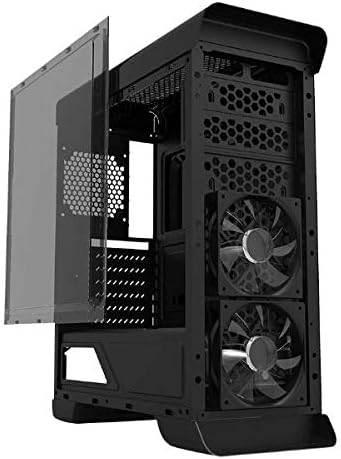
画像: サイド view of the Gamemax G503X Elysium case with the transparent acrylic panel detached, showing the internal structure and front fans.
2. マザーボードの取り付け
- ケースを横に置きます。
- Install the necessary motherboard standoffs into the motherboard tray according to your motherboard's form factor (ATX, Micro ATX, Mini-ITX).
- ネジ穴を合わせながら、マザーボードをスタンドオフの上に慎重に置きます。
- 付属のネジでマザーボードを固定します。
3. ドライブのインストール
3.1. 5.25" Drive (Optical Drive)
The case features one 5.25" drive bay. Remove the front panel cover, slide the drive into the bay, and secure it with screws or tool-less clips if available.
3.2. 3.5" HDD Drives
Install up to two 3.5" HDDs into the designated drive cages. These typically use trays or direct screw mounting. Ensure they are securely fastened.
3.3. 2.5" SSD Drives
Install up to two 2.5" SSDs onto the dedicated mounting points, usually located behind the motherboard tray or on the PSU shroud. Secure with screws.
4. CPUクーラーの取り付け
Install your CPU cooler according to its manufacturer's instructions. Ensure the cooler's height does not exceed the maximum supported height of 158mm for this case.
5. グラフィックカード(GPU)のインストール
- Remove the necessary PCI slot covers from the rear of the case (up to 7 slots available).
- グラフィック カードをマザーボード上の適切な PCIe スロットに挿入します。
- Secure the graphics card with screws. The case supports graphics cards up to 380mm in length.

画像: 背面 view of the Gamemax G503X Elysium case, highlighting the 7 PCI expansion slots and the rear fan mount.
6. Fan Installation and Configuration
The case comes with pre-installed RGB fans. Additional fan mounting options are available:
- フロント: Up to 3x 120mm fans (2 pre-installed, 1 optional)
- 後方: 1x 120mm fan (optional, may be pre-installed)
- トップ: Up to 2x 120mm fans (optional)
Connect all fan power cables to your motherboard or a fan controller. The case includes an integrated fan controller for speed adjustment.
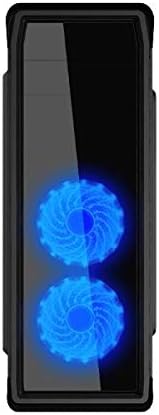
画像: 正面 view of the Gamemax G503X Elysium case, showcasing the two illuminated RGB fans visible through the front panel.
7.ケーブル管理
Utilize the space behind the motherboard tray and the provided cable tie points to route and secure cables. This improves airflow and aesthetics.
8. フロントパネルI/Oの接続
Connect the following cables from the case's front panel to the corresponding headers on your motherboard:
- USB3.0ヘッダー
- USB2.0ヘッダー
- HD Audio header (for headphone and microphone jacks)
- Power switch, Reset switch, Power LED, HDD LED headers
ケースの操作
電源オン
Once all components are installed and connected, close the side panel. Connect your monitor, keyboard, mouse, and power cable to the PC. Press the power button on the front panel to start your system.
ファンコントロール
The Gamemax G503X Elysium features an integrated fan controller on the top panel. Use this controller to adjust the speed of the connected case fans to High, Low, or Off, depending on your cooling needs and noise preference.
RGB照明
The pre-installed fans feature RGB LEDs. The lighting effects are typically controlled via the motherboard's RGB software or a dedicated controller if included with the fans. Refer to your motherboard manual for RGB software instructions.
メンテナンス
クリーニング
Regular cleaning helps maintain optimal performance and extends the lifespan of your components. Use a can of compressed air to remove dust from inside the case, especially from fans and heatsinks. Wipe exterior surfaces with a soft, damp 布。 刺激の強い化学物質や研磨材の使用は避けてください。
Periodically check and clean any dust filters (if present) to ensure unrestricted airflow.
トラブルシューティング
- システムが電源オンにならない: Ensure all power cables (motherboard, CPU, GPU, drives) are securely connected. Check that the power supply switch is in the 'ON' position. Verify front panel power switch connection to the motherboard.
- ファンが回転していません: Check fan power connections to the motherboard or fan controller. Ensure the fan controller is set to 'High' or 'Low', not 'Off'.
- ディスプレイ出力なし: Ensure your graphics card is properly seated and connected to the power supply. Verify that your monitor cable is connected to the graphics card, not the motherboard's integrated graphics port (unless using integrated graphics).
- 過熱の問題: Ensure all case fans are spinning correctly and oriented for proper airflow (intake/exhaust). Check CPU cooler installation and thermal paste application. Ensure the case is not obstructed.
For further assistance, consult your motherboard and component manuals or contact Gamemax support.
仕様
| 特徴 | 仕様 |
|---|---|
| ケースタイプ | ミッドタワー |
| モデル | G503X Elysium |
| 色 | 黒 |
| サイドパネル | Full Transparent Acrylic |
| マザーボードのサポート | ATX、マイクロATX、ミニITX |
| ドライブベイ | 1x 5.25", 2x 3.5" HDD, 2x 2.5" SSD |
| PCI拡張スロット | 7 |
| フロントI / Oポート | 1x USB 3.0, 2x USB 2.0, HD Audio (Input/Output) |
| ファンコントロール | Integrated (High/Off/Low) |
| プレインストールされたファン | 3x 120mm RGB Fans (typically 2 front, 1 rear) |
| Optional Fan Support | Front: 3x 120mm; Rear: 1x 120mm; Top: 2x 120mm |
| CPUクーラーの最大高さ | 158mm |
| グラフィックカードの最大長 | 380mm |
| ケーブル管理スペース | Yes (behind motherboard tray) |
| 材料 | Acrylic (side panel) |
| アイテム重量 | 5.75キロ |
保証とサポート
Gamemax products come with a limited warranty. Please refer to the warranty information provided with your purchase or visit the official Gamemax website for details on warranty terms and conditions. For technical support or inquiries, please contact your retailer or Gamemax customer service.