1. はじめに
This manual provides instructions for the proper setup, operation, and maintenance of your IPD IPH-160 Monaural Wired Headset. The IPH-160 is designed for clear communication in various environments, featuring a noise-cancelling microphone and a 3.5mm jack for broad compatibility.
2. パッケージ内容
パッケージにすべてのアイテムが含まれていることを確認してください。
- IPD IPH-160 Monaural Headset
- Quick Disconnect (QD) to 3.5mm Jack Cable (4-pole)
- イヤークッション(プリインストールまたはスペア)
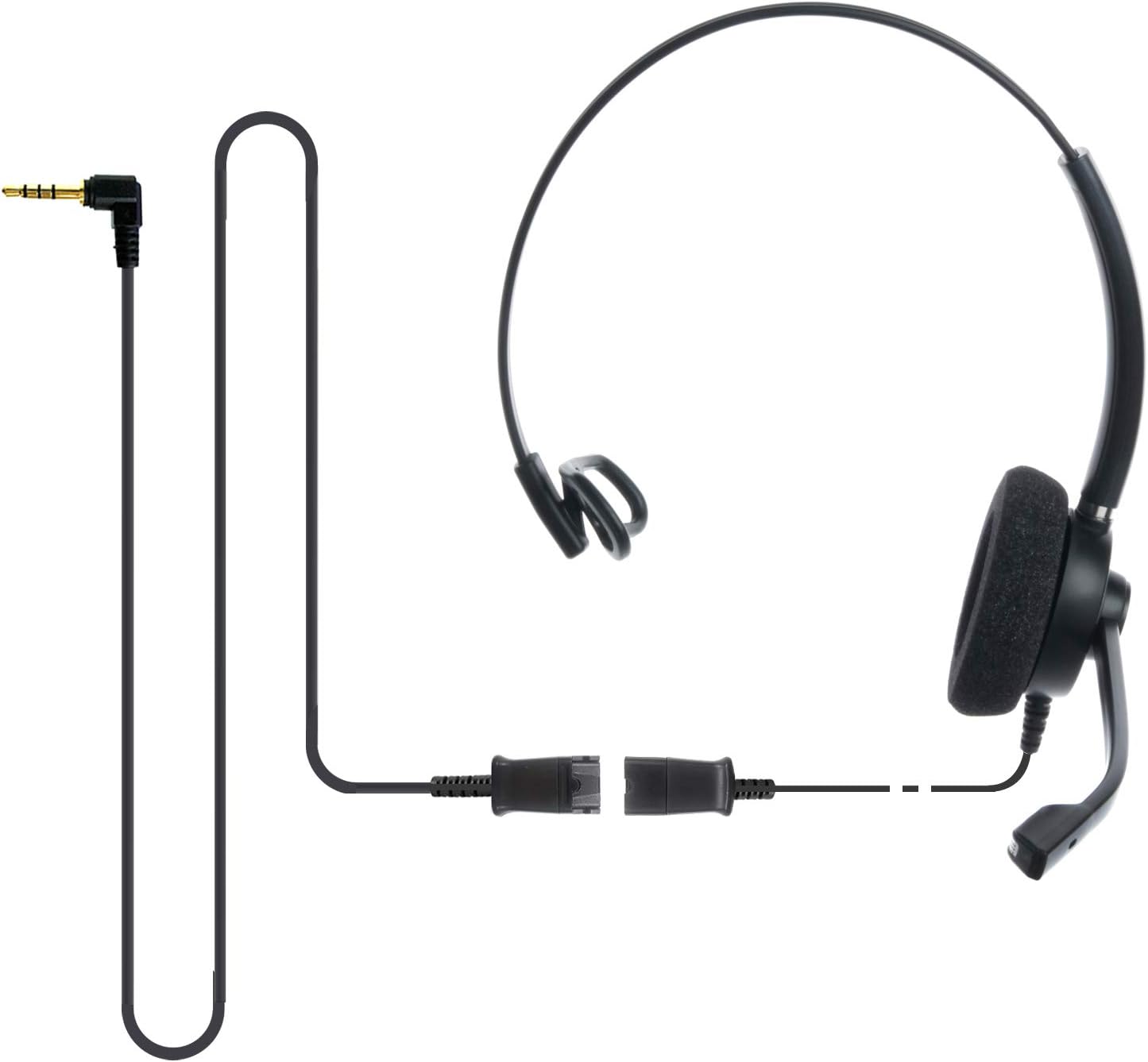
Image: The IPD IPH-160 headset with its detachable Quick Disconnect cable and 3.5mm jack connector.
3. セットアップ
3.1 ヘッドセットの接続
- Connect the Quick Disconnect (QD) cable to the headset. Ensure a secure connection.
- Insert the 3.5mm jack of the cable into the corresponding port on your device (Android cell phone, laptop, tablet, Apple MacBook, or other smart device).

画像: クローズアップ view of the 3.5mm jack connector, illustrating its connection to a mobile device and laptop.
3.2デバイスの互換性
The 3.5mm jack (4 poles) is compatible with a wide range of devices including:
- Android cell phones (e.g., Samsung, Huawei, HTC, ZTE)
- ノートパソコン
- タブレット
- Apple MacBooks with a single 3.5mm headset port
注記:
- iPhone 7/7S and later models may require an additional Lightning to 3.5mm adapter (not included).
- If your specific phone model is not listed or you encounter compatibility issues, please contact IPD support for assistance.

Image: The IPD headset shown with various connection options for desk phones, PCs/softphones, and mobile phones, highlighting the versatility of Quick Disconnect cables.
4. ヘッドセットの操作
4.1 着用と調整
The IPH-160 headset is designed for all-day comfort. Adjust the headband for a secure yet comfortable fit. The microphone boom is flexible; position it approximately 1-2 inches from your mouth for optimal voice pickup.
4.2ノイズキャンセリングマイク
The headset features a passive noise-cancelling microphone to reduce background noise, ensuring clearer conversations. Proper microphone positioning is crucial for effective noise cancellation.

Image: A user wearing the headset, demonstrating the microphone's position and illustrating the effect of noise cancellation on audio waveforms.
4.3 Acoustic Shock Protection (ASP)
The headset incorporates an Acoustic Shock Protection (ASP) circuit on the speaker. This feature protects your hearing from sudden, unwanted loud noises by cutting sounds over 105dB and maintaining levels below 105dB.
4.4 Wideband Audio
The HD Wideband speaker delivers clear sound, enhancing the quality of your calls and audio monitoring.

Image: A close-up of the headset's ear cushion, visually representing the distinction between acoustic noise and clear sound for high-quality voice communication.
5. メンテナンス
5.1 クリーニング
To maintain hygiene and performance, regularly clean the ear cushions and other surfaces of the headset with a soft, dry cloth. Avoid using harsh chemicals or abrasive materials.
5.2 ストレージ
ヘッドセットを使用しない場合は、直射日光や極端な温度を避け、清潔で乾燥した場所に保管してください。ケーブルが絡まると損傷する恐れがあります。
6。 トラブルシューティング
6.1 音が出ない、または音量が低い
- 3.5mm ジャックがデバイスに完全に挿入されていることを確認してください。
- デバイスの音量設定を確認してください。
- Verify that the headset is selected as the audio output device in your computer's sound settings.
- Confirm the Quick Disconnect (QD) cable is securely connected to the headset.
6.2 マイクが機能しない
- マイクのブームが口の近くに正しく配置されていることを確認します。
- Check your device's microphone input settings and ensure the headset is selected as the input device.
- Test the headset with another compatible device to rule out a device-specific issue.
6.3 互換性の問題
If you experience compatibility problems with your device, especially if it's not explicitly listed as compatible, please contact IPD customer support for guidance.
7. 仕様
| 特徴 | 仕様 |
|---|---|
| モデル名 | IPH-160-35 |
| 接続技術 | 有線 |
| ヘッドフォンジャック | 3.5 mm Jack (4-pole) |
| 騒音制御 | パッシブノイズキャンセリング |
| 周波数応答 | 10 kHz |
| 感度 | 58デシベル |
| インピーダンス | 150オーム |
| アイテム重量 | 198グラム(7オンス) |
| 材料 | プラスチック |
| 耳の位置 | オーバーイヤー |
| 特集 | ノイズキャンセリング |
| 含まれるコンポーネント | イヤークッション |
8. 保証情報
The IPD IPH-160 Headset comes with a 3年間保証 ご購入日から1年間有効です。本保証は、通常の使用における製造上の欠陥を対象としています。保証請求の際は、購入証明書を保管してください。
9. サポート
For technical assistance, warranty claims, or any questions regarding your IPD IPH-160 Headset, please contact IPD customer support. You can find contact information on the official IPD webサイトまたは小売店を通じてご購入いただけます。
訪問する IPD Store 詳しい情報と製品については、こちらをご覧ください。


