
1. はじめに
Thank you for choosing the BolyGuard MG984G-36M Trail Camera. This manual provides detailed instructions for the setup, operation, and maintenance of your camera. Designed for outdoor surveillance, this camera captures high-resolution images and videos, offering 4G connectivity for cloud services and remote management via a dedicated application.
最適なパフォーマンスと寿命を確保するために、カメラを使用する前にこのマニュアルをよくお読みください。
2.製品オーバーview
The BolyGuard MG984G-36M is a robust trail camera featuring a camouflage design for discreet outdoor placement. It is equipped with a high-resolution sensor, infrared LEDs for night vision, and an external antenna for reliable 4G communication.
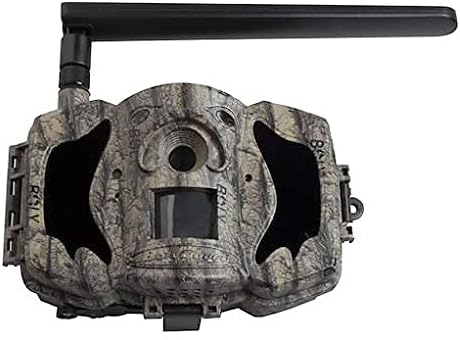
図1: 前面 view of the BolyGuard MG984G-36M trail camera. This image displays the front view of the BolyGuard MG984G-36M trail camera. It features a camouflage pattern casing, a prominent external antenna on the top left, and the main lens and sensor area visible on the front. The camera is designed for outdoor use and blends with natural environments.
主要コンポーネント:
- メインレンズ: 画像やビデオをキャプチャします。
- PIRセンサー: 動きを検知して録画を開始します。
- 赤外線LED: 夜間視力のための照明を提供します。
- 外部アンテナ: Ensures stable 4G network connectivity.
- LCDスクリーン: For menu navigation and settings adjustment (located inside the camera).
- バッテリーコンパートメント: Holds required batteries (not included).
- SDカードスロット: キャプチャしたメディアの保存用。
- SIMカードスロット: For 4G network access.
3. セットアップ
3.1 バッテリーの取り付け
- カメラを開くasing ラッチ。
- バッテリー収納部を見つけます。
- Insert the required batteries (e.g., AA batteries, not included) according to the polarity indicators (+/-). Ensure all batteries are new and of the same type.
- 電池ケースをしっかりと閉めてください。
3.2 SIMカードとSDカードの取り付け
- With the camera powered off, locate the SIM card slot. Insert a activated 4G SIM card into the slot until it clicks into place.
- Locate the SD card slot. Insert a compatible SD card (up to 32GB, Class 10 recommended, not included) into the slot until it clicks.
- Attach the external antenna to the designated port on the camera.
3.3 Initial Power-On and App Setup
- Switch the camera to the 'SETUP' mode. The internal LCD screen will power on.
- Follow the on-screen prompts to set the date, time, and other basic settings.
- Download the official BolyGuard app from your smartphone's app store.
- Register an account and add your camera to the app by following the in-app instructions, typically involving scanning a QR code or entering the camera's serial number.
- Ensure the camera has a stable 4G signal, indicated on the LCD screen.
4. 操作手順
4.1 基本操作モード
- OFF: カメラの電源がオフになっています。
- セットアップ: Allows access to the camera's menu for configuration and viewキャプチャしたメディアを ing します。
- に: Camera is in active surveillance mode, detecting motion and capturing media according to settings.
4.2 Settings Configuration
In 'SETUP' mode, use the navigation buttons to access and modify settings:
- モード: 写真、ビデオ、または写真とビデオを選択します。
- 画像サイズ: 写真の解像度を設定します(例:36MP、24MP)。
- ビデオサイズ: ビデオ解像度を設定します(例:1080P、720P)。
- PIR感度: Adjust motion detection sensitivity (High, Normal, Low).
- トリガー間隔: 連続するトリガー間の遅延を設定します。
- タイムラプス: Configure time-lapse photography settings.
- 送信モード: Configure how media is sent via 4G (e.g., instant, daily report).
- クラウドサービス: Enable or disable cloud storage and app connectivity.
4.3 Remote Management via App
Once connected to the BolyGuard app, you can:
- Receive real-time notifications of detected activity.
- View captured photos and videos remotely.
- Change camera settings from your smartphone.
- Monitor camera status (battery level, signal strength, SD card capacity).
5. メンテナンス
- クリーニング: Regularly clean the camera lens and PIR sensor window with a soft, dry cloth. Avoid abrasive materials or harsh chemicals.
- バッテリー交換: Replace all batteries when the low battery indicator appears or when performance degrades. Always use fresh batteries of the same type.
- SDカード管理: Periodically format the SD card in the camera's menu to maintain optimal performance and prevent data corruption. Back up important file■フォーマットする前。
- ファームウェアの更新: Check the BolyGuard official website for any available firmware updates. Follow the provided instructions carefully for installation.
- ストレージ: 長期間使用しない場合は、電池を取り外し、直射日光を避けて涼しく乾燥した場所にカメラを保管してください。
6。 トラブルシューティング
- カメラの電源が入らない: Ensure batteries are correctly inserted with correct polarity and are fully charged. Check if the power switch is in the 'SETUP' or 'ON' position.
- No 4G Signal: Verify the SIM card is active and correctly inserted. Ensure the external antenna is securely attached. Move the camera to an area with better network coverage.
- 画像/ビデオはキャプチャされませんでした: Check if the SD card is inserted and has sufficient free space. Verify PIR sensitivity settings and ensure the camera is in 'ON' mode.
- 画像/ビデオの品質が悪い: Clean the camera lens. Ensure the camera is securely mounted and not subject to excessive vibration. Check resolution settings.
- アプリの接続の問題: Ensure the camera has a stable 4G connection. Verify your smartphone has internet access. Re-add the camera to the app if necessary.
7. 仕様
| 特徴 | 詳細 |
|---|---|
| モデル番号 | MG984G-36M |
| 画像解像度 | 最大36メガピクセル |
| ビデオ解像度 | Full HD (1080P) |
| 接続技術 | ワイヤレス(4G) |
| 製品寸法 | 50 x 50 x 28 cm |
| アイテム重量 | 5.66キロ |
| バッテリー | 必須(含まれていません) |
| ASIN | B087V4SWGH |
| 初回利用可能日 | 7年2020月XNUMX日 |
8. 保証とサポート
For warranty information and technical support, please refer to the official BolyGuard webご購入の際は、サイトをご覧いただくか、正規販売店にお問い合わせください。保証請求の際は、購入証明としてレシートを保管してください。
Online resources, including FAQs and additional troubleshooting guides, may be available on the manufacturer's support pages.