
1. はじめに
The PWAYTEK HDMI Extender Splitter HTS010X is designed to distribute a single HDMI source to multiple displays over long distances using Ethernet cables. This device supports high-definition video up to 1080P@60Hz and 3D signals, making it suitable for various applications including home entertainment, security systems, and professional presentations. It features Power Over Cable (POC) functionality, requiring only one power adapter for the entire system, simplifying installation.
2. パッケージ内容
以下にリストされているすべてのアイテムがパッケージに含まれていることを確認してください。
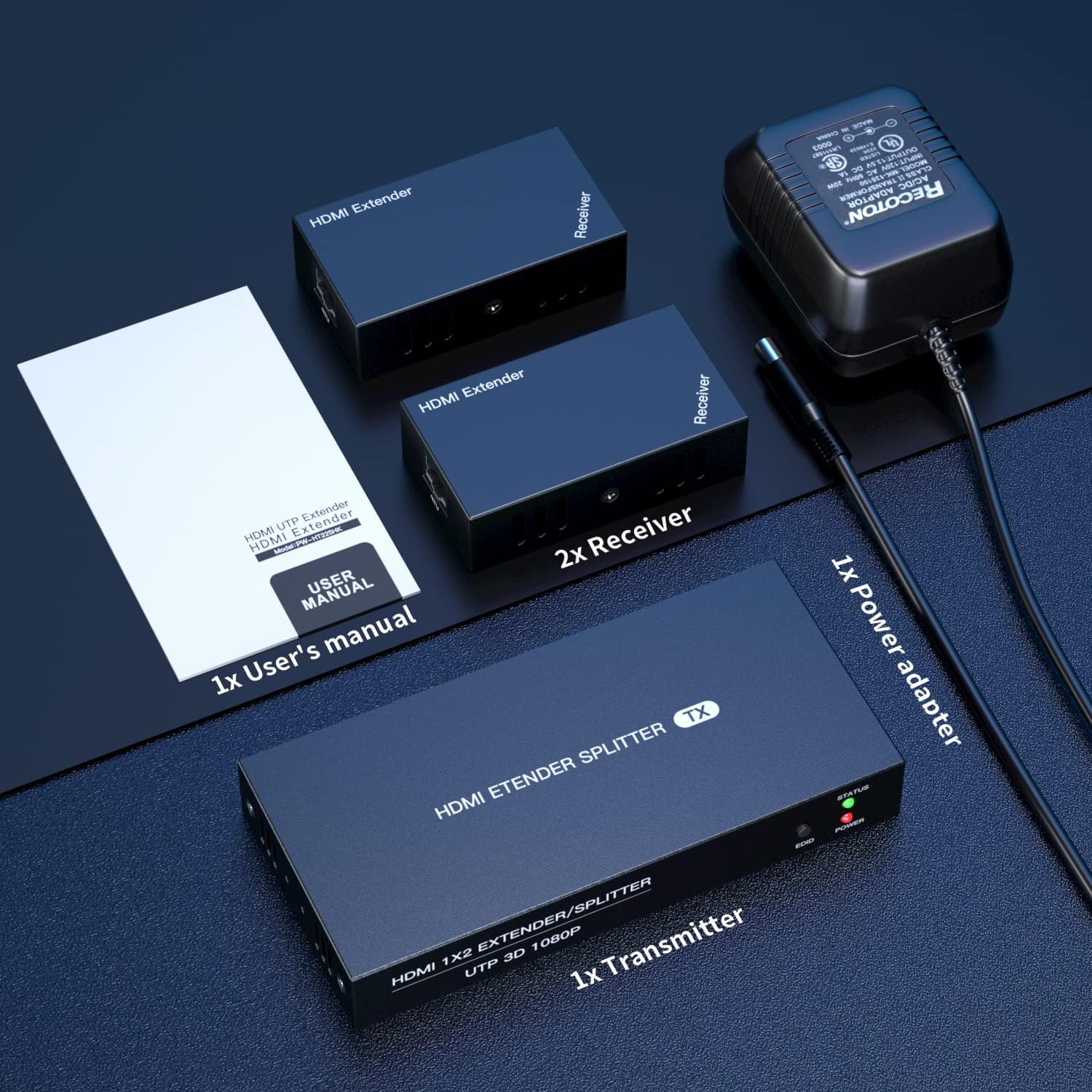
- 1x HDMI Transmitter Unit
- 2x HDMI Receiver Units
- 電源アダプター (DC 1V) x 12
- ユーザーマニュアル x 1
- 保証カード x 1

3.製品オーバーview
The PWAYTEK HDMI Extender Splitter system consists of a transmitter unit and two receiver units. Below are the descriptions of their ports and indicators.
3.1 Transmitter Unit (TX)
The transmitter unit is the central hub where the HDMI source connects and signals are distributed.
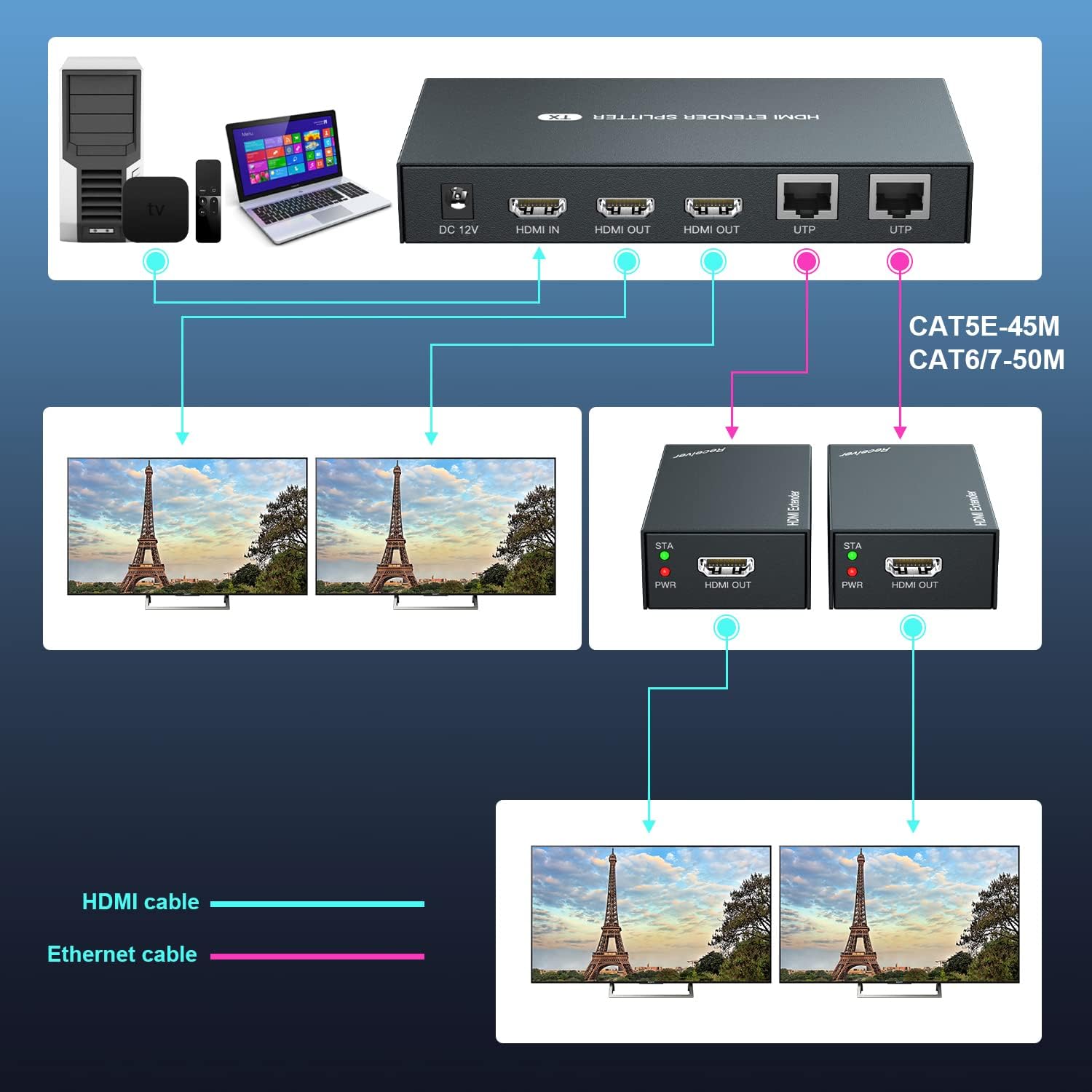
- DC-12V: 付属の電源アダプター用の電源入力ポート。
- HDMI入力: Connect your HDMI source device (e.g., laptop, TV box).
- HDMI OUT (x2): Two HDMI loop-out ports for connecting local monitors.
- UTP(×2): Two RJ45 ports for connecting to the receiver units via Ethernet cable.
- ステータスインジケーター: Lights up when a stable connection is established.
- EDID ボタン: EDIDコピー機能に使用されます。
- 電源インジケーター: デバイスの電源がオンになると点灯します。
3.2 レシーバーユニット(RX)
Each receiver unit connects to a remote display and receives the HDMI signal from the transmitter via an Ethernet cable.
- HDMI出力: Connect your remote HDMI display.
- UT: RJ45 port for connecting to the transmitter unit via Ethernet cable.
- STA Indicator: Lights up when a stable connection is established with the transmitter.
- PWRインジケーター: Lights up when the device is powered on (receives power via POC).

4. セットアップとインストール
Follow these steps to set up your PWAYTEK HDMI Extender Splitter:
- 接続電源: Plug the included 12V power adapter into the DC-12V port on the transmitter unit. Connect the power adapter to an electrical outlet. The POWER indicator on the transmitter will light up.
- HDMIソースを接続: Connect an HDMI cable (not included) from your HDMI source device (e.g., laptop, Blu-ray player, TV box) to the HDMI IN port on the transmitter unit.
- ローカルディスプレイを接続する(オプション): If you wish to use local monitors, connect HDMI cables from the HDMI出力 ports on the transmitter unit to your local displays.
- イーサネット ケーブルを接続します。 Connect Cat 5E/6/7 Ethernet cables from the UTPA の ports on the transmitter unit to the UTPA の ports on each receiver unit. Ensure the cables are securely connected.
- リモートディスプレイを接続する: HDMIケーブルを HDMI出力 port on each receiver unit to your remote displays.
- 接続を確認します: Once all connections are made, the STATUS indicator on the transmitter and the STA indicator on the receivers should turn green, indicating a successful connection.
- EDIDコピー機能: If your display does not show an image or experiences compatibility issues, you may need to perform an EDID copy. Connect a compatible monitor directly to the HDMI IN port of the transmitter. Power on the transmitter. Press and hold the EDID button on the transmitter for 3-5 seconds until the green light stops flashing. This copies the monitor's EDID information to the transmitter, which can resolve display issues.

5. 操作手順
Once the setup is complete, operating the HDMI Extender Splitter is straightforward:
- Ensure all devices (HDMI source, transmitter, receivers, and displays) are powered on.
- Select the correct HDMI input source on your connected displays.
- The content from your HDMI source will now be mirrored on all connected local and remote displays.


6. メンテナンス
To ensure the longevity and optimal performance of your PWAYTEK HDMI Extender Splitter, follow these maintenance guidelines:
- Keep the devices in a cool, dry environment, away from direct sunlight and excessive heat.
- ユニットを湿気や液体にさらさないでください。
- ユニットは柔らかく乾いた布で拭いてください。刺激の強い化学薬品や研磨剤入りの洗剤は使用しないでください。
- Ensure all cables are securely connected and not bent or kinked, which can damage the cables or ports.
- Periodically check for firmware updates (if available from the manufacturer) to ensure compatibility and performance improvements.
7。 トラブルシューティング
If you encounter issues with your HDMI Extender Splitter, refer to the following troubleshooting tips:
- 表示される画像がありません:
- Ensure all power connections are secure and the power indicator on the transmitter is lit.
- Verify that the HDMI source device is powered on and outputting a signal.
- Check that all HDMI and Ethernet cables are correctly and securely connected.
- ディスプレイが正しい HDMI 入力ソースに設定されていることを確認します。
- Try performing the EDID Copy function as described in Section 4.
- Ensure the HDMI source provides a strong signal. Some sources may require a booster if the signal is weak.
- ちらつきや断続的な信号:
- Check the quality and length of your Ethernet cables. High-quality Cat 6/7 cables are recommended for stable, long-distance transmission.
- If using Ethernet cables between 1-10 feet, try a longer cable as very short cables can sometimes cause issues.
- Ensure there are no kinks or damage to the Ethernet or HDMI cables.
- 音声なし:
- ディスプレイのオーディオ設定が正しく構成されていることを確認します。
- Check the audio output settings on your HDMI source device.
- Remote Displays Not Working:
- Ensure the STA indicator on the receiver units is green, indicating a successful Ethernet connection.
- Confirm the Ethernet cable length is within the specified limits (50m/164ft for Cat6/7, 45m/147ft for Cat5e, 40m/131ft for Cat5).
8. 仕様
| カテゴリ | 仕様 |
|---|---|
| HDMI規格 | HDMI 1.3 |
| 最大ピクセルクロック | 165MHz |
| 最大データレート | 6.75Gbps |
| 解決サポート | 1920x1080@60Hz, 3D (also compatible with 1080i/720p) |
| HDMIコネクタ | HDMI-A |
| イーサネットインターフェース | RJ45 |
| Transmission Distance (Cat6/7) | 最大50m(164フィート) |
| Transmission Distance (Cat5e) | 最大45m(147フィート) |
| Transmission Distance (Cat5) | 最大40m(131フィート) |
| 電源入力 | 110〜220V |
| 電源出力 | 12V |
| ワット損 | 最大12W |
| 動作温度 | -5℃ ~ +70℃ |
| 動作湿度 | 5% ~ 90% (結露なし) |
| Transmitter Dimensions (TX) | 150 x 71 x 23mm |
| Receiver Dimensions (RX) | 81 x 45 x 23mm |
| アイテム重量 | 1.43ポンド |
| ASIN | B087FVWQCT |
| 商品型番 | HTS010X |
9. 保証
This product comes with a warranty. Please refer to the included Warranty Card in your package for detailed information regarding warranty terms, conditions, and duration. Keep your proof of purchase for warranty claims.
10. サポート
For technical assistance, troubleshooting, or any questions regarding your PWAYTEK HDMI Extender Splitter HTS010X, please contact PWAYTEK customer support. Refer to the contact information provided on the warranty card or the official PWAYTEK web最新のサポート詳細については、サイトをご覧ください。