
Iproda T1045A
iProda T1045A 10.1 inch Android Tablet User Manual
Comprehensive instructions for your iProda T1045A Android Tablet.
1. はじめに
This manual provides detailed instructions for the setup, operation, maintenance, and troubleshooting of your iProda T1045A 10.1 inch Android Tablet. Please read this manual thoroughly before using your device to ensure proper functionality and to maximize your user experience.
The iProda T1045A is a 10.1-inch tablet featuring an HD IPS display with 1280x800 resolution, powered by a 64-bit Quad-core processor running Android 9 Pie. It includes 3GB RAM, 64GB internal storage expandable up to 128GB via TF card, dual-band Wi-Fi, HDMI output, and a 5000mAh battery for extended use.
2.製品オーバーview
2.1 パッケージ内容
パッケージを開封したら、すべてのアイテムが揃っていることを確認してください。
- iProda T1045A 10.1 inch Android Tablet
- USBケーブル
- 電源アダプター
- ユーザーマニュアル(このドキュメント)

Image: Contents of the iProda T1045A tablet package.
2.2 デバイスのレイアウト
Familiarize yourself with the physical components and ports of your tablet:
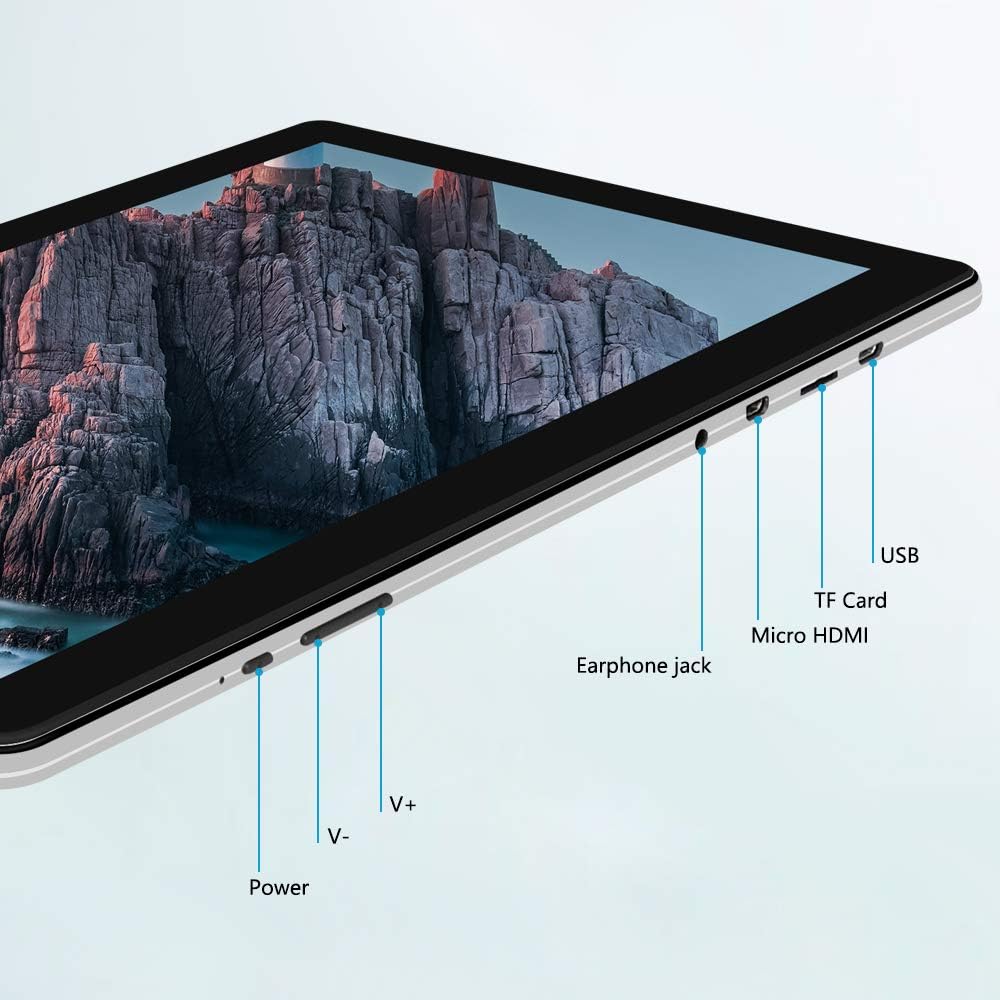
画像: サイド view of the iProda T1045A tablet highlighting port locations.
- 電源ボタン: Press and hold to power on/off or restart the tablet. Short press to turn the screen on/off.
- Volume Buttons (V+, V-): オーディオの音量を調整します。
- イヤホンジャック: 3.5mmヘッドホンを接続します。
- TFカードスロット: Insert a microSD card for expandable storage (up to 128GB).
- マイクロHDMIポート: Connect to an external display using a Micro HDMI to HDMI cable.
- USBポート: Connect to a computer for data transfer or for charging the device.
3. セットアップ
3.1 初期充電
Before first use, fully charge the tablet. Connect the provided USB cable to the tablet's USB port and the power adapter, then plug the adapter into a wall outlet. The charging indicator will typically illuminate. A full charge may take several hours.
3.2 電源のオン/オフ
- 電源を入れるには: 画面が点灯するまで電源ボタンを押し続けます。
- 電源を切るには: 電源ボタンを長押しし、画面に電源メニューが表示されるまで待ちます。「電源を切る」を選択して確定します。
- 再起動します: 電源メニューから「再起動」を選択します。
- 画面のオン/オフ: Briefly press the Power button to turn the screen off (sleep mode) or wake it up.
3.3 初期セットアップウィザード
The first time you power on the tablet, you will be guided through an initial setup process. Follow the on-screen prompts to:
- ご希望の言語を選択します。
- Wi-Fi ネットワークに接続します。
- Google アカウントを設定します (オプションですが、アプリのダウンロードには推奨されます)。
- 日付と時刻の設定を構成します。
3.4 Inserting a TF Card (MicroSD)
タブレットのストレージを拡張するには:
- タブレットの側面にある TF カード スロットを見つけます。
- Carefully insert a microSD card (up to 128GB) into the slot with the gold contacts facing down until it clicks into place.
- 取り外すには、カードが飛び出すまでゆっくりと内側に押します。
4. 操作手順
4.1 基本的なナビゲーション
The iProda T1045A uses a touch-sensitive screen for navigation:
- タップ: 項目を選択するか、アプリケーションを開きます。
- タップ&ホールド: コンテキスト メニューにアクセスしたり、アイコンを移動したりします。
- スワイプ: リストをスクロールしたり、ホーム画面を切り替えたりします。
- ピンチ: 画像を拡大または縮小し、 web ページ。
4.2 Wi-Fi接続
ワイヤレスネットワークに接続するには:
- へ移動 設定 > ネットワークとインターネット > Wi-Fi.
- Wi-Fiの切り替え On.
- リストから希望のネットワークを選択します。
- パスワードを求められた場合は入力し、タップします 接続する.
The tablet supports both 2.4G and 5G dual-band Wi-Fi for faster and more stable connections.
4.3Bluetoothペアリング
Bluetooth デバイス (ヘッドフォン、スピーカーなど) とペアリングするには:
- へ移動 設定 > 接続されたデバイス > ブルートゥース.
- Bluetoothを切り替える On.
- Bluetooth デバイスがペアリング モードになっていることを確認します。
- 利用可能なデバイスのリストからデバイスを選択し、画面上の指示に従ってペアリングを完了します。
4.4 カメラの使用
このタブレットには、2MP の前面カメラと 5MP の背面カメラが搭載されています。
- 開く カメラ application from the app drawer.
- カメラアイコンをタップして、前面カメラと背面カメラを切り替えます。
- シャッターボタンをタップして写真を撮ったり、ビデオ録画を開始/停止したりします。

Image: Tablet in use, showcasing its camera capabilities.
4.5 外部ディスプレイへの接続(HDMI)
To display your tablet's screen on a larger monitor or TV:
- Connect one end of a Micro HDMI cable to the tablet's Micro HDMI port.
- Connect the other end of the cable to an HDMI input on your external display.
- Select the correct HDMI input source on your external display.
- The tablet's screen content should now be mirrored on the external display.
4.6 アプリ管理
The tablet runs Android 9 Pie and supports applications from the Google Play Store.
- アプリのインストール: 開く Playストア アプリを選択し、目的のアプリケーションを検索してタップします インストール.
- アプリのアンインストール: Tap and hold an app icon on the home screen or in the app drawer, then drag it to "Uninstall" or select "App info" and choose "Uninstall". Alternatively, go to 設定 > アプリと通知をタップし、アプリを選択して アンインストール.
5. メンテナンス
5.1デバイスのクリーニング
タブレットをクリーニングするには:
- クリーニングする前にタブレットの電源をオフにしてください。
- 柔らかく、糸くずの出ない布を少し使用してください。amp水またはスクリーンクリーナーをつけて、画面と本体を拭きます。
- 刺激の強い化学薬品、研磨剤入りの洗剤、過度の湿気の使用は避けてください。
5.2ソフトウェアアップデート
Periodically check for software updates to ensure optimal performance and security:
- へ移動 設定 > システム > 高度な > システムアップデート.
- 画面の指示に従って、利用可能なアップデートをダウンロードしてインストールしてください。アップデート中は、タブレットが十分に充電されているか、電源に接続されていることを確認してください。
5.3 ストレージ管理
To manage internal storage and the TF card:
- へ移動 設定 > ストレージ.
- ここでは view storage usage, free up space, and manage files on both internal storage and the inserted TF card.
6。 トラブルシューティング
This section addresses common issues you might encounter with your iProda T1045A tablet.
6.1 デバイスの電源が入らない
- タブレットが十分に充電されていることを確認してください。電源アダプタに接続し、少なくとも30分間充電してから、再度電源を入れてください。
- 強制的に再起動するには、電源ボタンを 10 ~ 15 秒間押し続けてください。
6.2 Wi-Fi接続の問題
- Wi-Fiが有効になっていることを確認してください 設定.
- 正しい Wi-Fi パスワードを入力していることを確認してください。
- Wi-Fiルーターとタブレットを再起動します。
- Try connecting to a different Wi-Fi network to determine if the issue is with the tablet or the network.
6.3 パフォーマンスの低下
- 不要なバックグラウンド アプリケーションを閉じます。
- アプリのキャッシュデータを消去する 設定 > アプリと通知 > [アプリ名] > ストレージとキャッシュ > キャッシュをクリア.
- Ensure sufficient free storage space. Uninstall unused apps or move large files to a TF card.
- タブレットを再起動します。
6.4 バッテリーの消耗が早い
- 画面の明るさを下げます。
- 使用していないときは、Wi-Fi、Bluetooth、GPS を無効にします。
- Close background apps that consume significant power.
- バッテリー使用量を確認する 設定 > バッテリー 電力を大量に消費するアプリを特定します。
- Ensure the tablet is not allowed to run below 15% charge frequently, as this can impact battery longevity.
6.5 工場出荷時設定へのリセット
問題が解決しない場合は、工場出荷時設定にリセットすると解決する可能性があります。 警告: これにより、タブレット上のすべてのデータが消去されます。続行する前に、重要なデータをバックアップしてください。
- へ移動 設定 > システム > 高度な > オプションをリセット.
- 選択 すべてのデータを消去(工場出荷時設定にリセット).
- 決定を確認し、画面上の指示に従います。
7. 仕様
Below are the technical specifications for the iProda T1045A tablet:
| モデル名 | T1045A |
| オペレーティング·システム | Android 9 パイ |
| 表示サイズ | 10.1インチ |
| ディスプレイ解像度 | 1280 x 800ピクセル(HD IPS) |
| プロセッサ | MediaTek Quad-core 1.5Ghz |
| ラム | 3ギガバイト |
| 内部ストレージ | 64GB SSD |
| 拡張可能なストレージ | Up to 128 GB via TF Card (MicroSD) |
| グラフィックスコプロセッサ | ARM Mali-T720 MP2 |
| リアカメラ | 5 MP |
| フロントカメラ | 2 MP |
| バッテリー容量 | 5000mAhリチウムポリマー |
| 平均バッテリー寿命 | 最大8時間 |
| ワイヤレス接続 | Dual-Band Wi-Fi (802.11a/b/g/n), Bluetooth 4.0 |
| ポート | 1x USB 2.0, 1x Micro HDMI, 3.5mm Earphone Jack, TF Card Slot |
| 寸法 | 34.5 x 19.7 x 5.5 cm |
| 重さ | 550グラム |

画像: タブレットの主な性能仕様。

Image: Tablet portability and battery details.
8. 保証とサポート
8.1製品保証
The iProda T1045A tablet comes with a 12ヶ月保証 ご購入日から1年間有効です。本保証は、通常の使用における製造上の欠陥および故障を対象としています。誤用、事故、無許可の修理、または通常の摩耗や損耗による損傷は保証の対象外となります。
8.2 カスタマーサポート
If you encounter any issues not covered in the troubleshooting section or require further assistance, please contact iProda customer support. Refer to your purchase documentation or the iProda official web連絡先情報のサイト。
When contacting support, please have your tablet's model number (T1045A) and purchase details readily available.
Ask a question about this manual
Ask about setup, troubleshooting, compatibility, parts, safety, or missing instructions. Manuals+ will review the question and use this page’s manual context to help answer it.